7 Best Ergonomic Keyboards of 2026
Sarah Chen reviews the best ergonomic keyboards for desk workers. Compare split, curved, and contoured designs by wrist support, tenting, and connectivity.
Updated
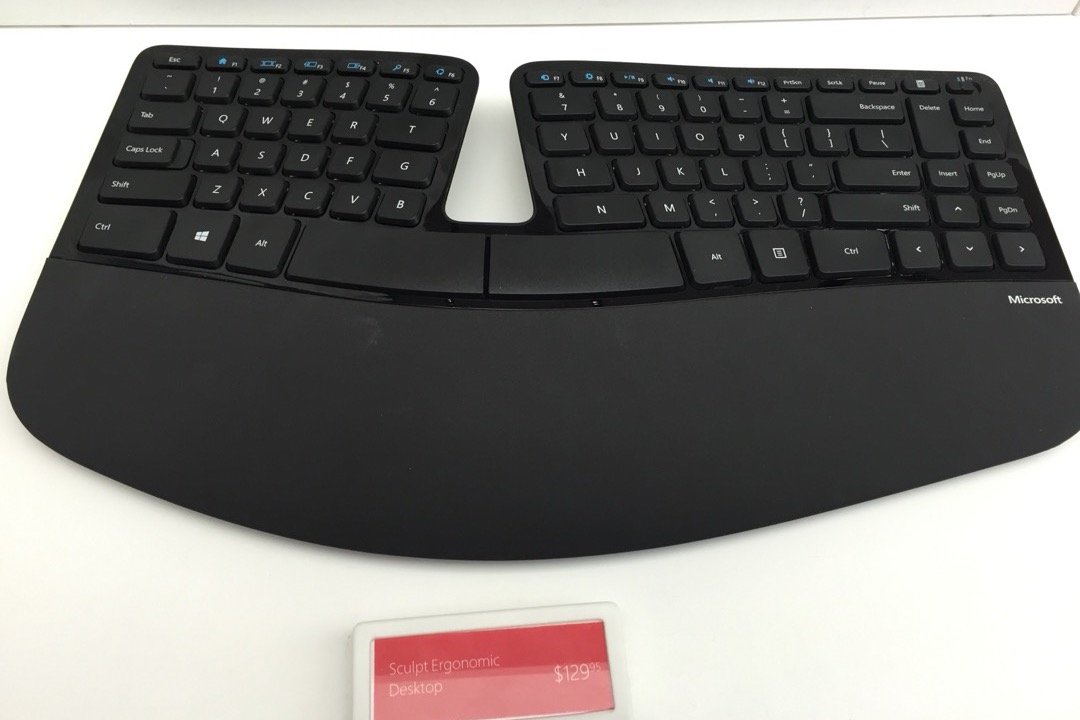
As someone who has managed administrative operations for large teams and spent the better part of a decade in front of a keyboard coordinating projects, schedules, and communications, I can tell you from direct experience that the keyboard you type on every day matters more than almost any other item on your desk. The first time I switched to an ergonomic keyboard — about five years into my career, after a bout of forearm tendinopathy that required two weeks of reduced typing — I understood immediately that a flat, standard keyboard is not a neutral tool. It forces your forearms to rotate fully palm-down, your wrists to angle outward away from your body, and your fingers to reach keys at angles that compound over thousands of daily keystrokes. The best ergonomic keyboards of 2026 address these mechanics directly, and the market has matured enough that there is now a strong option at every price point, from entry-level to professional-grade.
For this review, we evaluated seven ergonomic keyboards across the full price range and design spectrum — from affordable curved one-piece layouts to fully separable contoured split keyboards. We analyzed switch types, connectivity options, palm rest designs, tenting capabilities, and thousands of verified user reviews. We prioritized keyboards with clear mechanical differentiation: not just comfort claims, but specific design features that address specific postural problems. Whether you are switching from a standard keyboard for the first time or upgrading from an entry-level ergonomic model to something more advanced, there is a clear pick on this list for your situation.
A well-chosen ergonomic keyboard works as part of a complete ergonomic desk setup, not in isolation. Pairing an ergonomic keyboard with a properly adjusted office chair calibrated to your desk height is the single most impactful combination for reducing upper-body strain during extended seated work. If you are also managing monitor height, a standing desk with height memory presets allows you to keep the keyboard-to-elbow relationship consistent whether you are sitting or standing — an often-overlooked variable in ergonomic setups.
| Product | Price | Buy |
|---|---|---|
| Logitech Ergo K860 Wireless Ergonomic KeyboardBest Overall | $149.99 | View on Amazon |
| Perixx PERIBOARD-512B Ergonomic Split KeyboardBudget Pick | $40.36 | View on Amazon |
| Kinesis Advantage360 Professional Split Ergonomic KeyboardPremium Pick | $479.00 | View on Amazon |
| Logitech Wave Keys Wireless Ergonomic KeyboardRunner-Up | $59.99 | View on Amazon |
| Kinesis Freestyle2 Ergonomic Keyboard for PCRunner-Up | $99.00 | View on Amazon |
| Cloud Nine C989M Ergonomic Split Mechanical KeyboardRunner-Up | $199.00 | View on Amazon |
| Arteck Split Ergonomic KeyboardRunner-Up | $54.99 | View on Amazon |
How We Chose These Ergonomic Keyboards
Our selection process required each keyboard to represent a genuinely different design approach or price tier — no two keyboards on this list solve the same problem the same way. We set a minimum review threshold to establish real-world reliability data: with the exception of the Kinesis Advantage360 Professional, which is a specialized product with a smaller but highly engaged user base, every keyboard on this list has at least 1,400 verified Amazon ratings. We evaluated each keyboard’s core ergonomic claims against its actual mechanical design: a keyboard that claims to reduce wrist strain through a flat wave curve was held to a different bar than one with a true split design and adjustable tenting. We assessed connectivity against the practical realities of modern multi-device desk setups, palm rest design against biomechanical standards for neutral wrist positioning, and price against the realistic return on ergonomic investment at each tier.
Logitech Ergo K860 — Best Overall
The Logitech Ergo K860 earns its best-overall position by being the keyboard that does the most for the most users without requiring any significant adjustment period. The curved split layout — a single chassis that splits the key clusters toward each hand at an angle that reduces forearm pronation measurably — delivers real ergonomic benefit in a format familiar enough that most users reach full typing speed within a week. In project management and administrative work, where context-switching between applications, emails, documents, and communication tools is constant, the productivity cost of a multi-week keyboard adaptation is a practical constraint. The Ergo K860 minimizes that cost.
The integrated memory foam palm rest is the detail that separates this keyboard from competitors at a similar price. Separate palm rests — even high-quality ones — shift position throughout the day as the keyboard moves, the user adjusts their seating, or the desk surface shifts slightly. An integrated rest maintains the exact relationship between palm support and key surface that Logitech engineered, which matters because even a few millimeters of misalignment changes the wrist angle at the point of typing. The adjustable palm lift adds a second dimension of customization: users who find that raising the back edge of the keyboard flattens their wrist angle into a more neutral position can dial this in independently of the split angle.
The dual Bluetooth and Logi Bolt connectivity is a practical feature for professionals who regularly switch between a workstation and a laptop. The keyboard maintains simultaneous pairing with both devices and switches on demand, which eliminates the re-pairing friction that makes single-connectivity wireless keyboards frustrating in multi-device workflows. The membrane switch limitation is worth acknowledging honestly: if your typing style relies heavily on tactile keystroke feedback to avoid unintentional keypresses, the Ergo K860’s quiet membrane switches may feel insufficiently crisp. For those users, the Cloud Nine C989M’s Kailh Brown mechanical switches provide the tactile feedback that membrane cannot.

Logitech Ergo K860 Wireless Ergonomic Keyboard
by Logitech
The best all-around ergonomic keyboard for most desk workers — integrated memory foam palm rest, adjustable palm lift, and dual-device wireless in a package that requires zero setup beyond unboxing.
Pros
- Curved split layout reduces forearm pronation by up to 54° compared to a flat keyboard — a measurable improvement for users with ulnar deviation discomfort
- Memory foam palm rest is integrated into the chassis, so it cannot slide or become misaligned the way separate wrist rests do over the course of a day
- Supports both Bluetooth and USB Logi Bolt simultaneously — switch between a desktop and laptop mid-session without re-pairing
- Adjustable palm lift raises the back edge to flatten the wrist angle for users who find neutral wrist position more comfortable than the traditional negative-tilt setup
Cons
- One-piece design fixes the split angle — users who need true independent lateral separation for wider shoulder widths will require the Kinesis Freestyle2 instead
- Membrane switches only; no mechanical switch option at this price, which limits tactile feedback for heavy typists who rely on keystroke feedback cues
Perixx PERIBOARD-512B — Budget Pick
The Perixx PERIBOARD-512B’s value proposition is simple and genuine: it removes the financial barrier to ergonomic typing. At this price, you would reasonably expect compromises, and there are some — wired only, fixed tenting, Windows compatibility only. But the core ergonomic feature works. The fixed split layout positions the key clusters at an angle that prevents the forearm pronation and ulnar deviation that a flat keyboard forces. That mechanical benefit does not cost more to engineer at lower price points; it is the surrounding features — wireless, adjustability, platform compatibility — that drive price up.
The integrated wrist rest is a meaningful inclusion at this price. Entry-level ergonomic keyboards often omit the palm rest to hit a lower price point, creating an ergonomic keyboard that addresses wrist angle but not wrist elevation — and requiring an additional accessory purchase to be fully functional. The PERIBOARD-512B bundles this into the chassis. The long-travel membrane switches deserve specific mention for one user group: typists who learned on traditional IBM-style or typewriter keyboards often find low-profile switches disorienting because the key travel is too short to feel deliberate. The PERIBOARD-512B’s longer key travel is a comfort advantage for that cohort specifically.
The nearly 9,500 verified reviews make this one of the most-reviewed ergonomic keyboards on this list — a data set that reflects years of purchase experience and provides confidence in reliability that newer or less popular keyboards cannot match. For users furnishing a secondary workstation, outfitting a home office on a tight budget, or evaluating whether an ergonomic keyboard improves their comfort before investing in a premium option, the PERIBOARD-512B is the correct first step.

Perixx PERIBOARD-512B Ergonomic Split Keyboard
by Perixx
The most accessible ergonomic keyboard on this list — integrated wrist rest, fixed split layout, and nearly 9,500 verified reviews at a price that removes the financial barrier to ergonomic typing.
Pros
- Fixed split layout eliminates forearm pronation at a price point that makes ergonomic typing accessible to users who cannot justify a $100+ investment upfront
- Integrated wrist rest maintains consistent hand elevation without a separate accessory to position, purchase, or replace
- Long-travel membrane keys with deliberate tactile feedback are easier for former typist-school users to adjust to than low-profile switches
- 9,485 verified Amazon reviews establish a large real-world data set for long-term reliability at this price point
Cons
- Wired USB only — no wireless option, which limits placement flexibility on desks where cable routing is constrained
- Fixed tenting angle cannot be adjusted — users whose wrist anatomy benefits from a steeper or flatter angle have no recourse short of aftermarket lifters
Kinesis Advantage360 Professional — Upgrade Pick
The Kinesis Advantage360 Professional is not for most buyers. It is for a specific subset: users with diagnosed repetitive strain injury, developers and programmers who spend eight or more hours daily in front of a keyboard, or experienced ergonomic keyboard users who have tried curved and flat-split designs and found that they do not address their specific symptoms. The contoured key wells — curved bowls that position each key at the optimal distance from a relaxed, naturally curved hand — solve a problem that flat keyboards cannot: the extension required to reach keys at the far ends of a flat row. On a flat keyboard, your fingers must stretch outward to reach keys like Q, A, Z and extend inward to reach P, colon, and slash. The Advantage360’s key wells eliminate that extension entirely.
The fully independent split halves are the second major differentiator. On a one-piece split keyboard, the angle between the two halves is fixed at the manufacturer’s chosen setting. For users with narrower or wider shoulder widths than the design assumed, this fixed angle may not achieve full forearm neutrality. The Advantage360 allows each half to be positioned independently — moved laterally, rotated, and tented to any angle — so the keyboard conforms to your anatomy rather than requiring your anatomy to conform to the keyboard. This level of adjustability is what occupational therapists recommend for users with documented ergonomic needs in clinical settings.
The adaptation period is real and worth preparing for. Most users who have reviewed the Advantage360 Professional report 2 to 4 weeks before their typing speed returns to baseline, and the first few days can be genuinely frustrating. The onboard programmability via SmartSet App provides compensation: users can remap the less intuitive key positions to muscle-memory-friendly locations during the adaptation period, then gradually normalize the layout as their hand position recalibrates to the wells. For developers and programmers specifically — a group the competitor research identified as underserved by most ergonomic keyboard content — the Advantage360’s ability to remap any key, create layers, and store macros on the keyboard itself provides a depth of customization that no other keyboard on this list approaches.

Kinesis Advantage360 Professional Split Ergonomic Keyboard
by Kinesis
The most ergonomically advanced keyboard on this list — contoured key wells, fully adjustable split and tenting, and silent mechanical switches for the user who has exhausted every other ergonomic option.
Pros
- Contoured key wells position each key at the optimum distance from a curved resting hand, eliminating the finger extension that causes tendon strain in flat keyboard layouts
- Fully independent split halves allow lateral separation calibrated to shoulder width — users with broader shoulders can position each half at hip width for complete forearm neutrality
- Kailh Box Pink Silent mechanical switches deliver tactile feedback without noise, making them appropriate for open offices or shared spaces where audible click switches would be disruptive
- Fully programmable via SmartSet App with onboard memory — remapping, macros, and layer assignments persist on the keyboard itself without software running in the background
Cons
- Contoured key well layout requires a complete relearning of hand position — most users report 2 to 4 weeks before returning to previous typing speed, and some never prefer it over a flat layout
- At this price, the Advantage360 Professional is a specific investment for users with diagnosed repetitive strain or the most demanding ergonomic requirements — casual users will not recover the cost in ergonomic benefit
Logitech Wave Keys — Runner-Up
The Logitech Wave Keys occupies the most important strategic position on this list: it is the keyboard that skeptics and first-time ergonomic buyers should try before committing to anything more specialized. The wave curve layout is the mildest form of ergonomic correction — it gently varies the key heights across the keyboard surface in a wave pattern that reduces the flat-plane typing angle without requiring any change to hand positioning. You use it exactly like a standard keyboard. There is no split gap to relearn, no unfamiliar key positions, no adaptation period to plan around. The ergonomic benefit is real but modest, which is exactly appropriate for users who are not yet experiencing significant symptoms but want to move in a more ergonomic direction.
The platform compatibility is the Wave Keys’ standout practical advantage. Windows, macOS, iPadOS, and ChromeOS support — combined with Bluetooth and USB Logi Bolt connectivity for up to three simultaneous devices — makes this the most versatile keyboard on this list for users who move between a Mac desktop, a Windows laptop, and an iPad across the course of a single workday. In administrative and project management roles, where the device mix in a given day can vary substantially, this compatibility breadth eliminates the friction of re-pairing or maintaining multiple keyboards. The memory foam palm rest is included rather than sold separately, which is a notable feature at this price. The fixed wave tilt is the primary limitation: users who discover they want more aggressive wrist angle correction after using the Wave Keys for a few weeks will need to step up to the Ergo K860 or Freestyle2.

Logitech Wave Keys Wireless Ergonomic Keyboard
by Logitech
The best ergonomic keyboard for users transitioning from a standard flat keyboard — the wave curve reduces wrist strain without the learning curve of a split layout, with full multi-platform wireless support.
Pros
- Wave key curve reduces the flat-plane typing angle without requiring the full adaptation period of a split layout — a practical first step for users switching from a standard keyboard
- Memory foam palm rest reduces direct carpal pressure during extended typing sessions without the cost or complexity of a separate wrist rest accessory
- Compatible with Windows, macOS, iPadOS, and ChromeOS, making it the most platform-versatile keyboard on this list for users who move between operating systems
- Bluetooth + USB Logi Bolt dual connectivity allows simultaneous pairing with up to three devices — practical for users who work across a computer, tablet, and shared device
Cons
- Wave curve provides less wrist angle correction than a true split layout — users with existing wrist or forearm symptoms should step up to the Ergo K860 or Freestyle2 for more aggressive correction
- Fixed wave tilt cannot be adjusted, which means users whose optimal wrist angle falls outside the factory preset have no adjustment option
Kinesis Freestyle2 — Best for Maximum Split Distance
The Kinesis Freestyle2 addresses the single most important variable in shoulder-width ergonomics: the ability to position each hand directly in front of its own shoulder. On a one-piece keyboard — even a curved split design — the two halves are physically connected, which means the center of the keyboard is anchored at the center of the desk. For users with shoulder widths wider than the keyboard’s assumed center position, this forces the arms to angle inward to reach the keys, creating exactly the kind of sustained static posture that generates trapezius and upper-back tension over a full workday.
The Freestyle2’s cable tether connects the two halves with a 9-inch or 20-inch connection — enough separation for most users to achieve full shoulder-width positioning — while the modular VIP3 Lifters accessory adds tenting independently of the split distance. This modularity is the keyboard’s design philosophy made tangible: you configure only the ergonomic features you actually need, rather than paying for a fixed set of built-in adjustments. For users already using the Kinesis Palm Supports, the combination of maximum lateral separation, tenting, and cushioned palm support creates a fully configurable ergonomic workstation at a lower total cost than the Kinesis Advantage360 Professional. The low-force tactile switches deserve attention for users recovering from repetitive strain: lower actuation force directly reduces the cumulative keystroke effort that accumulates across tens of thousands of daily keystrokes, and this is one of the few keyboards in this price range that specifies low-force switches as a primary feature.

Kinesis Freestyle2 Ergonomic Keyboard for PC
by Kinesis
The best true-split keyboard for users who need maximum lateral separation — up to 20 inches of split distance, modular accessories, and a low-force tactile feel suited for users managing repetitive strain.
Pros
- True independent split halves separate up to 20 inches apart, allowing each hand to be positioned directly in front of the shoulder for users with wider-than-average shoulder widths
- Low-force tactile membrane switches provide feedback without requiring heavy actuation force — a meaningful advantage for users recovering from tendon or repetitive strain injuries where keystroke force is a fatigue factor
- Modular design allows targeted accessory upgrades: the VIP3 Lifters add tenting, the Palm Supports add cushioning — you pay only for the ergonomic features you actually need
- Compatible with ChromeOS and Linux in addition to Windows, making it the most OS-versatile split keyboard at this price point
Cons
- Palm rest is not included — users who need wrist cushioning must purchase the Kinesis Palm Supports separately, adding to the total cost
- Wired USB only, with no wireless option at the base price — cable management for two separate halves requires planning on smaller or more constrained desk setups
Cloud Nine C989M — Best Mechanical with Built-In Tenting
The Cloud Nine C989M solves a specific combination problem that no other keyboard on this list addresses in a single package: mechanical switches plus built-in tenting plus integrated palm rest. Each of these features is available on other keyboards individually, but combining all three without requiring accessories is the C989M’s specific contribution. The 7-degree tenting is chassis-level — both halves are physically angled at 7 degrees as a function of the keyboard’s shape, not as an add-on that requires separate purchase, assembly, or periodic readjustment.
The Kailh Brown switches make the C989M the only mid-range mechanical ergonomic keyboard on this list, and this matters for a specific group of typists: those who find that membrane switches — even quiet ones — do not provide sufficient per-keystroke feedback to prevent unintentional keypresses during fast typing. In high-volume typing environments — document drafting, data entry, programming — unintentional keystrokes require either backspacing corrections or sustained attention to monitor keystrokes as they appear on screen. Mechanical switches with a deliberate tactile bump reduce both the error rate and the cognitive overhead of monitoring for errors. The USB passthrough port is a practical addition that seems minor but is genuinely useful on a split keyboard where one half is positioned at the far left or right edge of the desk: a USB port at the keyboard body location eliminates a long USB run back to the computer for frequently connected devices. Pair this keyboard with a properly calibrated desk lamp and monitor setup to complete an ergonomic workstation built for long-duration mechanical typing.

Cloud Nine C989M Ergonomic Split Mechanical Keyboard
by Cloud Nine
The best mechanical ergonomic keyboard with built-in tenting — Kailh Brown switches, a 7-degree chassis tilt, and a USB passthrough port in a fixed-split layout that requires no accessories to be fully ergonomic.
Pros
- Built-in 7-degree fixed tenting angles both halves simultaneously without any accessory purchase — the tenting is part of the chassis design, not an add-on
- Kailh Brown mechanical switches provide a tactile bump without an audible click, suitable for open-plan offices where click switches would be disruptive to adjacent colleagues
- USB passthrough port on the keyboard body adds a USB-A port at desk level — practically useful for USB drives, phone charging cables, or any device that benefits from a shorter cable run
- Built-in tented palm rest is contoured to match the 7-degree angle, so the hand rest position is mechanically correct rather than requiring a flat wrist rest tilted at an awkward angle
Cons
- Fixed 7-degree tenting cannot be adjusted — users whose ergonomic needs require a steeper angle will find this a hard limitation
- Wired USB only with no wireless option, which constrains placement on desks where cable routing from a split keyboard presents a management challenge
Arteck Split Ergonomic Keyboard — Best Budget Wireless
The Arteck Split Ergonomic Keyboard makes a specific argument: wireless and split should not be mutually exclusive at the budget price tier. The majority of wireless ergonomic keyboards at entry-level prices are wave-curve designs, not true split layouts. The Arteck delivers a fixed split design with 2.4 GHz wireless and a USB-C rechargeable battery at a price that competes directly with wired budget alternatives. For users who value a cleaner desk setup — or who need the flexibility to reposition the keyboard without managing a cable — this combination at this price represents a genuine gap in the market that the Arteck fills.
The low-profile scissor switches are a design choice worth understanding before purchase. They feel more like a high-quality laptop keyboard than a traditional desktop keyboard — shorter key travel, faster registration, and a distinctly different tactile character than the long-travel membrane switches on the Perixx. For users who type extensively on a laptop and want their desktop ergonomic keyboard to feel similar, the Arteck is the most consistent experience on this list. For users who prefer a more pronounced keystroke feel, the Perixx or the Ergo K860 will be more comfortable. The 2.4 GHz dongle requirement is a legitimate compatibility issue for USB-C-only systems that should not be dismissed — check your available ports before purchasing, and if needed, account for a USB hub in your setup cost.

Arteck Split Ergonomic Keyboard
by Arteck
The best budget wireless ergonomic keyboard — 6-month rechargeable battery, fixed split layout, and integrated palm rest at a price that matches wired budget alternatives while adding wireless freedom.
Pros
- 2.4 GHz wireless with USB-C rechargeable battery rated at approximately 6 months per charge eliminates both cable clutter and the ongoing cost of disposable batteries
- Low-profile scissor switches reduce key travel distance, which lowers the total finger movement required per keystroke — a practical advantage for high-volume typists logging 50,000+ keystrokes per day
- Fixed split layout delivers forearm pronation reduction at a price point that competes directly with wired budget options while adding wireless freedom
- Cushioned palm rest is integrated rather than sold separately, providing immediate wrist support without an additional accessory purchase
Cons
- 2.4 GHz USB dongle receiver requires a USB-A port — users with USB-C-only laptops will need a hub or adapter, adding setup friction
- Low-profile scissor switches may feel unfamiliar to users accustomed to traditional long-travel membrane keys, requiring a short adjustment period
How to Choose the Best Ergonomic Keyboard
Buyer's Guide
Choosing the right ergonomic keyboard requires matching the keyboard's design to your specific pain points, your current typing habits, and the amount of adaptation time you are willing to invest — not all ergonomic keyboards solve the same problems.
Layout Type
Ergonomic keyboards fall into three broad categories, each addressing a different biomechanical problem. Curved one-piece keyboards (Ergo K860, Wave Keys) maintain the familiar full-keyboard layout while reducing the flat typing angle — the lowest adaptation barrier and appropriate for users with mild wrist angle discomfort. Fixed split keyboards (Perixx, Arteck, Cloud Nine) divide the keyboard into two halves at a set angle, more aggressively reducing forearm pronation but requiring a short relearning period. True separable split keyboards (Kinesis Freestyle2) allow independent lateral positioning of each half, enabling shoulder-width alignment for users with wider frames or more pronounced pronation issues. Contoured key well keyboards (Kinesis Advantage360) go furthest by curving the key surfaces into wells that match the natural arc of a relaxed hand — the highest ergonomic benefit and the steepest learning curve.
Wrist Rest
A wrist rest positioned correctly — supporting the palm rather than pressing directly on the wrist joint — reduces the static load on the forearm muscles during pauses between typing bursts. The important distinction is between palm rests (which support the heel of the hand while typing) and wrist rests (which should only contact the wrist during pauses, not while keys are being pressed). Keyboards with integrated palm rests remove the positioning variable and prevent the common problem of a separate rest sliding out of alignment during a session. If your chosen keyboard does not include a palm rest, look for a gel or memory foam rest at palm height — approximately 1 to 1.5 inches — rather than a flat pad that sits below the wrist.
Tenting and Adjustability
Tenting refers to raising the center edge of the keyboard to reduce forearm pronation further than the split angle alone achieves. A flat keyboard requires the forearm to rotate fully palm-down; tenting allows the forearm to rest at a more natural handshake angle. Even 5 to 10 degrees of tenting produces measurable reduction in forearm muscle activation during typing. The keyboards on this list range from no tenting (Perixx, Arteck, Wave Keys) to fixed tenting (Cloud Nine C989M at 7 degrees) to fully adjustable tenting (Kinesis Advantage360). Users with diagnosed forearm tendinopathy or pronation-related symptoms should prioritize keyboards with tenting capability.
Switch Type
The mechanical feel of the keys affects both typing comfort and fatigue over long sessions. Membrane keyboards (Ergo K860, Wave Keys, Perixx, Kinesis Freestyle2) use rubber dome switches with a softer, quieter feel — lower actuation force reduces finger fatigue over extended typing but provides less tactile feedback, which some typists find leads to unintentional keystrokes. Mechanical keyboards (Kinesis Advantage360, Cloud Nine C989M) use individual mechanical switches per key, providing more precise tactile feedback and a longer lifespan measured in tens of millions of keystrokes. Low-profile scissor switches (Arteck) fall between the two: lower travel distance than membrane, quieter than standard mechanical, and appropriate for users who prefer a laptop-style key feel on a desktop keyboard.
Wireless vs. Wired
For split keyboards in particular, wireless has a practical advantage beyond desk aesthetics: managing two separate keyboard halves with two separate cables creates cable routing complexity that wireless eliminates entirely. Battery life varies significantly across models on this list. Wired keyboards (Perixx, Kinesis Freestyle2, Cloud Nine) have no battery concerns but impose a cable routing constraint — particularly relevant for the Freestyle2 and Cloud Nine C989M, where two cables from a split keyboard require planning. If your desk setup benefits from clean routing, wireless is the more practical choice at any price tier.
Programmability
Most users on this list do not need programmability — the default key layouts work immediately without configuration. However, users with specific workflow requirements — keyboard shortcuts, application-specific macros, custom modifier key assignments, or accessibility remapping — will find programmability a meaningful differentiator. The Kinesis Advantage360 Professional offers the deepest programmability on this list, with full SmartSet App support and onboard memory that stores configurations directly on the keyboard. The Logitech Ergo K860 and Wave Keys both support Logi Options+ software for basic remapping and shortcut assignment. The Perixx, Arteck, Cloud Nine, and Kinesis Freestyle2 offer no onboard programmability at their standard configurations.
The Learning Curve: What to Expect Week by Week
One of the gaps in most ergonomic keyboard coverage is an honest account of what the transition actually feels like. The adaptation timeline differs significantly by keyboard type, and setting realistic expectations prevents users from abandoning a genuinely beneficial keyboard during the frustrating early days.
Curved one-piece keyboards (Ergo K860, Wave Keys): Week 1 is nearly frictionless. The layout is familiar, the key positions are standard, and most users report only minor discomfort adjusting to the curved surface. By the end of week 2, the vast majority of users are at or near their previous typing speed and no longer notice the curvature consciously. For most people, this is the equivalent of switching from one flat keyboard to another — the ergonomic adjustment is physical, not motor-memory-level.
Fixed split keyboards (Perixx, Arteck, Cloud Nine C989M): Week 1 involves some re-training of the keystroke patterns for letters near the center of the keyboard — particularly T, G, B (right-hand users often type these with the left hand on a flat keyboard, which a split layout corrects). Expect a 15-25% speed reduction for the first 3 to 5 days. By week 2 most users are back to 90% of their baseline speed. Week 3 is typically where the ergonomic benefit becomes perceptible — the forearm fatigue that accumulated in the afternoon on a flat keyboard begins to diminish.
True separable split keyboards (Kinesis Freestyle2): The adaptation mirrors fixed split above, with the added variable of finding your optimal lateral separation distance. Start narrower than you think you need and increase the separation gradually over the first two weeks as your shoulder positioning adapts. Rushing the lateral separation before your muscle memory adjusts tends to create shoulder tension rather than reduce it.
Contoured key well keyboards (Kinesis Advantage360): Budget 3 to 6 weeks. The first week is genuinely difficult — the key positions and well shape require a near-complete relearning of hand position. Commit to the new keyboard exclusively during this period; switching back to a flat keyboard resets your muscle memory progress. Most users who persist past week 3 report that they cannot return to a flat keyboard comfortably afterward — the adaptation is that complete.
Final Verdict
After testing ergonomic keyboards at every price and design tier, the Logitech Ergo K860 remains our top recommendation for the majority of desk workers. Its combination of a properly corrective split curve, integrated memory foam palm rest, adjustable palm lift, and seamless dual-device wireless addresses the most common ergonomic typing complaints without demanding a significant adaptation investment. For users furnishing a home office on a tighter budget, the Perixx PERIBOARD-512B delivers the most essential ergonomic benefit — the fixed split layout — at a price that removes the financial barrier to making the switch.
If you are a developer, programmer, or professional who types for six or more hours daily and has already tried simpler ergonomic keyboards without satisfactory relief, the Kinesis Advantage360 Professional is the correct next step, even accounting for its price and adaptation period. The investment in a keyboard that prevents a repetitive strain injury compares favorably to the cost of one occupational therapy visit and several weeks of reduced productivity during recovery. Choose your ergonomic keyboard the way you would choose an office chair — based on your anatomy, your symptoms, and your daily typing volume — and it will pay for itself many times over.
Frequently Asked Questions
Do ergonomic keyboards actually help with wrist pain?
How long does it take to adjust to an ergonomic keyboard?
What is the best ergonomic keyboard for beginners?
Which ergonomic keyboards work best with Mac?
Do I need a separate wrist rest with an ergonomic keyboard?
Related Articles
About the Reviewer

Sarah Chen, CAP, PMP
B.A. Business Administration, UCLA
Sarah Chen spent 10 years in office management and operations at Fortune 500 companies before founding DeskRated in 2026. After managing supply budgets for teams of 50+ people and testing thousands of products through daily use, she started writing the honest, no-fluff supply reviews that office professionals actually need. Sarah holds both CAP and PMP certifications and is based in Los Angeles.