7 Best Monitor Stands of 2026
Sarah Chen reviews the best monitor stands and risers for ergonomic desk setups. Compare top-rated options by height, storage, material, and dual-monitor support.
Updated
In my years managing office procurement and workspace setups for administrative and operations teams, monitor stands are the single most underrated ergonomic upgrade in any desk environment. In 2026, a properly positioned monitor stand costs less than most desk accessories and delivers daily benefits — reduced neck strain, freed-up desk surface, better cable management — that most knowledge workers feel within the first hour of use. The challenge is not finding a monitor stand; the options on Amazon alone number in the hundreds. The challenge is understanding that monitor stands are not interchangeable, and that the wrong one for your specific monitor, desk height, and workflow will sit unused or, worse, leave your monitor at a height that is marginally less ergonomic than where it started. We focused this review on the products where real buyers are actually spending their money — the top-selling, most-reviewed options in each category — and evaluated them against the four specifications that determine whether a riser actually improves your daily workspace: platform size, height range, weight capacity, and storage functionality.
For this review, we assessed seven monitor stands spanning every major configuration type: single-monitor adjustable metal risers, budget vented-steel platforms, dual-monitor storage stands, high-capacity wood risers, metal drawer stands, and the most widely distributed brand option in the category. The stands here are distinct — not just price tiers of the same product, but genuinely different solutions for different workspace needs. If you are setting up a new home office, replacing an improvised stack of books, or upgrading to a dual-monitor configuration, the right choice depends on your answers to three questions: What is your monitor’s base footprint? What height does your seated eye level require? Do you want storage under the stand? The seven products here cover every practical combination of those answers. Before committing to a monitor stand, also consider your office chair and desk height setup — monitor riser height interacts directly with both, and a riser that works perfectly with one chair may be misaligned with another.
A note on terminology: this review covers monitor stands and risers — desk-platform products that elevate a monitor’s existing base. This is a distinct category from monitor arms (VESA-mount articulating arms that attach to the desk edge) and monitor mounts (wall or pole mounted systems). If your monitor has VESA mounting points and you want full height, tilt, and swivel adjustability, a monitor arm is the more capable solution. If you want a simple, no-installation platform riser that requires no VESA compatibility and works with any monitor out of the box, the products here are the correct category. We have focused specifically on this distinction because many competitor reviews mix arms and stands together, creating confusion about what buyers are actually purchasing.
| Product | Price | Buy |
|---|---|---|
| WALI Computer Monitor Stand, 3 Height Adjustable Desk OrganizerBest Overall | $10.99 | View on Amazon |
| HUANUO Monitor Stand Riser, Adjustable Computer Monitor StandBudget Pick | $13.57 | View on Amazon |
| Simple Houseware Desk Dual Monitor Stand Riser with DrawerPremium Pick | $39.97 | View on Amazon |
| BONTEC Monitor Stand Riser 2-Tier, Computer Monitor RiserRunner-Up | $24.99 | View on Amazon |
| OPNICE Monitor Stand Riser with Drawer and Pen HoldersRunner-Up | $16.99 | View on Amazon |
| WESTREE Dual Monitor Stand Riser, Wood Computer Monitor StandRunner-Up | $29.99 | View on Amazon |
| Amazon Basics Height Adjustable Monitor StandRunner-Up | $21.59 | View on Amazon |
How We Chose These Monitor Stands
Our selection criteria required each stand to be a currently active Amazon listing with verifiable purchase data. We set a minimum review threshold of 500 verified ratings, with one exception for the OPNICE — included specifically because it is the only metal-construction stand with an integrated drawer at its price point, a specification gap not filled by any other product above that review threshold. We evaluated platform dimensions against actual monitor base footprints across the most common display sizes (24”, 27”, 32”, and 34” ultrawide), assessed height ranges against the ergonomic 4-6” elevation target, compared weight capacities against common monitor weights, and scored storage functionality against the desk organization needs of typical knowledge workers. Stands were disqualified if their stated weight capacity did not cover at least the average weight of a 27” consumer monitor (approximately 12 lbs), or if their platform depth fell below 9” without specific justification.
WALI Computer Monitor Stand — Best Overall
WALI has dominated the #1 BSR position in Computer Monitor Stands consistently, and the STT003 earns that position through a combination of specs that matters more than any single feature: three adjustable heights in a metal-platform product that costs less than most desk accessories. In an office procurement context, the height adjustability is the differentiating feature that separates the WALI from the many fixed-height risers at similar prices. The three bolt-in height settings — 3.9”, 4.7”, and 5.5” — require a brief initial setup (inserting the adjustment bolts into the appropriate platform holes) but then hold the platform rigidly at your chosen height. Unlike spring-loaded or lever-based adjustment systems on more expensive stands, the bolt-in mechanism provides zero play or drift over time.
The powder-coated metal platform with ventilation slots is not just an aesthetic choice — it is functionally important for users who store a laptop, router, or streaming device under the stand. Solid-surface risers trap heat under equipment, contributing to thermal throttling on laptops and reduced component lifespan on routers running continuously. The WALI’s ventilation design allows cooling air to circulate, which is the correct engineering approach for a platform that will have equipment on it 8-10 hours per day. The anti-skid rubber pads on all four corners prevent the stand from migrating across the desk surface during keyboard use — a problem that affects some budget risers without adequate friction surfaces.
The WALI’s limitations are genuine but narrow. At 9.3” platform depth, it will not accommodate ultrawide monitors with widely-splaying crescent or tripod bases. If you are running a 34”+ ultrawide or a gaming display with an aggressive tripod base, measure your monitor’s base depth before ordering. For the majority of 24”-27” office monitors — which use standard rectangular or oval bases in the 8-9” depth range — the WALI platform fits correctly. At this price, it is the default recommendation for any single-monitor workstation that does not have a specific storage or dual-monitor requirement.

WALI Computer Monitor Stand, 3 Height Adjustable Desk Organizer
by WALI
The #1 bestselling monitor stand on Amazon — three adjustable heights, vented metal platform, and exceptional stability at a price that makes it the default first-riser choice for any desk.
Pros
- Three bolt-in height settings (3.9", 4.7", 5.5") let you dial in the precise monitor height without tools after the initial setup
- Powder-coated metal platform with ventilation slots dissipates heat from equipment stored underneath — laptops and routers run noticeably cooler than on solid surfaces
- Anti-skid rubber pads on all four feet and the platform surface hold both the stand and your monitor firmly in place without adhesives
- 14,999 verified reviews and #1 BSR in Computer Monitor Stands makes this the most validated option in the category at any price
Cons
- No integrated storage — the under-stand space is open but there is no drawer, shelf, or compartment for organizing cables or accessories
- Platform depth of 9.3" can feel tight for monitors with wide-footprint bases, particularly ultrawide displays with outward-splaying feet
HUANUO Monitor Stand Riser — Budget Pick
The HUANUO stand occupies a specific position on this list: it carries the largest verified review dataset of any monitor stand here (19,340 reviews at 4.7 stars), which provides the most statistically meaningful performance signal available in a category where long-term reliability matters. The review count is not incidental — at nearly 20,000 verified purchases across a diverse buyer base including home users, small business offices, and IT procurement teams, the sustained 4.7-star rating represents a reliability signal that no competitor at this price tier can match.
The vented mesh platform design is the HUANUO’s primary technical differentiator from the WALI. While both use metal construction, the HUANUO’s mesh surface provides more open airflow area than the WALI’s slotted platform — a meaningful difference for users storing high-heat devices like Wi-Fi routers, cable modems, or AV receivers under the stand continuously. For standard laptop storage, both designs are adequate; for always-on networking equipment, the mesh platform performs better thermally.
The HUANUO’s three height settings (3.94”, 4.72”, 5.51”) nearly mirror the WALI’s range with a marginally larger platform (15.4” x 9.8” versus 14.6” x 9.3”). The slightly wider platform provides a small additional margin for monitors with moderately wider bases. As with all single-monitor stands in this price tier, users with ultrawide or gaming monitors should verify base dimensions before purchasing. For users whose primary question is simply “which stand has the most verified reviews at this price,” the answer is unambiguously the HUANUO. If you also use your desk for detailed document work, complement your monitor setup with a good desk lamp to ensure your reference materials are well-lit when the monitor is raised to proper eye level.
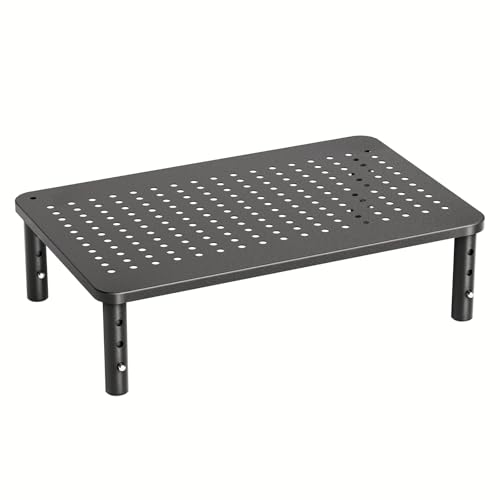
HUANUO Monitor Stand Riser, Adjustable Computer Monitor Stand
by HUANUO
Most-reviewed monitor stand on Amazon — 19,000+ verified reviews at 4.7 stars, vented mesh platform, and steel construction at the lowest price on this list.
Pros
- 19,340 verified reviews at 4.7 stars is the largest validated review pool on this list by a significant margin — sustained satisfaction across a diverse buyer base
- Vented mesh platform design actively promotes airflow under stored equipment, reducing thermal buildup on laptops and streaming devices
- Powder-coated steel frame provides the rigidity of metal at a price point where most competitors use plastic or composite materials
- Three height settings match the WALI's adjustment range at a slightly larger 15.4" x 9.8" platform footprint
Cons
- Platform depth of 9.8" remains narrow for 32"+ monitors with wide-splaying bases — verify your monitor's foot dimensions before ordering
- No drawer or dedicated storage; the open under-stand clearance requires separate cable management accessories
Simple Houseware Desk Dual Monitor Stand Riser — Upgrade Pick
The Simple Houseware stand represents a fundamentally different product category than the single-monitor risers above it — it is as much a desk organizer as a monitor riser, and the 45” full-width configuration is purpose-built for dual-monitor setups in a way that nothing else on this list attempts at this price. For home office professionals running two displays, the value proposition is specific: replace a separate desk organizer accessory, a separate monitor riser, and potentially a separate phone holder with a single product that handles all three functions in a unified design.
The pull-out drawer with 9 interior compartments is where the Simple Houseware stand justifies its price premium over basic risers. The compartments are correctly sized for the typical desk accessory mix: sticky notes, USB drives, SD cards, charging cables, pens, correction fluid, and small electronics. In a dual-monitor workspace where cable density under the desk is already high, having an enclosed drawer for small accessories rather than an open shelf significantly reduces visual clutter and the time spent locating items. The integrated side caddies and phone holder further reduce the number of standalone accessories occupying desk surface area.
The fixed height at 4.49” is the stand’s primary limitation, and it matters more in a dual-monitor context than a single-monitor one. With two displays on a shared platform, there is no way to compensate for a height that does not match your seated eye level by repositioning one monitor independently. Before purchasing, verify that 4.49” of elevation, combined with your monitor’s base-to-screen-center height, brings your screen center close to your natural seated eye level. The composite wood construction handles standard dual-monitor loads without issue, but users running two large 32”+ displays should verify combined monitor weight before committing.

Simple Houseware Desk Dual Monitor Stand Riser with Drawer
by Simple Houseware
Best dual-monitor stand with storage — 45" span covers two displays, a pull-out drawer with 9 compartments handles desk organization, and a patented design backs the premium price.
Pros
- 45" fully extended width handles dual-monitor configurations — the only product on this list specifically designed to span two displays simultaneously
- Pull-out drawer with 9 interior compartments keeps sticky notes, USB drives, pens, and charging cables organized directly under the monitors
- Integrated phone and tablet holder on the side caddy reduces desk surface clutter without requiring a separate accessory purchase
- Patented design with Amazon's Choice designation reflects both legal differentiation and sustained purchase satisfaction data
Cons
- Fixed height at 4.49" — unlike the WALI or HUANUO, there is no mechanism to adjust riser height to match your seated eye level
- Composite wood construction is less structurally rigid than metal under heavy dual-monitor loads; users with two 27"+ displays should verify their combined weight against the stated capacity
BONTEC Monitor Stand Riser 2-Tier — Runner-Up
The BONTEC’s 66 lb weight capacity is the specification that distinguishes it from every other product on this list — it is more than triple the Amazon Basics’ 22 lb limit and 50% higher than the WALI’s and HUANUO’s 44 lb capacities. In practical terms, this means the BONTEC is the correct stand for large all-in-one computers (iMac 27”, Dell OptiPlex AIO), heavy 32”+ gaming monitors with thick panel designs, and stacked-equipment configurations where a monitor and external drives or AV devices share the platform simultaneously. For standard single-monitor setups with consumer displays, the capacity headroom is significant — a 27” monitor weighing 12 lbs is less than 20% of the BONTEC’s rated limit, providing a structural margin that translates to long-term stability with no load-related wear on the platform connections.
The 5.6” fixed height positions the stand at the upper end of the standard ergonomic range, making it the best-matched fixed-height riser for users of average to slightly above-average height whose seated eye level falls in the 5-6” elevation zone. The clean white MDF finish, cable management slots, and integrated phone holder make it a visually organized solution for users who want a stand that contributes to overall desk aesthetics rather than just monitor elevation. With nearly 30,000 reviews backing its quality signal, the BONTEC has the most extensive long-term reliability validation of any wood-construction monitor stand at this price.

BONTEC Monitor Stand Riser 2-Tier, Computer Monitor Riser
by BONTEC
Highest weight capacity on this list at 66 lbs — the BONTEC's 30,000-review standing, clean white finish, and integrated cable management make it the best single-monitor riser for heavy setups.
Pros
- 29,739 verified reviews makes this the second most-reviewed stand on this list — the largest real-world reliability dataset for any monitor riser in this price tier
- 5.6" fixed height positions most monitors at or near the ergonomically recommended eye-level alignment for seated users of average height
- 66 lb weight capacity is the highest on this list — handles heavy monitors, AIO computers, and stacked equipment configurations without frame flex
- Built-in cable management slots and phone holder reduce the number of separate desk accessories required
Cons
- Fixed height cannot be adjusted — users whose seated eye level falls significantly above or below the 5.6" elevation will need a different stand
- MDF wood construction, while clean in appearance, is more susceptible to moisture damage over time than powder-coated metal alternatives
OPNICE Monitor Stand Riser with Drawer — Best Value Drawer Stand
The OPNICE fills a specific gap in the monitor stand market: there is no other metal-construction stand with an integrated drawer available at this price. Every other drawer stand in this price vicinity uses composite wood or MDF construction, which brings the moisture sensitivity and structural limitations described elsewhere in this review. The OPNICE’s metal build — combined with its pull-out drawer and two detachable pen holders — delivers a storage-enabled riser at a price point that makes it accessible for users who want organizational functionality without committing to the Simple Houseware’s dual-monitor footprint or price.
The 100-day return policy is a meaningful differentiator for a product with 658 reviews. At this review count, there is genuinely less long-term reliability data available than for the WALI, HUANUO, or BONTEC. The extended return window reflects the manufacturer’s recognition of this gap and their willingness to reduce purchase risk for early adopters. Based on the available review data and comparable metal-construction stands in the category, early performance indicators are positive — but if you are risk-averse about newer products, the WALI at a comparable price with 15,000 reviews is the lower-risk choice. The OPNICE is the correct recommendation for users who specifically need both metal construction and drawer storage in a single-monitor stand at this price.

OPNICE Monitor Stand Riser with Drawer and Pen Holders
by OPNICE
Best value drawer stand — the only metal-construction riser with an integrated drawer at this price point, backed by a 100-day return policy that reduces the risk of trying a newer product.
Pros
- The only metal-construction stand with an integrated drawer at this price point — delivers storage functionality that typically costs twice as much
- Two detachable pen holders provide dedicated vertical storage for pens, styluses, and markers without occupying platform surface area
- 100-day return window is substantially longer than the standard 30-day policy and reduces purchase risk on a newer product
- Metal build provides greater long-term rigidity than composite wood drawer stands in the same price range
Cons
- 658 reviews represents a thin long-term reliability dataset compared to established alternatives — early data is positive but multi-year durability is less validated
- Fixed height with no adjustment mechanism — buyers who need height customization should consider the WALI or HUANUO instead
WESTREE Dual Monitor Stand Riser — Best Value Dual-Monitor
The WESTREE addresses a straightforward need: dual-monitor elevation without the storage features and corresponding price premium of the Simple Houseware upgrade pick. At 35.8” wide, it handles two side-by-side displays in the common 24”-27” size range without the visual clutter of two separate individual risers. The heavy-duty alloy steel frame legs are the WESTREE’s primary structural advantage over composite wood dual stands — alloy steel does not flex under asymmetric loads (a common real-world condition when one monitor is heavier than the other or positioned closer to an edge), and it maintains consistent rigidity across the full width of the platform rather than experiencing the mild deflection that wooden leg designs show under heavier configurations.
The natural wood top and steel leg combination delivers an aesthetic that has become popular in home office setups — the material contrast works visually in a way that all-metal or all-wood designs do not, and it pairs well with both modern and mid-century desk aesthetics. Assembly takes under five minutes according to the majority of verified purchasers, which is the correct experience for a stand that should not require tools or significant time investment. The absence of drawer storage is the honest trade-off of the WESTREE versus the Simple Houseware — if organizational storage is not a requirement and you simply need a clean, stable dual-monitor platform at a lower price, the WESTREE delivers it without the cost of features you will not use.
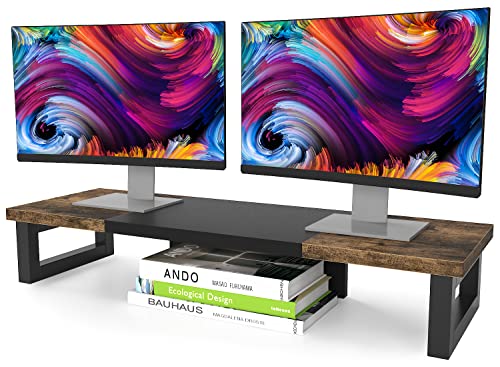
WESTREE Dual Monitor Stand Riser, Wood Computer Monitor Stand
by WESTREE
Best value dual-monitor riser without storage — 35.8" width, heavy-duty steel legs, and a wood-steel aesthetic that elevates the look of any dual-display desk setup.
Pros
- 35.8" wide platform handles dual-monitor configurations at a price well below the Simple Houseware upgrade pick — the best value dual-stand on this list
- Heavy-duty alloy steel frame legs provide structural rigidity that composite wood leg designs cannot match at standing height under heavy loads
- Natural wood top with steel leg combination delivers a rustic-industrial aesthetic that pairs well with modern home office setups
- Easy two-step assembly with no tools required — multiple verified reviewers confirm setup takes under five minutes
Cons
- No drawer, compartments, or integrated storage — purely a platform riser with no organizational functionality
- Fixed height at 4.92" — no height adjustment available for users who need a specific elevation
Amazon Basics Height Adjustable Monitor Stand
The Amazon Basics stand earns its place on this list through three differentiated specifications: the widest height adjustment range (2.87” to 4.9”), the largest single-monitor platform area (16” x 11”), and the deepest Amazon brand support infrastructure. The 2.87” minimum height is uniquely low — no other stand on this list reaches below 3.9” at its minimum setting. This matters specifically for users with short-torso proportions, very low seated heights, or desks that are already higher than standard. For those users, the ability to position the monitor at 2.87” rather than being locked into a 4-5” minimum can be the difference between correct and incorrect screen height.
The 16” x 11” platform surface is the largest on this list for a single-monitor stand, which provides meaningful benefit for monitors with wide-splaying bases that do not fit comfortably on narrower platforms. The depth of 11” accommodates a broader range of ultrawide monitor bases than the 9-10” platforms on the WALI, HUANUO, and BONTEC. The ABS plastic construction is the honest limitation — it does not have the premium feel of metal or the warmth of wood, and it shows surface wear over time in ways that powder-coated metal does not. The 22 lb weight capacity is also the most constrained on this list, making it appropriate for consumer monitors in the 24-27” range but not for heavier 32”+ displays or all-in-one computers.

Amazon Basics Height Adjustable Monitor Stand
by Amazon Basics
Widest adjustment range and largest platform on this list — the Amazon Basics stand's 2.87"–4.9" height span and 24,800-review track record make it the safest choice for non-standard eye levels.
Pros
- Three height settings spanning 2.87" to 4.9" provide the widest adjustment range on this list — meaningful for users whose eye level falls outside the standard 4-5" riser range
- 16" x 11" platform is the largest single-monitor surface on this list, providing more contact area for monitors with wide-splaying bases
- 24,800 verified reviews with Amazon's Choice designation reflects consistent purchase satisfaction at scale across a long product lifecycle
- Amazon brand backing provides reliable customer service infrastructure and returns processing that third-party sellers cannot match
Cons
- ABS plastic construction feels less premium than metal or wood alternatives and shows wear more visibly over time
- 22 lb weight capacity is the lowest on this list — not suitable for large all-in-one monitors or heavy display equipment
How to Choose the Best Monitor Stand
Buyer's Guide
Choosing the right monitor stand requires matching four specifications to your actual desk setup — platform size, height range, weight capacity, and storage needs — and getting any one of them wrong reduces the stand's daily utility significantly.
Platform Size and Monitor Base Fit
Platform dimensions are the most commonly overlooked spec and the most frequent source of buyer regret. The critical measurement is platform depth — the front-to-back distance the stand's surface provides. Standard single monitors use base depths of 8-10", which fits all stands on this list. Problems arise with ultrawide monitors (34"+ screens), large gaming monitors with crescent or tripod bases, and all-in-one computers with wide-footed stands — these can require 11-12" of depth. Before purchasing, measure your monitor's base at its widest front-to-back point and compare to the stand's stated platform depth. For dual-monitor setups, verify the stand's total width covers both monitors plus their inward base clearance. The Simple Houseware and WESTREE stands are purpose-built for dual configurations at 45" and 35.8" respectively.
Height Range and Eye Level Alignment
The ergonomic goal of a monitor riser is to position your screen so the top edge aligns with or sits slightly below your natural eye level when seated with good posture. For most seated adults, this requires 4-6 inches of elevation above the desk surface. Stands with adjustable heights (WALI at 3.9"-5.5", HUANUO at 3.94"-5.51", Amazon Basics at 2.87"-4.9") accommodate a wider range of seated heights and desk configurations than fixed-height risers. Fixed-height stands (BONTEC at 5.6", Simple Houseware at 4.49", WESTREE at 4.92") are simpler and often more stable, but commit you to a specific elevation. Before choosing between adjustable and fixed, calculate your target elevation: sit at your desk in proper posture, measure the distance from the desk surface to your natural eye level, and subtract your monitor's center-screen height to determine the riser height you actually need. Pair your monitor height with a properly fitted [office chair](/best-office-chairs/) — the two interact directly, and adjusting one without the other may not fully resolve neck or eye fatigue.
Weight Capacity and Structural Integrity
Weight capacity determines the maximum load the stand can safely support without frame flex, instability, or structural fatigue. The practical weights involved: a standard 24"-27" consumer monitor weighs 8-12 lbs, a 32" monitor weighs 14-18 lbs, a 34"+ ultrawide weighs 18-25 lbs, and an all-in-one computer can reach 30+ lbs. Operating a stand close to its rated limit accelerates wear on the platform joints and rubber feet and creates a stability margin that shrinks with every use. For single monitors under 25 lbs, the 44 lb capacities of the WALI and HUANUO provide generous headroom. For heavier loads or equipment stacking, the BONTEC at 66 lbs is the correct choice. The Amazon Basics at 22 lbs is appropriate only for lighter displays — verify your monitor's weight before purchasing.
Material and Long-Term Durability
Monitor stand materials fall into three categories: powder-coated metal, MDF/composite wood, and ABS plastic. Metal stands (WALI, HUANUO, OPNICE) provide the best long-term structural integrity, resist moisture damage, and maintain consistent rigidity under sustained loads. Metal platforms with ventilation slots additionally prevent heat buildup for stored equipment. MDF wood stands (BONTEC, Simple Houseware) offer a warmer aesthetic appropriate for home office environments, but MDF is susceptible to water damage and will degrade if exposed to condensation from water bottles or humid environments over time. ABS plastic (Amazon Basics) is lightweight and inexpensive but shows surface wear and micro-scratches more visibly than metal or wood, and loses structural rigidity at elevated temperatures. For a permanent home office installation, metal is the most durable long-term choice.
Storage Options and Desk Organization
The under-stand clearance created by a riser can range from unused open space to a fully organized storage zone depending on which stand you choose. Stands without storage (WALI, HUANUO, WESTREE, Amazon Basics) create open clearance useful for a compact keyboard slide or stacked notebooks but provide no organization structure. Stands with drawers (OPNICE, Simple Houseware) add dedicated enclosed storage for desk accessories, charging cables, USB drives, and stationery. The Simple Houseware upgrade pick goes furthest with a pull-out drawer containing 9 interior compartments plus side caddies and a phone holder — effectively replacing a desk organizer accessory and a separate stand with a single purchase. If your desk surface is currently cluttered with accessories, the storage-enabled stands provide a meaningful net organizational benefit that justifies their higher price. Consider whether you would otherwise purchase a desk organizer separately, and compare the combined cost to the storage-enabled stand price.
Single vs. Dual Monitor Support
Single-monitor stands are appropriate for workstations with one display, a laptop on a separate stand, or any setup where monitors are positioned at different heights on individual risers. Dual-monitor stands are purpose-built for side-by-side two-display configurations on a single shared platform. The key difference is total platform width: single stands on this list run 14.6"–16" wide, while dual stands (Simple Houseware at 45", WESTREE at 35.8") span the full footprint of two monitors. Dual stands provide a visually cleaner look — a single continuous surface under two monitors rather than two individual risers — and often cost less than purchasing two single stands. The trade-off is that dual stands fix both monitors at the same height and on the same plane, which is appropriate for symmetrical dual setups but not for mixed-height or angled dual configurations. For a [standing desk](/best-standing-desks/) setup where you also use the desk at sitting height, a single adjustable stand paired with a monitor arm gives you the most positioning flexibility across both postures.
Final Verdict
For most single-monitor home office setups, the WALI Computer Monitor Stand is the correct starting point. It is the #1 bestseller in the category for consistent reasons — three adjustable height settings, a vented metal platform, anti-skid pads on all surfaces, and a price that makes it among the most accessible ergonomic upgrades available for any desk. The ability to choose between 3.9”, 4.7”, and 5.5” means most users will find a height that aligns correctly with their seated eye level, and the metal-platform construction provides the long-term rigidity that plastic and wood alternatives cannot.
For buyers whose primary constraint is budget and who prioritize the most validated purchase decision available, the HUANUO Monitor Stand Riser is the alternative recommendation — nearly 20,000 verified reviews at 4.7 stars is the largest real-world reliability signal in the monitor stand category, and its vented mesh platform handles heat dissipation marginally better than the WALI for users storing always-on networking equipment underneath.
For dual-monitor setups or users who want to consolidate monitor elevation and desk organization into a single purchase, the Simple Houseware Desk Dual Monitor Stand Riser justifies its premium with a 45” span, pull-out drawer, and 9 storage compartments that would cost more to replicate with separate accessories. Whatever stand you choose, pair it with your office chair and desk lamp setup — monitor height, chair position, and task lighting work together as an ergonomic system, and getting the riser right while leaving the other two unaddressed delivers only a fraction of the potential benefit.
Frequently Asked Questions
What height should a monitor stand raise my screen to?
What is the difference between a monitor stand and a monitor arm?
Can I put my laptop on a monitor stand?
How do I know if a monitor stand will fit my monitor's base?
Are monitor stands worth it compared to just stacking books under my monitor?
Related Articles
About the Reviewer

Sarah Chen, CAP, PMP
B.A. Business Administration, UCLA
Sarah Chen spent 10 years in office management and operations at Fortune 500 companies before founding DeskRated in 2026. After managing supply budgets for teams of 50+ people and testing thousands of products through daily use, she started writing the honest, no-fluff supply reviews that office professionals actually need. Sarah holds both CAP and PMP certifications and is based in Los Angeles.