7 Best Cable Management Solutions of 2026
Sarah Chen reviews the best cable management solutions for home offices and standing desks. Compare trays, sleeves, boxes, raceways, and reusable ties.
Updated
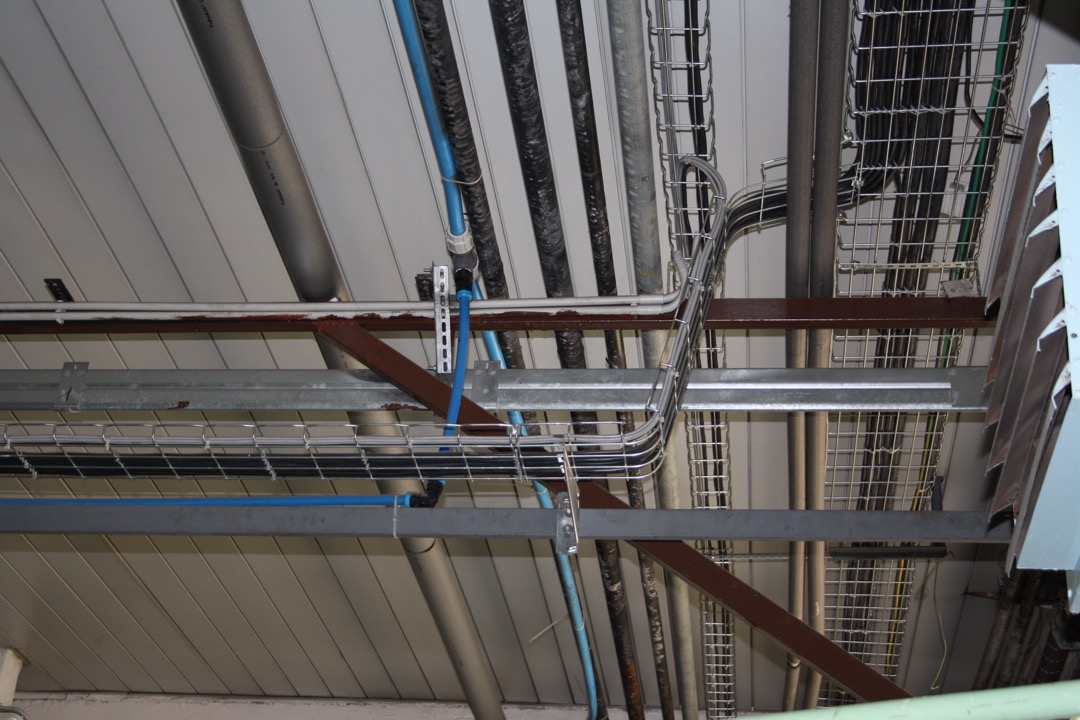
As a Certified Administrative Professional who has managed workspace setup and office supply programs for teams ranging from single-person home offices to 150-person firms, I find cable management to be the category that buyers most frequently underestimate and then most frequently rebuild. A productive workstation is not just a matter of the right chair, the right monitor, and the right standing desk — it is also a matter of what happens to the 8 to 15 cables that connect those components. Cables that dangle, coil, and tangle create the low-grade visual noise that quietly degrades focus across an entire workday. They also create real hazards: tripping risks, pet-chew risks, dust accumulation around power strips, and the accidental unplug that costs you an hour of work every time a foot catches the wrong cord. Good cable management is a productivity decision first, an aesthetic decision second, and a safety decision third.
The SERP for “best cable management” is surprisingly thin in 2026 — dominated by shallow listicles that either pick one product category (usually cable sleeves) and pretend it solves every problem, or recommend 15 products without distinguishing which type of buyer should pick which. Our goal with this review is to give you the structural framing that competitors consistently skip: cable management is a system composed of distinct product categories (kits, trays, ties, sleeves, boxes, raceways) that solve different problems, and a complete workstation needs most of them rather than one of them. We evaluated seven products across those categories, with a minimum review floor that ensures real-world validation rather than marketing claims. After reading this, you should know exactly which two or three products to combine to solve your specific cable situation — and which to skip.
Our selection criteria prioritized category diversity (one kit, two trays, one tie system, one box, one sleeve, one raceway), installation flexibility for renters and standing-desk users, and durable materials that justify a 5-10 year investment horizon. We also weighted products that work well together as a system — the N NOROCME kit pairs naturally with the Univivi tray, the Bluelounge CableBox, and the CableGeeker sleeve to build a complete desk cable management setup at a total cost of around $100. If you are also redesigning the top of your desk, our monitor stands, desk organizers, and USB-C docking stations guides cover the components that sit above the cable system you are about to build. Every product’s price and Amazon availability in this guide was re-verified in September 2026, including a check of which listings still have a live Add to Cart button rather than only third-party offers.
| Product | Price | Buy |
|---|---|---|
| N NOROCME Cord Management Organizer KitBest Overall | $15.65 | View on Amazon |
| Univivi No Drill Under Desk Cable Management Tray, 36"Premium Pick | $39.99 | View on Amazon |
| VELCRO Brand ONE-WRAP Cable Ties, 100-Pack (8"x1/2")Budget Pick | $15.89 | View on Amazon |
| REFLYING 15.7" Under Desk Cable Management TrayRunner-Up | $16.99 | View on Amazon |
| Bluelounge CableBox | $30.88 | View on Amazon |
| CableGeeker 120" Neoprene Cable Management Sleeve (10 ft, Cuttable) | $17.99 | View on Amazon |
| Legrand Wiremold CDI-5 Cord Cover Kit, 15 ft | $24.86 | View on Amazon |
Find the Right Cable Management for Your Setup
Cable management is a system, not a single product — so the right pick depends on what you are actually trying to solve. Jump straight to the section that matches your desk and your cable problem:
- Best cable management solutions overall
- Best for a desk and home office
- Best under-desk cable tray
- Best for a standing desk
- Best cable management box
- Best cable ties and sleeves
- Best for cords along walls and floors
How We Chose These Cable Management Solutions
Our selection process began with a minimum Amazon review floor of approximately 500 verified purchases for the newer products and several thousand for the legacy category leaders — enough sample size to distinguish real quality from launch-phase marketing. Beyond the review threshold, we required meaningful functional differentiation across the seven picks so that each product covers a distinct cable management problem rather than duplicating the others. The N NOROCME covers all-in-one entry-level needs. The Univivi 36-inch tray covers full-desk under-mount for standing desks. The VELCRO ONE-WRAP covers the bundling problem at the source. The REFLYING 15.7-inch tray covers compact clamp-mount setups and glass-top desks. The Bluelounge CableBox covers visible power strip concealment. The CableGeeker neoprene sleeve covers the long visible cable run. The Legrand Wiremold covers fixed-desk floor and baseboard raceway needs.
Standing-desk compatibility was a specific differentiator in our evaluation. Standing desks create failure modes that fixed desks do not — every cable must travel 12 to 20 inches vertically on every height change, adhesive mounts fail under repeated flex, and cable trays must attach to the desk top (not the wall) so they rise and fall with the workspace. The Univivi and REFLYING trays and the CableGeeker sleeve explicitly handle this; the Wiremold raceway explicitly does not. Buyers with standing desks should prioritize the products in our list that travel with the desk rather than the ones that anchor to the wall or floor.
Best Cable Management Solutions Overall
Below are all seven picks reviewed once each — the kit, the two under-desk trays, the ties, the box, the sleeve, and the floor raceway. The N NOROCME kit is the best all-around starting point for most desks, but the right complete system usually combines two or three of these. The use-case sections further down simply point back to the picks reviewed here, matched to specific setups.
N NOROCME Cord Management Organizer Kit — Best Overall
The N NOROCME Cord Management Kit earns its best-overall position by being the one cable management purchase that can actually solve an entire desk’s cable situation from a single box. Four split-design cable sleeves handle the bundle-hiding problem across multiple cable runs. Thirty-six adhesive clips provide the routing infrastructure along desk edges, desk legs, and wall paths. A set of reusable Velcro ties handles the tight-bundling problem at the source where cables exit a power strip or a dock. A set of zip ties covers the permanent-bundling scenarios where a cable group will not need to be re-opened. At under $20, this is the correct starting point for any buyer who has never set up cable management before and needs a complete toolkit rather than a single component.
The split-design sleeves are the standout feature. Unlike seamless sleeves that require you to thread cables through from one end — a frustrating process that fights you every inch if the cable has any connectors larger than the sleeve diameter — the split sleeves open along their length, drop in as many cables as you need, and press closed. Adding a new cable three months later takes 15 seconds instead of rebuilding the entire sleeve. The adhesive clips follow the same philosophy: they hold firmly on clean smooth surfaces and provide exactly the routing points a typical desk needs to keep cables off the floor and along the edge where they disappear visually.
The honest limitation is the quality of the adhesive. The clips work beautifully on lacquered wood, laminate, painted steel, and glass — any smooth, clean, room-temperature surface. They fail on textured wood grain, previously oiled or waxed finishes, and surfaces that run warm (which can include the underside of some desks near laptops and docks). The fix is straightforward: clean the mounting surface with isopropyl alcohol, let it dry completely, and install the clips while the surface is cool. Do the installation correctly the first time and the clips hold for years. Rush the installation and half of them will fall off within a month.
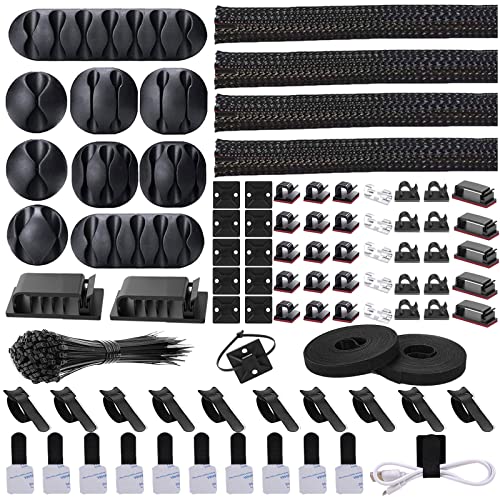
N NOROCME Cord Management Organizer Kit
by N NOROCME
The most comprehensive cable management kit on Amazon for under $20 — sleeves, clips, Velcro ties, and zip ties in a single purchase that covers an entire desk.
Pros
- All-in-one kit includes 4 split cable sleeves, 36 adhesive clips, reusable Velcro ties, and zip ties — covers every cable scenario across a single desk without buying multiple products
- Adhesive clips hold firmly on smooth clean desk surfaces and route cables along desk edges, legs, and wall runs without drilling or screws
- Split-design cable sleeves load and unload cables without tools — pull the seam open, insert cables, and press closed in seconds
- Reusable Velcro ties are thick, flexible, and hold their shape over hundreds of open-and-close cycles without loosening or fraying
Cons
- Adhesive clips fail on textured, rough, or warm surfaces — clean and dry the desk with isopropyl alcohol before mounting to get reliable adhesion
- Braided polyester sleeves feel less premium than dedicated neoprene wraps — adequate for hidden runs, but not the right choice for high-visibility cable paths
Univivi 36” No-Drill Cable Management Tray — Upgrade Pick
The Univivi 36-inch tray is the upgrade pick for buyers who want one product that handles the entire under-desk cable management problem on a standard-width desk. Most under-desk trays on Amazon are 14 to 18 inches long — adequate for hiding a single power strip, but not wide enough to span a full desk from one edge to the other. The Univivi at 36 inches covers the full width of a standard 48 to 60-inch desk in a single uninterrupted run, which means no gaps where cables droop between two shorter trays, no visible connection hardware bridging the two, and no halfway-concealed section in the middle where the system visually fails.
The fabric exterior is the second differentiator. Bare metal mesh trays are the industry default — functional, but aggressively industrial in appearance. If the bottom of your desk is visible from common seating positions in the room (which it almost always is in an open home office layout), a bare metal tray reads as unfinished. The Univivi’s fabric wrap provides a matte, quietly intentional look that matches the aesthetic of finished desks and modern home offices. The internal metal frame provides the structural rigidity to hold a fully loaded power strip plus cord slack without sag.
The dual mounting hardware is the detail that makes this tray practical for both fixed and standing desks. The clamp option is appropriate for standing desks (no drilling, no adhesive, travels with the desk top) and for renters who cannot drill into furniture. The screw option is appropriate for permanent installations where the clamp footprint would interfere with keyboard trays or other under-desk accessories. Including both in the box means one SKU handles every installation scenario. The lower review count (860) relative to older competitors is the only meaningful caveat — this is a newer product earning its reputation, not a legacy category leader.
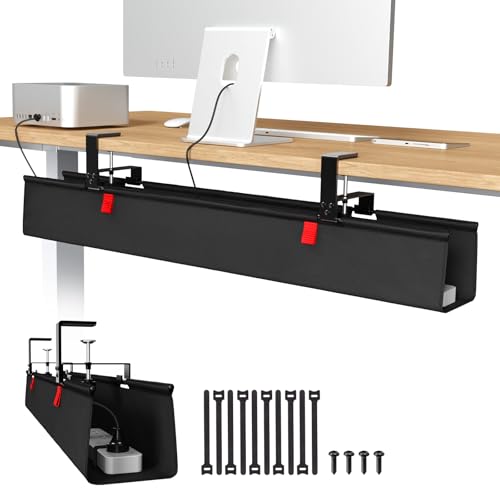
Univivi No Drill Under Desk Cable Management Tray, 36"
by Univivi
Amazon's Overall Pick for under-desk cable management — a 36" fabric-covered tray that hides an entire standing desk's cables with the cleanest aesthetic in the category.
Pros
- 36-inch length spans a full standard desk in a single run — no daisy-chaining two shorter trays or leaving gaps where cables droop
- Fabric exterior with internal metal frame looks intentional and finished instead of the exposed industrial-mesh aesthetic of bare wire trays
- Dual mounting hardware included — clamp mount for standing desks and screw mount for fixed desks, no drilling required for either
- Amazon Overall Pick badge in the under-desk cable management category, a meaningful signal of category-level user satisfaction
Cons
- Review count of 860 is lower than older competitors in the category — less social proof than the 5,000+ review alternatives, though rating is strong
- Fabric exterior may accumulate dust over time in ways that bare metal mesh does not — wipe periodically with a dry microfiber cloth
VELCRO Brand ONE-WRAP Cable Ties — Budget Pick
The VELCRO ONE-WRAP is the budget pick, and it is also the single most-reviewed cable management product on Amazon at 36,800-plus ratings, which makes it the most socially validated cable management purchase you can make at any price. The reason for that depth of social proof is that these ties are the universal bundling tool used by every professional installation trade — data center technicians, AV engineers, broadcast installers, IT administrators, and stage lighting crews all default to VELCRO ONE-WRAP for the same reason: they are reusable, they are the right size, and they never fail.
The reusability is the feature that separates these from zip ties. Zip ties are single-use — you cinch them once and cut them off when you need to add or remove a cable, which generates waste and creates a minor friction every time your setup changes. VELCRO ties loop back on themselves via hook-and-loop, which means you can open them, add a cable, close them, and repeat that cycle hundreds of times without any loss of holding power. For a desk that evolves as you add monitors, docks, and peripherals over the years, this difference is substantial: you set up your cable bundles once and adjust them indefinitely rather than building them from scratch every time.
The limitation worth stating directly is that VELCRO ties are a bundling tool, not a complete cable management system. They do not route cables along a surface, they do not hide cables visually, and they do not provide any concealment. You still need clips, trays, or sleeves for those functions. What they do is make every other component of your cable management system work better — a tray full of loose cables looks messy, but a tray full of neatly VELCRO-bundled cable groups looks like an intentional installation. Pair them with the N NOROCME kit’s sleeves or the Univivi tray to build the complete system.

VELCRO Brand ONE-WRAP Cable Ties, 100-Pack (8"x1/2")
by VELCRO
The universal tool for bundling cables at the source — VELCRO's ONE-WRAP is the industry standard used by AV professionals and data center technicians, and the obvious budget pick for any desk.
Pros
- Fully reusable and repositionable hundreds of times — unlike zip ties that require cutting and replacing each time a cable changes
- Pre-cut to a consistent 8-inch length with a slotted-head design that loops through and secures without tools or training
- Holds thick cable bundles securely without slippage — trusted by data center technicians, AV professionals, and broadcast engineers as the industry standard
- The most-reviewed cable management product on all of Amazon at 36,000+ ratings — the deepest social proof in the entire category
Cons
- This SKU is black only — red, green, blue, and color-assortment packs are sold as separate ASINs at different price points
- Not a complete cable management solution on its own — still requires clips, trays, or sleeves to route cables along surfaces and hide runs
REFLYING 15.7” Under-Desk Cable Management Tray — Runner-Up
The REFLYING 15.7-inch tray is the runner-up to the Univivi because it solves the same problem (under-desk cable concealment with clamp-mount installation) at roughly 40% of the price, with the tradeoff of a shorter length that works for some desk configurations but not others. At 15.7 inches, this tray is sized for a single power strip plus cable slack — which is exactly what most workstations actually need. If your workstation has one power strip and a typical cable count, a single REFLYING covers the full setup cleanly. If your workstation has two power strips, a dock, and 12+ cables, you need two REFLYINGs or a single Univivi.
The clamp design is the specific reason this product earns its runner-up position. The rubber-padded clamps grip reliably on glass-top desks, thin standing desk tops, and the narrow edges that defeat many clamp-mount competitors. I have installed cheap clamp trays that simply would not tighten enough on a standing desk’s thin top to hold their position — the REFLYING’s clamp geometry and rubber padding solve that problem. The adjustable spacing accommodates desk thicknesses from roughly 0.5 inches up to 1.5 inches, which covers essentially every desk type you are likely to own.
Installation is genuinely under five minutes: position the tray, tighten the two clamp screws, load the power strip and cables. No drilling, no adhesive, no surface prep. This matters specifically for renters and for buyers who want to relocate their cable management system when they eventually upgrade their desk. The black-only color finish is a minor limitation — if your workspace aesthetic runs white or warm-toned, the REFLYING will be visible as a black accent under a non-black desk. For most workspaces where the underside of the desk is not the focal point, this is a non-issue.

REFLYING 15.7" Under Desk Cable Management Tray
by REFLYING
The best-reviewed metal under-desk tray on Amazon — clamp-mount, no drill, and the rare design that grips reliably on thin and glass-top desks.
Pros
- Clamp installation completes in under 5 minutes with zero drilling, adhesive, or surface prep — the easiest setup in the under-desk tray category
- Rubber-padded clamps grip glass-top and thin standing desk surfaces where most clamp-mount competitors slip or fail to tighten adequately
- Powder-coated carbon steel construction holds multiple power bricks without flexing — noticeably sturdier than the lighter-gauge steel in budget trays
- Clamp spacing is adjustable to fit a wide range of desk thicknesses, including the thinner tops common on sit-stand desks
Cons
- 15.7-inch length is short — buyers with wider setups or more than one power strip need two units to cover a full desk
- Black is the only finish — no white or silver alternative for workspaces where a black tray would be visually out of place
Bluelounge CableBox — Premium Cable Concealment
The Bluelounge CableBox occupies a specific niche: the visible power strip problem. Most cable management systems assume the power strip lives under the desk where it cannot be seen. In practice, many workstations have power strips on the floor beside the desk, on the desk surface itself, or in locations where the under-desk-tray approach does not work — built-in desks without underside clearance, workspaces shared with other furniture, or setups where the nearest outlet is on the far side of the room. The CableBox handles those scenarios by putting the power strip inside a finished enclosure that reads as a piece of desk accessory rather than a hidden mess.
The flame-retardant ABS plastic construction is the feature that justifies the premium over generic cable boxes. A power strip runs electricity continuously for years, often under load from multiple high-draw devices (monitors, laptops, chargers), and occasionally experiences fault conditions from damaged cables, dust buildup, or pet chewing. A flame-retardant enclosure provides a last-line-of-defense buffer that generic plastic cable boxes do not. For always-on power strip installations — which includes nearly every home office — this is not a marketing feature. It is the correct specification.
The pet-proofing is the other feature that earns mention. Cats sleep on warm power bricks. Dogs chew exposed cables. Both can happen with a freestanding power strip in ways they cannot with a power strip inside a closed box. The CableBox is popular specifically among pet owners for this reason, and the four color options (including light sage and moonlight blue) let the box blend into or complement a room’s existing color palette rather than reading as industrial gray or plain black. The honest limitations are the price (premium for what is functionally a box) and the 90-day warranty (short for a product expected to last years).

Bluelounge CableBox
by Bluelounge
The definitive cable management box on Amazon — Bluelounge's flame-retardant enclosure cleanly hides a full-size power strip, adapters, and cord slack behind a pet-proof lid.
Pros
- Flame-retardant ABS plastic construction provides genuine peace of mind for always-on power strip setups that spend years plugged in and unmonitored
- Interior sized for a full-length surge protector plus bulky transformer bricks and cord slack — not the cramped fit of cheaper cable boxes
- Keeps power strips dust-free and pet-proof — specifically popular with cat and dog owners whose pets chew exposed cables or sleep on warm power bricks
- Four color options including on-trend moonlight blue and light sage — the rare cable management product that doesn't default to plain black or white only
Cons
- Premium pricing for what is functionally a molded plastic box — the premium buys the fire-retardant rating and the color options, not additional capacity
- 90-day manufacturer warranty is short for a desk accessory that most buyers expect to last many years
- Amazon has suppressed the featured offer on this listing, so there is no Add to Cart button — you have to open See All Buying Options and pick a third-party seller, currently from around $31 with Prime shipping. Availability through those sellers is thinner than the rest of this list
CableGeeker 120” Neoprene Cable Management Sleeve — Long-Run Sleeve
The CableGeeker neoprene sleeve solves a problem that no other product on this list handles well: the single long visible cable run. Most desks have at least one cable path that travels a long distance in plain sight — from the desk to a wall outlet across the floor, from a desk-mounted monitor to a dock across the desk surface, or from a standing desk up to a ceiling-mounted light. These runs are where the cable sleeves in the N NOROCME kit fall short, because at 20 inches each they are too short to cover a 6 to 10-foot cable path without multiple sleeve sections daisy-chained together (with visible gaps at every junction). With nearly 1,100 ratings at a 4.5-star average, the CableGeeker is one of the better-proven long sleeves on Amazon.
The CableGeeker’s 120-inch single length solves that problem directly. One sleeve, cut to the exact length you need, covers the full cable path in a single piece with no visible junctions — and because it is cuttable, a single 10-foot purchase can become two or three shorter sleeves sized to different runs around the desk. The reversible design flips to match either a light or a dark room, and the neoprene is durable enough for floor-run cables that accumulate dust and pet hair over time.
The hook-and-loop closure running the full length of the sleeve is what separates this from seamless-tube sleeves. Seamless tubes require threading cables from one end, which fights you the entire way. A full-length hook-and-loop closure lets you drop cables into the sleeve anywhere along its length, add a new cable to an existing run without rebuilding, and split the sleeve open partway to branch cords out to separate devices — useful where one bundle needs to fan out to a monitor, a dock, and a charger. The honest limitations are a seam that is visible up close (so it is happier on hidden or floor runs than across an open desktop) and a 1.5-inch diameter that strains once you push past a full monitor-plus-dock cable group. For most long-run installations, this is the correct sleeve choice.

CableGeeker 120" Neoprene Cable Management Sleeve (10 ft, Cuttable)
by CableGeeker
A 120-inch cuttable neoprene sleeve that wraps an entire desk-to-wall cable run in one piece — hook-and-loop closure, reversible, and splittable to branch cords out to separate devices.
Pros
- A single 120-inch (10-foot) length covers an entire desk-to-wall cable path in one uninterrupted piece without seams or splice points
- Cuttable to any length with household scissors, so one purchase can become several shorter sleeves sized to different cable runs
- Full-length hook-and-loop closure lets you add or remove cables at any point along the sleeve, and splits open to branch cords out to separate devices
- Reversible design flips to match a light or dark room, and the neoprene is durable enough for floor runs that accumulate dust and pet hair
Cons
- The hook-and-loop seam is visible up close, so it is better suited to hidden or floor runs than to high-visibility cable paths across a desktop
- At 1.5-inch diameter it bundles many cords but strains once you push past a full monitor-plus-dock cable group
Legrand Wiremold CDI-5 Cord Cover — Professional Floor Raceway
The Legrand Wiremold CDI-5 is the professional-grade solution for the floor and baseboard cable problem. Cable management guides typically stop at the desk — which leaves the cable path from desk to wall outlet as an uncovered problem. On hardwood and tile floors, these cable runs are tripping hazards. On carpet, they accumulate pet hair and dust. Against baseboards, they create visual clutter in rooms where the workspace shares the space with living areas. The Wiremold raceway addresses all three problems with a single product: it covers the cable run along the floor or baseboard with a low-profile flat channel that reads as building trim rather than as a cable solution.
The Legrand/Wiremold brand is the specification default for commercial installations — electricians, school IT departments, hospital facilities teams, and office build-out contractors use Wiremold raceways because they are reliable, they look professional, and they pass inspection. The CDI-5 kit is the residential-grade version of that product line, with 15 feet of raceway that cuts to length with household scissors and applies with pressure-sensitive adhesive to floors, baseboards, walls, or desk legs. Up to 10 cords fit in a single channel, which covers the full cable drop from a dual-monitor desk to a wall outlet.
The honest limitations are color and packaging. The ivory finish is not true white — it reads slightly warm, which can look mismatched against bright white walls or bright white trim. For homes with warm-toned walls, warm wood floors, or beige baseboards, the ivory blends well. For homes with crisp modern white, it reads slightly off. The raceway also arrives curled from packaging and needs time to flatten before the adhesive bonds properly — gentle warming with a hair dryer accelerates the flattening. Do the installation with some patience and the result is a nearly invisible cable path that lasts for years. For a standing-desk workstation where the cable path is covered by the desk itself, the Wiremold is less relevant than the under-desk trays above.

Legrand Wiremold CDI-5 Cord Cover Kit, 15 ft
by Legrand
The professional electrician's choice for desk and baseboard cord management — Wiremold's 15-foot peel-and-stick flat raceway handles up to 10 cords with a nearly invisible profile.
Pros
- Professional Legrand/Wiremold brand trusted in commercial, healthcare, and educational installations — the name electricians specify by default
- Cuts to any length with household scissors and applies directly to floors, baseboards, walls, or desk legs via pressure-sensitive adhesive
- Low-profile flat design sits nearly flush against the mounting surface — far less visible than the round cord protectors that dominate the category
- Holds up to 10 cords in a single channel — enough capacity for a multi-monitor desk drop or a floor-run cable path from desk to wall outlet
Cons
- Ivory finish is not true white — on bright white walls or floors it reads slightly warm, which some buyers find visually mismatched
- Tends to curl out of packaging during shipping and needs time to flatten, or gentle warming with a hair dryer, before adhesive bonds properly
Best Cable Management for a Desk & Home Office
For a single home-office desk, the fastest path to a tidy setup is to combine three things: a kit that gives you clips, sleeves, and ties in one box, a pack of reusable ties for the bundle points, and a no-drill tray to get the power strip off the floor. The N NOROCME kit is the foundation; add the VELCRO ties for the lowest-effort tidy-up at the bundle points and a Univivi tray when you want the cables hidden under the desk entirely.
| Product | Price | Buy |
|---|---|---|
| N NOROCME Cord Management Organizer KitBest all-in-one desk kit Clips, sleeves and ties in one box for a full desk | $15.65 | View on Amazon |
| VELCRO Brand ONE-WRAP Cable Ties, 100-Pack (8"x1/2")Best cheap tidy-up Reusable ONE-WRAP ties bundle cords in seconds | $15.89 | View on Amazon |
| Univivi No Drill Under Desk Cable Management Tray, 36"Best hidden under-desk tray No-drill tray lifts the power strip off the floor | $39.99 | View on Amazon |
Best Under-Desk Cable Management Tray
An under-desk tray is what actually hides the power strip and the tangle of transformer bricks, and the only real decision is length. The Univivi spans a full standard desk in one 36-inch run; the REFLYING is the compact clamp-mount tray for smaller desks or a single power strip. Both mount without drilling.
| Product | Price | Buy |
|---|---|---|
| Univivi No Drill Under Desk Cable Management Tray, 36"Best full-width tray 36" no-drill tray holds a power strip plus bricks | $39.99 | View on Amazon |
| REFLYING 15.7" Under Desk Cable Management TrayBest compact tray 15.7" tray for smaller desks and fewer cables | $16.99 | View on Amazon |
Best Cable Management for a Standing Desk
Standing desks are the hardest case because every cable travels 12 to 20 inches vertically on each height change. That rules out adhesive-only mounts and rewards clamp-mount trays that ride with the desk top plus a flexible sleeve to keep the vertical slack bundled. The Univivi and REFLYING clamp trays travel with the desk; the VELCRO ties keep the service-loop slack under control through the full height range.
| Product | Price | Buy |
|---|---|---|
| Univivi No Drill Under Desk Cable Management Tray, 36"Best standing-desk tray No-drill clamp tray flexes as the desk raises | $39.99 | View on Amazon |
| REFLYING 15.7" Under Desk Cable Management TrayCompact standing-desk tray Smaller clamp tray for compact sit-stand desks | $16.99 | View on Amazon |
| VELCRO Brand ONE-WRAP Cable Ties, 100-Pack (8"x1/2")Bundle the travel slack ONE-WRAP keeps slack bundled through the height range | $15.89 | View on Amazon |
Best Cable Management Box
When the power strip lives on the desktop or the floor where a tray cannot reach it, a cable box is the answer — it hides the strip and the cord nest inside a finished enclosure. The Bluelounge CableBox is the purpose-built pick with a flame-retardant shell; the N NOROCME kit adds clips and sleeves to tidy the cables that run into and out of the box.
| Product | Price | Buy |
|---|---|---|
| Bluelounge CableBoxBest cable box Conceals a power strip and cord nest on the desktop | $30.88 | View on Amazon |
| N NOROCME Cord Management Organizer KitKit with box-style organizer All-in-one kit adds clips and sleeves around the box | $15.65 | View on Amazon |
Best Cable Ties & Sleeves
For bundling and wrapping the cables themselves — as opposed to hiding them under the desk — the choice is ties versus a sleeve. The VELCRO ONE-WRAP ties are the reusable industry standard for cinching bundles at the source; the CableGeeker sleeve wraps a whole run in a continuous cuttable tube. Most desks use both.
| Product | Price | Buy |
|---|---|---|
| VELCRO Brand ONE-WRAP Cable Ties, 100-Pack (8"x1/2")Best reusable ties ONE-WRAP hook-and-loop ties, 100-pack, reusable | $15.89 | View on Amazon |
| CableGeeker 120" Neoprene Cable Management Sleeve (10 ft, Cuttable)Best long-run sleeve 120" cuttable neoprene sleeve wraps a full bundle | $17.99 | View on Amazon |
Best Cable Management for Cords Along Walls & Floors
Once cables leave the desk and run along a wall or across a floor, you want either a rigid raceway that protects a walked-over run or a flexible sleeve that bundles cords along a baseboard or desk leg. The Legrand Wiremold raceway is the floor-run pick electricians reach for; the CableGeeker sleeve is the flexible alternative for wall and desk-leg runs.
| Product | Price | Buy |
|---|---|---|
| Legrand Wiremold CDI-5 Cord Cover Kit, 15 ftBest floor raceway Wiremold cord cover protects floor runs underfoot | $24.86 | View on Amazon |
| CableGeeker 120" Neoprene Cable Management Sleeve (10 ft, Cuttable)Best flexible sleeve Neoprene sleeve bundles cords along a wall or desk leg | $17.99 | View on Amazon |
More Cable Management Picks
A couple of picks fit narrower needs — a compact tray for a small desk and a paintable raceway for cords that get walked over.
| Product | Price | Buy |
|---|---|---|
| REFLYING 15.7" Under Desk Cable Management TrayBest compact tray 15.7" no-drill tray for small desks | $16.99 | View on Amazon |
| Legrand Wiremold CDI-5 Cord Cover Kit, 15 ftBest floor raceway Paintable floor raceway for walked-over runs | $24.86 | View on Amazon |
Cable Management Buying Guide
The buyer’s guide section below walks through the six factors that matter most when building a cable management system. For most buyers, the right approach is not to pick one product from this list — it is to pick two or three that cover the distinct cable management problems your specific desk actually has. A starter system (N NOROCME kit plus VELCRO ties) handles most single-desk workstations for roughly the price of a single mid-tier tray. A complete system (the starter plus a Univivi tray, a Bluelounge CableBox, and a CableGeeker sleeve) handles a full dual-monitor standing-desk setup for around $100 and typically lasts a decade without replacement.
Buyer's Guide
Choosing the right cable management solution requires matching the product type to your specific desk configuration, cable count, and installation constraints — cable management failures are almost always mismatches between product type and use case rather than defects in the products themselves.
Installation Method — Adhesive, Clamp, Screw, or Freestanding
Installation method is the first filter because it narrows the product set dramatically based on your desk type and rental status. Adhesive clips (N NOROCME kit) work on clean smooth surfaces but fail on textured, warm, or previously oiled wood. Clamp mounts (REFLYING, Univivi) work on any desk with an accessible edge and do not mark the surface, but require the desk edge to be accessible — built-in desks with wall contact on all sides cannot use them. Screw mounts provide the most permanent and strongest hold but require drilling into the desk top, which voids warranties and damages rentals. Freestanding solutions (Bluelounge CableBox, VELCRO ties) have no installation at all, which is either the greatest flexibility or the largest limitation depending on your needs. Match the method to your desk and your tolerance for permanence.
Standing Desk vs. Fixed Desk Compatibility
Standing desks and fixed desks have fundamentally different cable management requirements, and the wrong choice will fail within weeks. On a standing desk, every cable must accommodate 12-20 inches of vertical travel every time the desk changes height — which means service loop slack at every connection point, flexible sleeves rather than rigid conduit, and cable trays attached to the desk top (so they travel with it) rather than to the wall or frame. On a fixed desk, cables can run directly to the wall or floor without service loops, making raceway-style solutions (Legrand Wiremold) practical. The Univivi and REFLYING clamp-mount trays are designed specifically for standing desk compatibility; the Wiremold raceway is designed for fixed installations. Mixing these up — attaching a raceway to a standing desk, for example — creates a system that self-destructs the first time the desk rises.
Cable Capacity and Count
Cable management products are rated for capacity, and exceeding the rated capacity is the most common reason systems fail visually. The VELCRO ONE-WRAP ties hold 5-8 cables per tie in a tight bundle before the bundle becomes unmanageable. The CableGeeker neoprene sleeve wraps many standard-gauge cords in its 1.5-inch diameter before the closure strains. The Univivi and REFLYING trays hold a full power strip plus 8-12 cable connections. The Legrand Wiremold raceway specifies up to 10 cords per channel. Count your actual cables before buying, add 30% headroom for future expansion, and size the system accordingly. Buying the smallest capacity that fits your current setup produces a system that fails when you add one accessory; buying 3x your current capacity produces a half-empty system that visually reads as oversized clutter.
Material Durability and Aesthetics
Materials matter because cable management products are long-lived — a good system should last 5-10 years without replacement. Powder-coated steel (REFLYING tray) is the most durable option and the correct choice for permanent installations. Flame-retardant ABS plastic (Bluelounge CableBox) adds a fire-safety rating that matters for always-on power strip enclosures. Neoprene (CableGeeker sleeve) is durable and cuttable — the right choice for long visible cable runs in dust-prone environments. Fabric-wrapped trays (Univivi) trade some durability for a cleaner aesthetic and are the correct choice for home offices where the cable management will be visible. PVC raceways (Legrand Wiremold) are the commercial-grade choice for floor and baseboard runs. Match the material to the visibility and longevity requirements of the installation.
Renter-Safe vs. Owner Installs
Renters and homeowners have different tolerances for permanent installation. Renter-safe solutions leave no holes, no adhesive residue, and no finish damage when removed at the end of the lease — the VELCRO ONE-WRAP ties, REFLYING clamp tray, Bluelounge CableBox, CableGeeker sleeve, and Univivi clamp-mount configuration all qualify. Owner installs can use permanent 3M VHB adhesive, wall-mounted raceways, or screw-mount hardware for the strongest and most permanent systems. The mistake renters most often make is installing Wiremold raceways with peel-and-stick adhesive thinking they will remove cleanly — they often do not, and the paint damage at the end of the lease exceeds the cost of the product. If you are in a rental, default to clamp and freestanding solutions.
Budget Tier and System-Level Value
Cable management pricing spans from under $15 to over $50 depending on the component. Under $20 (N NOROCME kit, VELCRO ties, REFLYING tray, CableGeeker sleeve) — the range where most buyers should start, and where the highest value-per-dollar products live. $20-$30 (Legrand Wiremold raceway) — where commercial-grade materials and finished trim start mattering. $30+ (Univivi 36" tray, Bluelounge CableBox) — the range where capacity, span length, and commercial-grade specifications earn their premium. Think about budget at the system level rather than the product level: a complete desk cable management system (kit + tray + sleeve + box) costs around $100 total and covers every cable on a full dual-monitor setup. That is cheap insurance for a desk you spend 40+ hours a week at.
Final Verdict
The N NOROCME Cord Management Kit is our best-overall pick because it is the one cable management purchase that can meaningfully improve any desk on its own. Four split sleeves, 36 adhesive clips, and a set of reusable Velcro ties and zip ties cover the full range of cable bundling, routing, and concealment problems at a sub-$20 price point. Nearly every desk needs exactly this kit as the foundation of its cable management system, regardless of whether additional products (trays, boxes, sleeves, or raceways) are layered on top.
For buyers on the tightest budget who already have a tray or box for major cable storage and just need the bundling component, the VELCRO ONE-WRAP ties are the obvious pick — the most-reviewed cable management product on Amazon, the industry standard used by AV and IT professionals, and the reusable-tie solution that makes every other cable management product work better. For buyers with a standing desk who want one premium product that handles the full under-desk cable management problem, the Univivi 36-inch fabric-covered tray is the upgrade choice, and it pairs naturally with the N NOROCME kit and a CableGeeker neoprene sleeve for the visible cable runs. Build the system in layers that match your actual cable situation, pair it with the right standing desk and a proper USB-C docking station to reduce the cable count at the source, and you will end up with a workspace that stays organized for years rather than weeks.
Frequently Asked Questions
What's the best cable management solution for a standing desk?
How many cables does a typical home office setup have?
What cable management is renter-safe (no holes, no permanent adhesive)?
Cable tray vs. cable box vs. cable sleeve — which type do I actually need?
How do I keep cables organized long-term without the system breaking down?
Related Articles
About the Reviewer

Sarah Chen, CAP, PMP
B.A. Business Administration, UCLA
Sarah Chen spent 10 years in office management and operations at Fortune 500 companies before founding DeskRated in 2026. After managing supply budgets for teams of 50+ people and testing thousands of products through daily use, she started writing the honest, no-fluff supply reviews that office professionals actually need. Sarah holds both CAP and PMP certifications and is based in Los Angeles.