8 Best Graphing Calculators of 2026
Sarah Chen compares the best graphing calculators of 2026 — TI-84 Plus CE, TI-84 Evo, TI-Nspire CX II CAS, Casio fx-CG50 and fx-9750GIII, HP Prime G2, and NumWorks — for calculus, engineering students, statistics, budget buyers, and every exam's approval rules.
Updated
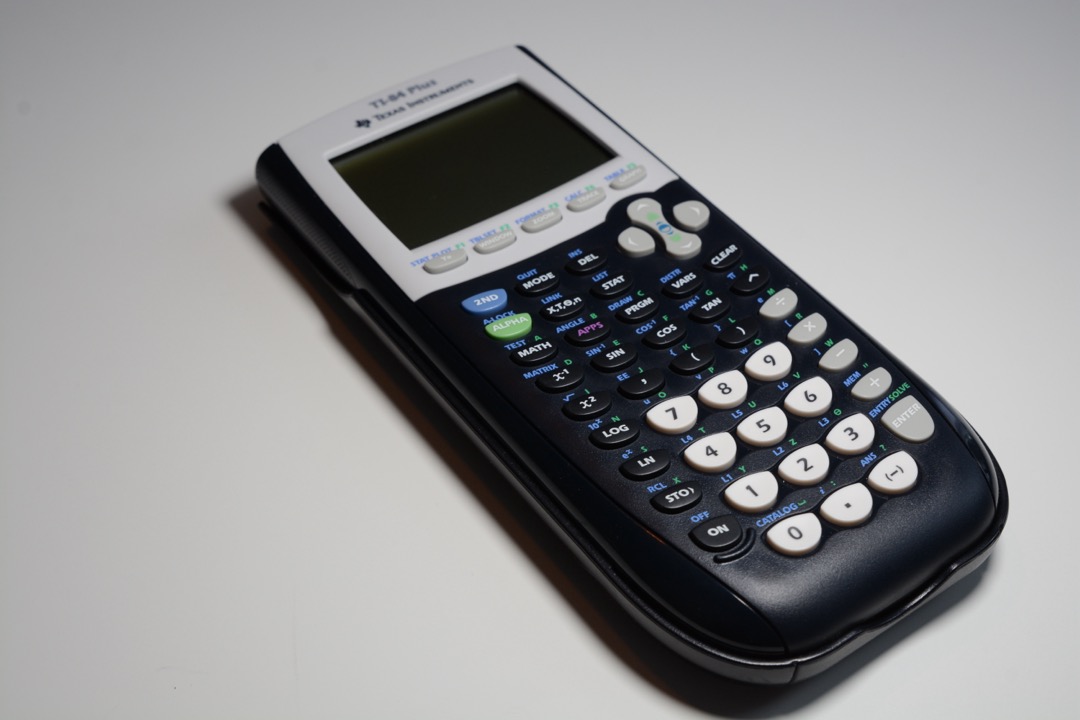
After eleven years managing office and school supply procurement — including the annual back-to-school calculator order that every administrative professional with school-age families in the office gets asked about — I have watched more money wasted on graphing calculators than on any other single school supply. Families buy twice because the first model turned out to be banned from the ACT, or buy a premium machine for a course load that never uses it. So for this guide I compared the best graphing calculators sold on Amazon in 2026 — eight models from Texas Instruments, Casio, HP, and NumWorks — against the criteria that actually decide the purchase: exam approval, CAS capability, display, power source, and how much classroom support each brand really has. Whether you need a graphing scientific calculator for one algebra course or a machine that will survive an engineering degree, one of these eight is the right answer — and if you only need basic arithmetic or a printing desk model instead, our general calculator roundup covers that territory.
| Product | Price | Buy |
|---|---|---|
| Texas Instruments TI-84 Plus CE Color Graphing Calculator, BlackBest Overall | $94.99 | View on Amazon |
| Casio fx-9750GIII Graphing Calculator, BlackBudget Pick | $65.12 | View on Amazon |
| Texas Instruments TI-Nspire CX II CAS Color Graphing CalculatorPremium Pick | $154.99 | View on Amazon |
| Casio PRIZM fx-CG50 Color Graphing CalculatorRunner-Up | $89.95 | View on Amazon |
| HP Prime G2 Graphing CalculatorRunner-Up | $149.99 | View on Amazon |
| NumWorks Graphing CalculatorRunner-Up | $99.99 | View on Amazon |
| Texas Instruments TI-84 Evo Graphing CalculatorRunner-Up | $85.99 | View on Amazon |
| Texas Instruments TI-84 Plus Graphing Calculator, BlackRunner-Up | $96.95 | View on Amazon |
Find the Best Graphing Calculator for Your Needs
Jump straight to the recommendation that matches your situation:
- Overall best graphing calculators
- Best graphing calculator for calculus
- Best graphing calculator for engineering students
- Best TI graphing calculator
- Best budget graphing calculator
- Best Casio graphing calculator
- Best graphing calculator for statistics
- More use cases
How We Chose These Graphing Calculators
Every model here had to clear four gates. First, live availability and a verified listing on Amazon — each of the eight was checked the week of publication. Second, a meaningful review record: six of the eight carry thousands of verified reviews. Two are exceptions and we flag both rather than bury them. The brand-new TI-84 Evo earns its slot on the strength of being the most significant hardware release in this category in a decade, and the HP Prime G2 sits on an Amazon listing only a few months old, so its review count reflects that listing’s age rather than the maturity of a calculator HP has shipped for years. Treat both scores as provisional. Third, exam-approval clarity — we confirmed each model’s standing with the SAT, ACT, AP, and IB programs, because a calculator that cannot enter the exam room is a paperweight that semester. Fourth, spread: the roster deliberately covers the budget tier, the classroom-standard midrange, the CAS premium tier, and the newest releases, so the right answer for your course load is actually on this page. Ratings, review counts, and prices reflect Amazon listings at the time of our latest check.
Best Graphing Calculators Overall
Here is every pick, reviewed in full — starting with the model that remains the standard against which the whole category is measured.
Texas Instruments TI-84 Plus CE — Best Overall
The best-rated graphing calculator conversation always circles back to one machine. The TI-84 Plus CE is the calculator American math education is built around: it is approved for the SAT, ACT, AP, IB, and PSAT without a single caveat, and — more valuable than any specification — it is the model your student’s teacher will almost certainly be holding during every demonstration. Textbooks print its keystrokes in their margins. Tutorial coverage on YouTube is effectively unlimited. When homework gets hard at 9 p.m., that ecosystem is worth more than a faster processor.
The hardware has aged gracefully. The color backlit display separates overlapping functions cleanly, MathPrint renders math the way the textbook prints it, and the rechargeable battery runs about a month per charge — no AAA supply chain required. Its genuine limitations are the lack of CAS (a deliberate choice that keeps it ACT-legal) and a mini-USB port that the newer TI-84 Evo finally replaces with USB-C. Neither changes the verdict: for the student whose course path you cannot fully predict, this is the lowest-risk purchase in the category, with more than 30,000 reviews and the number-one best-seller slot to prove it.
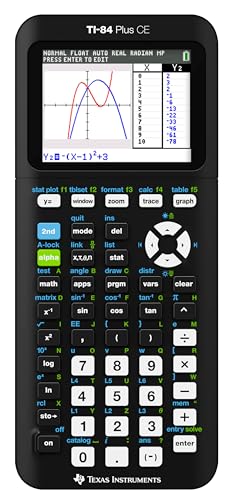
Texas Instruments TI-84 Plus CE Color Graphing Calculator, Black
by Texas Instruments
The default graphing calculator for American students and the safest purchase in the category — universally exam-approved, rechargeable, backed by more than 30,000 reviews, and supported by a teacher-and-tutorial ecosystem no rival matches. If you buy one calculator for high school, buy this one.
Pros
- Approved for every major standardized test — SAT, ACT, AP, IB, and PSAT — with no CAS asterisk, so one purchase covers a student from Algebra I through senior-year exams without a test-day surprise
- The single most-supported calculator in American classrooms: teachers teach on it, textbooks reference its keystrokes, and virtually every math tutorial on YouTube assumes you are holding one, which shortens homework battles more than any spec
- Rechargeable lithium battery replaces the AAA-swapping ritual of older models — a charge lasts up to a month of classroom use, and the battery-level indicator removes the dead-calculator-on-test-day risk
- The full-color backlit display distinguishes multiple plotted functions at a glance, and MathPrint renders fractions and exponents exactly as they appear in the textbook, which matters enormously for students still building notation confidence
Cons
- No CAS — it cannot solve symbolically, so college students in CAS-permissive courses will eventually want the TI-Nspire step-up
- The 2.8-inch screen is smaller than the Casio fx-CG50 or HP Prime display, and the mini-USB charging port is a generation behind the USB-C on the newer TI-84 Evo
- It carries a brand premium — the Casio fx-9750GIII covers the same exam list for roughly a third less money
Casio fx-9750GIII — Best Budget
Anyone hunting for the best cheap graphing calculator should start — and will probably finish — here. The fx-9750GIII carries the same exam-approval list as the TI-84 Plus CE (SAT, ACT, AP, IB) at roughly a third less money, and it refuses to behave like a stripped-down product. Casio’s Natural Textbook Display presents fractions and radicals in proper stacked notation, the icon-driven menu is easier for beginners than TI’s function-key maze, and — remarkably at this price — a full MicroPython environment is built in, making it the least expensive way for a student to program in Python on exam-legal hardware.
The savings come from two honest trade-offs. The screen is monochrome, so distinguishing several plotted functions takes line-style attention that color displays don’t demand. And because TI owns US classroom mindshare, a Casio student occasionally translates the teacher’s TI keystrokes into Casio’s menus. For a self-sufficient student — or a family outfitting more than one — neither trade-off comes close to outweighing the price gap. It has been the value benchmark of this category for years, and nothing in 2026 has changed that.
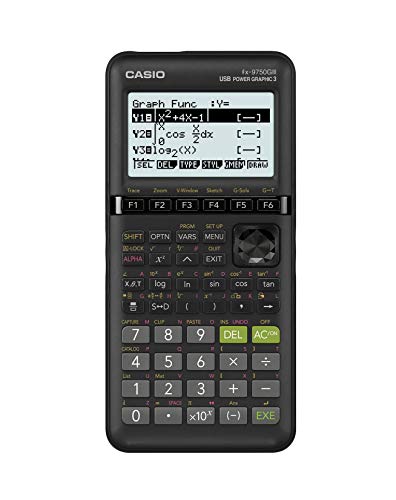
Casio fx-9750GIII Graphing Calculator, Black
by Casio
The best budget graphing calculator and the honest answer for most families — the full SAT/ACT/AP/IB approval list, Natural Textbook Display, and built-in Python for far less than any TI. You give up the color screen and TI's classroom mindshare; you keep every capability that scores points.
Pros
- The same standardized-test approval list as the TI-84 Plus CE — SAT, ACT, AP, and IB — at roughly a third less money, which makes it the value benchmark of the entire category
- Built-in MicroPython programming at this price is unmatched — students learning to code get a real Python environment on a calculator that costs less than most non-programmable rivals
- Casio's Natural Textbook Display renders fractions, roots, and exponents exactly as they are printed on the page, so the budget pick does not force students back to flat one-line notation
- Runs on four AAA batteries with legendary Casio efficiency — over a year of typical classroom use per set, and no charger to forget during exam week
Cons
- The monochrome screen makes distinguishing three or four plotted functions harder than on any color rival — the biggest genuine trade-off at this price
- TI dominates US classrooms, so a Casio student will occasionally translate the teacher's TI keystrokes to Casio menus — manageable, but a real friction for students who struggle with math confidence
TI-Nspire CX II CAS — Best for Advanced Math
This is the machine students graduate to when numeric answers stop being enough. The TI-Nspire CX II CAS carries a full computer algebra system: it expands, factors, differentiates, and integrates symbolically, returning answers with the variables intact — capability the entire TI-84 line, and every budget pick on this page, simply does not have. For AP Calculus students who want to check symbolic work, and for college math and engineering coursework where CAS is permitted, it is the most complete calculator TI has ever sold, backed by a 3.5-inch color display, animated path plots, and bundled desktop software that mirrors the handheld on a PC or Mac.
One rule must be understood before purchase: the ACT bans every CAS calculator, no exceptions, no exam mode that makes it legal. A student who still faces the ACT needs a non-CAS model in the bag as well. That single restriction — plus a document-based interface that takes real adjustment after a TI-84 — is why this is the step-up pick rather than the default. Buy it when your coursework demands symbolic math; skip it until then.

Texas Instruments TI-Nspire CX II CAS Color Graphing Calculator
by Texas Instruments
The CAS step-up for AP Calculus, college math, and engineering coursework — symbolic algebra, a bigger color screen, and bundled desktop software make it the most complete TI ever sold. Just know the hard rule before buying: CAS calculators are banned from the ACT, full stop.
Pros
- A full computer algebra system solves equations symbolically — derivatives, integrals, and factoring with variables intact — work the TI-84 line physically cannot do, and the reason college calculus students step up to it
- The 3.5-inch, 16-bit color display with animated path plotting and draggable coefficients turns abstract functions into something students can manipulate and watch respond — genuinely useful for visual learners
- Ships with the TI-Nspire CX Student Software for PC and Mac, so the same documents move between the handheld and a full desktop app for homework and reports
- The rechargeable battery runs up to two weeks per charge, and TI's build quality plus a 9,400-review track record make it a safe long-horizon purchase for a four-year degree
Cons
- Banned from the ACT — the ACT prohibits every CAS calculator with no exceptions, so students who still face that test need a non-CAS model alongside it
- The document-based Nspire interface and touchpad navigation have a real learning curve for students raised on the TI-84's arrow-key directness
- The most common premium pick, but a premium nonetheless — confirm your course actually permits and benefits from CAS before spending up
Casio PRIZM fx-CG50 — Runner-Up (Highest Rated, 3D Graphing)
At 4.8 stars across more than 4,000 reviews, the fx-CG50 holds the highest rating in this entire roundup on a review base deep enough to mean something. The new TI-84 Evo now matches the score, but on a few hundred reviews rather than four thousand, so the Casio is the more settled 4.8, and it is a distinction usually buried under TI’s louder marketing. The headline feature is genuine 3D graphing: spheres, cylinders, and planes rendered and rotated on the handheld, something no non-CAS competitor offers and a real aid for students heading into multivariable calculus or physics. The 65,000-color Natural Textbook Display is among the most legible screens in the category, and Casio ships it complete with a hard case and USB cable.
Strategically, the fx-CG50 occupies the most useful middle ground in the category: substantially more display and capability than a TI-84 Plus CE for similar money, while remaining fully ACT-legal because it skips CAS. Its costs are the familiar Casio pair — AAA batteries instead of a rechargeable pack, and a thinner ecosystem of teacher-made materials. For the student who wants maximum calculator per dollar and full exam access, this is the pick the spec sheet says it should be.

Casio PRIZM fx-CG50 Color Graphing Calculator
by Casio
The best-rated graphing calculator on Amazon and the sweet-spot pick between the budget Casio and premium TI models — a vivid color display, genuine 3D graphing, and approval on every exam including the ACT. The strongest answer for students who want more screen than a TI-84 without giving up any test.
Pros
- Tied for the highest rating in this entire roundup at 4.8 stars, and the only 4.8 built on a deep sample: more than 4,000 reviews, against a few hundred for the brand-new TI-84 Evo that matches the score
- True 3D graphing of spheres, cylinders, and planes is unique among non-CAS calculators — multivariable-calculus and physics students get visualization the TI-84 line simply does not offer
- Fully exam-approved everywhere including the ACT — because it skips CAS, it clears the one restriction that disqualifies the premium TI-Nspire CAS and HP Prime from that test
- Ships complete: hard slide case and USB cable in the box, with a 65,000-color Natural Textbook Display and MicroPython built in
Cons
- Runs on four AAA batteries rather than a rechargeable pack — cheap to feed, but one more thing to stock in the supply drawer
- TI's classroom dominance means fewer teacher-made resources reference Casio keystrokes, so self-sufficient students benefit most
HP Prime G2 — Runner-Up (Touchscreen for Engineering)
The HP Prime G2 is the machine for buyers who find every other calculator on this page technologically embarrassing. It is the only true touchscreen model here — pinch-to-zoom on a graph, drag it with a finger, sketch on the 3.5-inch multi-touch display — and it packs full CAS, dynamic geometry, a spreadsheet application, and an RPN mode into a brushed-metal body that feels more like an instrument than a school supply. With 256MB of storage and the fastest processor in the roster, it shrugs off the large matrices and long programs that make older calculators stutter, and a free companion app mirrors the whole device on Windows, iOS, and Android.
It is also the most demanding pick. The 4.2-star rating, the lowest here, traces mostly to a learning curve that rewards technically confident users and frustrates students who want TI’s familiar rails. Read that score with the sample size in mind: this listing went up only months ago and carries roughly a hundred reviews, so it reflects early buyers rather than a settled verdict. And as a CAS device it is banned from the ACT. The buyer profile is specific: college engineering and STEM students, done with the ACT, who will actually exercise the hardware. For them, nothing else here comes close.

HP Prime G2 Graphing Calculator
by HP
The engineering student's calculator — a genuine touchscreen, full CAS, dynamic geometry, and a spreadsheet in one brushed-metal device that out-specs everything else here. The trade: a steeper learning curve, an ACT ban, and a price that only makes sense if your coursework will actually use the power.
Pros
- The only touchscreen calculator in this roundup — the 3.5-inch multi-touch display supports pinch-to-zoom and finger-drag graph manipulation that makes every button-driven rival feel a generation older
- CAS, dynamic geometry, a spreadsheet app, and an RPN mode in a single device — a functional breadth that TI and Casio split across multiple product lines, which is why engineering students gravitate to it
- 256MB of storage and a fast processor handle large matrices and long programs without the lag older calculators show in linear-algebra work
- The free HP Prime companion app mirrors the full calculator on Windows, iOS, and Android, so students can work on a big screen at home and carry the handheld to class
Cons
- The lowest rating in this roster at 4.2 stars, and on a listing only a few months old, so the sample is thin: a meaningful share of reviewers cite a steep learning curve versus TI's familiar menu system
- Like every CAS calculator, it is banned from the ACT, and its exam-mode setup takes more configuration than TI's press-to-enter approach
- The premium price buys hardware many high-school courses never exercise — this is a college and engineering purchase, not a default one
NumWorks — Runner-Up (Open-Source, Easiest to Learn)
The NumWorks is what a graphing calculator looks like when it is designed in this decade. The interface is the cleanest in the category — an icon home screen and plain-language menus that reviewers repeatedly describe as the only calculator they never needed a tutorial for — and the firmware is open source, with Python as a first-class citizen rather than a bolted-on app. The same scripts run on the handheld, the free browser simulator, and the companion app, which makes it quietly excellent for students learning to code alongside their math. It charges over USB-C and holds full approval for the SAT, ACT, AP, and IB exams.
Its weakness is exactly the TI ecosystem’s strength: almost no American teacher demonstrates on a NumWorks, so students must translate classroom instructions themselves. That makes it the wrong choice for a student who leans on keystroke-level help, and a genuinely great one for homeschoolers, self-directed learners, and anyone who values a tool that doesn’t fight back. An 8,700-review base at 4.7 stars says the people who choose it don’t regret it.

NumWorks Graphing Calculator
by NumWorks
The modern, open-source alternative — full exam approval, USB-C charging, first-class Python, and the friendliest interface in the category. The right pick for homeschoolers, self-directed students, and coders; the wrong pick for a student who needs their teacher's keystroke-by-keystroke help.
Pros
- Reviewers consistently call it the easiest graphing calculator to learn — the clean, icon-driven interface reads like a modern app instead of a 1990s menu tree, which matters for students who fight the tool more than the math
- Open-source firmware and a Python-first design make it the coding-friendly pick — the same MicroPython scripts run on the handheld, the free web simulator, and the companion app
- Charges over USB-C — the modern connector the TI-84 Plus CE still lacks — and holds weeks of classroom use per charge
- Approved for the SAT, ACT, AP, and IB exams, with an 8,600-review base that is remarkably deep for a challenger brand
Cons
- Minimal US classroom adoption — teachers will not be demonstrating on a NumWorks, so students must be comfortable mapping instructions across interfaces
- The built-in app library is thinner than TI's 30-plus preloaded applications, and there is no CAS option anywhere in the line
TI-84 Evo — Runner-Up (Newest TI, USB-C)
The TI-84 Evo is the most significant hardware release in this category in a decade, and this is one of the first roundups to cover it. TI kept the exam approvals (SAT, ACT, AP, IB) and classroom lineage of the TI-84 family, then fixed nearly everything owners have complained about since 2015: the processor is roughly three times faster, the graphing area is 50 percent larger, the cluttered keypad and buried menus have been reorganized around an icon-based home screen with a built-in hint bar, and — at long last — it charges over USB-C, the same cable as every modern phone and laptop.
The honest caveat is newness itself. With only a few hundred reviews so far (though they average an outstanding 4.8 stars), the Evo lacks the twenty-year reliability record that makes the Plus CE the safe default, early pricing fluctuates by color and availability, and some course materials still reference the classic TI-84 layout. But it already sits at number two in Amazon’s graphing calculator best-sellers, and the trajectory is obvious: this is what the default TI will look like. Buyers who want the better machine today — and don’t need three decades of precedent — should pick it with confidence.

Texas Instruments TI-84 Evo Graphing Calculator
by Texas Instruments
The newest graphing calculator TI makes and the pick for buyers who want the TI-84 ecosystem without its dated hardware — faster processor, bigger graphing area, cleaner menus, and USB-C at last. Early adopters trade the CE's twenty-year track record for a genuinely better machine.
Pros
- TI's newest flagship modernizes the TI-84 formula: an icon-based home screen, decluttered keypad, and reorganized menus cut the keystroke archaeology that has defined this line for twenty years
- A processor roughly three times faster and 50 percent more graphing area than the TI-84 Plus CE make traces, intersections, and multi-function plots noticeably snappier
- Finally charges over USB-C — the same cable as a modern phone or laptop — ending the hunt for TI's legacy mini-USB cable on exam morning
- Approved for the SAT, ACT, AP, and IB exams from day one, and it stays inside the TI-84 ecosystem teachers already know, so classroom compatibility carries over
Cons
- Very new — the review base is a tiny fraction of the TI-84 Plus CE's, so the long-term reliability record that makes the CE a safe default does not exist yet for the Evo
- Early-adopter pricing moves with availability, and some course materials and tutorials keyed to the classic TI-84 layout have not caught up to the new menu structure
TI-84 Plus — Runner-Up (Legacy TI Continuity)
This is the original TI-84 Plus, the monochrome model the entire family is named after, and it earns its slot on continuity rather than specifications. It shares its file format with the Plus CE and the Evo, so programs, lists, and apps move between them untouched, and it takes the same cases and link cables a household may already own. That matters in one specific and very common situation: a unit goes missing in October, the rest of the family is already on TI-84s, and the replacement needs to behave identically. Exam approval is as broad as anything here — SAT, ACT, AP, IB, and PSAT — and the free OS 2.55 MathPrint update gives even this screen proper stacked fractions and exponents, which is the real dividing line between it and the TI-83 Plus generation it replaced.
Two cautions before you buy. First, Amazon’s own listing text for this model describes a color backlit screen; that copy is carried over from the CE and is wrong. The TI-84 Plus is a monochrome 96 x 64 machine, which is exactly what arrives, and I would rather you hear that here than discover it on the kitchen table. Second, at current pricing it costs more than the TI-84 Plus CE, which is a better calculator in every respect. Buy this one for accessory and file continuity or for AAA batteries you can replace mid-exam-week; if you are starting a student from scratch, the Plus CE above is the cheaper and stronger purchase.

Texas Instruments TI-84 Plus Graphing Calculator, Black
by Texas Instruments
The legacy TI-84 — the original monochrome model, still new on Amazon with more than 19,000 reviews behind it. Buy it when a household needs to stay file- and accessory-compatible with TI-84s it already owns, or wants AAA batteries instead of a charge cable; buy the Plus CE if you are starting fresh, because it costs less and does more.
Pros
- It is the TI-84 the whole family is named after — identical file format, programs, lists, and apps to the Plus CE and Evo, so a household replacing a lost or broken unit keeps every saved program and every accessory it already owns
- Exam approval as broad as anything on this page — SAT, ACT, AP, IB, and PSAT — with no CAS asterisk to check against a syllabus
- Four AAA batteries with a lithium memory backup run for months and revive from any supply drawer in thirty seconds, which is why a number of teachers still prefer it for exam settings over anything rechargeable
- The free OS 2.55 MathPrint update renders fractions, roots, and exponents in stacked textbook notation — the upgrade that separates this machine from the TI-83 Plus generation it replaced
Cons
- At current Amazon pricing it costs more than the better TI-84 Plus CE, so it makes sense for ecosystem and accessory continuity rather than on value
- The monochrome 96 x 64 screen means distinguishing three or four plotted functions comes down to line styles, where every color pick here separates them at a glance
- No Python and a dated mini-USB port — both Casios, the NumWorks, and the newer TI-84s all move ahead of it on features
Best Graphing Calculator for Calculus
Calculus splits the field cleanly, because the right answer depends on whether your exam allows symbolic math. For AP Calculus AB or BC, the exam permits CAS but many classrooms standardize on the TI-84 Plus CE — it handles numeric derivatives, integrals, and every plot the course requires while staying legal for the ACT the same student is probably taking that year. For college calculus where CAS is permitted, the TI-Nspire CX II CAS is the definitive pick: symbolic differentiation and integration turn it into a genuine study tool, not just an answer checker. The fx-CG50 splits the difference for visual learners on a budget.
| Product | Price | Buy |
|---|---|---|
| Texas Instruments TI-84 Plus CE Color Graphing Calculator, BlackBest for AP Calculus (exam-safe) The classroom standard — numeric calculus tools, legal on every exam including the ACT | $94.99 | View on Amazon |
| Texas Instruments TI-Nspire CX II CAS Color Graphing CalculatorBest for college calculus (CAS) Full symbolic derivatives and integrals — the true calculus machine where CAS is allowed | $154.99 | View on Amazon |
| Casio PRIZM fx-CG50 Color Graphing CalculatorBest color pick without CAS pricing Vivid color plots and 3D surfaces for visual learners, at midrange money | $89.95 | View on Amazon |
Best Graphing Calculator for Engineering Students
The best graphing calculator for engineering students has to survive four years of matrices, differential equations, and circuit math — and the two CAS machines here are the ones built for that load. The HP Prime G2 is the enthusiast’s answer: touchscreen, CAS, spreadsheet, and dynamic geometry in one device, with the horsepower for linear-algebra work that chokes lesser hardware. The TI-Nspire CX II CAS is the safer institutional pick, with far more campus mindshare and bundled desktop software. One warning for future engineers: the FE and PE licensure exams ban graphing calculators entirely, so plan on an approved scientific companion in senior year regardless of which you buy.
| Product | Price | Buy |
|---|---|---|
| HP Prime G2 Graphing CalculatorBest touchscreen CAS for engineering Touchscreen, CAS, spreadsheet, and RPN in one device — the most capable hardware here | $149.99 | View on Amazon |
| Texas Instruments TI-Nspire CX II CAS Color Graphing CalculatorBest TI pick for engineering coursework Full CAS with the biggest campus ecosystem and bundled PC/Mac software | $154.99 | View on Amazon |
Best TI Graphing Calculator
If you have already decided on the Texas Instruments ecosystem — usually because the teacher teaches on it — the best Texas Instruments graphing calculator question comes down to three machines. The TI-84 Plus CE is the proven default with a twenty-year track record and universal exam approval. The TI-Nspire CX II CAS is TI’s premium tier for symbolic math, with the ACT restriction that entails. And the new TI-84 Evo is the forward-looking pick: same family, same approvals, dramatically better hardware, and at the moment the cheapest of the three. The original monochrome TI-84 Plus reviewed above is the fourth answer, and a narrow one — take it only when file and accessory compatibility with TI-84s the household already owns is the actual requirement.
| Product | Price | Buy |
|---|---|---|
| Texas Instruments TI-84 Plus CE Color Graphing Calculator, BlackBest TI overall The classroom standard — the safe TI for any student | $94.99 | View on Amazon |
| Texas Instruments TI-Nspire CX II CAS Color Graphing CalculatorBest TI for advanced math TI's CAS flagship for college-level symbolic work (not ACT-legal) | $154.99 | View on Amazon |
| Texas Instruments TI-84 Evo Graphing CalculatorBest new TI release Faster processor, bigger graphs, USB-C — the TI-84's future | $85.99 | View on Amazon |
Best Budget Graphing Calculator
The best inexpensive graphing calculator is not a close call: the Casio fx-9750GIII delivers the complete SAT/ACT/AP/IB approval list, Natural Textbook Display, and built-in Python at a price no TI approaches. If the teacher’s demonstrations are all TI and the family wants to stay there, the cheapest way in right now is the TI-84 Evo, which has quietly undercut both the Plus CE and the older Plus while being the newest machine of the three — an unusual state of affairs that early-release pricing will not hold forever. If the budget can stretch to midrange, the fx-CG50 in the Casio section below adds a color screen and 3D graphing without giving up any exam.
| Product | Price | Buy |
|---|---|---|
| Casio fx-9750GIII Graphing Calculator, BlackBest budget overall Full exam approval and built-in Python at the lowest price here | $65.12 | View on Amazon |
| Texas Instruments TI-84 Evo Graphing CalculatorCheapest way into the TI ecosystem Currently the least expensive TI on this page, and the newest hardware of the family | $85.99 | View on Amazon |
Best Casio Graphing Calculator
Casio’s US graphing line reduces to two excellent answers. The PRIZM fx-CG50 is the best Casio graphing calculator outright — the highest owner rating in this whole roundup, a 65,000-color display, genuine 3D graphing, and full exam approval including the ACT. The fx-9750GIII is the budget star covered above, with the same core math engine and Python behind a monochrome screen. Both use Casio’s icon-menu interface, which many students find friendlier than TI’s — the trade is simply that fewer American classrooms speak Casio.
| Product | Price | Buy |
|---|---|---|
| Casio PRIZM fx-CG50 Color Graphing CalculatorBest Casio overall Highest-rated model in this roundup — color, 3D graphing, every exam approved | $89.95 | View on Amazon |
| Casio fx-9750GIII Graphing Calculator, BlackBest budget Casio Same math engine and Python behind a monochrome screen, for much less | $65.12 | View on Amazon |
Best Graphing Calculator for Statistics
Statistics coursework rewards the boring choice. AP Statistics in particular is taught almost universally on the TI-84 layout — every regression, distribution wizard, and hypothesis-test walkthrough your student sees in class will assume it — which makes the TI-84 Plus CE the default pick for the course. For heavier data work, the TI-Nspire CX II CAS behaves like a small spreadsheet: dynamic lists, richer data-manipulation tools, and a screen that fits more of a dataset at once, which is why college statistics students and researchers prefer it.
| Product | Price | Buy |
|---|---|---|
| Texas Instruments TI-84 Plus CE Color Graphing Calculator, BlackBest for AP Statistics The layout every AP Stats class teaches on — regressions and test wizards included | $94.99 | View on Amazon |
| Texas Instruments TI-Nspire CX II CAS Color Graphing CalculatorBest for heavy data analysis Spreadsheet-style lists and a bigger screen for serious datasets | $154.99 | View on Amazon |
Best Graphing Calculators by Use Case
A few more specific situations, each with the pick that fits it best:
| Product | Price | Buy |
|---|---|---|
| Casio PRIZM fx-CG50 Color Graphing CalculatorBest 3D graphing calculator The only non-CAS model that renders true 3D surfaces on the handheld | $89.95 | View on Amazon |
| Texas Instruments TI-84 Plus CE Color Graphing Calculator, BlackBest for the digital SAT The familiar handheld to pair with the built-in Desmos tool on test day | $94.99 | View on Amazon |
| NumWorks Graphing CalculatorBest open-source / coding pick Open firmware and first-class Python for students who code | $99.99 | View on Amazon |
| Texas Instruments TI-84 Evo Graphing CalculatorBest USB-C pick The newest hardware here — modern charging and the fastest TI-84 ever | $85.99 | View on Amazon |
Buyer's Guide
Graphing calculators are a rare school supply that survives from middle school to a college degree, so the right purchase is really a four-to-eight-year decision. The category splits along a handful of unglamorous but decisive lines — which exams accept the model, whether it computes symbolically, how it is powered, and whose keystrokes your teacher will be demonstrating. Getting one of these wrong is how a family ends up buying twice. Here are the six factors that actually separate these machines, in the order they should drive the decision.
Exam Approval (SAT, ACT, AP, IB)
Start here, because approval rules eliminate options before any spec matters. Every calculator in this roundup is approved for the SAT, AP exams, and IB exams — but the ACT bans all CAS-equipped models, which removes the TI-Nspire CX II CAS and HP Prime G2 for any student who still faces that test. The safest pattern for a high schooler is a fully approved non-CAS model — TI-84 Plus CE, TI-84 Evo, either Casio, or NumWorks — that walks into every exam room in America without a second thought. Keep the exam-mode requirements in mind too: proctors expect memory-clear or exam-mode indicators, and the mainstream models here all handle that with a simple key sequence.
CAS vs. Non-CAS
A Computer Algebra System manipulates symbols — solving, factoring, differentiating, and integrating with variables intact — while non-CAS models return only numeric answers. CAS is genuinely transformative for college calculus, differential equations, and engineering coursework, and it is why the TI-Nspire CX II CAS and HP Prime G2 command premium prices. But CAS is banned on the ACT and restricted by some high school math departments, and no calculator under the premium tier offers it. The practical rule: high school students should default to non-CAS and let college requirements pull them upward later, while college-bound STEM students who are done with the ACT can buy CAS once and use it for a full degree.
Display: Color, Monochrome, Touchscreen, and 3D
Display quality is the difference you feel every single day. Color screens — TI-84 Plus CE, TI-84 Evo, TI-Nspire, Casio fx-CG50, HP Prime, NumWorks — let you distinguish four plotted functions instantly, where a monochrome screen forces line-style squinting. The budget Casio fx-9750GIII goes monochrome to save real money, an honest trade for lighter workloads, and the legacy TI-84 Plus keeps a monochrome screen simply because it predates the color era. Two displays go further: the HP Prime's multi-touch screen manipulates graphs like a phone app, and the Casio fx-CG50 renders true 3D surfaces — spheres, planes, cylinders — that multivariable-calculus and physics students otherwise only see on a computer. Match the display to the heaviest math you will realistically take.
Power Source: Rechargeable vs. AAA
Rechargeable models — both new TI-84s, the TI-Nspire, HP Prime, and NumWorks — hold two weeks to a month per charge and end the AAA supply run, but they add one failure mode: a calculator that was not charged the night before a test. The AAA-powered picks — both Casios and the legacy TI-84 Plus — run many months per battery set and can be revived in thirty seconds from any office supply drawer, which is exactly why some teachers still prefer them for exam settings. Neither approach is wrong. Households that manage charging cables well should prefer rechargeable for the long-run economy; households that don't should respect what a fresh set of AAAs guarantees at 7:55 a.m. on exam day.
Course-Level Fit: Buy Two to Three Years Ahead
The most expensive mistake in this category is buying for this semester instead of the next three years. A calculator purchased for Algebra II should still be the right tool through AP Calculus or AP Statistics — which every mainstream pick here manages — but the horizon matters at the edges. A student headed for engineering school will eventually want CAS or a scientific companion: graphing calculators are actually banned from the FE and PE licensure exams, which is why many engineering upperclassmen keep the best non graphing calculator they can find, typically a TI-36X Pro, alongside their graphing model. Map the courses you can foresee, then buy the cheapest calculator that covers the last of them rather than the first.
Brand Ecosystem and Teacher Support
The spec sheets undersell TI's real advantage: the surrounding ecosystem. American teachers overwhelmingly demonstrate on TI-84s, textbooks print TI keystrokes in their margins, and tutorial coverage for the TI line dwarfs everything else — support that matters most for students who need help outside class and parents who cannot troubleshoot a Casio menu from memory. Casio counters with better price-to-hardware value and Python across its range; NumWorks counters with the cleanest interface and open-source firmware for self-directed learners. On price itself, this category is sharply seasonal: the best price on a TI-84 graphing calculator almost always appears during July and August back-to-school promotions, so buying in early summer rather than the first week of school routinely saves real money.
How to Choose the Best Graphing Calculator
Work the decision in three passes. First, eliminate by exam: if the ACT is anywhere in your student’s future, CAS models are out until it is behind them — that one rule prevents the most expensive category of regret. Second, match the machine to the heaviest course you can foresee, not the current one; a calculator bought for Algebra II should still be the right tool in AP Calculus, and every mainstream pick here passes that test. Third, weigh the ecosystem honestly: a student who needs the teacher’s keystroke-by-keystroke help belongs on a TI-84, while a self-directed learner can bank the Casio or NumWorks savings without consequence.
Timing the purchase matters more here than for almost any other item on a back-to-school supply checklist: calculator prices swing meaningfully with back-to-school promotions in July and August, and buying early beats buying in the September rush. And keep the machine in perspective — it earns its keep alongside ordinary tools, which is why the same students stocking up on mechanical pencils and graph-ruled spiral notebooks for STEM classes should treat the calculator as the one item worth researching before the cart, not after.
Final Verdict
The TI-84 Plus CE is the best graphing calculator for most people in 2026 — universally exam-approved, rechargeable, and supported by the deepest teacher-and-tutorial ecosystem in math education. The Casio fx-9750GIII is the unbeatable budget pick, delivering the same exam approvals and built-in Python for roughly a third less. Step up to the TI-Nspire CX II CAS when college-level symbolic math enters the picture (and the ACT has left it), consider the Casio fx-CG50 for the best-established owner ratings and 3D graphing in the midrange, and watch the TI-84 Evo — the newest machine here and the clear shape of the category’s future. Whichever you choose, buy it in early summer, charge it or stock its batteries before test day, and it will quietly outlast nearly everything else you put in the backpack. For the rest of the desk, our general calculator roundup covers the scientific, financial, and printing models this page deliberately leaves out.
Frequently Asked Questions
What is the best graphing calculator?
Which TI-84 model is best — the TI-84 Plus, TI-84 Plus CE, or the new TI-84 Evo?
Can these graphing calculators find the line of best fit?
What is a CAS graphing calculator, and which exams ban it?
Do I still need a graphing calculator for the digital SAT now that Desmos is built in?
Related Articles
Back to School Supply Checklist: A Grade-by-Grade Guide for Parents
classroom-supplies
7 Best Calculators of 2026
office-technology
7 Best Binders for School of 2026 (3-Ring Binders, Tested & Ranked)
organization-filing
7 Best Highlighters of 2026
writing-instruments
7 Best Mechanical Pencils of 2026
writing-instruments
About the Reviewer

Sarah Chen, CAP, PMP
B.A. Business Administration, UCLA
Sarah Chen spent 10 years in office management and operations at Fortune 500 companies before founding DeskRated in 2026. After managing supply budgets for teams of 50+ people and testing thousands of products through daily use, she started writing the honest, no-fluff supply reviews that office professionals actually need. Sarah holds both CAP and PMP certifications and is based in Los Angeles.