7 Best Monitor Arms of 2026
Sarah Chen reviews the best monitor arms for ergonomic desk setups. Compare top-rated single, dual, and heavy-duty arms by capacity, motion, mount, and warranty.
Updated
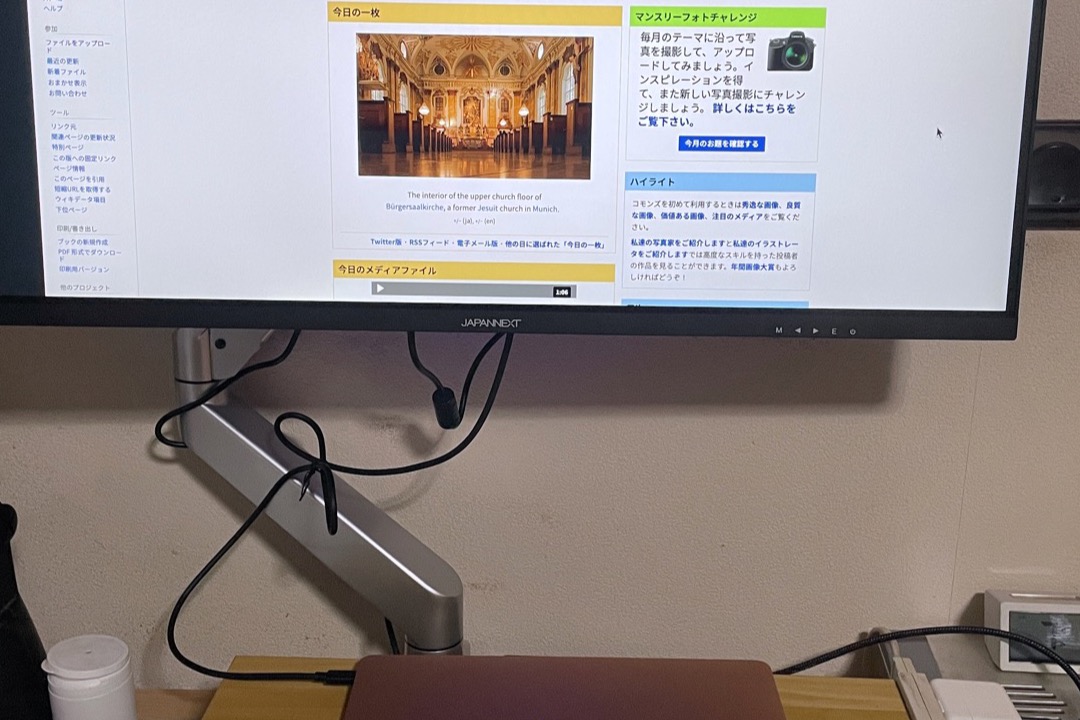
After a decade of managing office procurement and home-office reimbursement programs across hybrid teams, I have watched monitor arms go from a niche ergonomic upgrade to one of the highest-impact desk changes any knowledge worker can make. The reasons are practical and visible the moment you mount one: the monitor floats off the desk, the camera sits at a natural eye-line angle for video calls, your keyboard slides forward into the cleared space, and the cable nest behind the screen disappears into a single channel rather than spilling across the desk surface. In 2026, with hybrid work norms settled and most professionals running at least one external monitor at home, the question is no longer whether you need a monitor arm — it’s which one fits your desk, your monitor, and your daily workflow.
For this review, we evaluated seven monitor arms covering the full range of real-world office configurations: a single arm for the standard 24-27” workstation, a budget option for a secondary screen that doesn’t move much, a heavy-duty arm for users running 34-49” ultrawides, a battle-tested dual arm for two-screen productivity setups, gas-spring upgrades from a popular mid-tier brand, and Ergotron’s vertical-stacking dual for power users who arrange monitors in portrait stacks. The arms here are deliberately distinct — not seven price tiers of the same product, but genuinely different mounting solutions for different desk realities. Pair your monitor arm with a properly fitted office chair and a desk height that’s calibrated to your seated posture, and you have addressed the three biggest sources of upper-body tension in knowledge workers.
A note on terminology: this review covers VESA-mount monitor arms — articulating mechanical arms that attach to your desk and hold the monitor in the air with full height, tilt, swivel, and depth adjustment. This is a distinct category from monitor stands and risers (platform products that elevate a monitor’s existing base, covered separately in our best monitor stands review). Monitor arms require a VESA-compatible monitor — most modern displays qualify with either a 75x75mm or 100x100mm pattern on the rear panel — and a desk with an accessible edge for the C-clamp or a pre-drilled grommet hole. If your monitor has a non-removable proprietary stand and no four-screw VESA pattern, no arm here will mount it; a riser is the correct alternative.
Find the Best Monitor Arm for Your Setup
Jump straight to the arm that matches your screen count and desk:
- Best monitor arms overall
- Best single monitor arms
- Best dual monitor arms
- More use cases — ultrawide, heavy-duty, stacked, budget
| Product | Price | Buy |
|---|---|---|
| Ergotron LX Single Monitor ArmBest Overall | $219.00 | View on Amazon |
| Amazon Basics Single Monitor ArmBudget Pick | $30.23 | View on Amazon |
| Ergotron HX Heavy Duty Monitor ArmPremium Pick | $329.00 | View on Amazon |
| VIVO Dual Monitor Desk Mount (STAND-V002)Runner-Up | $34.99 | View on Amazon |
| HUANUO FlowLift Dual Monitor ArmRunner-Up | $59.99 | View on Amazon |
| HUANUO FlowLift Single Monitor ArmRunner-Up | $47.99 | View on Amazon |
| Ergotron LX Dual Vertical Stacking Monitor ArmRunner-Up | $472.99 | View on Amazon |
How We Chose These Monitor Arms
Our selection process prioritized arms with verified long-term reliability data — meaning a meaningful Amazon review count across multiple years of production rather than a high star rating on a recently launched listing. We evaluated weight capacity ranges against real-world monitor weights at every common screen size from 24” through 49”, assessed range-of-motion specifications against the practical needs of sit-stand desk users and video-call professionals, compared mounting hardware completeness (clamp + grommet versus clamp-only) at each price tier, and weighed warranty length as the most reliable available proxy for engineering confidence in long-term durability. Arms were disqualified if their stated capacity range did not span common monitor weights for their target screen size, or if their height-lift travel was inadequate for sit-stand desk use at the price tier they competed in. The seven products here represent the best option in each major use case, not simply the highest-rated arms in a keyword search.
Best Monitor Arms Overall
Every arm below earned its place by being the best option for a specific desk reality — not seven price tiers of one product. Full reviews come first; the single-versus-dual sections further down reference these same seven picks, so you can jump between them without re-reading a card.
Ergotron LX Single Monitor Arm — Best Overall
The Ergotron LX has been the default professional recommendation in the monitor arm category for years, and the engineering reasons remain unchanged: Constant Force tensioning, a 7-25 lb capacity range that covers nearly every mainstream monitor, 17.3 inches of height travel that handles full sit-stand transitions, and a 10-year warranty that signals genuine confidence in long-term build quality. In an office procurement context, the LX is the arm I specify when I want a single product line that fits the majority of users without per-employee accessory orders. The capacity range covers 24” through 34” monitors comfortably, the VESA support handles every standard pattern, and the included clamp-plus-grommet hardware means the same arm installs on any desk a team is likely to use.
Constant Force is the feature most worth understanding before purchase. Cheaper gas-spring arms hold a monitor in place at unboxing — but as the spring fatigues over months of daily use, the monitor begins drifting downward over the course of a workday. By month six on a budget arm, you’re re-tensioning the spring screw weekly. The LX’s Constant Force mechanism is engineered to deliver identical lifting force across the entire range of motion, which is why a 25-pound monitor stays where you put it after years of daily repositioning. For users who transition between sitting and standing on a standing desk multiple times per day, the difference between Constant Force and a fatiguing budget gas spring is a daily friction point — repositioning that should take one second and one hand instead taking ten seconds and two.
The LX’s limitations are narrow and honest. It’s more expensive than most users strictly need for a single 24-27” office monitor that almost never moves once installed. Its cable management uses external zip-tie clips along the arm’s underside rather than internal channel routing — clean enough from the front, but visually less elegant than premium gaming arms that route cables through hollow arm sections. For users who don’t need ten years of warranty coverage and who are comfortable accepting some drift over time, the HUANUO FlowLift Single covers similar functional ground at less than a quarter of the price. For everyone else — the majority of buyers setting up a home office or a primary workstation that will see daily use for years — the LX is the default recommendation.

Ergotron LX Single Monitor Arm
by Ergotron
The arm professional reviewers and standing-desk users keep choosing — Constant Force tension and a 10-year warranty set a standard budget arms can't match.
Pros
- Constant Force tension keeps the monitor exactly where you place it — no slow drift downward over the workday, which is the failure mode of most cheaper gas-spring arms
- Aluminum and steel construction with 10,000-cycle motion certification — built to handle a decade of repeated sit-stand transitions without play developing in the joints
- Industry-leading 10-year warranty with US-based support — the longest coverage period on this list and a meaningful procurement signal for office buyers
- 17.3 inches of height travel handles full sit-stand transitions on any standard desk — many competing arms cap at 10-13 inches and force a compromise at one posture or the other
Cons
- More expensive than gas-spring alternatives that adequately cover most single-monitor use cases for users who don't need Constant Force precision
- Cable management uses zip ties along the arm exterior rather than internal channel routing — clean enough but less elegant than premium gaming arms with through-arm cable channels
Amazon Basics Single Monitor Arm — Budget Pick
The Amazon Basics single monitor arm fills a specific position on this list: the lowest verified price for a stable, branded arm with full hardware in the box. At under thirty dollars, it does the essential job of getting the monitor off the desk surface, freeing up the keyboard zone, and giving you basic tilt and swivel adjustability for video call camera positioning. The 18,000+ verified reviews provide a meaningful real-world reliability dataset at a price tier where most competing arms are anonymous direct-from-China brands with no long-term feedback to evaluate.
The honest limitations matter for understanding when this arm is the correct choice and when it is not. The 7.9-14.2 inch height range is too narrow for proper sit-stand desk use — fine for a fixed-height seated workstation, but inadequate if you transition to a standing desk during the day. The 30-inch screen limit excludes the 32” mainstream office segment, so users with a current or planned 32” display should look at the HUANUO FlowLift Single instead. The 1-year warranty reflects the price tier honestly: this is an arm engineered to perform correctly through the warranty window and not necessarily beyond it. Within those constraints — fixed-height seated desk, 24-27” monitor, secondary or transitional workstation — the Amazon Basics arm is genuinely the best value on this list. Pair it with a separate cable management solution to handle the cabling between the arm and the desk underside, and you have a clean installation at a price that makes the upgrade decision easy.

Amazon Basics Single Monitor Arm
by Amazon Basics
A no-frills choice under thirty dollars — Amazon Basics covers the essential monitor-arm functions with brand-backed reliability for standard 24-27" setups.
Pros
- Lowest verified price for a stable single arm with cable management included — most arms under thirty dollars omit the cable clips entirely
- Sturdy steel construction stays put during heavy keyboard use and routine bumping — one of the few sub-thirty-dollar arms that doesn't visibly flex with two-handed typing
- Clear illustrated install guide with all hardware in the box including both C-clamp and the standard mount plate
- Backed by Amazon's customer service infrastructure for returns and warranty claims — meaningfully better support experience than most direct-from-China arm brands at this price
Cons
- 7.9-14.2 inch height range is too narrow for proper sit-stand desk use — fine for fixed-height seated workstations but not for standing transitions
- Supports up to 30 inches only — excludes the 32-inch mainstream office segment and any ultrawide configuration
- 1-year warranty is significantly shorter than the 3-10 years premium options offer at this list's higher tiers
Ergotron HX Heavy Duty Monitor Arm — Upgrade Pick
The Ergotron HX exists for users whose monitor has defeated every other arm. If you have ever bought a budget arm, mounted a 38” or 49” ultrawide on it, and watched the monitor sag a few millimeters per day until it was visibly tilted forward — you understand the problem the HX solves. With a 20-42 lb capacity range and broader VESA pattern support that includes 200x100 and 200x200mm (the patterns most arms skip but that are common on large ultrawides), the HX is the only widely available consumer arm that confidently holds 34-49” monitors up to 42 lbs without engineering compromises.
The Constant Force smoothness scaled up for heavier loads is what makes the HX feel premium in daily use. A 35-pound ultrawide monitor on a budget arm requires noticeable two-handed force to reposition — you brace one hand on the desk and use the other to lift the monitor through the arm’s range. On the HX, the same monitor moves with the same one-hand effort as a 27-inch monitor on the LX, because the Constant Force mechanism is calibrated to the load. For a video-heavy professional running a 49” curved superwide for multi-window workflow management, this difference is the entire reason the HX is worth its price. The full 10-year warranty applies even at this heavy-duty tier — a signal that’s particularly meaningful given the structural stresses involved in holding 40-pound monitors over a desk.
The accessory caveat is worth flagging clearly: aggressively curved 49” displays like the Samsung Odyssey G9 require the separate HX HD Pivot accessory because the standard HX pivot mechanism can’t accommodate the curvature angle. Verify your specific monitor model’s compatibility before purchasing. For everything else in the heavy-monitor segment — 34-38” ultrawides, large all-in-one displays, 43” 4K productivity monitors, multi-input video editing setups — the HX is the correct mount.

Ergotron HX Heavy Duty Monitor Arm
by Ergotron
The arm for users whose ultrawide has defeated every other mount — the only widely available arm that confidently holds 34-49" monitors up to 42 lbs.
Pros
- Handles 34-49 inch ultrawide and superwide displays up to 42 lbs without sag or wobble — one of the very few arms certified for the heaviest mainstream gaming and productivity monitors
- Broader VESA support (75x75, 100x100, 200x100, 200x200mm) covers mounting patterns most arms skip — particularly the 200x200 standard used by many 43-49" displays
- Same Constant Force smoothness as the LX series, scaled up for heavier loads — repositioning a 35-pound ultrawide feels nearly as light as moving a 27-inch monitor on a smaller arm
- Full 10-year warranty applies even at this heavy-duty tier — most ultrawide-capable arms drop warranty length at the top of their capacity range
Cons
- Samsung Odyssey G9 and similarly aggressively curved 49" displays require a separate HX HD Pivot accessory — verify accessory compatibility before purchasing if you own one of those models
- Largest clamp footprint in this lineup — may feel bulky on narrow desks under 28" deep, particularly if combined with a thick desk pad
VIVO Dual Monitor Desk Mount (STAND-V002) — Runner-Up
The VIVO STAND-V002 has earned 60,000+ verified Amazon reviews — more than any competing dual monitor arm at any price — through a specific combination of attributes: sub-thirty-five-dollar pricing, independent articulation per arm, a clamp range that handles unusually thick desks up to 3.25 inches, and a pole-mount design that survives the kind of routine bumping and repositioning that destroys cheaper arm-only designs. For users setting up a two-monitor workstation on a budget where both monitors are 24-27” and won’t be repositioned multiple times per day, the VIVO is genuinely the right choice — and the review volume backs that recommendation with the largest real-world dataset in the category.
The mechanical-spring tradeoff is the honest limitation. Unlike the gas-spring mechanism on the HUANUO FlowLift Dual or the Constant Force system on the Ergotron LX, the VIVO uses coiled mechanical springs to hold the monitors’ weight. Mechanical springs require more force to reposition — meaningful enough that one-hand adjustment on the VIVO feels different from the effortless float of a gas-spring arm — and they develop droop over time as the spring tension fatigues. Users who reposition their monitors daily will be re-tensioning the spring screws every few months. The 30-inch screen limit also excludes the 32” mainstream segment and any ultrawide. Within its target use case — two 24-27” monitors on a budget, with infrequent repositioning — the VIVO outperforms its price by a wide margin. For users who reposition more often or who plan to upgrade to 32” monitors in the next year, the HUANUO FlowLift Dual is worth the additional twenty-five dollars.

VIVO Dual Monitor Desk Mount (STAND-V002)
by VIVO
With 60,000-plus real-world reviews and a sub-thirty-five-dollar price, VIVO's STAND-V002 is the most battle-tested dual arm on Amazon — the right pick for two standard monitors on a strict budget.
Pros
- Most-reviewed dual monitor arm on Amazon by a wide margin — 60,000+ verified reviews represents a long-term reliability dataset no competing dual arm at this price can match
- Heavy-duty C-clamp fits desks up to 3.25" thick, among the widest clamp ranges available — works on thick reclaimed-wood desks and butcher block surfaces that defeat most arms
- Independent articulation per arm with 180° swivel and 360° rotation — full repositioning flexibility per monitor without the constraints of stacked-pole designs
- Sub-thirty-five-dollar pricing for dependable two-monitor support — among the cheapest paths to a clean dual-monitor desk in the entire category
Cons
- Mechanical (not gas) springs require more force to reposition and can droop without precise tension tuning — re-tightening every few months is realistic for users who reposition daily
- 30-inch screen limit excludes the 32" mainstream segment and any ultrawide configuration — strictly a two-screen-up-to-27" solution
HUANUO FlowLift Dual Monitor Arm
The HUANUO FlowLift Dual occupies a specific value position on this list: gas-spring repositioning on both arms, support for 32” monitors per side, and an upgraded dual C-clamp base for stability — all at a price that is only twenty-five dollars above the VIVO mechanical-spring dual. For users who reposition monitors daily (sit-stand transitions, video call camera adjustments, leaning forward for detailed work), the gas-spring difference is worth the cost gap on its own. Effortless one-hand repositioning is a daily quality-of-life upgrade, and the HUANUO holds tension through years of reviewers’ real-world use without the re-tensioning routine that mechanical-spring arms require.
The 33,000+ verified review count at 4.6 stars provides the second-largest dual-monitor-arm reliability dataset on Amazon (after the VIVO), and the upgraded dual C-clamp base — using two clamping points rather than a single central clamp — is the structural feature that makes the difference noticeable when adjusting one monitor while the other stays still. On single-clamp dual arms, repositioning one screen induces a perceptible micro-wobble in the second; the dual-clamp design eliminates that. Pair this arm with an ergonomic keyboard at the cleared keyboard zone the lifted monitors create, and the workstation reaches a level of organization and adjustability that genuinely affects how long you can work without postural fatigue.
The two real limitations: the limited z-axis depth means desks pushed against a wall need to be pulled forward 6-8 inches for comfortable viewing distance — a real constraint in small home offices where the desk is positioned tight to a wall — and the clamp requires a solid wood, MDF, or metal desktop. Glass desks and plastic-laminate hollow-core desks won’t hold the clamp tension reliably. For users with appropriate desk material and viewing-distance clearance, the HUANUO FlowLift Dual is the correct dual-arm recommendation under one hundred dollars.

HUANUO FlowLift Dual Monitor Arm
by HUANUO
The gas-spring upgrade over VIVO at only twenty-five dollars more — handles 32" screens per side with effortless one-hand adjustment and 34,000 reviews of validation.
Pros
- Gas-spring on both arms enables effortless one-hand repositioning — a significant ergonomic upgrade over VIVO's mechanical springs at only twenty-five dollars more
- 33,000+ verified reviews at 4.6 stars — sustained satisfaction across enough purchasers to validate real-world reliability across multiple production batches
- Upgraded dual C-clamp base reduces wobble compared to single-clamp competitors — particularly important when adjusting one monitor while the other stays steady
- Supports 32-inch screens per arm, covering the mainstream office sizes that VIVO's 30-inch limit excludes
Cons
- Limited z-axis depth — desks pushed against walls need to be pulled forward 6-8" for comfortable viewing distance, which is a real constraint in small home offices
- Not compatible with glass or plastic desktops — clamp must engage solid wood, MDF, or metal to hold tension properly
HUANUO FlowLift Single Monitor Arm
The HUANUO FlowLift Single occupies the sweet spot between Amazon Basics’ budget mount and Ergotron’s premium LX — gas-spring ease and 32” monitor support at a price that makes the upgrade obvious for most office workers who want better than budget but don’t strictly need ten years of warranty coverage. The gas spring stays at any angle without screw retensioning, which is the single most important functional difference between this arm and the Amazon Basics tier below it. Reviewers comparing it directly against forty-plus other arms in long-term head-to-heads consistently flag the FlowLift’s tension retention as the reason it remains in their setup after rotating through cheaper options.
The complete hardware kit (both clamp and grommet mounts in the box, with all fasteners pre-sorted) and the simplified assembly diagrams make this one of the most novice-friendly installs on the list. Multiple verified reviewers specifically call out completing the install in under five minutes without prior arm-mounting experience — the kind of detail that matters when you’re upgrading a home office without setting aside an afternoon for the project. The 15,000+ verified reviews at 4.6 stars across multiple years confirms that the gas spring holds tension over real-world multi-year use, not just at unboxing.
The two honest caveats: the gas spring can feel stiff during the first few adjustments before fully breaking in (first-week impressions are sometimes worse than month-two performance, which has caused some early reviews that contradict the long-term satisfaction data), and the desk surface must be wood or metal — not glass, and not desks with underside cross-beams that block the clamp jaw. For users with appropriate desk material running a 24-32” monitor on a workstation they’ll use daily for years, the HUANUO FlowLift Single is the price-performance leader on this list. The Ergotron LX justifies its premium for users who want the longer warranty and Constant Force precision; for everyone else, this arm covers the same functional ground at a price that makes the decision easy.

HUANUO FlowLift Single Monitor Arm
by HUANUO
The sweet spot between Amazon Basics and Ergotron LX — gas-spring ease and 32" support at a price that makes the upgrade obvious for most office workers.
Pros
- Gas spring stays at any angle without screw retensioning — repeatedly praised by reviewers comparing it directly against forty-plus other arms in long-term head-to-heads
- Both clamp and grommet hardware in the box — most arms in this price range force you to buy the grommet mount separately
- Installs in under five minutes — clearer assembly diagrams and fewer fastener types than competing arms make it the most novice-friendly install on this list
- 15,000+ reviews at 4.6 stars across multiple years validates that the gas spring holds tension over real-world multi-year use, not just at unboxing
Cons
- Gas spring can feel stiff during the first few adjustments before fully breaking in — first-week impressions are sometimes worse than month-two performance
- Desk surface must be wood or metal — not suitable for glass tops or desks with underside cross-beams that block the clamp jaw
Ergotron LX Dual Vertical Stacking Monitor Arm
The Ergotron LX Vertical Stacking dual is purpose-built for power users who run multi-monitor setups with non-standard arrangements — most commonly a portrait-stack configuration for code review, document editing, or financial-data workflows where vertical content density matters more than horizontal. The dual-pole stacking design lets you arrange monitors vertically (one above the other in either portrait or landscape orientation), side-by-side at the same height, or in mixed configurations where the secondary monitor sits at a different elevation than the primary. This flexibility is genuinely unique on this list — no other dual arm here supports vertical stacking, and no other product in the price tier offers expandability to 3 or 4 monitors via the LX Collar Kit.
The 40-inch per-arm screen size support and 7-22 lb per-arm capacity are the engineering specifications that distinguish this arm from the budget duals. A pair of 32” monitors (each weighing 14-18 lbs) sits comfortably in the middle of the capacity range — exactly where you want a monitor to live for the best long-term spring behavior. The Constant Force mechanism, scaled across two arms, delivers the same drift-free positioning that makes the single LX the best-overall pick on this list. For users running serious multi-monitor productivity setups — software developers with portrait-stacked code, financial analysts with multi-screen data dashboards, video editors with timeline-plus-preview-plus-bins layouts — the LX Vertical Stacking is the only arm that combines the structural capacity, repositioning precision, and 10-year warranty in a single product.
The honest limitations: this arm costs more than some monitors themselves, so it only justifies for users whose workflow genuinely requires the multi-orientation flexibility. The narrower clamp range (0.63-2.6”) than budget arms means some thin modern desks at the upper end of the desk-thickness range may not qualify — measure your desk before committing. For users who don’t need the vertical stacking specifically and who are running two same-size monitors at the same height, two single LX arms (or the HUANUO FlowLift Dual at a fraction of the price) cover the use case more efficiently. For users who need the configuration flexibility, this arm is the only correct answer.
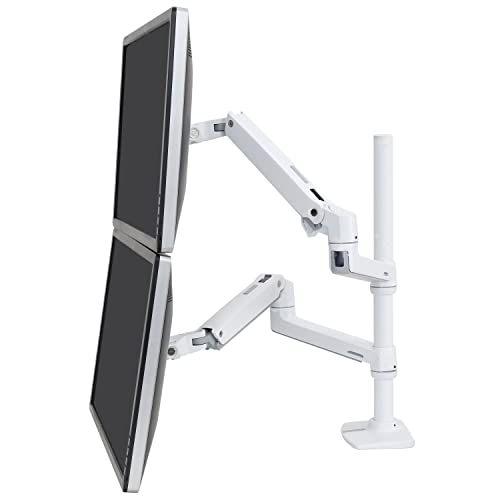
Ergotron LX Dual Vertical Stacking Monitor Arm
by Ergotron
Ergotron's vertical-stacking dual handles 40" screens, expands to four monitors, and brings the same Constant Force precision and 10-year warranty as the single LX — for the power user who won't compromise.
Pros
- Flexible stacking — arrange monitors vertically (portrait or landscape stack), side-by-side, or in a mixed orientation to match your actual workflow
- Supports 40-inch screens per arm — significantly more capable than budget duals capped at 27-32 inches and the only dual on this list certified for 40" displays
- Expandable to 3 or 4 monitors with the LX Collar Kit — a meaningful long-term path that no other arm on this list offers
- Same 10-year warranty and Constant Force precision as the single LX, scaled across two arms — drift-free positioning even after years of repeated repositioning
Cons
- Costs more than some monitors themselves — only justifies for serious multi-monitor users who reposition daily or run portrait-stack code review setups
- Narrower clamp range (0.63-2.6") than budget arms — some thin modern desks at the upper end may not qualify, so measure before committing
Best Single Monitor Arms
For a one-screen desk, the decision is really about how the arm holds tension over years of daily repositioning: Constant Force at the top, gas spring in the middle, and mechanical spring at the budget end. All three picks below mount a standard 24–34” monitor — they differ in warranty and how effortlessly they move.
| Product | Price | Buy |
|---|---|---|
| Ergotron LX Single Monitor ArmBest single arm overall Constant Force tensioning holds a 25-lb monitor as steadily at the top of its travel as the bottom, backed by a 10-year warranty — the arm to specify when you want one that outlasts the desk. | $219.00 | View on Amazon |
| HUANUO FlowLift Single Monitor ArmBest value single arm Gas-spring ease and 32-inch support at roughly half the premium price — stays put at any angle without re-tensioning, and installs in about five minutes. | $47.99 | View on Amazon |
| Amazon Basics Single Monitor ArmBest budget single arm The lowest-cost way onto an arm for a secondary screen that rarely moves, with clamp and grommet hardware included in the box. | $30.23 | View on Amazon |
Best Dual Monitor Arms
Two screens change the priorities: you need a mount rated for the combined weight, enough independent articulation to angle each display, and a footprint that fits both on one desk. These three cover the range from a budget crossbar to a premium stacking pole.
| Product | Price | Buy |
|---|---|---|
| HUANUO FlowLift Dual Monitor ArmBest value dual arm Gas-spring dual with independent height on each arm and a 15,000-plus review track record — the price-performance pick for two 24–32" screens side by side. | $59.99 | View on Amazon |
| VIVO Dual Monitor Desk Mount (STAND-V002)Best budget dual arm A proven mechanical-spring dual mount at the lowest dual price here, for a straightforward two-screen setup that stays put once positioned. | $34.99 | View on Amazon |
| Ergotron LX Dual Vertical Stacking Monitor ArmBest dual for stacked monitors The only pick that stacks monitors vertically (portrait or landscape) or mixes heights, with Constant Force precision and expandability to three or four screens. | $472.99 | View on Amazon |
Best Monitor Arms by Use Case
A few more buyer situations come up repeatedly. Each maps to an arm already reviewed above — this table routes you straight to the right one.
| Product | Price | Buy |
|---|---|---|
| Ergotron HX Heavy Duty Monitor ArmBest heavy-duty for large monitors Rated for 34–49" ultrawides and heavier panels that exceed a standard single arm's capacity, with the same 10-year Ergotron warranty. | $329.00 | View on Amazon |
| Ergotron LX Single Monitor ArmBest premium Ergotron arm The default professional single arm — Constant Force, full sit-stand height travel, and clamp-plus-grommet hardware for any desk. | $219.00 | View on Amazon |
| Ergotron LX Dual Vertical Stacking Monitor ArmBest for stacked monitors Vertical-stacking dual pole for portrait code review or multi-screen data work, expandable to three or four monitors. | $472.99 | View on Amazon |
| Amazon Basics Single Monitor ArmBest budget arm The cheapest way onto an arm for a rarely-moved secondary screen, hardware included. | $30.23 | View on Amazon |
| HUANUO FlowLift Dual Monitor ArmBest gas-spring value Gas-spring ease and multi-year tension retention at a mid-tier price — the easy upgrade over a budget mechanical arm. | $59.99 | View on Amazon |
How to Choose the Best Monitor Arm
Buyer's Guide
Choosing the right monitor arm requires matching six specifications to your actual desk setup, monitor, and workflow — getting any one of them wrong leaves you with an arm that either won't hold the monitor securely or won't move it the way you need.
Weight Capacity and Monitor Size Range
Weight capacity is the single most important arm specification, and the one most commonly underestimated by buyers. A standard 24" monitor weighs 8-10 lbs without stand, a 27" weighs 10-13 lbs, a 32" weighs 14-18 lbs, a 34" ultrawide weighs 18-25 lbs, and a curved 49" ultrawide can reach 35-42 lbs. Operating an arm at or above its stated capacity is the leading cause of sag, drift, and joint wear over time. Equally important is the minimum capacity — gas-spring arms have a minimum weight as well as a maximum, because the spring tension is calibrated to a range. A 5-pound 22" monitor mounted on an arm rated 7-25 lbs will float upward because the spring is too strong for the load. Match your monitor's weight to the middle of the arm's rated range, not the edges, for the best long-term behavior. The Ergotron LX (7-25 lbs) covers most 24-34" monitors comfortably; the Ergotron HX (20-42 lbs) is the correct choice for anything heavier.
Range of Motion and Adjustability
Motion specifications include height lift (vertical travel), tilt (forward-backward angle), pan (left-right rotation), swivel (rotation around the arm joint), and rotation (portrait-landscape pivot of the monitor itself). Height lift is the most important for sit-stand transitions: an arm with 17 inches of vertical travel like the Ergotron LX accommodates a full sit-to-stand height change on a standing desk without any compromise at either posture. Arms with 8-12 inches of height lift force you to choose between optimal seated height and optimal standing height — typically resulting in standing height being a few inches too low. Tilt range matters for video calls (you want to tilt the monitor down slightly so your camera meets your eye line at a natural angle) and for users who alternate between focused work and reclined reading postures. Portrait rotation matters specifically for code reviewers, document editors, and anyone who works with long vertical content.
Mounting Type: Clamp vs Grommet
Monitor arms attach to a desk in one of two ways: a C-clamp that grips the desk edge from above and below, or a grommet mount that bolts through a pre-drilled hole in the desk surface. C-clamps are reversible — you can move the arm to a different desk in seconds — and require no permanent modification to the desk. They're the right choice for renters, for users who reorganize their workspace periodically, and for any desk where drilling a hole isn't an option. Grommet mounts are more secure under heavy loads and produce a cleaner aesthetic with no clamp jaw visible at the desk edge — they're appropriate for permanent installations where the desk has an existing grommet hole or where the user is willing to drill one. Most arms on this list (LX, HX, HUANUO, VIVO) include both clamp and grommet hardware in the box, which lets you decide at install time. Verify your desk thickness against the clamp's range before purchasing — most clamps cover 0.4-2.4 inches; the VIVO at 3.25" max is unusual for handling thick reclaimed-wood and butcher block desks that defeat narrower clamps.
Gas Spring vs Mechanical Spring
Mechanical-spring arms (VIVO STAND-V002 and most arms under thirty dollars) use coiled metal springs to hold the monitor's weight. They work, but they require more force to reposition and develop noticeable droop over time as the spring tension fatigues — typically requiring re-tensioning the screws every few months for users who reposition daily. Gas-spring arms (HUANUO FlowLift, Amazon Basics) use sealed gas pistons that maintain consistent pressure throughout the arm's range of motion. Gas springs allow effortless one-hand repositioning and hold the monitor at any angle without re-tensioning. Constant Force mechanisms (Ergotron LX and HX) are a refinement of gas-spring technology — they're engineered to deliver exactly the same lifting force across the entire range of motion, which is why an Ergotron arm holds a 25-pound monitor as steadily at the top of its travel as at the bottom. For users who reposition the monitor multiple times daily — sit-stand transitions, video call camera adjustments, leaning forward for detailed work — gas-spring or Constant Force is meaningfully better than mechanical.
Cable Management
A monitor arm without integrated cable management leaves a HDMI or DisplayPort cable, USB hub cable, and power cable dangling visibly behind the monitor. The cleanest arms route cables internally through hollow channels in the arm sections, so cables enter at the monitor end and exit at the clamp without ever being visible. Mid-tier arms (Ergotron LX, HUANUO FlowLift) use external clip-on channels along the arm's underside — visually less clean than internal routing but functionally sufficient for hiding cables from front view. Budget arms (Amazon Basics, VIVO) include a few cable clips or rely on zip ties — you'll need to manage cables yourself, which is fine but adds setup time. If your desk shows cables prominently — an open desk with no privacy panel, or a glass desk where cables are visible from below — invest in a cable management kit alongside the arm to handle the cabling that runs from the arm down to the floor.
Warranty Length as a Quality Signal
Warranty length is the single most reliable proxy for monitor arm build quality, because the failure modes (joint wear, spring fatigue, clamp deformation) only emerge over years of use. A manufacturer offering a 10-year warranty on a $219 arm has run the engineering math on long-term failure rates and is comfortable absorbing the replacement cost — a strong signal that the arm is built to last. A manufacturer offering a 1-year warranty on a $26 arm is signaling the opposite: the arm is engineered to function correctly for the warranty period and the manufacturer is not committing to performance beyond that window. Ergotron's 10-year warranty across both LX and HX is the gold standard in the consumer arm market. The 3-year coverage on VIVO and the cycle-test specifications on HUANUO are reasonable middle-tier signals. Anything under 1 year on a clamping mechanism that holds an expensive monitor over your desk should be treated as a temporary solution, not a permanent install.
The six factors above cover the spec-sheet dimensions of arm selection. A few additional notes from the procurement and home-office-setup side:
Measure your desk thickness before ordering. This is the single most common cause of returns on monitor arms. C-clamps come with stated minimum and maximum desk thicknesses — typically 0.4 to 2.4 inches — and a desk outside that range simply won’t clamp. Reclaimed-wood desks, butcher block, and some commercial-grade office desks are routinely thicker than 2.4 inches and require an arm with an extended clamp range like the VIVO STAND-V002 (3.25”). Hollow-core IKEA-style desks are thin enough to clamp easily but compress under high clamp pressure and can crack the laminate if you over-tighten — finger-tight plus a quarter turn is enough.
Confirm VESA compatibility before ordering. Your monitor’s spec sheet will list the VESA pattern (75x75 or 100x100mm for most modern displays, 200x100 or 200x200mm for some 43-49” superwides). If your monitor lacks a VESA pattern entirely — usually because the manufacturer integrated the stand permanently — no arm will mount it, and the correct alternative is a monitor stand that elevates the existing base.
Know the height you are aiming for before you set the tension. An arm’s travel range only helps if you know where in that range the screen belongs, and the answer is the same rule a wall-mounted display follows: screen centre at your seated eye level. Our free TV mount height calculator takes your eye height, screen size, and viewing distance and returns the exact centre, bottom-edge, and top-edge heights, plus whether the result clears the THX and SMPTE viewing-angle limits. Set the arm once to that number instead of nudging it for a week.
Plan the cable run before you mount. Once an arm is installed, running cables back through the arm’s cable management retroactively is significantly more annoying than doing it during initial install. Connect the monitor’s HDMI/DisplayPort cable, USB hub cable, and power cable to the monitor before mounting it, route them through the arm’s cable channels or clips, and then mount the monitor to the VESA plate. Doing it in this order takes ten extra minutes during install and saves an hour of disassembly later.
Final Verdict
For most single-monitor home office setups, the Ergotron LX Single Monitor Arm is the correct starting point. The combination of Constant Force tensioning, 17.3 inches of height travel, a 7-25 lb capacity range that fits nearly every common monitor, and a 10-year warranty makes it the most capable single arm on this list at any price. For users transitioning between sitting and standing on a standing desk multiple times per day, the LX’s full sit-stand height range and drift-free positioning make the difference between an arm you adjust constantly and one you set once and forget.
For buyers whose primary constraint is budget and who run a fixed-height seated workstation with a 24-27” monitor, the Amazon Basics Single Monitor Arm is the alternative recommendation — under thirty dollars, 18,000+ verified reviews, and the brand-backed customer service that direct-from-China arm brands at this price simply don’t match. For users running 34-49” ultrawide or superwide monitors that have defeated every other mount, the Ergotron HX Heavy Duty Monitor Arm is the only widely available arm engineered to confidently hold up to 42 lbs without sag.
Whatever arm you choose, remember that the arm is one part of a complete desk setup. The arm clears the desk surface and positions the monitor; an office chair calibrated to your desk height handles your seated posture; and a desk lamp at the right angle removes screen glare and illuminates reference materials. Get all three right, and you have removed the most common sources of upper-body tension in extended desk work — neck flexion from a low monitor, shoulder strain from a poorly fitted chair, and eye fatigue from inadequate task lighting. The arm is often the highest-leverage of the three because it changes more than just monitor height: it clears the desk, simplifies cable management, and makes the entire workstation feel intentional rather than improvised.
Frequently Asked Questions
How do I know if my monitor is compatible with a monitor arm?
Should I get one dual monitor arm or two single monitor arms?
What monitor arm works best with ultrawide and large 32-inch+ monitors?
Can I install a monitor arm on an IKEA, hollow-core, or glass desk?
Is a premium monitor arm really worth it over a budget one?
Related Articles
About the Reviewer

Sarah Chen, CAP, PMP
B.A. Business Administration, UCLA
Sarah Chen spent 10 years in office management and operations at Fortune 500 companies before founding DeskRated in 2026. After managing supply budgets for teams of 50+ people and testing thousands of products through daily use, she started writing the honest, no-fluff supply reviews that office professionals actually need. Sarah holds both CAP and PMP certifications and is based in Los Angeles.