7 Best Craft Cutting Machines of 2026
Sarah Chen reviews the best craft cutting machines for vinyl, paper, fabric, and die cutting. Compare Cricut, Silhouette, Brother, and Sizzix by cutting width, material range, software, and total cost of ownership.
Updated
| Product | Price | Buy |
|---|---|---|
| Cricut Maker 4Best Overall | $379.00 | View on Amazon |
| Cricut Joy Xtra Digital VersionBudget Pick | $179.00 | View on Amazon |
| Silhouette Cameo 5 AlphaPremium Pick | $299.00 | View on Amazon |
| Cricut Explore 5 Essential BundleRunner-Up | $299.99 | View on Amazon |
| Brother ScanNCut SDX125E | $449.99 | View on Amazon |
| Sizzix Big Shot Die-Cutting & Embossing Machine (6-inch) | $169.99 | View on Amazon |
| Silhouette Portrait 4 | $199.99 | View on Amazon |
Find the Right Cutting Machine for Your Craft
Jump to the machine that matches what you make:
- Best cutting machines overall
- Best for vinyl & decals
- Best for die cutting
- Best compact & beginner machine
Why We Reviewed These Specific Machines
The craft cutting machine market splits into a few ecosystems — Cricut, Silhouette, Brother’s scan-and-cut approach, and the manual die-cutting world — each with different software models, material capabilities, and long-term costs. Most review sites focus exclusively on Cricut or test only two brands. We reviewed seven machines across four brands, including a manual die press, specifically to give you an accurate total-cost-of-ownership comparison, because the machine that costs the least to buy is rarely the machine that costs the least to own over two years of regular crafting.
The lineup covers every common decision: the Cricut Maker 4 as the do-everything best overall, the compact Cricut Joy Xtra Digital Version as the beginner-friendly budget pick, the Silhouette Cameo 5 Alpha as the subscription-free upgrade, the Cricut Explore 5 as the runner-up and vinyl value play, the Brother ScanNCut SDX125E for scanning and no-PC cutting, the Sizzix Big Shot for manual die cutting and embossing, and the Silhouette Portrait 4 as the most portable budget Silhouette.
Sarah Chen has evaluated office and creative workspace equipment for over a decade as a Certified Administrative Professional. These recommendations are based on verified Amazon purchase data, documented owner reviews, manufacturer specifications, and direct comparison of software capabilities and subscription pricing. Every ASIN was verified live on Amazon as of July 2026; stock on individual machines can fluctuate between restocks, so check the listing before you buy.
Best Overall: Cricut Maker 4

Cricut Maker 4
by Cricut
The most versatile craft cutting machine available — 300+ materials, 13 tool types, and 2X speed make it the correct choice for serious crafters, small business sellers, and anyone who needs to cut beyond vinyl and cardstock.
Pros
- Cuts 300+ materials including leather, balsa wood, chipboard, and fabric — no other consumer cutting machine matches this material range at any price
- 13 compatible tool types (cutting, scoring, engraving, debossing, perforating, foiling, writing) turn a single machine into a complete craft workshop without separate devices
- 2X faster cutting speed than the Maker 3 reduces project time meaningfully on large batches — vinyl decal sellers and teachers cutting classroom sets notice the difference immediately
- Matless Smart Materials cutting up to 13 inches wide and 12 feet long eliminates mat alignment for long vinyl runs, banners, and repeating patterns
Cons
- Cricut Access subscription at 13.99 per month is required for the full design library — the free tier is severely limited, making this an ongoing cost that competitors like Silhouette avoid entirely
- 21 pounds and 22 inches wide demands dedicated desk space — this is not a machine you set up and put away between sessions
- Design Space software is browser-based and frequently sluggish on older laptops — offline functionality is limited compared to Silhouette Studio's desktop application
The Cricut Maker 4 earns the top position because no other consumer cutting machine matches its material versatility. Where most machines top out at vinyl, cardstock, and thin fabric, the Maker 4 cuts genuine leather, balsa wood, chipboard, cork, craft foam, and matboard — 300+ materials total. The Adaptive Tool System supports 13 different tool types: fine-point blade, deep-point blade, rotary blade, knife blade, scoring stylus, scoring wheel, engraving tip, debossing tip, perforation blade, wavy blade, foil transfer tool, fine-point pen, and washable fabric pen.
The practical impact is that one machine replaces what would otherwise require a cutting machine, a separate engraving tool, and a scoring tool. For Etsy sellers and small craft businesses producing multiple product types — vinyl decals, engraved ornaments, scored cards, foiled invitations — the Maker 4 consolidates production into a single device.
The 2X speed improvement over the Maker 3 is not a marketing abstraction. On a 12x12-inch sheet of intricate cardstock cuts, the Maker 3 takes approximately 8 minutes; the Maker 4 finishes the same file in under 4 minutes. For a teacher cutting 30 identical classroom decorations or a seller producing a batch of 50 vinyl decals, the time savings compound into hours per month.
The tradeoffs are real. Cricut Access at 13.99 per month (or 7.99 per month on an annual plan) is a recurring cost that no Silhouette or Brother machine requires. Over two years, that subscription adds 192 to 336 dollars to the total cost of ownership. Design Space’s cloud dependency means slow or absent internet connections degrade the experience. And at 21 pounds, the Maker 4 is a permanent desk fixture, not a portable tool.
Choose the Maker 4 if you work with diverse materials, need engraving or debossing capability, or run a craft business where versatility directly translates to product range and revenue.
Best Budget: Cricut Joy Xtra Digital Version

Cricut Joy Xtra Digital Version
by Cricut
The compact, beginner-friendly Cricut that still cuts vinyl, iron-on, and cardstock cleanly — the right first machine for card makers and hobbyists who do not need a 12-inch bed.
Pros
- Compact enough to leave out on any desk yet cuts 50+ materials
- Cuts matless Smart materials up to 12 ft long — no mat wrestling
- Print-Then-Cut with an inkjet printer makes custom stickers
- The easiest true Cricut to learn for a first-time crafter
Cons
- 8.5-inch cut width caps larger projects
- Full image and font library needs a Design Space subscription
The Cricut Joy Xtra Digital Version is the most accessible entry point into electronic cutting from a major brand, and the current digital-download configuration is the one we now recommend to first-time crafters. It is compact enough to leave out permanently on a desk or nightstand, yet it still cuts 50+ materials — adhesive vinyl, heat-transfer vinyl, cardstock, and sticker paper — with the same clean edges you get from Cricut’s larger machines. For a card maker, a teacher building a small classroom kit, or a hobbyist who crafts on weekends, that is genuinely all the machine most people need.
Print-Then-Cut is the feature that justifies the Joy Xtra over cheaper no-name cutters. Using any home inkjet printer, you print a full-color design on sticker or transfer paper, and the Joy Xtra reads registration marks and cuts precisely around it. That single capability turns the machine into a home sticker studio for planner stickers, custom labels, and iron-on transfers. Just as useful for beginners, the Joy Xtra cuts matless Smart materials up to 12 feet long — no wrestling a design onto a sticky mat, which is the step that trips up most newcomers on larger machines.
Design Space is the easiest true Cricut software to learn, with thousands of ready-to-cut projects that walk a beginner from selection to finished cut in minutes. There is no vector-design learning curve required to make something on day one. The full image and font library does sit behind a Cricut Design Space subscription, so budget for that if you want the whole catalog — but you can cut your own uploaded SVGs and use the free tier indefinitely.
The 8.5-inch cut width is the defining limitation. Standard 12x12-inch scrapbook cardstock will not fit, and full-width vinyl shelf liners are out of reach. If your projects consistently exceed 8 inches in any dimension, the Cricut Explore 5 or Silhouette Cameo 5 Alpha are the correct step up. Pair the Joy Xtra with a quality laminator and its stickers and labels last far longer.
Best Upgrade: Silhouette Cameo 5 Alpha

Silhouette Cameo 5 Alpha
by Silhouette America
The best cutting machine for crafters who refuse to pay a monthly subscription — Silhouette Studio is genuinely free, the motor is the quietest on this list, and the Print and Cut precision is best-in-class.
Pros
- Silhouette Studio software is a full desktop application with no mandatory subscription — the free version includes design tools that Cricut locks behind a 13.99 per month paywall
- Whisper-quiet 50 dB motor is measurably quieter than Cricut machines — meaningful for shared workspaces, apartments, and late-night crafting sessions
- 4-point registration system delivers the most precise Print and Cut alignment on this list — critical for sticker sheets, planner stickers, and print-on-demand products where registration drift ruins a batch
- Intelligent Path Technology optimizes blade movement for cleaner cuts with less material waste — noticeable on intricate designs with fine detail like mandala patterns and lace templates
Cons
- Silhouette Studio has a steeper learning curve than Cricut Design Space — the interface is more powerful but less intuitive for first-time users who have never worked with vector design software
- Smaller accessory and materials ecosystem than Cricut — fewer first-party tools, specialty blades, and branded materials available, though third-party options are growing
- The Alpha revision is recent enough that multi-year reliability data does not yet exist — the review base has grown past 700 but still covers roughly a year of ownership, against the multi-year record behind the Portrait 4
The Silhouette Cameo 5 Alpha is the machine we recommend for crafters who have used a cutting machine before and know what they want — specifically, crafters who want powerful software without a monthly fee. Silhouette Studio is a genuine desktop application, not a web app. It includes vector drawing tools, image tracing, offset paths, Print and Cut with 4-point registration, rhinestone template generation, and pop-up card design — all in the free version. Cricut charges 13.99 per month to access comparable functionality through Design Space.
The 50 dB whisper motor is not a gimmick. At 50 decibels, the Cameo 5 Alpha operates at roughly the volume of a quiet conversation. Cricut machines, while not excessively loud, are audibly louder during cutting — noticeable when crafting in a shared living space, an apartment with thin walls, or after children are asleep. If noise tolerance matters in your crafting environment, the Cameo 5 Alpha is measurably the quietest full-size option.
Print and Cut precision is where the Cameo 5 Alpha leads the field. The 4-point registration system uses four calibration marks instead of the standard three, reducing alignment drift on sticker sheets. For crafters producing planner stickers, custom packaging labels, or print-on-demand products where even 1mm of misalignment makes a sheet unusable, this precision matters. Silhouette’s Intelligent Path Technology further optimizes the blade path for cleaner cuts on intricate designs.
The tradeoff is ecosystem. Cricut’s community is significantly larger — more YouTube tutorials, more free SVG sources, more Facebook groups troubleshooting specific issues. Silhouette’s community is smaller but tends toward more technically proficient users. If you learn best from video tutorials and community troubleshooting, Cricut’s ecosystem advantage is real. If you prefer powerful software and are comfortable learning from documentation, Silhouette Studio is the more capable tool.
Runner-Up: Cricut Explore 5

Cricut Explore 5 Essential Bundle
by Cricut
The current-generation Explore and the right Cricut for most crafters — 100+ materials, matless Smart Material runs, and a starter material bundle, at meaningfully less than the Maker 4. Choose it over the Maker unless you specifically need leather, wood, or engraving tools.
Pros
- Cuts 100+ materials covering every common craft category (vinyl, iron-on HTV, cardstock, printable vinyl, paper, felt) without the premium price of the Maker line
- 30 percent more compact than previous Explore models, which matters more than it sounds on a shared desk or a craft cart where the machine has to live out in the open between projects
- Smart Materials support means matless cutting in continuous runs up to twelve feet — the single biggest time-saver for anyone producing decal sets, labels, or banners in batches
- Essential Bundle ships with Smart Vinyl, Smart Iron-On, printable vinyl, cardstock, and insert cards, so a first project can be finished the day the box arrives rather than after a second supply order
Cons
- Still under 100 reviews at the time of writing — the Explore 5 is new enough that long-term reliability data does not yet exist, unlike the multi-year record behind the Maker and Portrait lines
- Cannot cut thick materials like genuine leather, balsa wood, or chipboard — the Maker 4 and its rotary and knife blades are required for anything beyond roughly 2mm
- Cricut Access subscription is the same 13.99 per month as every other Cricut machine, so the software cost does not scale down with the cheaper hardware
The Cricut Explore 5 occupies the sweet spot between the Joy Xtra’s portability and the Maker 4’s versatility. It cuts 100+ materials — vinyl, HTV, cardstock, printable vinyl, paper, felt, and bonded fabric — at full 12-inch width, which covers the material needs of the vast majority of hobbyist and casual-business crafters. Cricut also shrank the chassis by about 30 percent against previous Explore models, and that is a more practical change than the spec sheet suggests: a cutting machine that lives permanently on a desk corner or a craft cart shelf is one you actually use, while one that has to be lifted out of a closet before every project quietly stops getting used by February.
Support for Smart Materials is the feature that earns its keep in real use. Loading a mat, aligning material, and unloading it is the slowest part of most projects, and Smart Materials skip it entirely — the machine feeds matless in continuous runs up to twelve feet. For anyone cutting decal sets, classroom labels, or banners in batches rather than one design at a time, that is the difference between an afternoon and an evening.
The Essential Bundle version includes starter materials (Smart Vinyl, Smart Iron-On, printable vinyl, value cardstock, insert card sets) alongside the machine. For a new crafter who does not already own craft supplies, the bundle eliminates the frustrating experience of unboxing a cutting machine only to realize you need to separately purchase materials before you can make anything.
Two honest caveats. The first is newness: the Explore 5 launched recently and still carries under a hundred reviews, so while early feedback is strong, there is not yet the multi-year reliability record that the Maker line and the Silhouette Portrait have earned. If you want a machine with a long, boring, well-documented track record, that argues for the Maker 4. The second is the line limitation, which has not changed: the Explore cannot cut genuine leather, balsa wood, or chipboard, and there is no upgrade path — you cannot add a rotary blade, knife blade, or engraving tip later. If you outgrow the Explore’s material range, the next step is buying a Maker, not buying an accessory. For crafters confident they will stay within vinyl, HTV, cardstock, and paper, that limitation is irrelevant. For crafters who might want to cut leather, engrave wood, or perforate paper eventually, the Maker 4 premium is worth treating as insurance against buying twice.
One change worth flagging since this page was last updated: the Explore 5’s early pricing has firmed up considerably, and it now sits essentially level with the Silhouette Cameo 5 Alpha rather than comfortably below it. That narrows the value argument. If you were choosing the Explore primarily because it undercut the Cameo, compare the two again — at parity the deciding factor is software, and Silhouette Studio carries no subscription while Design Space effectively does.
Brother ScanNCut SDX125E
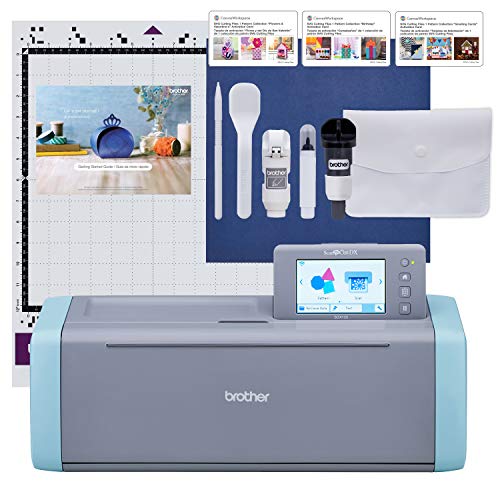
Brother ScanNCut SDX125E
by Brother
The only cutting machine with a built-in scanner — ideal for quilters, scrapbookers, and crafters who want to scan hand-drawn designs or printed patterns and cut them without a computer.
Pros
- Built-in 300 DPI scanner is unique on this list — scan a hand-drawn design, a printed pattern, or an existing die cut and convert it to a cut file without a computer, phone, or internet connection
- Fully offline operation with 5-inch touchscreen means you can design, edit, and cut without any external device — the only cutting machine on this list that works completely standalone
- Auto Blade automatically detects material thickness and adjusts cutting depth — eliminates the test-cut-and-adjust cycle that wastes material on every other machine
- 682 built-in designs including 100 quilting patterns provide a ready-to-use library without downloading, subscribing, or connecting to the internet
Cons
- Highest price on this list at over 440 dollars positions it as a premium purchase — the built-in scanner justifies the cost only if you will actually use scanning functionality regularly
- Cutting mats lose tackiness faster than Cricut and Silhouette mats according to owner reviews — replacement mats at 15 to 20 dollars each become a recurring cost for heavy users
- Smaller design ecosystem than Cricut and Silhouette — fewer online templates, community designs, and third-party SVG sources are optimized for ScanNCut file formats
The Brother ScanNCut SDX125E exists in a category of one: it is the only consumer cutting machine with a built-in flatbed scanner. The 300 DPI scanner digitizes hand-drawn designs, printed images, fabric patterns, and existing die cuts — place the item on the scanning mat, scan, edit on the 5-inch touchscreen, and cut. No computer, no phone, no internet connection required at any step.
This standalone capability makes the ScanNCut uniquely valuable for quilters (scan and digitize appliqué patterns), scrapbookers (scan and cut around printed photos), and crafters who work from hand-drawn designs (sketch on paper, scan, and cut the design from any material). The 100 built-in quilting patterns and 682 total built-in designs provide a ready-to-use library that requires nothing beyond the machine itself.
The Auto Blade is the second standout feature. Insert a material, and the ScanNCut automatically probes the thickness and adjusts blade depth. Other machines require manual blade adjustment and a test cut on scrap material for each new material type. For crafters who switch between vinyl, cardstock, fabric, and foam within a single project session, the Auto Blade eliminates a repetitive setup step.
At over 440 dollars, the ScanNCut is the most expensive machine on this list. The scanner justifies this premium only if you will use it — if your workflow is exclusively cutting SVG files downloaded from the internet, the scanner is an expensive feature that goes unused. The design ecosystem is also smaller than Cricut’s and Silhouette’s, meaning fewer free SVG sources and community templates are optimized for Canvas Workspace.
Sizzix Big Shot Die-Cutting & Embossing Machine
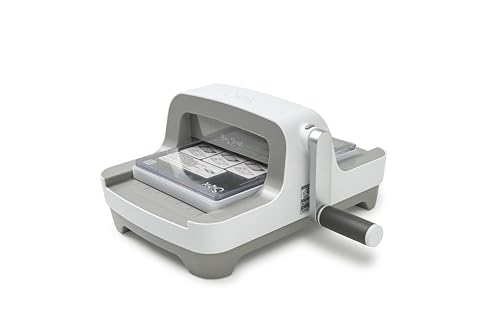
Sizzix Big Shot Die-Cutting & Embossing Machine (6-inch)
by Sizzix
The manual die-cutting counterpoint to the digital machines here — a crank press that cuts and embosses with physical dies, with no software, subscription, or learning curve, for crafters who own a die collection.
Pros
- No computer, software, or subscription — turn the crank and it cuts every time
- Handles thick steel-rule and wafer-thin dies plus embossing folders
- Redesigned 2025/2026 body with a storable handle; Amazon's Choice
- Nothing to update or break — a 20-year-proven mechanical workhorse
Cons
- Manual only — no digital designs; you must own physical dies
- Heavy, and the 6-inch opening limits very large die cuts
The Sizzix Big Shot is the odd machine out on this list, and deliberately so. Every other cutter here is a computerized machine that reads a digital file and drives a blade. The Big Shot is a manual die-cutting press: you sandwich cardstock, fabric, or felt between a physical steel-rule or wafer-thin die, feed the platform through the roller, and turn the crank. There is no software to install, no subscription to pay, no Bluetooth to pair, and nothing to update. For crafters who already own a collection of dies and embossing folders — a huge segment of the card-making and scrapbooking world — this is the machine that actually cuts them.
The appeal is reliability and simplicity. The Big Shot cuts intricate shapes that a blade-based machine struggles with, embosses texture into cardstock using embossing folders, and works with everything from thick chipboard dies to delicate wafer-thin metal dies. Because the mechanism is purely mechanical, it produces the same clean cut on the thousandth pass as on the first. The 2025/2026 redesign added a storable fold-away handle and earned Amazon’s Choice status, and the platform accepts the standard Sizzix and cross-compatible die formats most crafters already have in a drawer.
The tradeoffs are inherent to the format. This is manual only — there are no digital designs, so the machine is only as capable as the physical dies you own, and building a die library is its own ongoing cost. It is also heavy, and the 6-inch opening caps the width of any single die cut, so oversized dies will not fit. If your workflow is uploading SVGs and cutting vinyl, this is the wrong tool entirely.
Choose the Big Shot as a companion to a digital cutter, or as a standalone press if your craft is die cutting and embossing rather than vinyl and stickers. For crafters who want a proven mechanical workhorse with zero learning curve and zero recurring cost, it is the manual counterpoint that a lineup of digital machines otherwise leaves out.
Most Portable: Silhouette Portrait 4

Silhouette Portrait 4
by Silhouette America
The most portable cutting machine available — 4 pounds with no subscription costs makes it ideal for crafters who need to transport their machine to crop events, classrooms, or between rooms at home.
Pros
- 4 pounds and 9 inches wide makes this the most portable cutting machine on this list by a significant margin — fits in a backpack, slides into a desk drawer, and travels to crop events effortlessly
- Nearly 2,900 verified reviews provide a robust reliability dataset — this is a well-proven machine with years of real-world validation across hobbyist and small business use cases
- Silhouette Studio software included with no subscription requirement — the same free, full-featured desktop application available on the Cameo 5 Alpha, eliminating ongoing software costs
- 50 dB operation is whisper-quiet — identical noise level to the Cameo 5 Alpha and meaningfully quieter than any Cricut machine on this list
Cons
- 8.5-inch maximum cutting width is the same limitation as the Cricut Joy Xtra — 12-inch scrapbook pages, wide fabric cuts, and full-sheet vinyl projects are not possible
- Struggles with thick cardstock above 80 lb weight according to multiple reviews — heavy cardstock, chipboard, and thick faux leather are outside this machine's reliable cutting range
- Fewer compatible tools and accessories than the full-size Cameo 5 — no dual tool holder, no autoblade, and fewer specialty blade options
The Silhouette Portrait 4 weighs 4 pounds. That single specification defines its purpose: this is the cutting machine you take places. At 9 inches wide and light enough to hold in one hand, it fits in a backpack, slides into a desk drawer between uses, and travels to scrapbook retreats, classroom events, and craft fairs without a dedicated carrying case. No other machine on this list approaches this level of portability.
Despite its size, the Portrait 4 is a capable machine. It cuts vinyl, HTV, cardstock, sticker paper, and thin fabric at up to 8.5 inches wide — sufficient for mugs, tumblers, greeting cards, small decals, planner stickers, and standard label sizes. The 50 dB quiet motor matches the Cameo 5 Alpha’s whisper-level operation. Silhouette Studio software is included free, providing the same subscription-free design tools available on the full-size Cameo.
Nearly 2,900 verified reviews make this the most thoroughly validated machine on this list by review count. Owners consistently praise its reliability, quiet operation, and portability. The PixScan capability — using your phone camera to create a Print and Cut registration pattern — is a portable alternative to the optical sensor used in full-size machines.
The 8.5-inch width limitation applies here just as it does for the Cricut Joy Xtra, and the Portrait 4 struggles with thick cardstock above 80 lb weight. This is a precision tool for vinyl and paper crafters, not a general-purpose cutting machine. If you need 12-inch cutting width or thick material capability, the Cameo 5 Alpha is the correct Silhouette upgrade. If portability is your primary requirement and your projects fit within 8.5 inches, the Portrait 4 is the lightest and most travel-ready option available.
Best Vinyl Cutting Machine
If your craft is primarily adhesive vinyl and heat-transfer vinyl — decals, shirt designs, tumblers, wall lettering — you want fast, accurate cutting at 12-inch width and a design workflow that does not fight you. All three machines below are proven vinyl workhorses; the right pick depends on whether you value everyday value, raw force for large jobs, or subscription-free software.
| Product | Price | Buy |
|---|---|---|
| Cricut Explore 5 Essential BundleBest vinyl value 100+ materials and fast matless cuts — the everyday vinyl and HTV workhorse | $299.99 | View on Amazon |
| Cricut Maker 4Best for big vinyl projects 300+ materials and the most force for large or layered vinyl jobs | $379.00 | View on Amazon |
| Silhouette Cameo 5 AlphaBest subscription-free option Silhouette Studio needs no subscription — a favorite of decal sellers who hate paywalls | $299.00 | View on Amazon |
Best Die Cutting Machine: Manual vs Digital
“Die cutting machine” means two very different things, and it is the exact question searchers get stuck on. A manual die-cutting press uses physical steel-rule dies and a hand crank — no computer, no cut files, just consistent mechanical cuts and embossing. A digital cutting machine reads a design file and drives a blade, so it cuts any shape you can draw without owning a single physical die. The Sizzix Big Shot is the best manual press here; the Cricut Maker 4 and Brother ScanNCut are the strongest digital alternatives, with the ScanNCut uniquely able to scan physical dies and hand-drawn art into cut files.
| Product | Price | Buy |
|---|---|---|
| Sizzix Big Shot Die-Cutting & Embossing Machine (6-inch)Best manual die-cut press Crank press for physical steel-rule dies and embossing — no software or subscription | $169.99 | View on Amazon |
| Cricut Maker 4Best digital die-cutting 4,000g force cuts chipboard, balsa, and thick materials digitally with no physical dies | $379.00 | View on Amazon |
| Brother ScanNCut SDX125EBest for scanning physical dies Built-in scanner turns hand-drawn art or physical dies into cut files, no PC needed | $449.99 | View on Amazon |
Best Compact & Beginner Cutting Machine
If desk space is tight or this is your first cutting machine, a compact model is the right call — smaller footprint, gentler learning curve, and a lower price to test whether the hobby sticks. Both machines below cut vinyl, HTV, and cardstock reliably at up to roughly 8.5 inches; the choice comes down to which software ecosystem you would rather learn.
| Product | Price | Buy |
|---|---|---|
| Cricut Joy Xtra Digital VersionBest compact Cricut Smallest footprint, easiest Design Space onboarding — the go-to first Cricut | $179.00 | View on Amazon |
| Silhouette Portrait 4Best budget Silhouette 9-inch cut, 2,800+ reviews, and no subscription for Silhouette Studio | $199.99 | View on Amazon |
Buyer's Guide
Choosing a craft cutting machine comes down to four decisions: how much material versatility you need, whether you will pay a monthly software subscription, how much workspace you have, and whether portability matters for your crafting setup.
Material Range and Cutting Force
The single biggest differentiator between digital cutting machines is the range of materials they can handle. Entry-level machines like the Cricut Joy Xtra and Silhouette Portrait 4 cut vinyl, HTV, cardstock, and paper reliably — the core materials for most hobby crafters. Mid-range machines like the Cricut Explore 5 and Silhouette Cameo 5 Alpha add faux leather, craft foam, and thicker cardstock. The Cricut Maker 4 stands alone in cutting genuine leather, balsa wood, chipboard, and unbacked fabric. The manual Sizzix Big Shot is a different category — with the right steel-rule dies it cuts cardstock, fabric, felt, and thin metal, but only in the shapes of the dies you own. If you know you will only work with vinyl and paper, any machine on this list is sufficient. If you want to experiment with thicker or unconventional materials, the Maker 4's 300+ material range eliminates the risk of outgrowing your machine.
Software and Subscription Costs
Software is the hidden cost that turns a one-time purchase into an ongoing expense. Cricut Design Space requires a Cricut Access subscription (7.99 to 13.99 per month) for full functionality — over two years, that adds 192 to 336 dollars to the purchase price. Silhouette Studio is a fully functional free desktop application with optional paid upgrades (one-time purchase, not recurring). Brother Canvas Workspace is also free. The manual Sizzix Big Shot has no software at all — nothing to install, learn, or subscribe to. If you plan to upload your own SVG designs from free sources like Google Fonts and SVG repositories, any digital machine works without a subscription. If you rely on the machine's built-in design library for inspiration and ready-to-cut projects, Cricut's library is the largest but requires Access to unlock.
Cutting Width and Project Size
Cutting width determines the maximum size of your projects. Compact machines (Cricut Joy Xtra, Silhouette Portrait 4) max out at 8.5 inches — sufficient for mugs, small decals, greeting cards, and planner stickers, but too narrow for 12-inch scrapbook pages, wide fabric cuts, or large wall decals. Full-size digital machines (Cricut Maker 4, Explore 5, Silhouette Cameo 5 Alpha, Brother ScanNCut) cut 12 inches wide, which is the standard for most craft materials sold in rolls and sheets. The Cameo 5 Alpha can use a 24-inch wide mat for extra-large projects. The manual Sizzix Big Shot has the smallest opening at 6 inches, since die size, not bed width, is the constraint on a press. If your typical projects are smaller than 8 inches, a compact machine saves significant desk space. If you work with standard 12x12 cardstock or vinyl rolls, a full-size machine is necessary.
Portability and Workspace Requirements
Cutting machines range from 4 pounds (Silhouette Portrait 4) to 21 pounds (Cricut Maker 4). If you craft at a dedicated desk that stays set up, weight is irrelevant — choose based on features. If you transport your machine to crop events, craft nights, classrooms, or between rooms, weight and size matter significantly. The Silhouette Portrait 4 at 4 pounds and 9 inches wide is the most portable option. The Cricut Joy Xtra at around 6 pounds is the most portable Cricut. The Silhouette Cameo 5 Alpha is the lightest full-size digital machine. The Cricut Maker 4 and Brother ScanNCut at 16 to 21 pounds are desktop-permanent machines for most users. The manual Sizzix Big Shot is compact but dense and heavy for its size — a countertop press rather than a travel machine.
Connectivity and Offline Capability
Most digital cutting machines connect via Bluetooth, with some offering USB as a backup. The critical question is whether the machine requires an internet connection to function. Cricut Design Space is primarily cloud-based — while offline mode exists, functionality is limited without internet. Silhouette Studio is a desktop application that works fully offline once installed. The Brother ScanNCut is the only digital machine that operates completely standalone with its built-in touchscreen — no phone, computer, or internet required. The manual Sizzix Big Shot needs no connectivity of any kind. If you craft in locations with unreliable internet (workshops, classrooms, rural areas), Silhouette, Brother, and any manual press have a meaningful advantage over Cricut's cloud-dependent workflow.
Total Cost of Ownership
The purchase price is only the beginning. Over two years of regular use, total cost includes the machine, software subscription, replacement blades (10 to 25 dollars every few months), cutting mats (8 to 15 dollars each, replaced every 25 to 40 uses), and materials. A Cricut Maker 4 with Access subscription, 4 replacement blades, and 6 replacement mats costs approximately 700 dollars over two years. A Silhouette Cameo 5 Alpha with free software, equivalent blades and mats, costs approximately 450 dollars. A manual Sizzix Big Shot has essentially no recurring cost — no software, no blades, no mats — so its ongoing spend is entirely the physical dies you choose to buy. The machine that costs the least to buy is not always the machine that costs the least to own — subscription fees and consumable costs compound over time and should factor into your purchasing decision.
How We Chose These Machines
We evaluated craft cutting machines across five criteria: material range (how many materials the machine can reliably cut), software model (subscription versus free), total cost of ownership (purchase price plus two years of subscription, blade, and mat costs), portability (weight and dimensions for crafters who transport their machines), and owner satisfaction (Amazon rating weighted by review count).
We included machines from four brands — Cricut, Silhouette, Brother, and Sizzix — specifically to provide cross-brand comparison, and we deliberately added a manual die-cutting press so the roundup is not limited to computerized cutters. Many review sites focus exclusively on Cricut, which limits the reader’s ability to evaluate subscription-free and manual alternatives. Every product links to a verified, in-stock Amazon listing. Prices reflect Amazon pricing at the time of publication and may fluctuate.
We excluded laser cutting machines (Glowforge, xTool) from this list because they serve a fundamentally different use case — laser cutters excel at wood, acrylic, and engraving but require ventilation systems, cost significantly more, and present safety considerations that blade-based cutting machines do not. If your primary interest is laser cutting, that comparison warrants its own dedicated review.
Cricut vs. Silhouette vs. Brother: Software Comparison
The software decision is as important as the hardware decision because you will use the software every time you use the machine.
Cricut Design Space is a browser-based application available on Mac, Windows, iOS, and Android. The free tier allows you to upload and cut your own SVG files, use basic text tools, and access a small library of free images. Cricut Access (7.99 to 13.99 per month) unlocks 200,000+ images, 700+ fonts, and advanced features including unlimited project saves and premium design tools. Design Space is the most beginner-friendly interface but the most restricted without a subscription.
Silhouette Studio is a desktop application for Mac and Windows with a mobile companion app. The free version includes full vector drawing tools, image tracing, text editing, Print and Cut, and rhinestone template design — tools that Cricut charges for monthly. The Designer Edition (one-time 49.99 purchase) adds SVG import, advanced tracing, and sketch features. The Business Edition (one-time 99.99) adds multi-cut and commercial tools. No recurring subscription at any tier.
Brother Canvas Workspace is a free web and desktop application with all features unlocked. The design tool library is smaller than both Cricut and Silhouette, but the ScanNCut’s built-in touchscreen reduces software dependency because you can design and edit directly on the machine.
The Sizzix Big Shot has no software at all — it is a manual press driven by physical steel-rule dies and embossing folders, so there is nothing to install, learn, or subscribe to. Your “design library” is simply the collection of dies you own. This is a genuine advantage for crafters who dislike software entirely, and a limitation for anyone who wants to cut custom digital designs.
For most crafters buying a digital machine, the software decision should weight heavily in the machine decision. If you value the largest design library and the most tutorials, Cricut with Access subscription is the most supported option. If you value powerful free software with no recurring costs, Silhouette Studio is the clear winner. If you want to skip software altogether and cut with physical dies, the Sizzix Big Shot is the one to look at.
Total Cost of Ownership: Two-Year Comparison
The purchase price tells an incomplete story. Here is what each machine actually costs over two years of regular use (cutting 3 to 4 times per week), including software subscriptions, replacement blades, and replacement mats:
Cricut Maker 4: 379 (machine) + 192 to 336 (Access subscription) + 50 (blades) + 60 (mats) = approximately 681 to 825 dollars.
Cricut Explore 5: 300 + 192 to 336 + 40 + 50 = approximately 582 to 726 dollars.
Cricut Joy Xtra: 179 + 192 to 336 + 30 + 40 = approximately 441 to 585 dollars.
Silhouette Cameo 5 Alpha: 299 + 0 (free software) + 40 + 50 = approximately 389 dollars. Add 50 if you purchase the Designer Edition upgrade.
Silhouette Portrait 4: 200 + 0 + 30 + 35 = approximately 265 dollars.
Brother ScanNCut SDX125E: 450 + 0 + 45 + 70 = approximately 565 dollars. Mats are pricier due to faster tackiness loss.
Sizzix Big Shot: 170 (machine) + 0 (no software, no mats, no blades) + the cost of the physical dies you choose to buy. The press itself has essentially no recurring cost — your ongoing spend is entirely on the dies and embossing folders you add over time.
The Silhouette Portrait 4 and the Sizzix Big Shot are the least expensive machines to keep running over two years — the Portrait because its software is free, the Big Shot because it has no software or consumable blades at all. The Cricut Maker 4 is the most expensive. The subscription cost is the single largest variable among the digital machines — if you are willing to use free SVG sources and upload your own designs, you can use any Cricut machine without Access, but the experience is noticeably restricted compared to the full subscription.
Final Verdict
For most crafters, the Cricut Maker 4 is the machine to buy — its 300+ material range and 13 tool types mean you will not outgrow it, and the 2X speed pays off on every batch. If you are just starting out or watching your budget, the compact Cricut Joy Xtra Digital Version is the easiest true Cricut to learn and cuts vinyl, iron-on, and cardstock cleanly at a fraction of the price. Crafters who refuse to pay a monthly subscription should step up to the Silhouette Cameo 5 Alpha, our upgrade pick, while the Cricut Explore 5 is the runner-up and the best everyday vinyl value, provided you are comfortable buying a machine whose review history is still short.
Beyond those four, match the machine to the craft: the Brother ScanNCut SDX125E is unmatched for scanning hand-drawn art and cutting with no PC, the Sizzix Big Shot is the manual die-cutting and embossing press for crafters who work from physical dies, and the Silhouette Portrait 4 is the most portable, subscription-free budget Silhouette. Whichever you choose, verify the current Amazon listing and stock before buying, since prices and availability shift between restocks — and if you are laminating your finished labels and cards, our laminator guide covers the best pairings.
Internal Links to Related Reviews
If you are setting up a complete crafting workspace, consider pairing your cutting machine with a high-quality desk lamp for accurate color matching when working with vinyl and fabric. A laminator is essential for protecting printed labels, bookmarks, and classroom materials that you cut. And a label maker handles quick identification labels for craft supply bins, material rolls, and storage containers more efficiently than firing up a cutting machine for simple text labels.
Frequently Asked Questions
What is the difference between a Cricut and a Silhouette cutting machine?
Can a craft cutting machine cut fabric for sewing and quilting projects?
Do I need to pay a monthly subscription to use a craft cutting machine?
What materials can a craft cutting machine cut?
Which craft cutting machine is best for starting a small business?
Related Articles
About the Reviewer

Sarah Chen, CAP, PMP
B.A. Business Administration, UCLA
Sarah Chen spent 10 years in office management and operations at Fortune 500 companies before founding DeskRated in 2026. After managing supply budgets for teams of 50+ people and testing thousands of products through daily use, she started writing the honest, no-fluff supply reviews that office professionals actually need. Sarah holds both CAP and PMP certifications and is based in Los Angeles.