9 Best Vertical Mice of 2026, Tested for Wrist Relief
Sarah Chen, CAP, reviews the best vertical mice for office work — wireless, wired, left-handed, small-hand and large-hand picks that put your wrist in a neutral handshake position.
Updated
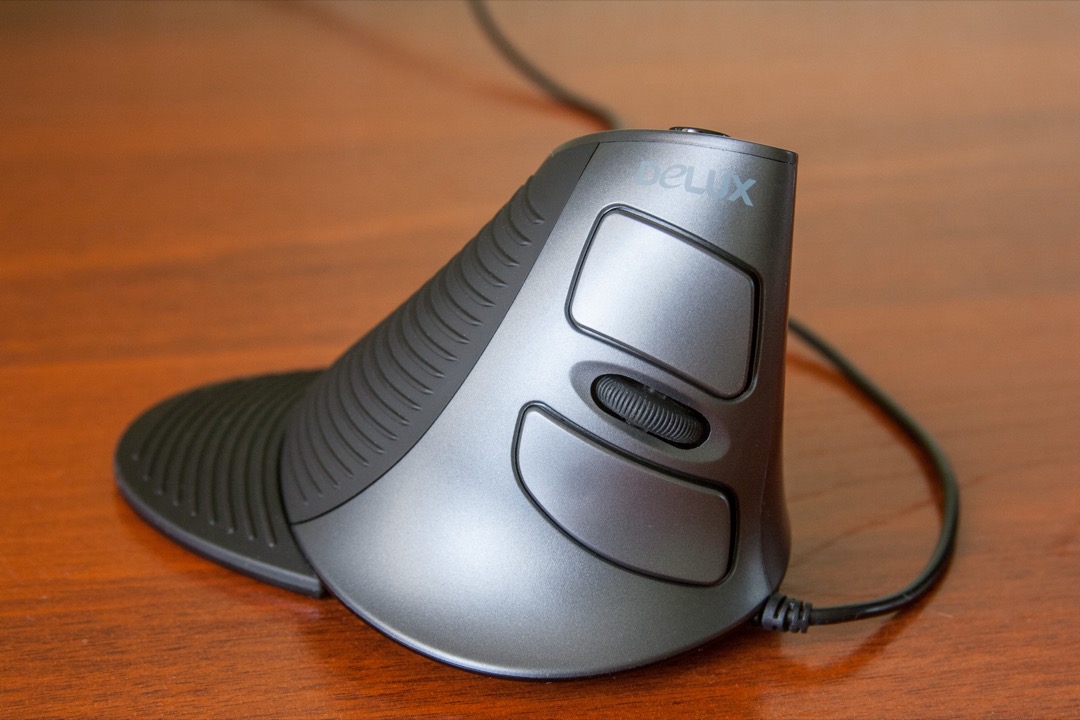
9 Best Vertical Mice of 2026, Tested for Wrist Relief
A flat mouse holds your forearm in constant pronation — palm rotated down, the two bones in your forearm crossed and the muscles loaded the entire workday. A vertical mouse rotates your hand into a handshake position instead, and for a lot of office workers that single change is the difference between a forearm that aches by 3 p.m. and one that doesn’t. I’m Sarah Chen, a Certified Administrative Professional, and after two decades of setting up workstations I’ve watched vertical mice go from a niche ergonomic curiosity to the first thing I recommend when someone mentions wrist or forearm fatigue.
The catch is that “vertical mouse” covers a huge range — a $20 dongle mouse and a $109 clinical tool both wear the label, and the right one depends almost entirely on your hand size, your hand (left or right), and whether your office machine will even let you pair a Bluetooth device. This guide sorts the field by exactly those questions. If you’re also rethinking your keyboard, our best ergonomic keyboards guide pairs naturally with any pick here.
| Product | Price | Buy |
|---|---|---|
| Logitech Lift Vertical Ergonomic MouseBest Overall | $64.99 | View on Amazon |
| Anker 2.4G Wireless Vertical Ergonomic Optical MouseBudget Pick | $19.98 | View on Amazon |
| Logitech MX Vertical Advanced Ergonomic MousePremium Pick | $77.95 | View on Amazon |
| Logitech Lift Left Vertical Ergonomic Mouse (Left-Handed)Runner-Up | $35.00 | View on Amazon |
| Anker USB Wired Vertical MouseRunner-Up | $16.99 | View on Amazon |
| TECKNET Wireless Bluetooth Vertical Ergonomic MouseRunner-Up | $20.85 | View on Amazon |
| Perixx PERIMICE-713L Wireless Left-Handed Vertical MouseRunner-Up | $19.99 | View on Amazon |
| Perixx PERIMICE-713RX Rechargeable Vertical MouseRunner-Up | $29.99 | View on Amazon |
| Evoluent VerticalMouse 4 (VM4RW) WirelessRunner-Up | $109.45 | View on Amazon |
Find the Best Vertical Mouse for Your Need
Jump straight to the pick that matches how and where you work:
- Overall best vertical mice
- Best wireless vertical mouse
- Best wired vertical mouse
- Best left-handed vertical mouse
- Best vertical mouse for small hands
- Best vertical mouse for large hands
- Best budget vertical mouse
- More use cases: rechargeable, Mac, power users
How We Chose These Vertical Mice
I weighted three things above raw specs. First, fit: a vertical mouse that doesn’t match your hand size is one you’ll abandon in a week, so every pick is tagged small, medium, or large. Second, the honesty of the ergonomics — a genuine 57-degree-plus handshake angle with real forearm support, not a mildly tilted flat mouse wearing the label. Third, the office realities that reviews skip: whether the mouse pairs on a Bluetooth-locked corporate desktop, whether the clicks are quiet enough for a live call, and whether it’s proven at scale. Review counts and current ratings were pulled live from Amazon; the lineup runs from a $20 dongle mouse to a $109 clinical tool so there’s a right answer at every budget.
Best Vertical Mice Overall
The Logitech Lift is the vertical mouse I hand to most people first: the correct handshake angle, quiet clicks, multi-device pairing, and a small-to-medium hand fit that covers the majority of office workers. The reviews below are the full field — every mouse appears once here, and the use-case sections further down simply point back to these picks.
Best Overall: Logitech Lift Vertical Ergonomic Mouse
The Lift gets the fundamentals right for the widest range of hands. Its 57-degree angle is a true handshake position, not a token tilt, and Logitech sized the shell specifically for small-to-medium hands — the exact group the larger, older MX Vertical never fit well. In practice that means most people can pick it up and adapt within a week rather than fighting a mouse that’s too big for their grip.
It’s also the most office-ready pick here. Quiet clicks keep it silent on live calls, and the Bluetooth-plus-Logi-Bolt dual mode means it pairs on a personal laptop and on a corporate desktop where IT has switched Bluetooth off. Three-device Easy-Switch handles the hybrid worker’s work-laptop-and-home-desktop reality with one button. The only real trade-offs are the one-to-two-week adjustment curve every vertical mouse imposes and a single AA battery instead of a rechargeable pack — a fair price for the fit and features.

Logitech Lift Vertical Ergonomic Mouse
by Logitech
The best vertical mouse for most office workers — a true 57-degree handshake angle, quiet clicks for open offices and calls, multi-device pairing, and the small-to-medium hand fit that makes it the most accessible entry point to vertical mousing.
Pros
- 57-degree handshake angle rotates the wrist out of the palm-down pronation a flat mouse forces, which is the specific posture change that takes the static load off the forearm during an eight-hour office day
- Sized deliberately for small to medium hands (roughly 6.9 to 8 inches, base of palm to fingertip), which is the fit most vertical mice miss — the larger MX Vertical leaves smaller hands stretching for the buttons
- Quiet clicks reduce audible click noise to near-silent, so the mouse is appropriate for open offices and live video calls where a flat mouse's click cadence carries across the room
- Bluetooth plus Logi Bolt USB dual mode pairs with three devices and switches with a button on the base — practical for the work-laptop-plus-personal-desktop setup and for corporate machines where IT has disabled Bluetooth
Cons
- One to two week adaptation curve is real; fine cursor work like spreadsheet cell-selection or design feels slower for the first week before the hand relearns the angle
- Right-handed and left-handed models are sold as separate products, so left-handed buyers must specifically choose the Lift for Left listing or they will receive the right-handed shape
- Runs on a single AA cell rather than a rechargeable pack, so you trade dockless recharging for the two-year convenience of a replaceable battery
Best Budget: Anker 2.4G Wireless Vertical Ergonomic Mouse
With more than 53,000 ratings, the Anker wireless is the most battle-tested vertical mouse on Amazon by a wide margin — and at that scale, a budget mouse’s reliability is a known quantity rather than a gamble. It delivers the one thing that matters most, the handshake angle that takes your forearm out of pronation, and skips the premium extras.
The plug-and-play 2.4 GHz receiver is quietly its best feature for office use: no software, no pairing, works instantly on a locked-down corporate desktop. Adjustable DPI covers single- and dual-monitor setups. You give up Bluetooth entirely and the build feels its price, but as a first vertical mouse to test whether the format works for your wrist, nothing else offers this much proof for this little money.

Anker 2.4G Wireless Vertical Ergonomic Optical Mouse
by Anker
The most-reviewed and most cost-effective vertical mouse on Amazon — a plug-and-play nano receiver that works on any locked-down office desktop, adjustable DPI, and the core handshake ergonomics at a quarter of the premium price.
Pros
- More than 53,000 verified Amazon ratings make this the most battle-tested vertical mouse on the platform by a wide margin — the failure rate at that scale is well-understood, which matters more on a budget mouse than any spec
- The 2.4 GHz nano receiver is plug-and-play with no software or pairing, so it works immediately on locked-down corporate desktops where Bluetooth is disabled and app installs are blocked
- Adjustable DPI (800/1200/1600) via a dedicated button covers everything from a single 1080p monitor to a dual-monitor office setup without needing a companion app
- Costs roughly a quarter of the premium picks while delivering the same core ergonomic benefit — the handshake angle that takes your forearm out of pronation — which makes it the right first vertical mouse to test the format before committing
Cons
- AA batteries rather than a rechargeable pack, and the mouse is heavier in the hand than the Logitech models once the cells are in
- No Bluetooth option at all — the nano receiver occupies a USB-A port and cannot pair to a tablet or a USB-C-only laptop without an adapter
- Build materials are visibly budget: the plastic and scroll wheel feel their price next to the Lift or MX Vertical, even though function holds up
Upgrade Pick: Logitech MX Vertical Advanced Ergonomic Mouse
The MX Vertical is the premium answer, and specifically the answer for large hands — the anatomy the Lift leaves cramped. Same 57-degree angle, bigger chassis, and a USB-C rechargeable battery that runs up to four months and keeps working plugged in, so it doubles as a wired mouse when you want it to.
Its standout feature is Logitech Flow: pair it across a Mac and a PC on the same desk and the cursor crosses between them as if they shared one screen, copy-paste included. For anyone running two machines, that’s a genuine software KVM. It’s the largest mouse here and right-handed only, but for large-handed users and dual-computer desks it’s the clear step up.

Logitech MX Vertical Advanced Ergonomic Mouse
by Logitech
The premium vertical mouse for large hands and dual-computer workflows — a rechargeable USB-C battery, Logi Flow cursor sharing across two machines, and the build quality that justifies the step up from the budget field.
Pros
- Sized for large hands (palm width over 4 inches, longer fingers) at a 57-degree angle — the correct vertical mouse for the anatomy that finds the smaller Lift cramped, which is the single most common fit complaint in vertical mouse reviews
- USB-C rechargeable with up to four months per charge and a one-minute fast charge that yields a full day, and it keeps working plugged in — so it doubles as a wired mouse on request
- Logitech Flow moves the cursor between two computers as if they shared one screen, with copy and paste working across both — a genuine software KVM for anyone running a Mac and a PC on the same desk
- Bluetooth plus Logi Bolt USB with three-device Easy-Switch, including the corporate-friendly receiver for machines where IT policy blocks Bluetooth
Cons
- At 135 grams and a tall profile it is the largest mouse here in any orientation; small-handed users should choose the Lift instead, where the smaller chassis is a deliberate fit decision
- Right-handed only, with no left-handed MX Vertical produced — left-handed users wanting this tier must look to the Lift for Left or outside Logitech
- The 2018 design has had no successor, so while fully supported and stocked, it is the older generation of Logitech's vertical line
Best Left-Handed: Logitech Lift Left Vertical Ergonomic Mouse
Left-handed users are usually stuck choosing between ambidextrous mice that fit no one well and no-name imports with no support. The Lift for Left is the rare exception: a properly mirrored shell — buttons, scroll, and sculpt all built for the left hand — with the identical 57-degree ergonomics, quiet clicks, and multi-device pairing of the standard Lift.
You pay a premium over budget lefty options for what’s functionally a mirror of the standard Lift, but you’re buying Logitech’s build, Options+ software, and warranty — a meaningful step up in a niche where those are usually absent. Small-to-medium sizing only, since there’s no left-handed MX Vertical for large hands.

Logitech Lift Left Vertical Ergonomic Mouse (Left-Handed)
by Logitech
The best left-handed vertical mouse — a properly mirrored shell with the exact ergonomics, quiet clicks, and multi-device pairing of the standard Lift, and the only left-handed vertical from a major brand with real software and warranty support.
Pros
- A genuinely mirrored left-handed shell, not a symmetrical compromise — the buttons, scroll, and sculpt are built for the left hand, which is rare enough that left-handed users often settle for ambidextrous mice that fit no one well
- Same 57-degree handshake angle, quiet clicks, and small-to-medium hand fit as the standard Lift, so left-handed office workers get the identical ergonomic package the right-handed majority takes for granted
- Bluetooth plus Logi Bolt USB with three-device Easy-Switch, so it drops into a corporate machine or a personal setup with the same multi-device flexibility as the rest of the Logitech line
- Backed by Logitech's warranty and Options+ software support, which is a meaningful difference from the no-name left-handed verticals that dominate the budget end of this niche
Cons
- Carries a premium over the budget left-handed options for what is functionally the mirror of the standard Lift — you are paying for the brand's build and software, not extra features
- Small-to-medium sizing only; large-handed left-handers have no true premium option, since there is no left-handed MX Vertical
- Same AA battery and one-to-two week adjustment curve as the standard Lift
Best Wired: Anker USB Wired Vertical Mouse
Not every desk wants a battery to manage. The Anker wired vertical is live the instant it’s plugged in — no pairing, no recharging, no wireless radio for a corporate security policy to block and nothing to troubleshoot in a crowded office RF environment. For shared workstations, call-center desks, and security-locked machines, that simplicity is the whole point.
Over 9,000 ratings make it one of the most-proven corded verticals, and it delivers the same forearm relief as its wireless sibling with no ongoing battery cost. The cable is the obvious limit, and it’s right-handed with a medium sculpt, but as a set-and-forget office mouse it’s hard to beat for the money.

Anker USB Wired Vertical Mouse
by Anker
The best wired vertical mouse — no battery, no pairing, no wireless radio for IT to block, just a proven handshake-angle sculpt that comes alive the moment it is plugged in, ideal for shared and locked-down office machines.
Pros
- A wired connection means zero battery management and zero pairing — the mouse is live the instant it is plugged in, which is exactly what a shared workstation, a call-center desk, or a security-locked machine needs
- No wireless radio at all, so there is nothing for a corporate security policy to block and no 2.4 GHz interference to troubleshoot in a crowded office wireless environment
- Over 9,000 ratings on a sub-$30 wired vertical put it among the most-proven corded options, with the same Anker reliability record as the wireless version
- Adjustable DPI (1000/1600) and a comfortable handshake sculpt deliver the core forearm-pronation relief without any of the ongoing cost of a rechargeable or AA-powered mouse
Cons
- The cable is the point but also the limitation — no portability, and cable drag is noticeable to users coming from a wireless mouse
- Right-handed only, with a medium-hand sculpt that runs slightly large for the smallest hands
- Lower DPI ceiling than the premium picks, which is a non-issue for office work but limits fast traversal on a 4K or ultrawide display
Runner-Up Multi-Device Value: TECKNET Wireless Bluetooth Vertical Mouse
The TECKNET punches above its budget price by offering something the budget field almost never does: dual Bluetooth and 2.4 GHz connection. That means it pairs to a tablet or a Bluetooth laptop and keeps a receiver for the corporate desktop — genuine multi-device flexibility at a budget tier. Its six-level DPI ceiling of 4800 also gives real cursor-speed headroom for high-resolution and dual-monitor setups.
A roughly 12-month charge cycle lands it between disposable-AA budget mice and pricier rechargeables, and quiet clicks keep it call-appropriate. The build is budget-tier and the taller shell favors medium-to-large hands, but for a multi-device office setup on a tight budget it’s the value standout.

TECKNET Wireless Bluetooth Vertical Ergonomic Mouse
by TECKNET
The best budget vertical mouse with real multi-device support — dual Bluetooth and 2.4 GHz pairing, a 4800 DPI ceiling, and a year-long charge cycle at a price the dongle-only budget field can't match on features.
Pros
- Dual Bluetooth and 2.4 GHz connection at a budget price is unusual — most sub-$30 verticals are dongle-only, so this one pairs to a tablet or a Bluetooth laptop and still keeps a receiver for corporate desktops
- Six-level adjustable DPI up to 4800 is far higher than the budget field, giving genuine cursor-speed headroom for dual-monitor and high-resolution office setups
- Rated for roughly a 12-month battery on a single charge cycle, so it lands between the disposable-AA budget mice and the pricier rechargeables in ongoing convenience
- Quiet-click switches keep it call-appropriate, and over 12,000 ratings give it a real reliability track record for the price
Cons
- Build and scroll-wheel feel are budget-tier; it does not match the Logitech models in materials or long-term click feel
- The taller shell suits medium to larger hands better than small hands, where the Lift is a cleaner fit
- Right-handed only, with no left-handed variant offered
Budget Left-Handed Pick: Perixx PERIMICE-713L Wireless Left-Handed Vertical Mouse
For left-handed workers who want to try the vertical format without the Lift for Left’s premium, the Perixx 713L is the most-proven affordable option — one of the few genuinely left-handed verticals under $20, with more than 2,600 ratings behind it in a category otherwise full of unreviewed imports. Six buttons and three-level DPI cover navigation and cursor speed that cheaper mice omit.
It’s dongle-only with an AA battery and a plainer build than the Logitech, and the medium sculpt won’t suit the smallest or largest left hands. But as an inexpensive way to find out whether vertical mousing helps your wrist, it’s the right lefty starting point.
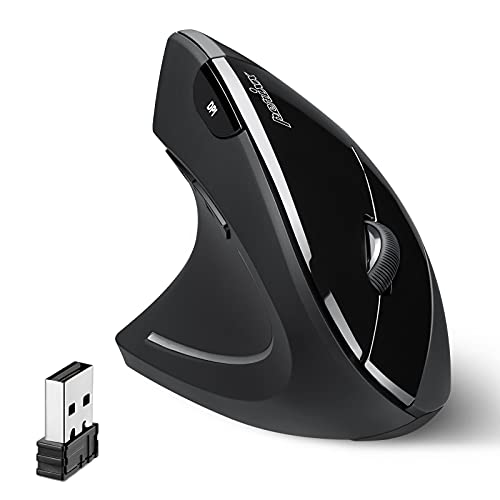
Perixx PERIMICE-713L Wireless Left-Handed Vertical Mouse
by Perixx
The best budget left-handed vertical mouse — a properly left-handed sculpt with six buttons and adjustable DPI under $20, and the most-reviewed affordable lefty option for testing the vertical format without paying the premium.
Pros
- One of the few genuinely left-handed vertical mice under $20, and with more than 2,600 ratings it is the most-proven budget lefty option — a category where most listings are unreviewed no-name imports
- Six-button design with three-level adjustable DPI covers back/forward navigation and cursor-speed changes that most cheap mice omit
- A 2.4 GHz nano receiver keeps it plug-and-play on locked-down machines, and the medium sculpt fits the majority of left hands comfortably
- Delivers the same forearm-pronation relief as mice three times the price, which makes it the right way for a left-handed worker to test the vertical format without a premium commitment
Cons
- AA battery and dongle-only connection — no Bluetooth and no rechargeable option
- Budget build materials and a plainer finish than the Logitech Lift for Left
- Medium sizing only, so very small or very large left hands may not find an ideal fit
Best Rechargeable: Perixx PERIMICE-713RX Rechargeable Vertical Mouse
The 713RX solves the friction that kills most rechargeable mice — remembering to plug them in — by shipping both a cable and a wireless charging pad. Set it on the pad between sessions and it never sits dead. That’s rechargeable convenience under $30, a price point where rechargeables are usually missing entirely, with no disposable-AA cost.
Six buttons, three-level DPI, and a plug-and-play receiver round out a solid office feature set. The review base is still thin next to the Anker and Logitech veterans, and it’s right-handed with a medium sculpt, but for a rechargeable pick that stays topped up without effort it’s the standout.

Perixx PERIMICE-713RX Rechargeable Vertical Mouse
by Perixx
The best rechargeable vertical mouse under $30 — a dual cable-and-pad charging system that keeps it topped up between sessions, adjustable DPI, and a plug-and-play receiver, so you get rechargeable convenience without the budget field's disposable batteries.
Pros
- Dual charging — a standard cable plus an included wireless charging pad — so the mouse tops up on the pad between sessions and never sits dead, which is the friction point that kills most rechargeable mice
- Rechargeable battery eliminates the disposable-AA cost of the budget field while staying under $30, a price point where rechargeables are usually absent
- Six-button layout with three-level DPI and a comfortable handshake sculpt for medium hands covers the core office feature set
- The 2.4 GHz receiver keeps it plug-and-play on corporate desktops, so the rechargeable convenience does not cost you Bluetooth-blocked compatibility
Cons
- Newer listing with a smaller review base than the proven Anker and Logitech picks, so the long-term reliability record is still thin
- Right-handed only, with a medium sculpt that runs large for the smallest hands
- The wireless charging pad is a nice touch but one more thing to keep on the desk versus a simple cable
Most Programmable: Evoluent VerticalMouse 4 (VM4RW) Wireless
Evoluent patented the vertical mouse shape in 2002, and the VerticalMouse 4 is still the reference design — a fully upright sculpt with a pronounced thumb rest and finger ledges that support the whole hand in a static neutral posture. Reviewers consistently rate it as the most complete pronation relief of any mouse here, which is why occupational-health programs specify it when the goal is maximum posture correction rather than budget.
Six fully programmable buttons with per-application mapping make it a fixture on power-user, CAD, and finance desks. It’s easily the priciest option and has the steepest adjustment curve of the group, with dated styling and an older driver, but for anyone whose priority is relief and control over cost, it’s the tool.

Evoluent VerticalMouse 4 (VM4RW) Wireless
by Evoluent
The original and most programmable vertical mouse — a fully upright, occupational-health-grade sculpt with six mappable buttons and the deepest pronation relief on this list, for power users and anyone whose priority is posture correction over price.
Pros
- From the company that patented the vertical mouse shape in 2002, with a fully upright sculpt that reviewers consistently rate as the most complete pronation relief of any mouse here — the reference design the category is built on
- Six customizable buttons with per-application mapping in the Evoluent driver make it the most programmable pick, which is why it is a fixture on power-user, CAD, and finance desks
- A pronounced thumb rest and finger ledges support the whole hand in a static neutral posture, the detail that separates a true ergonomic tool from a merely angled mouse
- Wireless with a nano receiver and a long clinical track record — this is the mouse occupational-health programs specify when the goal is maximum posture correction rather than budget
Cons
- By far the most expensive option here, at a clinical-tool price that only makes sense when pronation relief is a priority rather than a preference
- The aggressive full-vertical shape has the steepest adjustment curve of any mouse on this list — the payoff is real but the first weeks are the hardest
- Utilitarian styling and an older driver experience that feels dated next to Logitech's Options+
Best Wireless Vertical Mouse
If you want to lose the cable, the decision comes down to how much you want to spend and how big your hand is. The Lift is the all-around wireless pick for most hands; the MX Vertical is the rechargeable, large-hand, dual-computer upgrade; the Anker is the proven budget entry point. All three pair wirelessly, but only the two Logitech models add Bluetooth for tablets and modern laptops.
| Product | Price | Buy |
|---|---|---|
| Logitech Lift Vertical Ergonomic MouseBest wireless overall Bluetooth + Bolt, quiet clicks, fits most hands | $64.99 | View on Amazon |
| Logitech MX Vertical Advanced Ergonomic MouseBest rechargeable wireless USB-C rechargeable, large hands, Logi Flow across two PCs | $77.95 | View on Amazon |
| Anker 2.4G Wireless Vertical Ergonomic Optical MouseBest budget wireless 53k+ ratings, dongle-only, plug-and-play on locked-down desktops | $19.98 | View on Amazon |
Best Wired Vertical Mouse
A wired vertical makes sense when you don’t want to manage a battery, when IT blocks wireless pairing, or when the mouse lives on a shared or security-locked machine. The Anker wired is the purpose-built pick — no radio, no battery, instantly live. The MX Vertical is the premium alternative: it ships with a USB-C cable and works fully wired with its wireless radios off, so you get a corded connection and a rechargeable mouse in one.
| Product | Price | Buy |
|---|---|---|
| Anker USB Wired Vertical MouseBest dedicated wired mouse Pure USB-A wired, no battery or radio — ideal for locked-down desks | $16.99 | View on Amazon |
| Logitech MX Vertical Advanced Ergonomic MousePremium wired-capable pick Runs fully wired over USB-C with radios off, doubling as a rechargeable | $77.95 | View on Amazon |
Best Left-Handed Vertical Mouse
Left-handed vertical mice are a genuinely thin market, so the choice is really premium versus budget. The Logitech Lift for Left is the only properly mirrored vertical from a major brand with real software and warranty support. The Perixx 713L is the most-proven affordable lefty option for testing the format first.
| Product | Price | Buy |
|---|---|---|
| Logitech Lift Left Vertical Ergonomic Mouse (Left-Handed)Best left-handed overall Mirrored shell, quiet clicks, Bluetooth + Bolt, brand support | $35.00 | View on Amazon |
| Perixx PERIMICE-713L Wireless Left-Handed Vertical MouseBest budget left-handed Under $20, dongle-only, 2.6k+ ratings — the proven budget lefty | $19.99 | View on Amazon |
Best Vertical Mouse for Small Hands
Hand size is the single biggest predictor of whether a vertical mouse works for you, and small hands are the group most often let down by oversized shells. The Logitech Lift was designed specifically for small-to-medium hands, which makes it the default here. The Anker wireless is a reasonable budget alternative with a less aggressive, more compact form for smaller grips.
| Product | Price | Buy |
|---|---|---|
| Logitech Lift Vertical Ergonomic MouseBest for small hands Purpose-sized for small-to-medium hands with quiet clicks | $64.99 | View on Amazon |
| Anker 2.4G Wireless Vertical Ergonomic Optical MouseBudget small-hand option Compact budget shell, plug-and-play, proven at scale | $19.98 | View on Amazon |
Best Vertical Mouse for Large Hands
Large hands need the opposite of the Lift: a taller, longer shell that fills the palm so the fingers aren’t curled up. The MX Vertical is the large-hand champion, sized deliberately for bigger anatomy at the same 57-degree angle. The Evoluent VerticalMouse 4 is the alternative for large-handed power users who want maximum posture support and programmable buttons.
| Product | Price | Buy |
|---|---|---|
| Logitech MX Vertical Advanced Ergonomic MouseBest for large hands Large chassis, 57-degree angle, rechargeable, Logi Flow | $77.95 | View on Amazon |
| Evoluent VerticalMouse 4 (VM4RW) WirelessLarge-hand power-user pick Fully upright sculpt, 6 programmable buttons, deepest relief | $109.45 | View on Amazon |
Best Budget Vertical Mouse
You don’t need to spend $60 to get the core ergonomic benefit. The Anker wireless is the safest budget bet on sheer proof; the TECKNET adds Bluetooth and a high DPI ceiling for a couple dollars less; the Perixx 713L is the budget answer for left-handers. All three deliver the handshake angle that does the actual work.
| Product | Price | Buy |
|---|---|---|
| Anker 2.4G Wireless Vertical Ergonomic Optical MouseBest budget overall 53k+ ratings, plug-and-play, the proven safe pick | $19.98 | View on Amazon |
| TECKNET Wireless Bluetooth Vertical Ergonomic MouseBest budget multi-device Dual Bluetooth + 2.4 GHz and 4800 DPI at a budget price | $20.85 | View on Amazon |
| Perixx PERIMICE-713L Wireless Left-Handed Vertical MouseBest budget left-handed Under $20 mirrored left-handed sculpt | $19.99 | View on Amazon |
Best Vertical Mice by Use Case
A few narrower needs, matched to the pick that fits them best:
| Product | Price | Buy |
|---|---|---|
| Perixx PERIMICE-713RX Rechargeable Vertical MouseBest rechargeable Cable + wireless charging pad keeps it topped up between sessions | $29.99 | View on Amazon |
| Logitech Lift Vertical Ergonomic MouseBest for Mac macOS and iPadOS compatible with Bluetooth and Easy-Switch | $64.99 | View on Amazon |
| Evoluent VerticalMouse 4 (VM4RW) WirelessBest for power users Six per-app programmable buttons for CAD, finance, and heavy multitasking | $109.45 | View on Amazon |
Buyer's Guide
A vertical mouse is one of the few desk upgrades that changes your posture rather than just your workflow, so the right choice is less about specs and more about matching the mouse to your hand and your office environment. Here's what actually determines whether you'll still be using it in a month.
Hand size and fit
This is the first and most important filter. Measure from the base of your palm to the tip of your middle finger: under about 6.9 inches is small, 6.9 to 8 inches is medium, and above 8 inches is large. Small-to-medium hands should start with the Logitech Lift, which is sized for them; large hands need the MX Vertical or the Evoluent, which fill the palm so the fingers aren't curled. A mouse that's too big forces you to stretch for the buttons and defeats the ergonomic purpose entirely — the most common reason people abandon a vertical mouse is buying one sized for the wrong hand.
Orientation and angle
Not all 'vertical' mice are equally vertical. A true 57-degree-or-greater handshake angle, like the Logitech and Evoluent picks, meaningfully reduces forearm pronation; a mildly tilted flat mouse offers a fraction of the benefit. The steeper the angle, the more relief — but also the longer the adjustment curve. The Evoluent's near-fully-upright sculpt gives the deepest relief and the hardest first week; the Logitech 57-degree angle is the sweet spot most people adapt to fastest.
Connection type (wireless, Bluetooth, or wired)
The overlooked office reality is that many corporate machines have Bluetooth disabled by security policy. If you're buying for a locked-down work computer, favor a model with a 2.4 GHz USB receiver (every wireless pick here has one) or go fully wired with the Anker. For personal machines and tablets, Bluetooth on the Logitech and TECKNET models keeps a USB port free and pairs to more devices. Wired eliminates batteries and pairing entirely — ideal for shared or security-locked desks.
Left-handed availability
Left-handed vertical mice are a thin market, and a right-handed vertical is genuinely unusable in the left hand — the thumb buttons and sculpt are backwards. If you're left-handed, you have two real choices: the Logitech Lift for Left for brand build and software support, or the Perixx 713L as a proven budget option. Don't settle for an 'ambidextrous' vertical; the whole benefit comes from a shell built for one specific hand.
Battery: rechargeable, replaceable, or wired
Rechargeable mice like the MX Vertical and Perixx 713RX eliminate disposable-battery cost but need docking or a pad; the 713RX's included charging pad removes most of that friction. AA-powered mice like the Lift run up to two years on a cell and are trivially revived with a spare battery. Wired mice sidestep the question entirely. For users who keep a mouse five-plus years, an AA model often has the lowest lifetime cost; for a tidy desk, rechargeable wins.
Buttons and DPI for productivity
Office work rarely needs high DPI, but back/forward thumb buttons and per-application button mapping are genuine productivity gains for anyone who lives in browsers, file managers, and spreadsheets. The Evoluent leads here with six fully programmable buttons; the Logitech models offer solid customization through Options+. If you just need a comfortable mouse for documents and email, the budget picks' fixed DPI and standard buttons are entirely sufficient — don't overbuy features you won't map.
How to Choose the Best Vertical Mouse for You
Work the filters in order. Start with your hand size, because it eliminates most of the field immediately — small-to-medium hands to the Lift, large hands to the MX Vertical or Evoluent. Then apply your hand: if you’re left-handed, you’re choosing between the Lift for Left and the Perixx 713L, full stop. Next, check your office machine — if IT has locked down Bluetooth, you want a 2.4 GHz receiver or a wired mouse. Finally, set your budget: the core forearm relief is available at $20, so the premium picks are about fit, build, rechargeable convenience, and software, not about whether the ergonomics work.
Whatever you choose, give it two weeks. Every vertical mouse feels slow and slightly awkward for the first several days while your hand relearns the angle — that’s universal and temporary, not a sign you bought the wrong one. Pair it with a supportive setup and the payoff compounds: our ergonomic desk setup guide and best keyboard wrist rests cover the rest of the workstation, and a good desk mat gives the optical sensor a consistent surface to track on.
Frequently Asked Questions
Do vertical mice actually help with wrist pain and carpal tunnel?
For many people, yes — but with an important caveat. A vertical mouse rotates your forearm out of the palm-down pronation that a flat mouse forces, which reduces the static muscular load that drives a lot of forearm and wrist fatigue. Users with pronation-related discomfort often feel a real difference within a few weeks. That said, I’m a Certified Administrative Professional writing about workstation setup, not a clinician, and a mouse is one input alongside chair height, desk height, monitor distance, and break frequency. If you have persistent, worsening, or numbness-and-tingling symptoms that suggest carpal tunnel, see an occupational therapist or physician — a mouse change is a helpful tool, not a diagnosis or a cure.
How long does it take to get used to a vertical mouse?
Plan on one to two weeks, with the first few days being the most awkward. Your hand has years of muscle memory built around a flat mouse, and the handshake angle relearns fine cursor control — spreadsheet cell-selection and precise clicking feel slower at first. The steeper the mouse’s angle, the longer the curve: the Logitech 57-degree models adapt fastest, while the near-fully-upright Evoluent takes the longest. Almost everyone who pushes through the first week stops noticing the transition entirely by the end of the second.
Wired or wireless vertical mouse — which is better for the office?
It depends on your machine and your desk. Wireless (with a 2.4 GHz receiver) keeps your desk clean and works on most setups, and Bluetooth models add tablet and modern-laptop pairing. But if your work computer has Bluetooth disabled by IT policy — common on managed corporate machines — you want either a mouse with a USB receiver or a fully wired one. Wired mice also eliminate battery management entirely, which is why they’re the right call for shared workstations and security-locked desks. For a typical personal or hybrid setup, wireless with a receiver fallback is the most flexible choice.
Is there a good left-handed vertical mouse?
Yes, though the market is thin. The Logitech Lift for Left is a genuinely mirrored left-handed shell with the same ergonomics, quiet clicks, and multi-device pairing as the standard Lift, plus real warranty and software support — the best option for most left-handed users. On a budget, the Perixx PERIMICE-713L is a proven left-handed vertical under $20. Avoid right-handed verticals hoping to adapt; the thumb buttons and sculpt are built for one specific hand and are genuinely unusable reversed.
Are vertical mice good for gaming?
Not really, and that’s not what these picks are for. The mice in this guide are tuned for office and productivity work — documents, spreadsheets, browsers, and calls — where the ergonomic angle matters far more than sensor polling rate or click latency. Competitive gaming demands a lightweight, high-polling-rate sensor and fast repeated clicks that a vertical office mouse isn’t designed to deliver, and the handshake angle actually works against the rapid flick aiming that shooters require. If your main use is gaming, this is the wrong category; if you game occasionally but work all day, prioritize the workday and accept the vertical mouse is a compromise for play.
Final Verdict
For most office workers, the Logitech Lift is the right vertical mouse — the correct handshake angle, quiet clicks, multi-device pairing, and a hand fit that covers the majority of people, all at a fair price. Large hands and dual-computer desks should step up to the Logitech MX Vertical for its size, rechargeable battery, and Logi Flow; anyone testing the format on a budget should start with the Anker 2.4G Wireless and its 53,000-rating track record. Left-handed users have a genuine best-in-class option in the Lift for Left. Whichever you pick, match it to your hand first, give it two weeks, and build the rest of the workstation around it — the best ergonomic keyboards are the natural next upgrade once your mousing hand is sorted.
Related Articles
7 Best Wireless Mice for Office Work in 2026
desk-setup-furniture
8 Best Desk Mats of 2026
desk-setup-furniture
7 Best Ergonomic Keyboards of 2026
desk-setup-furniture
Ergonomic Desk Setup Guide: Exact Measurements, Angles, and Adjustments for Pain-Free Work
desk-setup-furniture
7 Best Keyboard Wrist Rests of 2026
ergonomic-accessories
About the Reviewer

Sarah Chen, CAP, PMP
B.A. Business Administration, UCLA
Sarah Chen spent 10 years in office management and operations at Fortune 500 companies before founding DeskRated in 2026. After managing supply budgets for teams of 50+ people and testing thousands of products through daily use, she started writing the honest, no-fluff supply reviews that office professionals actually need. Sarah holds both CAP and PMP certifications and is based in Los Angeles.