8 Best Laptop Stands of 2026
Sarah Chen reviews the best laptop stands for ergonomic desk setups. Compare adjustable, foldable, and travel-ready stands by height, material, and laptop compatibility.
Updated
In my years coordinating office procurement and ergonomic workstation rollouts for administrative and operations teams, the laptop stand is the single most cost-effective ergonomic correction available for a desk setup that includes a laptop. A laptop placed flat on a desk forces a posture that occupational therapists describe with a specific term — “laptop neck” — referring to the sustained forward neck flexion required to look down at a screen positioned roughly 12 inches below natural seated eye level. Over a workday, that flexion creates the trapezius tension and cervical fatigue that build into chronic upper-back discomfort. In 2026, a properly chosen laptop stand corrects the geometry in a way that an ergonomic keyboard or wrist rest cannot — it addresses the screen-height problem at its source, raising the display to natural eye level and freeing the user to type on an external keyboard at desk-level arm height. The two corrections together complete the ergonomic equation; one without the other addresses only half the problem.
For this review, we evaluated eight laptop stands across the full price and design spectrum: continuously adjustable aluminum risers, the most-reviewed budget aluminum stand on Amazon, the benchmark single-piece machined aluminum upgrade, foldable dual-rod designs, weighted-base adjustable stands, vertical desk-saving stands for clamshell-mode laptops (both a premium steel pick and a budget aluminum dock), and the travel-optimized polymer stand that has redefined what a portable laptop stand can be. We focused specifically on the products where verified Amazon buyers are spending their money — the listings with thousands or tens of thousands of reviews — and evaluated them against the four specifications that actually determine whether a laptop stand will be used daily or relegated to a closet shelf: height range, stability, portability, and laptop compatibility.
Before committing to a laptop stand, also consider the rest of your desk setup. The right stand pairs naturally with a monitor stand or monitor arm configuration if you run a laptop alongside an external display, because the goal is a single horizontal eye-line across both screens. We will return to that dual-display alignment problem later in this review, since it changes which laptop stand is appropriate for your specific setup.
| Product | Price | Buy |
|---|---|---|
| BoYata Laptop Stand, Adjustable Multi-Angle Laptop HolderBest Overall | $29.99 | View on Amazon |
| SOUNDANCE Laptop Stand, Aluminum Computer RiserBudget Pick | $17.99 | View on Amazon |
| Rain Design 10032 mStand Laptop Stand, SilverPremium Pick | $39.90 | View on Amazon |
| Nulaxy Ergonomic Adjustable Laptop Stand, Dual FoldableRunner-Up | $15.99 | View on Amazon |
| Lamicall Adjustable Laptop Stand, Foldable Aluminum | $35.99 | View on Amazon |
| Twelve South Curve for MacBooks and Laptops | $59.95 | View on Amazon |
| Roost V3 Laptop Stand | $89.95 | View on Amazon |
| UGREEN Vertical Laptop Stand Holder for Desk, Adjustable | $19.99 | View on Amazon |
Find the Best Laptop Stand for How You Work
Jump straight to the pick that matches your setup:
- Best laptop stands overall — our eight top picks, reviewed
- Portable for travel — light, packable stands for working on the road
- Vertical for clamshell setups — recover desk depth with a docked laptop
- Foldable — fold-flat stands for a desk you reorganize
- Aluminum — metal-grade rigidity with heat-sink cooling
How We Chose These Laptop Stands
Our selection process required each stand to be a currently active Amazon listing with verifiable purchase data, a minimum review threshold of 1,000 verified ratings, and a sustained 4.7-star or higher average rating. We evaluated height ranges against the realistic range of seated eye-level requirements (which vary substantially by user height — anywhere from 4 inches to 12 inches of laptop elevation depending on chair height, desk height, and torso proportions). We assessed structural stability against the actual forces a laptop stand experiences in daily use, including screen closing, repositioning, and incidental contact during typing. We compared maximum laptop size and chassis depth specifications against the most common laptop footprints — 13-inch MacBook Air, 14-inch ThinkPad, 15-inch Dell XPS, 16-inch MacBook Pro, and 17-inch Windows laptops — to ensure each stand on this list supports a meaningful share of the market. We also weighted the review pool size as a quality signal: a stand with 50,000 verified reviews at 4.8 stars has a stronger long-term reliability dataset than a stand with 500 reviews at the same rating, and that signal matters for products that will see thousands of repositioning cycles over their lifetime.
Best Laptop Stands Overall
These are the eight stands we recommend, each reviewed in full below. Each is the best answer for a particular setup — from an under-twenty-dollar most-reviewed budget riser to a travel stand that folds to six ounces to a vertical dock that recovers desk depth. If you already know how you work, jump to the use-case sections further down for a focused two-or-three-product comparison.
BoYata Laptop Stand — Best Overall
The BoYata Laptop Stand earns its best-overall position by being the only continuously adjustable aluminum stand on this list with the build quality, weight capacity, and review validation to match. The multi-angle adjustment system is the differentiating feature: where most adjustable stands offer 3 to 5 stepped positions, the BoYata’s hinged arms move continuously through both height and tilt ranges, locking firmly at any position via tensioned joints. In practical terms, this means you can dial in the exact elevation that places your laptop screen at your specific seated eye level — not an approximation chosen from preset positions, but the precise height your eye level actually requires.
The structural execution matches the adjustment range. The alloy steel frame is heavy gauge and the joints are reinforced at every articulation point, which prevents the wobble that plagues lighter telescoping stands when you press a key on the laptop’s built-in keyboard or close the screen. Silicone pads cover every contact surface — the base feet that grip the desk, the laptop platform, the angled back stop that prevents the laptop from sliding forward — both protecting the laptop chassis and anchoring the stand against incidental movement. The 14,824 verified reviews at 4.8 stars represent the strongest validation signal in the adjustable-stand category at this price point; for users who want a single stand that handles every laptop, every height adjustment, and every workflow without compromise, this is the default recommendation.
The honest limitation is that the BoYata does not fold — its minimum profile, even with the arms collapsed, takes up substantial desk depth. For users who need to clear desk space frequently or travel between locations, the Nulaxy or Roost V3 are better-matched to that workflow. For users with a permanent desk setup where the stand will live in one position, the BoYata’s adjustment quality and build rigidity make it the correct first-stand recommendation for the majority of professional and home office setups.

BoYata Laptop Stand, Adjustable Multi-Angle Laptop Holder
by BoYata
The most versatile adjustable laptop stand on Amazon — multi-angle height and tilt, heavy alloy steel frame, and silicone-protected contact surfaces in a single package backed by nearly 15,000 verified reviews.
Pros
- Multi-angle height and tilt adjustment lets you dial in the exact screen elevation that matches your seated eye level — the only adjustable stand on this list with continuous (not stepped) positioning
- Heavy-duty alloy steel frame with reinforced joints stays rigid under 17-inch laptops without the wobble that plagues lighter telescoping designs
- Silicone pads on every contact surface — base, arms, and back stop — protect the laptop chassis and prevent the stand from sliding during typing or trackpad use
- 14,824 verified reviews at 4.8 stars is the strongest validation signal in the adjustable-stand category at this price point
Cons
- Non-foldable design — the stand stays at full height when not in use, which makes it less suitable for users who need to clear desk space or travel with it
- The fully-extended footprint is larger than fixed-height stands; verify your desk has at least 11 inches of front-to-back depth available before ordering
SOUNDANCE Laptop Stand — Budget Pick
The SOUNDANCE Aluminum Computer Riser is the laptop stand with more verified Amazon reviews than any other product in the category — over 51,000 buyers at a sustained 4.8-star rating — and that review density alone tells most of the story. A product does not accumulate that level of validation across that many users without doing the fundamental job correctly. The fundamental job here is straightforward: elevate the laptop to roughly eye level for users of average seated height, and do it in a stand that will last for years without flexing, peeling, or losing grip. The SOUNDANCE’s 5mm aluminum alloy construction delivers exactly that for a price below twenty dollars.
The detachable three-piece design is a thoughtful detail at this price point. While the SOUNDANCE is not a true folding stand, the three pieces disassemble flat for storage in a desk drawer or for occasional travel between desk locations. The open-back ventilated geometry is the second meaningful design choice: there is no closed structure between the laptop’s rear vent and the surrounding air, which means hot exhaust air escapes freely rather than recirculating around the chassis. Verified reviewers consistently note temperatures running cooler with the SOUNDANCE than with solid-back risers, and for sustained workloads — video calls, document collaboration, light development — this thermal benefit translates to less throttling and more consistent performance.
The honest limitations are scoped to the price and design type. Fixed 6-inch elevation is appropriate for users of approximately average seated height; users who are significantly taller or shorter will need an adjustable stand to reach their actual eye-level requirement. The 15.6-inch maximum laptop size excludes 16-inch MacBook Pro and 17-inch Windows laptops — verify your laptop’s screen size before ordering. For users with a standard 13- to 15-inch laptop and an average seated height, the SOUNDANCE delivers the most validated value in the entire laptop stand category.

SOUNDANCE Laptop Stand, Aluminum Computer Riser
by SOUNDANCE
The most-reviewed laptop stand on Amazon — 51,000+ verified reviews at 4.8 stars, solid aluminum construction, and fixed 6-inch elevation at the lowest price on this list.
Pros
- 51,707 verified reviews at 4.8 stars is the largest validated review pool of any laptop stand on Amazon — sustained satisfaction across hundreds of thousands of buyers
- 5mm-thick aluminum alloy construction provides metal-grade rigidity at a price point where most competitors use thin sheet metal or plastic composites
- Detachable three-piece design disassembles flat for occasional travel or storage despite not being a true folding stand
- Open-back ventilated design allows full airflow under and behind the laptop — verified reviews consistently note temperatures running cooler than on solid risers
Cons
- Fixed 6-inch height with no adjustment — users whose seated eye level requires a different elevation have no built-in correction option
- Maximum 15.6-inch laptop compatibility excludes 16-inch MacBook Pro and 17-inch Windows laptops — verify your laptop's screen size before purchasing
Rain Design mStand — Upgrade Pick
The Rain Design mStand has been the design reference for premium fixed-height aluminum laptop stands since 2008, and the design has remained essentially unchanged because the original engineering was correct. The mStand is machined from a single piece of aluminum — there are no hinges, no joints, no assembly seams to flex or wear. That single-piece construction is responsible for the stand’s signature characteristic: complete absence of any vibration or movement during use. Type on the laptop’s keyboard, close the screen, lean against the back arch — none of it produces any flex or tremor. For MacBook users in particular, the matte aluminum finish matches the chassis aesthetic precisely, and the sculpted form factor reads as an intentional design accessory rather than a utilitarian peripheral.
The integrated cable management slot is the detail that justifies the premium price for desk setups with multiple connected peripherals. The slot routes the laptop charger, USB-C dock cable, and any additional peripheral cables through a single channel at the back of the stand, eliminating the cable spaghetti that accumulates around laptop stands without dedicated routing. For users who connect their laptop to an external dock, monitor, keyboard, mouse, and audio setup, this single design feature recovers significant visual and functional desk-surface organization.
The mStand’s 5.9-inch fixed elevation places the laptop screen at the correct height for users of approximately average seated height, and the engineered forward tilt of the keyboard surface acts as a deliberate posture cue — the angle is uncomfortable enough for direct typing on the laptop’s keyboard that it nudges users toward the correct ergonomic configuration of an external keyboard at desk level. The 10.4-inch chassis depth limit is the spec to verify before purchasing: 13- and 14-inch laptops fit easily, 15-inch laptops fit if their footprint is depth-conservative, and some 16- and 17-inch laptops exceed the platform. For MacBook Air, MacBook Pro 13/14/16 (footprint-permitting), and depth-compatible PC laptops, the mStand is the single most refined fixed-height stand available at any price tier we evaluated.

Rain Design 10032 mStand Laptop Stand, Silver
by Rain Design
The benchmark single-piece aluminum laptop stand — Rain Design's mStand has been the design reference for premium fixed-height risers since 2008, and the cable routing slot and sculpted form factor justify the upgrade price for MacBook users.
Pros
- Single-piece machined aluminum chassis — there are no joints, hinges, or assembly points to flex or wear, which is why this design has remained essentially unchanged since 2008
- Cable management slot routes the laptop charger and external peripherals through the back of the stand, eliminating the cable spaghetti that accumulates around standard risers
- Sculpted form factor matches the aluminum aesthetic of MacBook Pro and MacBook Air precisely, and the matte finish resists fingerprints during repositioning
- Engineered tilt angle elevates the laptop screen to 5.9 inches above the desk while angling the keyboard surface forward — a deliberate posture cue that discourages laptop-keyboard typing in favor of an external keyboard
Cons
- Chassis depth limited to 10.4 inches — the stand will not accommodate laptops with footprints deeper than that, which excludes some 16- and 17-inch Windows laptops
- Premium price reflects the single-piece machining process; less expensive alternatives provide similar height elevation if the design and cable management are not priorities
Nulaxy Adjustable Laptop Stand — Runner-Up
The Nulaxy Ergonomic Adjustable Laptop Stand fills a specific gap that the BoYata and Rain Design mStand do not address: a high-capacity, fully adjustable, fold-flat aluminum stand at a budget-friendly price. The dual-rod design is the structural engine of the Nulaxy’s performance — two parallel telescoping rods support the laptop platform on both sides, which doubles the load-bearing surface compared to single-rod adjustable stands and produces the 44-pound stated weight capacity. That capacity is the highest on this list, and while no laptop on the market actually requires that headroom, the engineering reserve translates to long-term stability without frame fatigue or joint loosening over thousands of adjustment cycles.
The independent height and angle adjustment is the Nulaxy’s second meaningful feature. Where most adjustable stands move height and angle as a single coupled mechanism, the Nulaxy’s dual rods adjust independently — you can set the rear elevation high while keeping the keyboard surface relatively flat, or set the rear elevation low while tilting the keyboard surface forward at a more aggressive angle. This decoupling matters specifically for users with eye level and wrist-angle preferences that don’t align with the default coupled positions of most adjustable stands.
The fold-flat design is the third differentiator. Unlike the BoYata, which stays at full extension when not in use, the Nulaxy collapses to a flat profile that stores in a desk drawer or fits in a laptop bag for travel between locations. The honest limitations are that the dual-rod adjustment is slower than the BoYata’s single-handed angle adjustment — both rods need tensioning to lock — and the folded profile, while flat, is still approximately 2 inches thick at its narrowest, which is bulkier than the truly travel-optimized Roost V3. For users who need adjustability and foldability at a price point well below the BoYata, the Nulaxy is the right choice. Pair it with a calibrated monitor stand for a hybrid laptop-plus-external-monitor setup, since the Nulaxy’s adjustment range is wide enough to match most external monitor heights precisely.

Nulaxy Ergonomic Adjustable Laptop Stand, Dual Foldable
by Nulaxy
Best foldable adjustable stand — 22 lb weight capacity, dual-rod independent adjustment, and a fold-flat profile that lets you put the stand away when the desk needs to be cleared.
Pros
- Dual-rod design folds completely flat when not in use, which means the stand can be stored in a desk drawer or laptop bag instead of permanently occupying desk surface area
- 22 lb weight capacity — the highest stated rating on this list — handles heavy 16-inch laptops, tablets, and even small all-in-one displays without frame flex
- Independent height and angle adjustment via dual rods lets you set the rear elevation and the keyboard angle separately, providing more positioning flexibility than single-axis adjustable stands
- Aluminum alloy frame with full silicone pad coverage protects the laptop chassis on every contact surface during repositioning
Cons
- Adjustment requires loosening and tightening the rod tensioners on both sides — slower to reposition than the BoYata's single-handed angle adjustment
- Folded flat the stand is still approximately 2 inches thick at its narrowest — slimmer travel stands like the Roost V3 will pack into a laptop bag more efficiently
Lamicall Adjustable Laptop Stand — Best Heavy-Anchored Adjustable
The Lamicall Adjustable Laptop Stand addresses a problem that lighter adjustable stands struggle with: tipping or sliding when the user presses against the laptop screen during touch interaction or repositions the stand during a workflow shift. The weighted base is the engineering response — the stand’s foot is mass-loaded so that even when the laptop platform is extended at its highest position, the center of gravity stays low enough that the stand resists tipping under typical desk-use forces. For users who use a touchscreen MacBook or a 2-in-1 laptop on a stand, this anchoring is functionally important; for stationary use on a stable desk, it provides peace-of-mind reliability.
The single-handed height and angle adjustment is the second practical advantage. The Lamicall’s mechanism allows you to lift, lower, or tilt the laptop platform with one hand while the other holds the laptop in position — a workflow detail that matters when you reposition the stand multiple times per day. The mechanism holds firmly without requiring tool-based tightening, and the resistance is calibrated such that intentional adjustments are smooth while incidental contact does not move the platform unintentionally. Universal compatibility from 10-inch tablets through 17.3-inch gaming laptops makes this one of the broadest size ranges on this list.
The honest limitation of the weighted base is mass — the Lamicall is heavier than non-weighted alternatives, which matters specifically for users who move the stand frequently between locations. For a stationary desk, the weight is a feature; for daily transport between home and office, the Roost V3’s 6-ounce profile is a dramatically better match. The adjustment range, while practical, is more limited than the BoYata’s continuous multi-angle system; the Lamicall is best suited for users who set a preferred height once and leave it, rather than users who reposition multiple times per session.

Lamicall Adjustable Laptop Stand, Foldable Aluminum
by Lamicall
Best heavy-anchored adjustable stand — the weighted base eliminates the wobble that plagues lighter telescoping designs, and the foldable profile keeps it practical for desk reorganization.
Pros
- Weighted base provides stand-anchoring stability that lighter frames cannot match — particularly noticeable when typing or pressing the laptop screen during touch interaction
- Height and angle adjustable with a smooth single-handed motion that holds position firmly without tool-based tightening
- Foldable design collapses to a low profile for storage or transport between desk locations, while the weighted base means the folded stand sits flat without rolling
- Universal compatibility from 10-inch tablets through 17.3-inch gaming laptops — one of the broadest size ranges on this list
Cons
- The weighted base adds noticeable mass — moving the stand frequently between locations is more cumbersome than the lightweight Roost or Nulaxy designs
- Adjustment range is more limited than the BoYata's continuous multi-angle system; the Lamicall is best suited for users who set a height once and leave it
Twelve South Curve — Best Vertical Stand for Desk-Space Recovery
The Twelve South Curve solves a category problem that no horizontal laptop stand addresses: desk-space recovery for laptops that operate permanently in clamshell mode, connected to an external monitor, keyboard, and mouse. A horizontal stand elevates the laptop but still occupies 10 to 12 inches of front-to-back desk depth — substantial real estate on shallow desks or workstations sharing space with monitor arms, document trays, and writing areas. The Curve’s vertical orientation occupies 4 to 6 inches of depth, holding the closed laptop on its edge like a book on a shelf. For a laptop that is acting purely as a desktop computer through a dock, the recovered desk depth is the entire point of the product.
The self-adjusting bent steel arms are the design execution that makes universal compatibility work. Where most vertical stands use fixed-width slots that fit specific laptop thicknesses, the Curve’s bent arms are spring-tensioned to adjust automatically to any laptop width — 13-inch MacBook Air, 14-inch ThinkPad, 15-inch Dell XPS, 16-inch MacBook Pro, all fit the same stand without modification. The steel construction provides metal-grade rigidity in a more compact form factor than aluminum can achieve, and the silicone arm pads protect the laptop chassis during seating and removal. The matte black finish and sculptural form factor are aesthetically considered enough that the Curve reads as an intentional design accessory in client-facing or video-call backgrounds.
The strict scope is worth understanding before purchase. The Curve is a vertical-only stand — it does not provide the open-laptop horizontal stand functionality of the BoYata, SOUNDANCE, or Rain Design mStand. If you actively use the laptop screen alongside an external monitor (rather than in clamshell mode), this is the wrong category of stand and you should choose a horizontal model from this list instead. For users committed to clamshell-mode docked laptop operation, the Curve is the most refined desk-space-recovery stand available, and it pairs naturally with the USB-C docking station setup that most clamshell users already run.
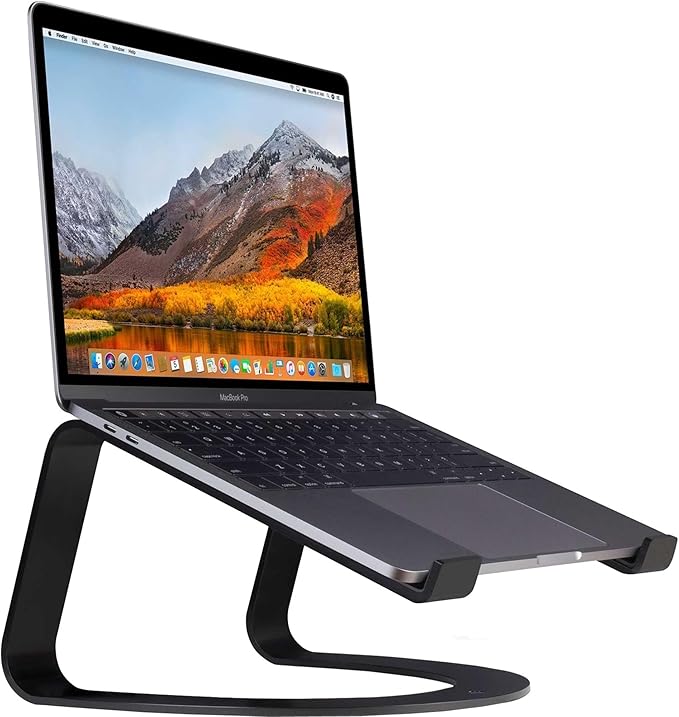
Twelve South Curve for MacBooks and Laptops
by Twelve South
The best vertical laptop stand for desk-space-constrained workstations — self-sizing bent arms accept any laptop width, and the vertical orientation frees the desk depth that horizontal stands occupy.
Pros
- Self-adjusting bent steel arms grip laptops of any width without size-specific configuration — the Curve fits 13-inch, 14-inch, 15-inch, and 16-inch MacBooks without modification
- Vertical-leaning silhouette occupies dramatically less desk depth than horizontal stands — ideal for shallow desks or workstations sharing space with monitors and document trays
- Steel frame construction with silicone arm pads provides metal-grade rigidity while preventing laptop chassis scratches during seating and removal
- Matte black finish with sculptural form factor reads as an intentional design accessory rather than a utilitarian peripheral — appropriate for client-facing or video-call backgrounds
Cons
- Vertical orientation only — the Curve elevates a closed laptop for use as a desktop with an external monitor, but does not provide the open-laptop horizontal stand functionality of the BoYata or SOUNDANCE
- Premium price reflects the steel construction and brand positioning; users who only need vertical laptop storage can find functional alternatives at lower price points
Roost V3 — Best Travel Stand
The Roost V3 represents a fundamentally different design philosophy from every other stand on this list. Where the others optimize for stationary desk performance, the Roost V3 optimizes for the workflow of professionals who type on a laptop in three or four different locations every week — primary office, home office, conference room, coffee shop, hotel desk, client site. At 6 ounces and a 13 x 1.4 x 1.4 inch folded profile, the Roost V3 is the only stand in this review that fits in the slim front pocket of a standard laptop sleeve, which means the stand travels with the laptop as a single integrated package rather than as a separate item the user has to remember and pack.
The high-stiffness polymer truss frame is engineered specifically for the load distribution of a laptop, and the engineering yields a counterintuitive result: a 6-ounce polymer stand that holds an 18-inch laptop without measurable flex during typing on the laptop’s own keyboard. The truss geometry distributes the laptop’s weight across multiple support points rather than concentrating it on a single column or hinge, which is how the design achieves rigidity without aluminum or steel mass. The PivotGrip arms accept laptops from 12 to 18 inches without size-specific configuration, and the deployment workflow takes under 30 seconds — fold open the legs, snap the PivotGrip arms into position, set the laptop in place. There is nothing to assemble or adjust beyond the height setting.
The 6.5 to 12.5-inch height range is the widest on this list and the most consequential specification for taller users. A user with a seated eye level higher than 6 inches above their desk surface — common for users approximately 5 feet 11 inches and taller — cannot reach correct eye-level alignment with any of the fixed 6-inch stands on this list. The Roost V3 is the only stand here that reaches above 8 inches of elevation; for tall users specifically, that height range is what makes the Roost V3 the correct stand regardless of whether portability is also a priority. The premium price reflects the engineering and the travel-focused design philosophy; for users who only need a stationary desk stand, the BoYata or SOUNDANCE deliver comparable height with more straightforward construction at lower prices.

Roost V3 Laptop Stand
by Roost
The best travel laptop stand — folds to 6 ounces and 1.4 inches thick, deploys in seconds, and provides the widest height range on this list for users whose seated eye level requires more than 6 inches of elevation.
Pros
- Folds to a 13-inch x 1.4-inch x 1.4-inch profile and weighs 6 ounces — the only stand on this list that fits in the slim front pocket of a standard laptop sleeve
- Adjustable from 6.5 to 12.5 inches of elevation — the widest height range on this list, which is the variable that determines whether a stand can reach the eye-level position required for taller users
- High-stiffness polymer truss frame is engineered for the load distribution of a laptop — no metal flex or vibration transfer during typing on the laptop's own keyboard
- PivotGrip arms accommodate laptops from 12 to 18 inches without size-specific configuration, and the no-tools setup deploys the stand in under 30 seconds
Cons
- Premium price is the highest on this list and reflects the engineering and travel-focused design rather than additional features for stationary desk use
- Polymer construction looks distinctly utilitarian compared to the aesthetic of the Rain Design mStand or Twelve South Curve — appropriate for travel productivity but less suited to client-facing setups
UGREEN Vertical Laptop Stand — Best Value Vertical
The UGREEN Vertical Laptop Stand exists for the same reason as the Twelve South Curve — recovering desk depth by standing a docked laptop on its edge — but it reaches that outcome at roughly a third of the price, which is why it has accumulated more than 8,000 verified reviews. For the large share of clamshell users who simply want the laptop off the desk surface and out of the way while it runs on an external monitor, the UGREEN does the essential job without the premium the Curve charges for its steel construction and self-sizing arms.
The distinguishing feature is the adjustable-width slot. Where the Curve’s bent arms self-size to any laptop automatically, the UGREEN uses a dial on the base that you turn to set the slot width to your specific laptop’s thickness — a manual step, but one that also means the stand locks the laptop at exactly the fit you set rather than relying on spring tension. The aluminum body and silicone-lined slot protect the chassis finish, and the up-to-17.3-inch compatibility covers everything from a thin ultrabook to a thick gaming laptop.
The honest scope is that this is a single-slot, single-laptop stand — users who dock a laptop and a tablet together need the dual-slot version or a second unit, and the plastic width dial should be adjusted gently rather than forced. But for a straightforward clamshell setup on a budget, the UGREEN captures the vertical stand’s entire desk-space-recovery benefit for the price of a horizontal riser.

UGREEN Vertical Laptop Stand Holder for Desk, Adjustable
by UGREEN
The value vertical laptop stand — an adjustable-width aluminum dock that holds any laptop up to 17.3 inches on its edge to recover desk depth in a clamshell setup, backed by more than 8,000 verified reviews at a fraction of the price of premium vertical stands.
Pros
- Adjustable-width dock accepts everything from thin ultrabooks to 17.3-inch gaming laptops — a dial on the base sets the slot width so one stand fits every laptop in a mixed-device household
- Aluminum body with a silicone-lined slot holds the closed laptop securely on its edge while protecting the chassis finish from scratches during insertion and removal
- Vertical orientation recovers 8 to 10 inches of desk depth versus a horizontal riser — the entire point of a clamshell dock — at roughly a third of the price of premium vertical stands
- 8,045 verified reviews at 4.7 stars make it the most-validated budget vertical stand on Amazon
Cons
- Single-slot design holds one laptop only — users docking a laptop plus a tablet need the dual-slot version or a second stand
- The width-adjustment dial is a small plastic mechanism; set it gently when changing slot width to avoid wearing it out over many adjustments
Best Portable Laptop Stand for Travel
If you type in three or four locations a week, the stand has to travel with the laptop rather than live on one desk. Weight and packed thickness are the specs that matter here — both of these fold down small enough to move with you.
| Product | Price | Buy |
|---|---|---|
| Roost V3 Laptop StandBest for travel Folds to 6 ounces and 1.4 inches — the only stand here that slips into a laptop-sleeve pocket, with the widest height range for tall users | $89.95 | View on Amazon |
| Nulaxy Ergonomic Adjustable Laptop Stand, Dual FoldableBest fold-flat value Folds dead flat with a 22 lb capacity for a fraction of the price, if a 2-inch packed thickness fits your bag | $15.99 | View on Amazon |
Best Vertical Laptop Stand for Clamshell Setups
A vertical stand holds a closed laptop on its edge so it runs in clamshell mode through an external monitor — recovering 8 to 10 inches of desk depth a horizontal riser occupies. Choose on fit mechanism and price.
| Product | Price | Buy |
|---|---|---|
| Twelve South Curve for MacBooks and LaptopsPremium pick Self-sizing bent steel arms fit any laptop width with no adjustment — the design-grade pick with a client-facing matte finish | $59.95 | View on Amazon |
| UGREEN Vertical Laptop Stand Holder for Desk, AdjustableBest value Adjustable-width aluminum dock that captures the same desk-space saving for roughly a third of the price | $19.99 | View on Amazon |
Best Foldable Laptop Stand
Foldability turns a stand from a permanent desk fixture into something you can stow in a drawer when the desk needs clearing. All three collapse — they differ in how flat, how much they carry, and whether they stay put once set.
| Product | Price | Buy |
|---|---|---|
| Lamicall Adjustable Laptop Stand, Foldable AluminumBest foldable overall Folds to a low profile and the weighted base keeps it wobble-free once you set the height | $35.99 | View on Amazon |
| Nulaxy Ergonomic Adjustable Laptop Stand, Dual FoldableHighest capacity Folds dead flat with a 22 lb capacity and independent height-and-angle rods | $15.99 | View on Amazon |
| Roost V3 Laptop StandMost packable Folds to 6 ounces for travel and reaches the widest height range here for tall users | $89.95 | View on Amazon |
Best Aluminum Laptop Stand
Aluminum does double duty — it delivers the rigidity that stops wobble and acts as a heat sink that pulls warmth off the chassis. Five of our picks are aluminum; these three span the price range.
| Product | Price | Buy |
|---|---|---|
| Rain Design 10032 mStand Laptop Stand, SilverPremium aluminum Single-piece machined aluminum with an integrated cable slot — the design benchmark for MacBook desks | $39.90 | View on Amazon |
| SOUNDANCE Laptop Stand, Aluminum Computer RiserBudget aluminum 5mm aluminum with an open-back vent at under twenty dollars and 50,000+ verified reviews | $17.99 | View on Amazon |
| Lamicall Adjustable Laptop Stand, Foldable AluminumBest adjustable aluminum Aluminum frame on a weighted base with single-handed height and angle adjustment — the adjustable metal pick | $35.99 | View on Amazon |
How to Choose the Best Laptop Stand
Buyer's Guide
Choosing the right laptop stand requires matching four specifications to your actual workspace and laptop — height range, adjustability type, foldability, and laptop size compatibility — and getting any one of them wrong can leave you with a stand that sits unused after the first week.
Height range and adjustability
The single most important specification is whether the stand can position your laptop screen at your specific seated eye level. There are three categories: fixed-height stands (Rain Design mStand at 5.9 inches, SOUNDANCE at 6 inches, Twelve South Curve at 6 inches) commit you to a single elevation that works only if it happens to match your seated eye-level requirement. Stepped or limited-adjustment stands (Lamicall, Nulaxy) provide a small range of positions that cover most users of average height. Continuously adjustable stands (BoYata, Roost V3 at 6.5 to 12.5 inches) let you dial in the exact elevation your eye level requires. The simple rule: if you are taller than approximately 5 feet 10 inches, an adjustable stand with at least 8 inches of maximum elevation is significantly more likely to reach the height you actually need. For seated heights under 5 feet 8 inches, a 6-inch fixed stand may be sufficient. Pair the stand height with a properly adjusted [office chair](/best-office-chairs/) — chair height is the other variable in the eye-level equation, and tuning one without the other rarely produces a fully ergonomic setup.
Stability and build quality
Laptop stands experience more force than most users assume. Closing the laptop screen, repositioning the stand, leaning against it during note-taking, and even sustained keyboard typing all transmit force to the stand structure. A stand that wobbles or flexes under these loads is functionally worse than no stand at all — it transfers vibration to the screen and creates an unstable typing surface for the laptop's own keyboard if you happen to be using it. Single-piece aluminum constructions (Rain Design mStand) provide the highest rigidity because there are no joints to flex. Heavy-duty alloy frames with reinforced joints (BoYata, Nulaxy) approach single-piece rigidity at lower price points. Weighted bases (Lamicall) anchor lightweight frames against tipping. Polymer truss frames (Roost V3) are engineered for distributed laptop loads and trade some apparent stiffness for dramatic weight savings. Verify the stated weight capacity matches your laptop — a 16-inch MacBook Pro weighs 4.7 pounds, a 17-inch gaming laptop can exceed 6 pounds, and a stand operating near its rated limit will degrade faster and be less stable in daily use.
Portability and foldability
If you work between multiple locations — office, home office, coffee shop, conference rooms — foldability becomes a primary specification rather than a nice-to-have. The Roost V3 is the category benchmark at 6 ounces and a 13 x 1.4 x 1.4 inch folded profile that fits the front pocket of any laptop sleeve. The Nulaxy folds flat but at a thicker 2-inch profile that limits bag fit. The Lamicall folds but the weighted base makes it heavier in transit. Non-folding stands (BoYata, SOUNDANCE, Rain Design mStand, Twelve South Curve) are appropriate only for stationary desk setups where the stand will not be moved. For users who need a single stand that works on a primary desk and travels occasionally, the Nulaxy is the practical compromise. For frequent travelers who pack daily, the Roost V3 is purpose-built for that workflow even at its premium price.
Material and heat dissipation
Laptop stand materials affect both long-term durability and laptop thermal performance. Aluminum stands (SOUNDANCE, Rain Design mStand, Nulaxy, Lamicall, UGREEN) provide the dual benefit of structural rigidity and heat-sink properties — aluminum's thermal conductivity actively pulls heat away from the laptop chassis. The trade-off is weight: solid aluminum stands are heavier than steel-frame or polymer alternatives. Steel-frame stands (Twelve South Curve, BoYata) provide rigidity that matches or beats aluminum but contribute less to thermal management, since steel conducts heat far more slowly than aluminum. Polymer stands (Roost V3) sacrifice thermal-conductive benefits in exchange for dramatic weight savings — appropriate for travel use where thermal load is typically lower. Open-back designs and ventilated platforms additionally allow direct airflow under the laptop, which compounds the thermal benefit. For sustained heavy workloads (video editing, code compilation, 3D rendering), aluminum with an open-back design is the highest-performing thermal combination.
Laptop size and weight compatibility
Verify both the maximum supported laptop size and the chassis depth before purchasing. Maximum laptop size on Amazon listings refers to screen diagonal, but the more important measurement is laptop chassis depth — the front-to-back dimension of the laptop on the stand. The Rain Design mStand caps at 10.4 inches of chassis depth, which excludes some 16- and 17-inch Windows laptops with deeper footprints. The SOUNDANCE supports laptops up to 15.6 inches, which excludes 16-inch MacBook Pro and 17-inch Windows models. The BoYata, Lamicall, and Roost V3 accommodate up to 17 inches; the Nulaxy caps at 16 inches, which excludes 17-inch Windows models. Weight capacity matters equally: a 4.7-pound 16-inch MacBook Pro, a 6-pound gaming laptop, and a fully-loaded 17-inch mobile workstation place very different demands on the frame. Stands rated at 8 to 10 pounds have minimal headroom for the heaviest laptops; the Nulaxy at 22 pounds and the Roost V3's polymer truss design provide substantial reserve capacity that translates to better long-term stability.
Cable management and desk integration
Laptop stands often complete one ergonomic problem (screen height) while creating another: the cable run from the laptop now extends from an elevated position down to the desk surface, where it may interfere with keyboard placement or get caught under monitor stands and document trays. The Rain Design mStand's integrated cable slot routes the laptop charger and peripheral cables through the back of the chassis to the desk surface in a single channel. The Twelve South Curve's vertical orientation runs the cables along the back edge of the desk where they can be managed against the wall. Other stands leave cable management as a separate problem to solve with adhesive cable channels or zip-tie organizers. If your desk surface is already crowded with peripherals, a stand with built-in cable routing significantly reduces the visual and functional complexity of the elevated laptop. Pair the stand with a complete [keyboard wrist rest](/best-keyboard-wrist-rests/) and external keyboard placement plan to ensure the cables coming off the laptop do not run across the keyboard typing area.
Matching Laptop Stand Height to a Dual-Monitor Setup
One of the most common ergonomic mistakes I see in administrative office setups is a laptop stand chosen and installed without reference to the height of the external monitor it sits next to. The laptop stand elevates the laptop screen, the external monitor sits at its own height on a separate riser or arm, and the two screens end up at different elevations — which forces the user’s eyes to travel up and down between displays as they shift attention. Over the course of a workday, that vertical eye travel creates exactly the kind of cervical fatigue the laptop stand was supposed to prevent.
The fix requires matching the laptop stand’s elevation to the external monitor’s screen-center height. Measure the external monitor first: with the monitor on its current riser or arm, measure the distance from the desk surface to the vertical center of the screen. That measurement is the target your laptop screen needs to match. Subtract roughly half the laptop screen’s height (typically 4 to 5 inches for a 14- to 16-inch laptop) to determine the laptop’s bottom-edge elevation — this is the height the laptop stand needs to provide.
For most external monitor setups using risers in the 4 to 6-inch range, the laptop’s bottom edge needs to be elevated approximately 5 to 7 inches above the desk to match. Stands with adjustability in this range — BoYata, Nulaxy, Lamicall, Roost V3 — let you dial in the exact match. Fixed stands at 5.9 to 6 inches may match by coincidence but rarely match by design. For external monitor arms positioned at higher elevations, the Roost V3’s 12.5-inch maximum is the only stand on this list that reaches the high end of the range.
If you are still finalizing the rest of the setup, our reviews of the best monitor stands and best monitor arms can help you choose the external display elevation first, then match the laptop stand to that height — which is the correct order of operations.
Final Verdict
For most professional and home office setups that include a laptop, the BoYata Laptop Stand is the correct starting point. The continuous multi-angle adjustment lets you set the laptop screen at exactly your seated eye level rather than approximating, the heavy alloy steel frame and silicone pads deliver build quality that justifies the price multiple times over the stand’s lifetime, and the 14,824 verified reviews at 4.8 stars provide the strongest validation signal in the adjustable-stand category. For taller users (5 feet 11 inches and above) who need elevations beyond the BoYata’s range, the Roost V3 is the alternative recommendation — its 12.5-inch maximum elevation is the only height in this review that reaches above 8 inches.
For buyers whose primary constraint is budget and who have an average seated height that aligns with a 6-inch elevation target, the SOUNDANCE Laptop Stand delivers the most validated value in the entire laptop stand category — over 51,000 verified reviews at 4.8 stars in solid aluminum construction at a price that removes the financial barrier to laptop ergonomic correction. For MacBook users who want the design-grade aluminum aesthetic with integrated cable management, the Rain Design mStand has been the category benchmark since 2008 for the right reasons.
Whichever stand you choose, plan it as part of a complete ergonomic system rather than a standalone purchase. A laptop stand, an external ergonomic keyboard, an external mouse, and a properly adjusted office chair work together as the seated workstation — and getting any one of those right while leaving the others unaddressed delivers only a fraction of the potential ergonomic benefit. The laptop stand is typically the first and lowest-cost piece of that puzzle to solve, which is why it remains the single most cost-effective ergonomic correction available for any desk setup that includes a laptop in 2026.
Frequently Asked Questions
Do I need an external keyboard if I use a laptop stand?
What is the correct screen height for a laptop stand?
Does a laptop stand help keep a laptop cool?
What is the difference between a horizontal laptop stand and a vertical laptop stand?
What laptop stand works best in a dual-monitor setup?
Related Articles
About the Reviewer

Sarah Chen, CAP, PMP
B.A. Business Administration, UCLA
Sarah Chen spent 10 years in office management and operations at Fortune 500 companies before founding DeskRated in 2026. After managing supply budgets for teams of 50+ people and testing thousands of products through daily use, she started writing the honest, no-fluff supply reviews that office professionals actually need. Sarah holds both CAP and PMP certifications and is based in Los Angeles.