10 Best Monitor Light Bars of 2026
Sarah Chen reviews the best monitor light bars of 2026 — no-glare screen bars ranked by optics, color temperature, curved-monitor fit, and controls, from budget picks to BenQ's flagship.
Updated

As a Certified Administrative Professional who has specced and set up workstations for everyone from solo remote workers to a 150-person professional-services floor, I can tell you that desk lighting is the most overlooked ergonomic variable in the modern office — and the monitor light bar is the single tidiest fix for it. Unlike a desk lamp, a light bar clamps to the top of your monitor, takes up zero desk space, and uses asymmetric optics engineered to light your desk without throwing a single reflection onto the screen. For anyone who spends the better part of the day staring at a display in a dim room, it directly targets the bright-screen-in-a-dark-room contrast that drives afternoon eye strain and headaches.
The category has matured fast. What was a one-brand novelty when BenQ launched the original ScreenBar is now a crowded, competitive market — which is good news for buyers, because genuinely capable bars now start at impulse-buy prices. For this guide I evaluated ten of the best monitor light bars on Amazon across every price tier and use case, from a metal-bodied budget pick to BenQ’s wireless-dial flagship, weighing the specs that actually change the daily experience: no-glare optics, color temperature range and CRI, curved-monitor compatibility, control method, and whether a rear backlight is on offer. Every product here was confirmed in stock with a live listing, and every pick addresses a distinct buyer — no two bars on this list serve exactly the same setup.
One gap worth flagging up front: most published roundups cover only three to five bars and skip the two questions readers actually ask most — whether a bar will fit a curved ultrawide, and how a task light bar differs from a decorative RGB gaming strip. This guide answers both directly, with a dedicated curved-and-ultrawide section, a gaming-and-backlight section, and a plain-spoken buyer’s guide. If you want the short version: the Quntis ScreenLinear Basic is the right bar for most desks, and you can spend up or down from there with confidence.
Find the Best Monitor Light Bar for Your Setup
Jump straight to the pick that matches how you work:
- Best monitor light bars overall
- Best for curved & ultrawide monitors
- Best for gaming & RGB backlight
- Best budget monitor light bars
How We Chose These Monitor Light Bars
Our selection required a live, in-stock Amazon listing and a genuine spread of use cases — no two bars here serve the same buyer. We weighted the specs that change daily use: asymmetric no-glare optics (a hard requirement for every serious pick), color temperature range paired with CRI (Ra90 minimum for real work, Ra95+ preferred), curved-monitor compatibility by curvature rating, control method (touch versus remote versus wireless dial), and the presence of an auto-dimming sensor or rear backlight where they add value. We cross-checked review volume as a reliability signal — from the Quntis Basic’s category-leading 13,700-plus ratings down to newer purpose-built models — and we deliberately excluded decorative RGB gaming strips that do not light a work surface. Prices were verified live at the time of writing; use the buttons for current Amazon pricing.
Best Monitor Light Bars Overall
Each bar below is reviewed once in full, then referenced again in the use-case sections further down. Start here for the across-the-board picks — the best all-around bar, the budget champion, and the flagship — then jump to the section that matches your setup: a curved ultrawide, a gaming or media desk, or a tight budget.
Quntis ScreenLinear Basic — Best Overall
The Quntis ScreenLinear Basic wins best overall for the simplest reason in this category: it does everything most people need a monitor light bar to do, does it well, and is validated by more real-world reviews than any competitor by a factor of two or more. Its 13,771 ratings at 4.6 stars represent a reliability dataset no other bar here approaches — when a product this widely bought holds a rating this high, it is telling you the fundamentals are sound.
Those fundamentals are the right ones. The asymmetric optics do the core job flawlessly, throwing an even wash of light across the desk while keeping the screen completely free of glare and reflection. The auto-dimming ambient sensor is the feature that elevates it above cheaper bars: it reads the room and holds a steady work-surface brightness as daylight shifts through the day, so you set it once and forget it. And the Ra98 color rendering is genuinely exceptional at this price, accurate enough that printed proofs, swatches, and color-coded documents look right under it — a spec most bars twice the price cannot match.
The honest limitations are what separate it from the pricier tier: it is touch-controlled only, so adjustments mean reaching up to the bar rather than using a remote, and there is no rear backlight or deep-curve rating. Neither matters for a standard flat or gently curved monitor, which is exactly the setup most buyers have. For the overwhelming majority of desks, this is the bar to buy.

Quntis Computer Monitor Lamp, Screen Monitor Light Bar for Eye Caring
by Quntis
The best-selling, most-reviewed monitor light bar on Amazon — auto-dimming, no-glare optics, and Ra98 color at a price that makes it the smart default for almost any desk.
Pros
- 13,700+ verified reviews make it the most-trusted monitor light bar on Amazon by a wide margin — the largest real-world reliability dataset in the category
- Auto-dimming ambient sensor holds a steady work-surface brightness as daylight shifts, so you never reach up to adjust it manually
- Asymmetric no-glare optics throw all the light down onto the desk and none onto the screen, eliminating the reflections a traditional desk lamp creates
- Ra98 color rendering rivals bars costing three times as much — accurate enough for reviewing printed proofs and color-coded documents
Cons
- Touch controls only — no wireless remote, so you reach up to the bar to change settings
- No RGB or rear backlight, and it is not rated for deeply curved ultrawide screens like the Curved RGB model
SAMPHON Monitor Light Bar — Best Budget
The SAMPHON exists to answer one question: what is the least you can spend and still get a monitor light bar that actually works? As the lowest-priced bar on this list — less than a takeout lunch — the answer is genuinely impressive. It carries Amazon’s Choice, and the recurring theme in its reviews is a version of “you can’t beat it at this price,” which is exactly the sentiment you want from a budget pick.
What makes it more than a throwaway is the memory function: the bar recalls your last color and brightness setting on power-up, a convenience usually reserved for products three times the price. The counterweight clip installs in under a minute with no tools, the three color-temperature settings (3000K, 4000K, 6500K) cover the practical warm-to-cool range, and it puts out up to 800 lux across a 30-by-20-inch area — enough to properly light a standard single monitor.
The compromises are honest and predictable at this price. The body is plastic and feels it, the 11.8-inch bar is too short to fully span a 27-inch or wider monitor, and there is no auto-dimming or remote. But for a second monitor, a dorm or student desk, or a first-time buyer who wants to test whether a light bar earns a place on their desk before spending more, the SAMPHON is the smart, low-risk entry point.

SAMPHON Monitor Light Bar, Eye-Care USB Reading Monitor Lamp
by SAMPHON
A genuinely functional monitor light for the price of lunch — the honest pick for a second monitor, a dorm desk, or a first-time buyer testing whether a light bar is for them.
Pros
- The lowest price in the entire category — costs less than a takeout lunch yet delivers genuinely usable task lighting
- Memory function recalls your last color and brightness on power-up, a feature usually reserved for bars three times the price
- Counterweight clip installs in under a minute with no tools and grips thin or thick top bezels
- Amazon's Choice at this price with up to 800 lux across a 30-by-20-inch area — enough for a standard single monitor
Cons
- Plastic body feels noticeably cheaper than metal-built competitors and won't win any desk-aesthetic awards
- The 11.8-inch bar is too short to fully span a 27-inch or wider monitor
- No auto-dimming and no remote — you adjust it by hand at the bar
BenQ ScreenBar Halo 2 — Upgrade Pick
The BenQ ScreenBar Halo 2 is the flagship of the category and the closest thing to a no-compromise monitor light bar you can buy. It is by far the most expensive bar on this list, but it is the only one that combines every premium feature into a single unit — and if you want the best, this is unambiguously it.
The standout is the wireless dial controller. Rather than reaching up to touch buttons on the bar, you adjust brightness, color temperature, and lighting mode from a weighted dial on your desk with a small digital readout — the most refined control experience in the category by a wide margin. The adjustable rear backlight casts genuine bias lighting onto the wall behind the monitor, softening the harsh screen-to-wall contrast that drives late-day eye fatigue. A motion sensor turns the bar on when you sit down and off when you leave, and it auto-syncs with your monitor’s power state so it behaves like part of the display.
It is also the most curve-capable bar here, rated for 1000R–1800R monitors on a clamp that fits panels from 0.17 to 2.36 inches thick. The caveats are the price and the fact that the backlight needs a few inches of clearance behind the monitor to shine — a wall-hugging setup won’t get the full benefit. For a professional building a no-compromise workstation, or anyone who simply wants the best and will use the backlight and dial daily, the Halo 2 justifies its premium.

BenQ ScreenBar Halo 2 LED Monitor Light Bar
by BenQ
BenQ's flagship and the closest thing to a no-compromise monitor light bar — wireless dial, bias backlight, motion sensor, and curved-screen support in one premium package.
Pros
- The wireless dial controller with a digital readout is the best control experience in the category — brightness, color temp, and mode from a puck on your desk, never reaching the screen
- An adjustable rear backlight casts soft bias lighting behind the monitor, cutting the harsh screen-to-wall contrast that drives late-day eye fatigue
- A motion sensor switches the bar on when you sit down and off when you leave, and it auto-syncs with your monitor's power state
- Rated for curved monitors from 1000R to 1800R on a clamp that fits panels from 0.17 to 2.36 inches thick — the widest compatibility here
Cons
- By far the most expensive bar in this roundup — a deliberate investment, not an impulse upgrade
- The rear backlight needs a few inches of clearance behind the monitor to work well, which a wall-hugging setup won't have
- More features than a basic single-monitor desk will ever use
BenQ ScreenBar Pro — Runner-Up
The BenQ ScreenBar Pro is the highest-rated bar on this entire list at 4.8 stars, and it exists for the buyer who wants BenQ’s build quality and optics without paying for the Halo 2’s backlight and wireless dial. It sits one clear tier below the flagship while keeping everything that makes a BenQ a BenQ.
Brightness is its calling card: over 1,000 lux of central output spread across a 33-by-20-inch area, enough to light even a large desk evenly and brightly. It is USB-C powered with an included adapter — the modern, tidy connector that runs easily off a laptop dock — and an ultrasonic motion sensor auto-dims the bar after five minutes away from the desk, saving power with no input from you. The ASYM-Light optics deliver the same reference-grade glare control as the rest of the ScreenBar line.
What you give up versus the Halo 2 is the wireless dial (the Pro uses physical touch buttons) and the rear backlight. Neither is a flaw so much as a deliberate simplification — this is pure, bright, well-built task lighting without the extras. For buyers who want the BenQ name and optics, USB-C power, and the highest satisfaction rating in the category, the Pro is the value-conscious way into the premium tier.

BenQ ScreenBar Pro LED Monitor Light Bar (Black)
by BenQ
BenQ's best-rated bar — brighter and simpler than the Halo 2, and USB-C powered, for buyers who want the brand's optics and build without paying for backlight extras.
Pros
- The highest-rated BenQ bar at 4.8 stars — buyers who want proven build quality without the Halo 2's backlight pick this one
- 1000-plus lux of central brightness spread across a 33-by-20-inch area lights even a large desk evenly
- USB-C powered with an included adapter — the modern connector, and easy to run off a laptop dock
- An ultrasonic motion sensor auto-dims after five minutes away, saving power without any manual input
Cons
- Physical touch buttons only — no wireless dial or remote like the Halo 2
- No rear backlight or RGB, so it is pure task lighting
- Still a premium price for a functionally simpler unit than the flagship
BenQ ScreenBar (Original) — Proven Entry Into BenQ
The original BenQ ScreenBar is the product that created this entire category, and it remains the most accessible way into the BenQ ecosystem. It is also the most-reviewed BenQ SKU, giving it the longest proven track record of any premium bar here — a meaningful reassurance when you are spending three figures on desk lighting.
It covers the essentials that made the category worth caring about. The auto-dimming ambient sensor comes standard, adjusting output to hold a consistent desk brightness as the room changes. It is flicker-free and blue-light certified with an anti-glare optical design, and the aluminum body will outlast the plastic shells of cheaper rivals. The patented counterweight clamp needs no desk space and rests securely with no screws or adhesive.
Where it shows its age is in the details the newer Pro and Halo 2 improved: a narrower clamp range of 0.4 to 1.2 inches (less curved-monitor headroom), touch-only controls, and a feature set that predates USB-C and motion sensing. None of that makes it a bad bar — it is still an excellent one — but if your monitor is flat or mildly curved and you want proven BenQ reliability at the lowest BenQ price, the original ScreenBar is a safe, well-understood choice.

BenQ ScreenBar LED Monitor Light Bar (Original)
by BenQ
The category-defining BenQ at the lowest ScreenBar price — proven reliability, auto-dimming, and CRI over 95 for buyers who want the brand without the flagship spend.
Pros
- The original that created the category, and the most-reviewed BenQ SKU at 3,100-plus ratings — a long, proven track record
- Auto-dimming ambient sensor comes standard, adjusting to keep a consistent brightness across the desk
- Flicker-free and blue-light certified with an anti-glare optical design and an aluminum body that outlasts plastic rivals
- The patented counterweight clamp needs no desk space and rests securely without screws or adhesive
Cons
- Narrower clamp range (0.4–1.2 inches) leaves less curved-monitor headroom than the Pro or Halo 2
- Touch-only controls, no remote
- Its feature set is starting to show its age next to the newer Pro and Halo 2
ONWAY Curved Light Bar with Remote — Best Curved-Friendly Mid-Range
The ONWAY is the bar to reach for when you want curved-monitor compatibility and a proper wireless remote without stepping up to BenQ pricing. What earns it the slot is a detail most of this category avoids: it publishes the curve it actually fits. Where a typical mid-range listing says only that it works on curved screens, ONWAY states 1000R and 1800R across 27 to 34 inch panels, which is the same kind of specific rating BenQ gives its flagship and the number you need to check a bar against your own monitor before buying.
The four-button wireless touch remote is the meaningful upgrade over the touch-only Quntis Basic: color temperature, brightness, RGB, and dynamic modes from your seat, with no reaching up to the monitor. Power is USB-C rather than the older USB-A the rest of the mid-range still ships, and the clamp carries a camera mount, which is the one clean answer on this list to the standing conflict between a top-bezel light bar and a top-mounted webcam. The optics are the expected 45-degree asymmetric design at Ra95 across 3000K to 6500K.
Two honest notes. ONWAY is a much newer name than BenQ or Quntis, so there is no long track record to lean on. And while the listing is titled around auto-dimming, the ambient sensor is not spelled out in its own spec bullets — what confirms it is the owners, several of whom describe the sensor on top brightening and dimming the bar as room light changes, and several of whom add that they leave it in manual anyway. Treat the sensor as a genuine bonus rather than the reason to buy. Note too that the 1,148-review figure is shared with a higher-priced sibling listing, so it reflects the product family rather than this SKU on its own.

ONWAY Curved Monitor Light Bar with Wireless Remote and Camera Base
by ONWAY
The mid-budget bar that names the curve it fits — a published 1000R–1800R rating, a proper wireless remote, USB-C, and a webcam mount, without stepping up to BenQ money.
Pros
- The only bar here besides BenQ's flagship to publish an actual curvature rating — 1000R and 1800R across 27 to 34 inch panels, rather than a vague claim that it fits curved screens
- A four-button wireless touch remote drives color temperature, brightness, RGB, and dynamic modes without ever reaching up to the bar
- Owners repeatedly confirm the ambient light sensor works as an auto mode, brightening and dimming the bar as room light shifts through the day
- USB-C power with a 1.8m cable, plus a camera mount on the clamp for a webcam — the only bar on this list that solves the light-bar-versus-webcam conflict by design
Cons
- ONWAY is a far newer name than BenQ or Quntis, with no long track record behind it
- The auto-dimming sensor is confirmed by owners but not documented in the listing's own spec bullets, and several of those owners say they leave it in manual anyway
- Its review count is shared with a higher-priced sibling listing, so the 1,148 figure covers the product family rather than this SKU alone
Quntis Glow (Backlight) — Best Affordable Bias Lighting
The Quntis Glow is the affordable way to get both a task light and true ambient bias lighting in one bar. It pairs a proper front task light with a separate rear-facing backlight that glows onto the wall behind the monitor — the same contrast-reducing bias lighting that premium bars charge a large premium for, at a fraction of their cost.
The dual lighting genuinely works: the rear glow lifts the darkness immediately around the screen, which both reduces long-session eye fatigue and looks great on a media or gaming desk. The smart remote is a highlight in its own right, with tactile backlit buttons you can find in the dark and three presets — Work, Immersive, and Design — that swap the whole lighting character in one press. A sliding weighted clip handles curved and thin-bezel monitors, and memory recalls your last setting.
The trade-offs keep it out of the top tier: there is no auto-dimming ambient sensor (the front light is manual), the rear backlight adjusts brightness but not color, and front output trails premium bars on a very large desk. But at a 4.6-star rating and this price, it is the best-value entry into ambient bias lighting on the list.

Quntis Computer Monitor Light Bar with Backlight (Glow)
by Quntis
The affordable way to get both task light and ambient bias lighting — a dual front-and-back Quntis with a tactile backlit remote for well under BenQ Halo 2 money.
Pros
- Dual front-and-back lighting adds a soft rear glow that reduces screen-to-wall contrast — real bias lighting without a separate LED strip
- The smart remote has tactile backlit buttons you can find in the dark, and three presets: Work, Immersive, and Design
- Strong 4.6-star rating at an accessible mid-budget price
- A sliding weighted clip fits curved and thin-bezel monitors, and memory recalls your last setting
Cons
- No auto-dimming ambient sensor — the front light is manual only
- The rear backlight adjusts brightness but not color
- Front output is lower than premium bars for very large desks
Xiaomi Mi Computer Monitor Light Bar — Best Metal-Build Value
The Xiaomi Mi Light Bar is the design-conscious buyer’s mid-price pick — a metal-bodied, magnetically mounted bar with a free wireless remote that looks the part on a considered desk setup. It undercuts the premium tier while delivering a build quality and aesthetic that punches above its price.
The magnetic mount is its most distinctive feature. It attaches with a 40-degree-adjustable magnetic base that fits bezels from 1 to 32mm, and reviewers repeatedly note how versatile it is — some even repurpose the magnetic clearance to sit alongside or hold a webcam, which makes it a natural fit for a video-call setup. The 2.4GHz wireless remote is included at no extra cost, where several rivals ship touch-only or charge extra, and with 6,258 reviews it is one of the most-validated non-Quntis bars in the category.
Two cautions temper the recommendation. The remote puck has recurring reports of failing after several months, with no easy replacement path, and because the mount is magnetic rather than clamped, the bar can shift or tip if it sits on a monitor arm you swing quickly. It is also not rated for wide curved monitors. For a flat or mildly curved screen where build quality and a clean look matter, though, the Xiaomi is a distinctive, well-priced choice.
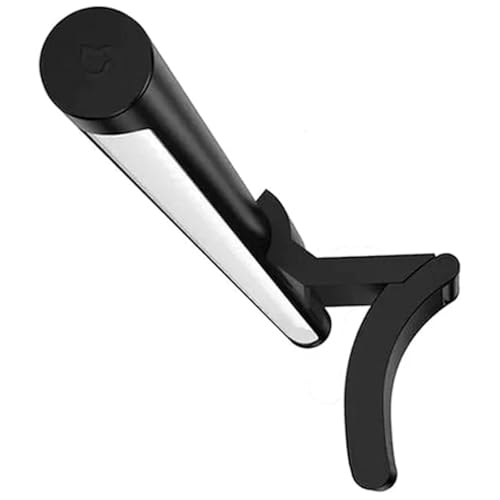
Xiaomi Mi Computer Monitor Light Bar with Wireless Remote
by Xiaomi
A metal-bodied, magnetically mounted bar with a free wireless remote — the design-conscious mid-price pick, and the most webcam-friendly clamp here.
Pros
- A premium metal body and clean design at a mid price — it looks the part on a considered desk setup
- The magnetic 40-degree-adjustable mount is genuinely versatile; reviewers repurpose it to clear or even hold a webcam
- A 2.4GHz wireless remote is included free, where several rivals charge extra or ship touch-only
- A review base in the thousands makes it one of the most-validated non-Quntis bars in the category
Cons
- The remote puck has recurring failure reports after several months, with no easy replacement path
- The unmounted design can tip if it is on a monitor arm that moves quickly
- Not rated for wide curved monitors
Quntis Curved RGB (34”+) — Best for Curved & Ultrawide
The Quntis Curved RGB is the only bar on this list purpose-engineered for big curved and ultrawide monitors, and for a 34-inch-plus screen it is in a category of one here. Rather than a single rigid bar that lifts off a curved panel at the ends, it uses a foldable dual-bar design that flexes to track the monitor’s curve, keeping the light even across the whole width — the specific failure mode of flat bars on curved screens, solved by design.
It fits a deep 1000R–3000R curvature on a clamp that opens to 3.35 inches, and puts out 500–1400 lux across its 26-inch span. Remarkably for its mid-tier price, it combines an auto-dimming ambient sensor with a 15-mode RGB backlight — a pairing that is genuinely rare at this price — so you get correct, hands-off front lighting plus the ambient rear glow that suits an immersive ultrawide setup. Its 4.6-star reviews come specifically from ultrawide and curved-monitor owners, exactly the buyers it is built for.
The caveats are minor for its intended use: it is a newer listing with a smaller review count than Quntis’s veteran SKUs, the RGB modes are fixed presets with no custom color control, and the remote is battery-only. If you run a 34-inch-plus curved or ultrawide monitor, though, this is the bar that will actually fit and light it properly.

Quntis Curved Monitor Light Bar with 15 RGB Backlight (34"+)
by Quntis
The purpose-built pick for big curved and ultrawide monitors — foldable dual bars that follow the curve, plus auto-dimming and RGB backlight in one affordable package.
Pros
- The only bar here purpose-built for 34-inch-plus ultrawide and curved screens — the foldable dual bars flex to track the panel's curve
- Combines auto-dimming AND a 15-mode RGB backlight, a pairing that is rare at this price point
- Fits deep 1000R–3000R curvature on a clamp that opens to 3.35 inches, with 500–1400 lux of front output
- Strong 4.6-star owner reviews specifically from ultrawide and curved-monitor buyers
Cons
- Newer listing, so its review count is lower than Quntis's veteran SKUs
- RGB modes are fixed presets — no app or custom color control
- The remote is battery-only, with no rechargeable or USB-C option
YEELIGHT Monitor Light Bar — Best Budget Metal Build
The YEELIGHT sits one rung above the rock-bottom SAMPHON and earns its place with a specific promise: real metal build quality at a budget price. For not much more than the cheapest bar here — about the cost of two coffees a month — it delivers a full aluminum body where nearly every rival this cheap is plastic, and it carries Amazon’s Choice.
Beyond the build, it is unusually well-specced for the money. It holds an RG0 blue-light safety rating (the safest photobiological classification) alongside Ra95 color rendering, and its 2700K–6500K color range is genuinely wide — budget bars usually restrict you to a couple of fixed steps. The low-profile design clears a top-mounted webcam and works on both flat and curved panels, making it a tidy pick for a video-call-heavy desk on a budget.
The limitations are the expected ones at this price: no remote (touch and a cable puck only, which reviewers call merely adequate), a modest 250-lumen output that shows on a very large desk, and fewer reviews than the category’s best-sellers. For a budget buyer who wants metal build and a wide color range rather than the absolute lowest price, the YEELIGHT is the more grown-up value pick.

YEELIGHT Monitor Light Bar, Eye-Care LED Screen Bar
by YEELIGHT
A metal-built, blue-light-safe bar for the price of two coffees a month — the budget pick for buyers who want real build quality and a wide color range without a plastic shell.
Pros
- A full-metal aluminum body at a budget price — nearly every rival this cheap is plastic
- RG0 blue-light safety rating, the safest photobiological classification, backed by Ra95 color rendering
- A genuinely wide 2700K–6500K color range that budget bars usually restrict to a few fixed steps
- A low-profile design that clears webcams and works on both flat and curved panels
Cons
- No remote — touch and a cable puck only, which reviewers call merely adequate
- At 250 lumens it is dimmer than premium bars on a very large desk
- Fewer reviews than the category's best-sellers
Best Monitor Light Bars for Curved & Ultrawide Monitors
Curved and ultrawide monitors are where light-bar shopping goes wrong most often. A standard straight bar cannot follow a deep curve — the ends lift off the panel and the edges of your desk go dim — so on a 34-inch-plus 1000R–1500R screen you need a bar rated for the curvature. The three picks below are the curve-capable options on this list, spanning a purpose-built ultrawide bar, a premium flagship, and a curved-friendly mid-range. All three are reviewed in full above.
| Product | Price | Buy |
|---|---|---|
| Quntis Curved Monitor Light Bar with 15 RGB Backlight (34"+)Best for 34"+ ultrawide The only bar here purpose-built for big curved screens — foldable dual bars flex to a 1000R–3000R curve and add auto-dimming plus RGB backlight, all at a mid-tier price. The default pick for a 34-inch-plus ultrawide. | $59.99 | View on Amazon |
| BenQ ScreenBar Halo 2 LED Monitor Light BarBest premium curved bar Rated to 1000R–1800R on the widest clamp in the roundup, with a wireless dial, motion sensor, and bias backlight — the no-compromise choice if budget is not the constraint. | $199.00 | View on Amazon |
| ONWAY Curved Monitor Light Bar with Wireless Remote and Camera BaseBest value curved bar The only mid-range bar here that publishes its curvature rating — 1000R–1800R across 27 to 34 inch panels — with a wireless remote, USB-C, and a webcam mount. The value route to a curved-capable bar without BenQ money. | $59.00 | View on Amazon |
For most curved and ultrawide setups the Quntis Curved RGB is the right answer — it is the only bar here actually engineered to follow a deep curve, and it bundles auto-dimming and RGB backlight at a mid-tier price. Step up to the BenQ ScreenBar Halo 2 if you want the flagship’s dial and backlight and don’t mind the price, or choose the ONWAY for a published 1000R–1800R rating plus a remote at the lowest cost. All three are reviewed in full above.
Best Monitor Light Bars for Gaming & RGB Backlight
For a gaming or media desk, the feature that matters beyond glare-free task light is a rear ambient backlight — bias lighting that glows behind the screen, both looking good and easing the contrast fatigue of long sessions. The three picks below all pair proper front task lighting with an adjustable backlight, from an affordable dual-light bar to the refined flagship. One rule first: a light bar with a backlight is not the same as a decorative RGB gaming strip (Govee, Monster and the like), which adds color but does not light your desk or control screen glare — start with a real task bar. All three below are reviewed in full above.
| Product | Price | Buy |
|---|---|---|
| Quntis Computer Monitor Light Bar with Backlight (Glow)Best affordable backlight Dual front-and-back lighting with a tactile backlit remote and Work/Immersive/Design presets at an accessible price — the best-value way to add real bias lighting to a gaming desk. | $49.99 | View on Amazon |
| Quntis Curved Monitor Light Bar with 15 RGB Backlight (34"+)Best for curved gaming setups A 15-mode RGB backlight plus auto-dimming on a bar built to fit 34-inch-plus curved and ultrawide gaming monitors — the immersive-setup pick at a mid-tier price. | $59.99 | View on Amazon |
| BenQ ScreenBar Halo 2 LED Monitor Light BarBest premium backlight The most refined bias-lighting implementation in the category, with a wireless dial and motion sensor — the flagship choice for a no-compromise battlestation. | $199.00 | View on Amazon |
For most gaming desks the Quntis Glow delivers genuine bias lighting and a great remote at an accessible price. Choose the Quntis Curved RGB if you game on a 34-inch-plus curved or ultrawide screen, or the BenQ ScreenBar Halo 2 for the most polished backlight-and-dial experience. All three are reviewed in full above.
Best Budget Monitor Light Bars
You do not need to spend big to get a glare-free, well-lit desk — the two picks below prove a good monitor light bar now starts at impulse-buy prices, and the best-selling bar in the category is still an affordable upgrade. Budget here does not mean compromised: each of these delivers proper asymmetric task light, and the step up from cheapest to best-overall is small in dollars but meaningful in features. All three are reviewed in full above.
| Product | Price | Buy |
|---|---|---|
| SAMPHON Monitor Light Bar, Eye-Care USB Reading Monitor LampCheapest that works The lowest price in the category with a genuine memory function and tool-free install — the honest pick for a second monitor or a first-time buyer testing the concept. | $13.99 | View on Amazon |
| YEELIGHT Monitor Light Bar, Eye-Care LED Screen BarBest budget metal build A full aluminum body, RG0 blue-light safety rating, and a wide 2700K–6500K range at a low price — the grown-up budget pick for buyers who want real build quality. | $26.49 | View on Amazon |
| Quntis Computer Monitor Lamp, Screen Monitor Light Bar for Eye CaringBest value overall For a little more, the category's best-seller adds an auto-dimming sensor and Ra98 color to the budget equation — the smartest overall value if you can stretch to it. | $39.95 | View on Amazon |
If you want the absolute lowest price, the SAMPHON works and won’t embarrass itself. Spend a little more for the YEELIGHT’s metal build and blue-light safety rating, or stretch to the Quntis ScreenLinear Basic for auto-dimming and the best value on the whole list. All three are reviewed in full above.
Monitor Light Bar vs. RGB Gaming Light Bar — Don’t Confuse These
One point trips up more buyers than any other in this category, so it is worth stating plainly: a monitor light bar and an RGB gaming light strip are different products that solve different problems. A monitor light bar (everything on this list) is a task light with asymmetric optics that illuminates your desk surface while keeping glare off the screen — its job is to help you see and to reduce eye strain. A decorative RGB strip like the Govee or Monster bias lights adds colorful ambient glow behind or around your setup, which looks great but does not light your work surface or control screen reflections at all.
The confusion is understandable because several task bars here (the Quntis Glow, Quntis Curved RGB, and BenQ Halo 2) now include a rear RGB or white backlight, blurring the line. The rule to remember: if a product is described only as an “RGB light bar” or “bias lighting” with no mention of asymmetric optics or lux output onto the desk, it is a decorative strip, not a task bar. Buy a real monitor light bar first for the functional lighting, and treat any RGB backlight it includes as a welcome bonus rather than the main event.
How to Choose the Best Monitor Light Bar
Buyer's Guide
A monitor light bar is one of the highest-value, lowest-cost upgrades you can make to a screen-based workstation — but the specs that matter are not obvious from a product photo. Match these six factors to how and where you work, and the right bar becomes clear regardless of price tier.
Glare Control & Asymmetric Optics
This is the single most important factor and the reason a monitor light bar exists. Asymmetric optics (BenQ's ASYM-Light, and the '45-degree' optics on the Quntis and SAMPHON bars) aim all the light downward and forward onto the desk while projecting nothing onto the vertical screen — so you get a fully lit work surface with a reflection-free monitor, something a desk lamp positioned nearby cannot achieve. Every pick on this list uses some form of no-glare optics, but the execution varies: the BenQ and top Quntis bars have the tightest, most even beam control, while the cheapest bars can show slight edge spill. If glare and screen reflections are your primary complaint, weight this factor above all others and choose a bar that names its asymmetric or anti-glare optical design explicitly.
Color Temperature Range & Color Accuracy
Color temperature, measured in Kelvin, sets the mood and alertness of the light: warm (2700K–3000K) for evening wind-down, neutral (4000K–5000K) for sustained focus, and cool daylight (5500K–6500K) for maximum alertness. The most useful bars span at least 3000K to 6500K, and the best offer stepless adjustment rather than a few fixed presets. Just as important is CRI (Color Rendering Index), which measures how accurately colors appear under the light — Ra90 is the practical minimum for serious work and Ra95+ approaches daylight quality. The Quntis bars (Ra98) and BenQ ScreenBar line (CRI over 95) lead here, which matters if your work involves any color judgment: reviewing printed proofs, matching swatches, or reading color-coded documents. For plain text work the difference is smaller, but it costs nothing to get a high-CRI bar in this category.
Mounting Design & Curved-Monitor Fit
Monitor light bars mount with a weighted clip or counterweight clamp that rests on the top bezel and needs no tools, screws, or adhesive. The key compatibility numbers are the clamp's thickness range and, for curved screens, its curvature rating. A standard straight bar is fine on a flat or gently curved monitor, but on a deeply curved 34-inch-plus ultrawide (1000R–1500R) it will lift at the ends and leave the edges dim. For those screens, choose a bar rated for the curvature — the Quntis Curved RGB flexes its foldable dual bars to a 1000R–3000R curve, and BenQ's Pro and Halo 2 are rated to 1000R–1800R. If you run a curved ultrawide, this factor can override every other consideration. Pair the bar with a stable [monitor arm](/best-monitor-arms/) and confirm the clip seats securely after any repositioning.
Dimming Type & Controls
How you adjust the bar day to day matters more than the spec sheet suggests. The three control methods, from simplest to most convenient, are touch buttons on the bar itself, a wireless remote or puck on the desk, and BenQ's wireless dial with a digital readout. Touch-only bars (Quntis Basic, YEELIGHT) are reliable but require reaching up to the monitor; a remote (ONWAY, Quntis Glow, Xiaomi) lets you adjust from your seat, which is genuinely nicer in daily use. The standout convenience feature is an auto-dimming ambient sensor (on the Quntis Basic, the BenQ ScreenBar line, the Quntis Curved RGB, and the ONWAY) that reads the room and holds a steady desk brightness automatically as daylight changes — once you have it, manually adjusted bars feel like a chore. Prioritize auto-dimming if you work through changing daylight; prioritize a remote if you re-tune your lighting by hand throughout the day.
Power Connector & Cable Routing
Every bar on this list is USB-powered, drawing a modest amount from a monitor USB port, a hub, or a wall adapter — none require their own outlet, which is part of the appeal. The connector split is worth noting: the newer premium bars (BenQ ScreenBar Pro, Xiaomi) use USB-C, which is tidier and runs easily off a modern laptop dock, while most others use USB-A. Practically, either works; just confirm you have a spare port of the right type or an adapter. Because the bar sits at the top of the monitor, plan the cable route down the back of the stand — a bar clamped to a monitor on an [adjustable arm](/best-monitor-arms/) needs enough cable slack to travel with the arm. This is a minor factor but a common source of avoidable desk clutter if ignored.
Backlight / Ambient Mode (and RGB vs. Task Bars)
Some bars add a rear-facing backlight that casts a soft glow onto the wall behind the monitor. This is bias lighting, and it serves a real ergonomic purpose: it lifts the darkness immediately around the bright screen, reducing the contrast that tires your eyes during long sessions — and on a gaming or media setup it simply looks good. The Quntis Glow and Quntis Curved RGB add adjustable backlighting affordably, and the BenQ Halo 2 offers the most refined version. One important distinction: a monitor light bar with a backlight is not the same as a pure RGB gaming light strip (Govee, Monster and similar). Those decorative strips provide ambient color but do not light your desk or control screen glare — if your goal is a lit, glare-free work surface, buy a task-optimized light bar first and treat RGB as a bonus, not the main feature.
Final Verdict
For most people setting up or upgrading a monitor-based workstation in 2026, the Quntis ScreenLinear Basic is the monitor light bar to buy. It nails the fundamentals — asymmetric no-glare optics, an auto-dimming sensor, and Ra98 color — is backed by more verified reviews than any competitor by a wide margin, and stays genuinely affordable. It is the pick that requires the fewest compromises for the broadest range of desks.
If budget is the priority, the SAMPHON proves a functional light bar no longer requires a real investment, while the YEELIGHT adds a metal body and blue-light safety rating for buyers who want a little more. At the premium end, the BenQ ScreenBar Halo 2 is the no-compromise flagship — wireless dial, bias backlight, and motion sensor — with the ScreenBar Pro offering the highest satisfaction rating in the category one tier down. And if you run a curved or ultrawide monitor, the Quntis Curved RGB is the only bar here actually built to fit it. Whichever you choose, pair it with a properly set monitor arm and the right desk lamp for tasks away from the screen — good lighting and good ergonomics work together to make a workstation you can use comfortably all day.
Frequently Asked Questions
Are monitor light bars actually worth it, or do they really reduce eye strain?
Do monitor light bars cause glare on the screen?
Do monitor light bars work on curved or ultrawide monitors?
Is a monitor light bar better than a desk lamp?
Will a monitor light bar's clip damage my monitor?
What is the best monitor light bar for gaming or video calls?
Related Articles
About the Reviewer

Sarah Chen, CAP, PMP
B.A. Business Administration, UCLA
Sarah Chen spent 10 years in office management and operations at Fortune 500 companies before founding DeskRated in 2026. After managing supply budgets for teams of 50+ people and testing thousands of products through daily use, she started writing the honest, no-fluff supply reviews that office professionals actually need. Sarah holds both CAP and PMP certifications and is based in Los Angeles.