Best Bluetooth Keyboards of 2026
Sarah Chen, CAP, reviews the best Bluetooth keyboards for office work in 2026: quiet multi-device picks for shared offices, Mac desks, tablets, and travel.
Updated
As a Certified Administrative Professional and PMP-credentialed project manager, I have specified, ordered, and unboxed more office keyboards than I can reasonably account for, including the batch of twelve I bought for a floor of shared desks that all came back within a month because nobody could stand the noise. The best Bluetooth keyboards of 2026 solve a set of problems that have very little to do with the specs manufacturers lead with. What actually determines whether a keyboard survives on a working desk is how quietly it types in a room with other people in it, how many devices it can hold at once, whether it has the number pad your job requires, and whether the battery will still be alive on a Tuesday morning when you have a status meeting in four minutes.
This is not a gaming keyboard guide. Most of the roundups ranking for this term evaluate boards on switch actuation force, polling rate, and RGB lighting zones, which are the right criteria for a completely different buyer. If you want tactile switches, hot-swap sockets, and a keyboard you can tune, start with our mechanical keyboards guide instead, and read keyboard switch types first so you know what you are choosing between. Everything below is judged for office and multi-device productivity work: quiet typing, clean pairing, sensible layouts, and batteries that do not become your problem.
I evaluated sixteen boards for this guide, weighted toward the situations that come up in actual office administration. That includes buying multiples for a team, which changes the calculus entirely because per-unit reliability matters more than any single feature. It also includes Android and Chromebook compatibility, which most keyboard roundups skip even though a large share of school and small-business fleets run on Chromebooks. A good Bluetooth wireless keyboard should pair to the tablet in the drawer as easily as it pairs to the laptop on the desk, and several of the picks below do exactly that.
Find the Best Bluetooth Keyboard for Your Need
Jump straight to the section that matches your situation:
- Best Bluetooth keyboards overall
- Best for tablets
- Best for iPhone
- Best with a touchpad
- Best portable and folding
- Best for Mac
- Best multi-device
- More use cases
How We Chose These Bluetooth Keyboards
Every board here was assessed on four things that matter to office buyers and get almost no coverage elsewhere. First, multi-device pairing: how many devices a keyboard actually holds, how it switches between them, and whether it falls back to a USB receiver for machines where corporate IT has disabled Bluetooth. Second, battery claims measured against what reviewers actually report, because the gap between a rated figure and the lived experience is where most keyboard disappointment lives, and the MX Keys S is a clear example of a board whose rated battery life depends almost entirely on how you run the backlight.
Third, the office-noise lens. Nearly every keyboard in this category is now marketed on quiet typing, and the reviews tell a more complicated story on almost all of them. Where a manufacturer’s quiet claim is contested by a meaningful share of its own reviewers, I say so in the review rather than repeating the marketing line. Fourth, the procurement angle: whether a board makes sense to buy six or twelve of. That means a large enough review pool to trust the failure rate, a price that clears an approval threshold without a conversation, and a battery arrangement that does not create a support queue. The Arteck HB192 and the Pebble Keys 2 K380s both score well here for reasons the premium boards do not.
Ratings and review counts were read directly from the live Amazon listings, and every product on this page was confirmed available and in stock before publication.
Best Bluetooth Keyboards Overall
Every keyboard below is reviewed once in full here, then referenced again in the use-case sections further down. Start with the across-the-board picks, then jump to the section that matches your specific device, desk, or budget situation.
Best Overall: Logitech MX Keys S
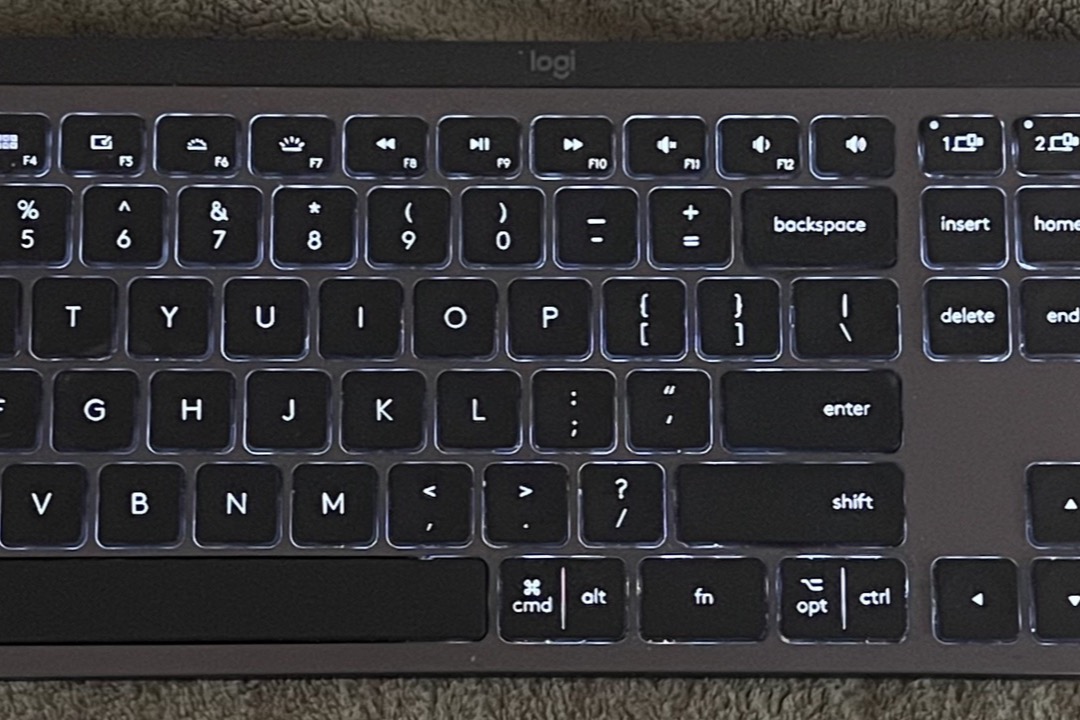
The MX Keys S is the keyboard I recommend when someone asks for one good board and does not want to think about it again. It holds three devices over Bluetooth and adds a Logi Bolt receiver for the fourth situation nobody plans for, which is the corporate desktop where IT has switched Bluetooth off at the policy level. The switching itself is one key press per device, and it is fast enough that moving from the work laptop to the tablet mid-sentence is a non-event.
The keycaps are the part that justifies the price. They are dished, with a spherical scoop that catches the fingertip, on a low-profile scissor mechanism with a short, damped stroke. In practice that means very little noise in a room with other people in it and very little fatigue over a long typing day. The adaptive proximity backlight is the other feature that earns its place: it wakes as your hands approach, then adjusts to the room’s ambient light rather than running at a fixed brightness, which is why the same cell can be rated at ten days backlit and five months with the backlight off.
Two honest caveats. The battery reviews are genuinely mixed, and the pattern is clear once you read enough of them: users who run the backlight at maximum in a dim room charge every few days, while users who let the adaptive sensor do its job report something close to the rated figure. And the compact full-size layout drops the number pad, which is a real problem for numeric-entry roles. If you code invoices all day, the Signature Slim K950 or the Apple Magic Keyboard with Numeric Keypad are the better shapes for the work.

Logitech MX Keys S Wireless Keyboard
by Logitech
The best Bluetooth keyboard for office work in 2026: three-device switching, a backlight that manages itself, and a quiet dished key feel that holds up across an eight-hour day.
Pros
- Pairs three devices over Bluetooth and adds a Logi Bolt USB receiver, so one keyboard covers a work laptop, a home desktop, and a tablet with a single key press per switch
- Adaptive proximity backlight wakes as your hands approach and adjusts to ambient room light, which keeps keys readable in a dim conference room without draining the cell in a bright open office
- USB-C rechargeable cell rated at roughly 10 days with the backlight on and up to 5 months with it off, so a Friday top-up covers a normal working week
- Dished, spherically scooped keycaps on a low-profile scissor mechanism give a quiet, short stroke that reviewers repeatedly describe as the closest a membrane office board gets to a premium laptop keyboard
Cons
- One of the most expensive boards on this list, and a large share of the critical reviews are price objections rather than product faults
- Battery reports are genuinely mixed: some users hit the rated 10-day backlit figure, others report charging every few days at full backlight brightness
- The compact full-size layout drops the dedicated number pad, which is a real loss for accounts payable, payroll, and any role doing sustained numeric entry
Best Budget: Logitech Pebble Keys 2 K380s
The Pebble Keys 2 K380s is the best-value board on this page, which is a different claim from being the cheapest. The OMOTON below costs considerably less. What the K380s delivers for the money is the full three-device Easy-Switch experience in a keyboard that costs roughly a third of the MX Keys S, with a battery rated for three years on two AAA cells. For a team refresh, that combination is close to unbeatable: no charging cables to manage, no dock per desk, and a battery replacement cycle measured in years rather than weeks.
The round scooped keycaps are the K380s signature, and they divide people for about three days before most come around. The scoop is deliberate, giving the fingertip a defined landing point, and the stroke is short and quiet enough for a shared pod or an open-plan floor. It is comfortable to type on from a couch or a kitchen counter, which matters more than it sounds for hybrid workers who do a chunk of their reading and replying away from a desk.
The compatibility list is the reason this board shows up in so many of the use-case sections below. Windows, macOS, iPadOS, ChromeOS, and Android are all officially supported with correct per-OS key mapping, which is a bigger deal on a keyboard than on a mouse because the modifier keys move between platforms. The two limitations to know: there is no backlight at all, and a recurring minority of reviews report Bluetooth drops after a sleep and wake cycle that need a re-pair to clear.

Logitech Pebble Keys 2 K380s Multi-Device Bluetooth Keyboard
by Logitech
The best-value Bluetooth keyboard here: three-device switching, a three-year battery, and quiet scooped keys at a price that makes buying six for a team an easy approval.
Pros
- Easy-Switch keys hold three paired devices at once and move between them instantly, which is the entire point of a Bluetooth board for anyone running a laptop, a phone, and a tablet
- Two AAA cells rated for up to three years, so the keyboard outlasts most of the devices paired to it before it asks anything of you
- Round scooped keys are quiet enough for a shared desk pod and shallow enough to type on comfortably from a couch, a kitchen counter, or a hot desk
- Officially supports Windows, macOS, iPadOS, ChromeOS, and Android with correct per-OS key mapping, which matters far more on a keyboard than on a mouse because modifier keys differ by platform
Cons
- No backlight of any kind, so a dim conference room or an evening desk means typing by touch
- A recurring minority of reviews report intermittent Bluetooth drops that need a re-pair, usually after a sleep and wake cycle
- Compact layout with no number pad, and the small round keycaps take a few days of adjustment coming from a full-size board
Premium Upgrade: Apple Magic Keyboard with Numeric Keypad
For a Mac desk that does real numeric work, this is the correct upgrade. The full-size layout includes a proper number pad and a complete arrow cluster, which is the shape that finance, bookkeeping, and operations roles actually need and which the compact Apple board and the MX Keys S both give up. If you spend your day in spreadsheets, the number pad pays for itself in the first month in avoided reaching.
The typing action is the quietest and most consistent on this page, and it ties for the highest star rating here at 4.6. Pairing is the other genuine advantage: connect the cable once and the keyboard auto-pairs to the Mac with no settings menu, no channel keys, and no receiver to lose in a drawer. The rechargeable cell runs about a month per charge and tops up over cable while you continue typing, so a low battery is never a work stoppage.
The trade-offs are real and worth stating plainly. It pairs to one device at a time, so a Mac plus iPad workflow means returning to Bluetooth settings each way, which is exactly the friction the Logitech Easy-Switch boards exist to remove. It supports macOS, iPadOS, and iOS only, with no Windows layout. And it has no backlight, which at this price is a conspicuous omission if you work in a dim room.

Apple Magic Keyboard with Numeric Keypad
by Apple
The premium upgrade for Mac users who do real numeric work: a full number pad, the best typing feel on this list, and auto-pairing that removes every setup step.
Pros
- Full-size layout with a dedicated number pad and a full arrow cluster, which is the correct shape for finance, bookkeeping, and any role that lives inside spreadsheets
- Auto-pairs to a Mac over Bluetooth the moment you connect the cable once, with no pairing menu to navigate and no receiver to lose
- Rechargeable cell runs roughly a month per charge and tops up over cable while you keep typing, so a low battery never stops the workday
- The scissor key action is the quietest and most consistent on this list, and it ties for the highest star rating here at 4.6
Cons
- Pairs with one device at a time, so moving between a Mac and an iPad means going back into Bluetooth settings each way
- macOS, iPadOS, and iOS only, with no supported Windows layout
- Sits near the top of this list on price with no backlight at all
Best Compact Mac Keyboard: Apple Magic Keyboard
The compact Apple Magic Keyboard is the default for a Mac desk where space is tight, and it earns that position on fit and finish rather than features. It shares the 4.6-star rating and the same quiet scissor switches as its numeric-keypad sibling in a smaller and noticeably cheaper package, and the narrower footprint leaves genuine room for a trackpad or mouse without pushing the mousing arm to the edge of the desk. On a shallow desk, that difference is worth more than the number pad to most people.
Setup is the least fussy of any keyboard here. Connect the cable once and it pairs, then stays paired through sleep cycles, restarts, and OS updates without the re-pairing rituals that budget Bluetooth boards occasionally demand. The rechargeable battery runs about a month per charge, which is short of the AAA-powered Logitech boards but long enough that charging becomes a monthly background task rather than a weekly one.
Its limitations are the same as the full-size Apple board, and they matter more here because the price gap to a multi-device Logitech board is narrower. There is no Easy-Switch equivalent, so a Mac plus iPad setup means re-pairing each time you move. Support is macOS, iPadOS, and iOS only. Several reviewers also report pairing difficulty on older Macs, which is worth checking before you buy for a machine more than a few years old.

Apple Magic Keyboard (US English)
by Apple
The default compact keyboard for a Mac desk: quiet, well built, and paired in a single step, provided you only ever need it on one machine.
Pros
- Compact footprint leaves room on a shallow desk for a trackpad or mouse without crowding the mousing arm into the edge of the desk
- Auto-pairs on first cable connection and stays paired, which is the least fussy Bluetooth setup of any keyboard reviewed here
- Rechargeable battery lasts roughly a month per charge, and typing continues uninterrupted while it charges
- Shares the 4.6-star rating and the same quiet scissor switches as the numeric-keypad model in a smaller and noticeably cheaper package
Cons
- Single-device pairing with no Easy-Switch equivalent, so a Mac plus iPad workflow means re-pairing every time you move
- macOS, iPadOS, and iOS only, and several reviews report pairing difficulty on older Macs
- No backlight and no number pad
Best for Quiet Offices: Logitech Signature Slim K950
The K950 is the board I would specify for a shared or open-plan floor, with one caveat I will get to. Logitech sells it specifically on quiet typing, and the low-profile action is genuinely soft compared to a standard membrane office board. The caveat is that a visible minority of its reviews describe it as still clicky in a truly silent room. My read after weighing the sentiment is that it is quiet enough for an ordinary office floor with background HVAC and conversation, and not silent enough to disappear in a library. If your team sits in near-silence, order one and listen to it before ordering eleven more.
The compatibility list is the strongest argument for standardizing on it. Windows, macOS, ChromeOS, Linux, iPadOS, iOS, and Android are all supported, which makes it the safest single SKU for a mixed-device team where some people run Windows laptops, some run MacBooks, and the shared meeting-room machine is a Chromebook. It connects over Bluetooth or the Logi Bolt receiver, so it also works on managed corporate machines where Bluetooth pairing is disabled by policy, and it holds three devices at once.
The physical layout is what most fixed-desk office roles need: full size with a number pad and a palm-rest edge, running on two AAA cells so there is no charging cable competing for outlets. It costs more than several full-size Bluetooth boards here, and some reviewers question the value against Logitech’s own K585. If you also want the phone cradle, the K585 is the better buy; if you want the wider OS support and the Bolt fallback, this is.

Logitech Signature Slim K950 Quiet Typing Wireless Keyboard
by Logitech
The full-size Logitech board with the widest OS support here, quiet enough for most shared offices, with a Bolt receiver fallback for corporate machines.
Pros
- The broadest compatibility list on this page, covering Windows, macOS, ChromeOS, Linux, iPadOS, iOS, and Android, which makes it the safest single SKU to standardize a mixed-device team on
- Connects over Bluetooth or the Logi Bolt receiver, so it still works on locked-down corporate machines where IT has disabled Bluetooth pairing at the policy level
- Full-size layout with a number pad plus a palm-rest edge, which is the shape most fixed-desk office roles actually need
- Two AAA cells with three-device switching, so the board driving an entire desk setup never needs a charging cable competing for outlets
Cons
- Logitech markets the quiet typing angle heavily, and a visible minority of reviews say the board is still clicky enough to notice in a genuinely quiet room
- Priced above several full-size Bluetooth boards here, and some reviewers question the value against Logitech's own cheaper K585
- No backlight
Best Budget Multi-Device: Arteck HB192
The Arteck HB192 is the keyboard I reach for when someone needs eight of something and the budget is a line item rather than a conversation. It offers three-device Bluetooth switching at a price most single-device keyboards sell for, in a full-size layout with a number pad, in a stainless-steel body that sits heavier and more planted on a desk than the price would suggest. For hot-desk pods, spare-desk stock, and shared workstations, that combination is very hard to beat.
The review pool is the reason I trust it at that price. With 5,523 ratings at 4.2 stars, it has the second-largest review base on this page, which means the failure-rate picture is real data rather than a guess. That data is not uniformly flattering, and I would rather quote it accurately: intermittent Bluetooth drops after sleep are the most common complaint theme, and a minority of reviewers report the board failing inside the first year. At this price and this volume, that is the honest trade, and it is one most procurement decisions can absorb when the alternative costs four times as much per seat.
The rechargeable cell is rated around six months per charge, which for a shared unit means nobody needs to keep a battery drawer stocked behind it. There is no backlight. If a backlight is a requirement on a budget, Arteck’s own seven-color model covers that at a small premium.

Arteck HB192 Universal Multi-Device Bluetooth Keyboard
by Arteck
A full-size, three-device, rechargeable Bluetooth keyboard at a bulk-order price, with a review pool large enough to know exactly what you are getting.
Pros
- Three-device Bluetooth switching at a price most single-device keyboards sell for, which is what makes it the sensible bulk order for a team refresh
- Rechargeable cell rated around six months per charge, so a shared or hot-desk unit does not need a battery drawer stocked behind it
- Full-size layout with a number pad in a stainless-steel body that sits heavier and more planted on the desk than the price suggests
- 5,523 ratings at 4.2 stars is the second-largest review pool on this list, which gives the long-term reliability picture real weight
Cons
- Intermittent Bluetooth drops are the most common complaint theme, typically after the keyboard has gone to sleep
- A minority of reviews report the board failing inside the first year, which is the honest trade-off at this price
- No backlight
Best Folding Travel Keyboard: ProtoArc XK01
The XK01 solves the problem every other travel keyboard punts on: it folds small without giving up the number pad. Tri-folded it measures 8.46 by 4.68 by 0.78 inches, which fits the front pocket of a laptop bag alongside a tablet rather than competing with it for space, and unfolded it is a full 105-key layout. For anyone who does numeric work on the road, that is the difference between a travel keyboard you actually use and one that stays in the bag.
Bluetooth 5.1 with three-device switching means it pairs to the tablet, the phone, and the laptop simultaneously, which is exactly the pattern a travel setup needs. The USB-C rechargeable cell carries a 150-day standby rating, so a keyboard that only comes out on trips is unlikely to be dead when it does. Support spans Windows, macOS, iPadOS, iOS, and Android, which is the right coverage for a board that gets paired to whatever device is in the bag that week.
The compromises are inherent to the format. The two folding hinges put seams across the typing surface, and touch typists notice them for the first few sessions before the muscle memory adjusts. And a recurring minority of reviews report individual keys failing after several months of repeated folding, which is the mechanical cost of a hinge running through a keyboard. Treat it as a travel board rather than a daily driver and it holds up well.

ProtoArc XK01 Foldable Bluetooth Keyboard
by ProtoArc
The travel keyboard that does not make you give up the number pad: tri-folds to pocket size, unfolds to a full 105-key layout, and holds three paired devices.
Pros
- Tri-folds to 8.46 by 4.68 by 0.78 inches, small enough to ride in the front pocket of a laptop bag next to a tablet instead of competing with it for space
- Unfolds to a 105-key layout with a real number pad, so choosing a travel keyboard does not cost you the numeric entry you rely on at your desk
- Bluetooth 5.1 with three-device switching and a 150-day standby rating on a USB-C rechargeable cell
- Works across Windows, macOS, iPadOS, iOS, and Android, which is the right coverage for a keyboard that gets paired to whatever device is in the bag that week
Cons
- The folding hinges put two seams across the typing surface, and touch typists notice them for the first few sessions
- A recurring minority of reviews report individual keys failing after several months of repeated folding
Best Rechargeable Budget Mac Board: iClever BK10 SE
The BK10 SE is the value answer to the Apple Magic Keyboard, and it wins on two specs Apple does not compete on. The first is runtime: the Nordic low-power chipset gives it a rated 180 days per charge, the longest rechargeable figure on this page and roughly six times what the Apple boards deliver. The second is multi-device support, with three simultaneous Bluetooth connections against Apple’s one.
The auto OS detection is the feature that makes it genuinely usable on a mixed desk. It identifies the operating system of each paired device and remaps the modifier keys accordingly, so the Command key behaves as Command on the Mac channel and the same physical key behaves as the Windows key on the PC channel. This is the single most annoying friction point in cross-platform keyboard use, and handling it automatically is worth more than most of the feature bullets manufacturers lead with. The full-size layout with a number pad in a slim silver body suits a Mac desk without carrying the Apple price, and the low-profile scissor switches give a shallow, quiet stroke much closer to a laptop keyboard than to a typical budget membrane board.
The caution is connectivity. Reviews are mixed on reliability, with a minority reporting dropped connections that need a manual re-pair, and occasional reports of individual keys sticking after several months. At 4.4 stars across 1,287 ratings, the overall picture is solid, but this is not the board to buy for the executive who will escalate a dropped connection.

iClever BK10 SE Slim Full-Size Bluetooth Keyboard for Mac (Silver)
by iClever
A slim, full-size, Mac-friendly Bluetooth keyboard with the longest rechargeable runtime here, at roughly a quarter of the price of Apple's own board.
Pros
- Rechargeable cell on a Nordic low-power chipset rated up to 180 days per charge, the longest rechargeable runtime quoted on this list
- Auto-detects the operating system of each paired device and remaps the modifier keys accordingly, across three simultaneous Bluetooth connections
- Full-size layout with a number pad in a slim silver body that suits a Mac desk without carrying the Apple price
- Low-profile scissor switches give a shallow, quiet stroke much closer to a laptop keyboard than to a typical budget membrane board
Cons
- Connectivity reliability is mixed in reviews, with a minority reporting dropped connections that need a manual re-pair
- Occasional reports of individual keys sticking after several months of daily use
Best Budget iPad Keyboard: OMOTON Ultra-Slim
The OMOTON is the cheapest keyboard on this page and the most reviewed by an enormous margin: 27,123 ratings at 4.5 stars. When a product that costs this little accumulates a review pool that large at that rating, the reliability picture is about as well-established as consumer electronics data gets. It has been on sale, essentially unchanged, for over a decade, and it keeps selling because it does one job very well.
That job is being an iPad keyboard. At 0.2 inches thick it slips behind an iPad in a folio case or into a laptop sleeve without adding bulk you would notice, and the 78-key layout gives up the number pad and the spacing of a full board in exchange for that footprint. The function row is the detail that separates it from generic slim boards: the media and system hotkeys are mapped for iOS specifically, covering volume, brightness, home, and the on-screen keyboard toggle without reaching up to touch the screen. On an iPad, that mapping is the whole experience.
Three limitations, all reasonable at the price. It pairs to one device at a time, so an iPad plus iPhone workflow means re-pairing between them. It runs on AAA cells with no rechargeable option, roughly 400 hours of typing per set, which some buyers prefer and others find dated. And a recurring minority of reviews report keycaps popping off under heavy use, which is the most common failure mode for a board this thin.

OMOTON Ultra-Slim Bluetooth Keyboard for iPad
by OMOTON
The lowest-priced keyboard here and the most-reviewed by a wide margin: a 0.2-inch iPad companion with proper iOS hotkeys and nothing to charge.
Pros
- 27,123 ratings at 4.5 stars, by a wide margin the largest review pool on this list and the strongest long-term reliability signal here
- 0.2 inches thick, which slips behind an iPad in a folio case or into a laptop sleeve without adding noticeable bulk to the bag
- Dedicated iOS media and system hotkeys along the function row cover volume, brightness, home, and the on-screen keyboard toggle without reaching for the screen
- AAA cells run roughly 400 hours of typing, and there is no charging cable to remember to pack
Cons
- Single-device pairing only, so an iPad plus iPhone workflow means re-pairing between them each time
- AAA-powered with no rechargeable option, so you keep spare cells in a drawer rather than a cable on the desk
- A recurring minority of reviews report keycaps popping off under heavy use
Best for Four-Device Desks: TECKNET 4-Device
The TECKNET carries the highest connection count on this page: three Bluetooth channels plus a 2.4 GHz USB receiver, for four simultaneous connections. That fourth channel is more useful than it sounds. Most three-device boards force a choice between the desktop that needs a receiver and the tablet that only speaks Bluetooth. The TECKNET takes both, which covers the common office desk where a docked work machine, a personal laptop, a tablet, and a phone all live within arm’s reach.
The 2.4 GHz receiver is also the answer for machines where Bluetooth is disabled or unreliable, and for docking setups where Bluetooth contention with a headset and a mouse causes stutter. The 500 mAh rechargeable cell is rated around 180 days per charge, so four paired devices does not translate into constant charging. And the layout is full-size with a number pad, which is unusual to find alongside a four-connection radio at this price.
The honest caution is durability. A minority of reviews report the keyboard failing at around the three-month mark, which is the risk profile at this price and the reason I would not specify it for an executive desk. There is no backlight, and the key feel is functional rather than refined. For a heavily multi-device desk on a budget, those trade-offs are usually worth taking.

TECKNET 4-Device Rechargeable Bluetooth Keyboard
by TECKNET
The highest connection count here: three Bluetooth devices plus a 2.4 GHz receiver, in a full-size rechargeable board at a budget price.
Pros
- Three Bluetooth channels plus a 2.4 GHz USB receiver gives four simultaneous connections, the highest count of any keyboard on this list
- The 2.4 GHz receiver covers desktops and dock setups where Bluetooth is disabled or unreliable, without giving up any of the three Bluetooth channels
- 500 mAh rechargeable cell rated at roughly 180 days per charge, so four paired devices does not translate into constant charging
- Full-size layout with a number pad, which is unusual at this price alongside a four-connection radio
Cons
- A minority of reviews report the keyboard failing at around the three-month mark, which is the durability risk at this price point
- No backlight, and the key feel is functional rather than refined
Best Number Pad Plus Phone Cradle: Logitech K585
The K585 addresses a desk problem almost every office worker has improvised a bad solution for: where the phone goes. The integrated cradle holds a phone or a small tablet at a readable angle at the top of the keyboard, which retires the propped-against-the-monitor arrangement most desks develop and gets the phone into your working sightline rather than face-down beside the mousepad. If you run a second inbox, a scheduling app, or a messaging channel on your phone during the workday, this changes the ergonomics of your desk more than a spec sheet would suggest.
The rest is a well-judged Logitech office board. It ships with both Bluetooth and a 2.4 GHz USB receiver, so it serves a corporate desktop and a personal tablet from the same keyboard, and it holds three devices. It packs a full number pad and 12 function keys into a slim chassis, which is a lot of layout for the footprint, and it runs on two AAA cells so there is no cable of its own to manage.
Two things to weigh. Some reviews report intermittent connection hiccups, more often on the Bluetooth channels than on the receiver, which is a useful detail because it means the receiver is the more reliable path if you have a spare USB port. And the cradle occupies the space above the function row, which pushes the keyboard slightly further from the monitor on a shallow desk. Measure before you buy if your desk is under 24 inches deep.

Logitech K585 Slim Multi-Device Wireless Keyboard with Phone Cradle
by Logitech
A full-size Logitech board with a built-in phone cradle and both radio types, for the desk where the phone is a second screen rather than a distraction.
Pros
- Integrated cradle holds a phone or a small tablet at a readable angle, which retires the propped-against-the-monitor habit most desks develop
- Ships with both Bluetooth and a 2.4 GHz USB receiver, so it serves a corporate desktop and a personal tablet from the same keyboard
- Full number pad plus 12 function keys in a slim chassis, which is a lot of layout for the desk footprint
- Two AAA cells with three-device switching, so the keyboard driving three screens never needs a cable of its own
Cons
- Some reviews report intermittent connection hiccups, more often on the Bluetooth channels than on the receiver
- The cradle occupies the space above the function row, which pushes the keyboard slightly further from the monitor on a shallow desk
- No backlight
Best Backlit Compact Keyboard: Logitech MX Keys Mini
The MX Keys Mini takes the MX Keys key feel and adaptive proximity backlight and puts them in a minimalist footprint. The narrower body is the point, and it is a real ergonomic gain rather than only a desk-space one: a compact board shortens the reach from the home row out to the mouse, which over an eight-hour day reduces the repeated shoulder abduction that a full-size board with a number pad forces on the mousing arm. If you have wrist or shoulder symptoms, this is the same reasoning that drives our ergonomic keyboards picks, and it pairs well with a properly positioned keyboard wrist rest.
The backlight is the same adaptive proximity system as the MX Keys S, waking as hands approach and adjusting to room light, with the same rating of about 10 days backlit and 5 months with the backlight off. Three-device Bluetooth switching and USB-C recharging round it out. With 4,244 ratings it is the most-reviewed premium compact Bluetooth keyboard covered here, so the sentiment data is substantial.
That sentiment is mixed in two specific places. Connectivity and long-term reliability reports include a visible minority citing dropped connections and individual key failures, which is a pattern the full-size MX Keys S shows less of. And a number of reviewers say plainly that it is expensive for a compact board with no number pad. Both objections are fair. Buy it for the backlight and the compact ergonomics, not because it is the value pick.

Logitech MX Keys Mini Minimalist Illuminated Wireless Keyboard
by Logitech
The MX Keys backlight and key feel in a minimalist footprint, for desks where the distance between keyboard and mouse matters more than a number pad.
Pros
- The same adaptive proximity backlight as the MX Keys S in a minimalist footprint that pulls the mouse hand closer to the body
- Three-device Bluetooth switching with USB-C recharging rated at 10 days backlit and 5 months with the backlight off
- The narrower width is a genuine ergonomic gain rather than only a desk-space one, because a compact board shortens the reach out to the mouse
- 4,244 ratings make it the most-reviewed premium compact Bluetooth keyboard covered here
Cons
- Connectivity and long-term reliability reports are mixed, with a minority citing dropped connections and individual key failures
- Expensive for a compact board with no number pad, and a number of reviews say exactly that
Best Budget Backlit Keyboard: Arteck Universal Backlit
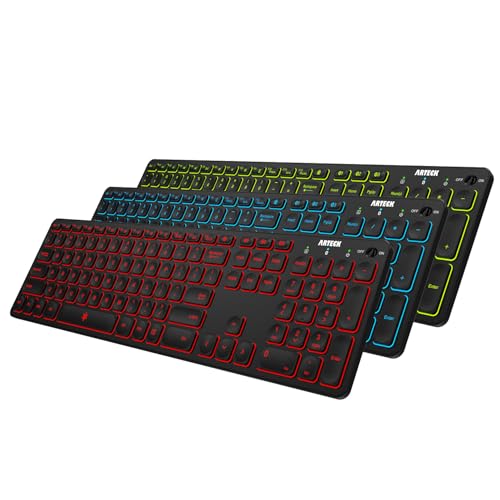
If you want a backlight and cannot justify the MX Keys Mini, this Arteck board is the practical route. Seven backlight colors at two brightness levels is a consumer flourish in an office context, and the white channel is the only one most workplaces will ever use, but a usable white backlight at this price is genuinely hard to find. It matters most in the two situations backlights actually earn their keep: a dim conference room and an office where the overhead lights go off on a timer before everyone has left.
The rest of the board is a straightforward full-size layout with a number pad and three-device Bluetooth switching, on a rechargeable cell rated around six months with the backlight off. Running the backlight will cut that considerably, which is the trade every backlit keyboard makes and which nobody prints on the box. Android support is explicit rather than incidental, which is why this board appears in the Android row of the use-case table below.
At 4.2 stars it ties Arteck’s other board near the bottom of this page, and for the same reason: Bluetooth drops turn up in a recurring minority of reviews, generally after a sleep cycle. As a personal desk keyboard where a re-pair is a minor annoyance, that is acceptable. For a shared or executive desk, spend more.
Arteck Universal Backlit Bluetooth Keyboard, 7 Colors
by Arteck
The least expensive genuinely backlit full-size Bluetooth keyboard here, with three-device switching and explicit Android support.
Pros
- Seven backlight colors at two brightness levels, which is the least expensive route on this list to a genuinely usable backlight
- Three-device Bluetooth switching with a rechargeable cell rated around six months per charge with the backlight off
- Full-size layout including a number pad, so adding a backlight does not cost you the numeric column
- Android support is explicit rather than incidental, which matters on a keyboard because modifier mapping differs by platform
Cons
- Bluetooth drops turn up in a recurring minority of reviews, generally after a sleep cycle
- The seven-color backlight is a consumer flourish more than a work feature, and the white setting is the only one most offices will use
- At 4.2 stars it ties the other Arteck board near the bottom of this list, with only the Bnnwa rating lower
Best Keyboard with Touchpad: ProtoArc XK01 TP
Keyboard-and-touchpad combos are a compromise category, and most of them are built for living rooms rather than offices. The XK01 TP is the exception I would specify for actual work. It puts a multi-touch trackpad on the folding XK01 chassis, which means a tablet, a conference-room display, or a wall-mounted screen becomes a workable machine with one item out of the bag instead of two, and the trackpad supports real gestures rather than acting as a bare cursor pad.
Bluetooth 5.1 with three-device switching is rare in this category, where most units pair to a single device and stay there. That makes it usable as a genuine roaming setup: paired to the meeting-room display, the tablet, and a laptop at once. USB-C recharging covers both halves of the device on one cable and one charge cycle, which matters when the alternative is a combo board with two separate battery compartments.
Set expectations correctly on the trackpad. It is small by laptop standards and works as a supplement to a mouse rather than a replacement, and it sits to the side rather than centered under the space bar, which takes some adjusting. For presenting, for a tablet workstation, and for any situation where carrying a mouse is inconvenient, it does the job. For eight hours of spreadsheet work, pair a proper wireless mouse with a standard keyboard instead.

ProtoArc XK01 TP Foldable Bluetooth Keyboard with Touchpad (Black)
by ProtoArc
The office-appropriate keyboard and touchpad combination: a folding full layout with a real multi-touch trackpad and three paired devices.
Pros
- Combines a folding full-layout keyboard with a multi-touch trackpad, so a tablet or a wall-mounted display becomes a workable machine with one item in the bag
- Bluetooth 5.1 with three-device switching, which is rare in the keyboard-plus-touchpad category where most units pair to one device
- The trackpad supports multi-touch gestures rather than acting as a bare cursor pad, which is what separates it from the cheap combo boards
- USB-C rechargeable, so the keyboard and trackpad share one cable and one charge cycle
Cons
- The trackpad is small by laptop standards and works as a supplement to a mouse rather than a replacement for one
- Folding seams run through the typing surface, and the trackpad sits to the side rather than centered under the space bar
Best Budget Touchpad Keyboard: Bnnwa Multi-Device
I am including the Bnnwa with more caveats than any other board here, because it fills a real gap at a price nothing else matches and because the caveats are important. It combines a built-in touchpad with both Bluetooth multi-device pairing and a 2.4 GHz receiver rated to 33 feet, which is genuinely enough range to drive a conference-room display from the back row. As a one-unit presentation setup, that combination costs a fraction of anything comparable.
Two things you should know before buying. First, its own product listing pitches office work and home-theater PC use in the same breath, and the build quality reflects the entertainment-accessory side of that pitch more than the office side. That is not a knock invented in review; it is what the manufacturer is telling you about who the product is for. Second, connectivity complaints are the single most common theme across its reviews, which at 3.9 stars and 721 ratings is a meaningful signal rather than background noise.
Buy it as a secondary or occasional-use device: a meeting-room drawer keyboard, a shop-floor or warehouse display controller, a backup for the presentation cart. Do not buy it as a primary daily driver, and do not buy twelve for a team without testing one first. For daily touchpad use in an office, the ProtoArc XK01 TP above is the better spend.

Bnnwa Multi-Device Wireless Bluetooth Keyboard with Touchpad
by Bnnwa
The budget keyboard and touchpad option for presentation rooms and secondary displays, with connectivity caveats worth reading before you buy.
Pros
- Built-in touchpad plus Bluetooth and a 2.4 GHz receiver with a 33-foot range, enough to drive a conference-room display from the back of the room
- Multi-device pairing at the lowest price of any touchpad keyboard reviewed here
- A full keyboard and pointer in one hand-carried unit, so a presentation setup travels as one item rather than two
- The 33-foot 2.4 GHz range is the practical spec that matters for room use, and it holds up in the reviews that discuss it
Cons
- Connectivity complaints are the single most common theme across its reviews, which is a real caution at 3.9 stars
- Its own listing pitches office work and home-theater PC use in the same breath, and the build reflects the entertainment-accessory side of that pitch more than the office side
- One of the smallest review pools on this list, so the long-term reliability picture is thinner than for most other picks here
Best Retro Styling: YUNZII ACTTO B303
The B303 is the one board here bought primarily for how it looks, and I have no objection to that. Round typewriter-style keycaps on a compact retro chassis read as a deliberate choice on a desk where everything else is anonymous black plastic, and for a home office that appears on video calls, or a reception desk that visitors see, that is a legitimate purchasing criterion rather than a frivolous one.
The mechanism underneath is membrane, not mechanical, which matters in both directions. Buyers expecting the tactile authority of a real typewriter, or of a mechanical board, will be disappointed, and the product listing is not always clear about it. But membrane also keeps the sound level closer to an office keyboard than a mechanical tribute board would manage, which makes it far more appropriate for a shared space than the styling implies. It runs on Bluetooth with AAA cells, so there is no charging cable and no dock competing for desk space.
The adjustment period is real. Tall round keycaps sit differently from low-profile scissor keys, and touch typists occasionally catch a cap edge for the first week. At 4.3 stars across 1,775 ratings, it holds a stronger reliability record than most design-led keyboards manage, which is the reassurance you want when the purchase is partly aesthetic.

YUNZII ACTTO B303 Retro Typewriter Bluetooth Keyboard
by YUNZII
The retro-styled Bluetooth board for a desk with a point of view, membrane underneath the typewriter keycaps and no charging cable to manage.
Pros
- Round retro typewriter keycaps that read as a deliberate choice on a desk where everything else is anonymous black plastic
- Bluetooth connectivity on AAA cells, so there is no charging cable and no dock competing for desk space
- Membrane switches under the retro caps keep the sound level closer to an office board than a true typewriter tribute would
- 1,775 ratings at 4.3 stars for a design-led product, a stronger reliability record than most aesthetic keyboards manage
Cons
- Membrane rather than mechanical, which will disappoint buyers expecting a genuine typewriter key feel to match the styling
- The tall round keycaps take an adjustment period coming from low-profile scissor keys, and touch typists occasionally catch a cap edge
How to Choose the Best Bluetooth Keyboard
Buyer's Guide
A Bluetooth keyboard is bought once and typed on for years, so the decision is less about headline features and more about matching the board to your devices, your desk, and the noise level of the room you sit in. These are the six factors that decide whether a keyboard gets used daily or ends up in a supply closet.
Connectivity and multi-device pairing
The number of devices a keyboard can hold simultaneously is the feature that separates a desk accessory from a workflow tool. Single-device boards such as both Apple Magic Keyboards and the OMOTON pair to one machine and require a trip into Bluetooth settings to move. Three-device boards, which covers most of this list, hold a laptop, a tablet, and a phone at once and switch with one key press. The TECKNET goes furthest with three Bluetooth channels plus a 2.4 GHz receiver for four total connections. The second half of this decision is whether the keyboard offers a USB receiver at all, because corporate IT departments increasingly disable Bluetooth pairing on managed machines as a security policy. The MX Keys S and Signature Slim K950 fall back to a Logi Bolt receiver, and the K585 and TECKNET include a 2.4 GHz receiver, which makes all four safer purchases for a work computer you do not control.
Battery type and real-world life
Rechargeable is not automatically the better choice. AAA-powered boards like the Pebble Keys 2 K380s (three years), the Signature Slim K950, and the K585 run so long between changes that the battery stops being something you think about, and when the cells finally die you replace them for the price of a coffee rather than replacing the keyboard. Rechargeable boards win on convenience per charge cycle and lose on end-of-life: the cell is not user-replaceable on most models, so battery degradation eventually retires the keyboard. Read the rated figures with the backlight in mind, too. The MX Keys S is rated at roughly 10 days backlit and up to 5 months with the backlight off, and its mixed battery reviews come almost entirely from users running the backlight at full brightness. For a keyboard that lives in a bag, AAA is the safer bet, because a rechargeable travel keyboard is dead exactly when you need it.
Size and layout
Decide about the number pad before anything else, because it is the one thing you cannot add later. If your day includes invoice entry, expense coding, payroll, or any sustained numeric work, a full-size board with a number pad will save you more time than any other feature on this page, and a budget Bluetooth keyboard can still be full-size: the Arteck HB192, TECKNET, and iClever BK10 SE all include one. Compact boards trade the number pad for desk space and for a shorter reach out to the mouse, which is a real ergonomic gain over an eight-hour day. Folding boards like the ProtoArc XK01 sit in a third category, giving you a full 105-key layout that collapses to bag size, at the cost of two hinge seams across the typing surface. Measure your desk depth before committing to a full-size board with a wrist rest or a phone cradle, since both add depth.
Typing feel and noise level
In an open office or a shared home, key noise is a courtesy issue rather than a preference. Low-profile scissor switches, which is what nearly every board here uses, are inherently quieter than the mechanical switches covered in our mechanical keyboard guide, and the dished keycaps on the MX Keys S and the scooped round keys on the Pebble Keys 2 K380s are the quietest actions on this list. Treat manufacturer quiet claims with some skepticism, though. Logitech markets the Signature Slim K950 specifically on quiet typing, and a visible minority of its reviews still describe it as clicky in a genuinely silent room, a pattern that repeats across nearly every board marketed on noise. If you sit within earshot of colleagues, the safest approach is to favor a low-profile scissor board and test it during a call before committing your whole team to it.
OS and device compatibility
Keyboards are more OS-sensitive than mice because the modifier keys differ by platform. A Windows-labeled board paired to a Mac still types fine, but Command and Option land where Alt and the Windows key are printed, and you spend the first month looking down. Boards that print both legends or auto-detect the OS avoid this entirely, which is what the iClever BK10 SE does across its three channels. Apple's Magic Keyboards are the cleanest possible Mac experience and are macOS, iPadOS, and iOS only, so they are not an option on a mixed desk. The Signature Slim K950 lists the broadest support on this page, covering Windows, macOS, ChromeOS, Linux, iPadOS, iOS, and Android, which makes it the safest single model to standardize a mixed-device team on. For Chromebook use specifically, check that ChromeOS is explicitly listed, since the search key and function row mapping depend on it.
Backlighting and extras
Backlighting is genuinely useful in a dim conference room, on an evening shift, or in any office where the overheads get switched off before people leave, and it costs battery life in direct proportion to how brightly you run it. The MX Keys S and MX Keys Mini use an adaptive proximity backlight that wakes when hands approach and dims to ambient light, which is the version of the feature that manages its own power draw. The Arteck seven-color board is the budget route to a backlight, and in an office setting the white channel is the only one you will use. The other extras worth paying for are practical rather than decorative: the K585's phone cradle turns a phone into a genuine second screen instead of something propped against the monitor, the ProtoArc XK01 TP's trackpad removes the need to carry a mouse, and dedicated media keys are worth more than they sound to anyone who runs calls all day.
The factors above interact more than they look like they do. The most common purchasing mistake I see is choosing a backlight and then being surprised by the battery life, because the two are directly linked: every rated runtime figure you see quoted assumes the backlight is off or adaptive, and running one at full brightness in a dim room can cut a five-month rating to under two weeks. The second most common mistake is buying a compact board to save desk space and then discovering the job needed a number pad, which cannot be added later.
For team purchases specifically, weight the review pool over the feature list. A board with 5,000 reviews at 4.2 stars is a more predictable purchase across twelve seats than a board with 400 reviews at 4.5, because you are buying the failure rate as much as the product. And whichever direction you go, order one and put it on a real desk for a week before committing the rest of the budget. Noise, key feel, and pairing reliability are all things that reveal themselves in the second week rather than the first hour.
Best Bluetooth Keyboard for Tablets
A tablet keyboard has different priorities from a desk keyboard: it has to be thin enough to travel with the tablet rather than instead of it, and its function row needs to be mapped for the tablet’s operating system, or half the keys do nothing. For iPad, the OMOTON is the specialist here. For a Samsung Galaxy Tab or any other Android tablet, the Pebble Keys 2 K380s is the safer pick because Android is officially supported with correct key mapping rather than treated as an afterthought. If you want a real number pad on a tablet setup, the folding ProtoArc XK01 is the only board here that delivers one in a bag-sized package.
A Bluetooth keyboard for an iPad mini is the one tablet case worth calling out separately, because the mini is narrow enough that a full-size board dwarfs it and turns the pairing into a keyboard with a screen propped behind it. Either commit to that, by treating the mini as a tiny monitor on a proper desk board, or pick a compact keyboard whose footprint is close to the tablet’s own. What does not work is the middle ground: a mid-size board is too big to travel with a mini and too cramped to type on all day.
If the tablet in question is an iPad, read our dedicated guide to the best Bluetooth keyboards for iPad instead. It covers the Smart Connector folio cases and trackpad keyboards that this page does not, and it breaks the picks down by iPad generation, which is the part that decides whether a case physically fits.
| Product | Price | Buy |
|---|---|---|
| OMOTON Ultra-Slim Bluetooth Keyboard for iPadBest for iPad on a budget A 0.2-inch board with an iOS-mapped function row and the largest review pool on this page, at the lowest price here. Single-device pairing, so it lives with one tablet. | $17.99 | View on Amazon |
| Logitech Pebble Keys 2 K380s Multi-Device Bluetooth KeyboardBest multi-OS tablet keyboard Official iPadOS, Android, and ChromeOS support with correct per-OS mapping, plus three-device switching, which makes it the right pick for a Samsung Galaxy Tab or a mixed tablet and laptop setup. | $37.99 | View on Amazon |
| ProtoArc XK01 Foldable Bluetooth KeyboardBest folding tablet companion Tri-folds to pocket size and unfolds to a full 105-key layout with a number pad, so a tablet becomes a real numeric-entry workstation on the road. | $44.99 | View on Amazon |
A Bluetooth keyboard for a smart TV is a related but distinct job, and the constraint is pairing rather than typing. Most smart TVs, streaming sticks and consoles will pair with a standard Bluetooth keyboard and instantly make searching a streaming catalogue bearable, but they expose no pairing UI beyond a basic device list, so a keyboard with a physical channel-switch key is worth far more here than a backlight or a nice key feel. Check your TV’s own Bluetooth settings before buying, because a minority of sets accept only their own remote and a USB receiver, in which case a keyboard with a dongle rather than pure Bluetooth is the one that will work.
Best Bluetooth Keyboard for iPhone
Typing long replies on a phone screen is the fastest way to lose ten minutes to a two-sentence email, and a Bluetooth keyboard fixes it if you pick one that fits the way a phone is actually used. Pocketability and iOS hotkey mapping matter more than layout here, because you will use the keyboard in short bursts, often somewhere other than a desk. The OMOTON is the pocket option with iOS media keys built into the function row. The K380s is better if the phone is one of three devices you switch between. The MX Keys Mini is the pick when the phone is a secondary target for a keyboard that mainly lives on a desk. Android phones work with all three, though the OMOTON’s hotkeys are iOS-specific.
| Product | Price | Buy |
|---|---|---|
| OMOTON Ultra-Slim Bluetooth Keyboard for iPadMost pocketable iPhone pick iOS media and system hotkeys on the function row and a 0.2-inch profile, so it goes wherever the phone goes. One paired device at a time. | $17.99 | View on Amazon |
| Logitech Pebble Keys 2 K380s Multi-Device Bluetooth KeyboardBest for phone plus two other devices Three-device Easy-Switch with a three-year battery, so the phone is one key press away from the laptop and tablet without any re-pairing. | $37.99 | View on Amazon |
| Logitech MX Keys Mini Minimalist Illuminated Wireless KeyboardBest desk board that also serves a phone A compact backlit desk keyboard with three-device switching, for when the phone is the third channel on a board that mainly serves a computer. | $99.99 | View on Amazon |
Best Bluetooth Keyboard with Touchpad
Keyboard-and-touchpad combos are a compromise category and worth approaching with clear expectations. Integrated trackpads are smaller and less precise than a laptop’s, and they suit presenting, tablet work, and secondary-display control far better than eight hours of spreadsheet editing. Buy one when carrying a separate mouse is the problem you are solving. The ProtoArc XK01 TP is the office-appropriate pick, with real multi-touch gestures and three-device switching. The Bnnwa is the budget alternative, with the honest caveat that connectivity complaints dominate its reviews and its own listing markets it for home-theater use as much as office use.
| Product | Price | Buy |
|---|---|---|
| ProtoArc XK01 TP Foldable Bluetooth Keyboard with Touchpad (Black)Best office keyboard with touchpad A folding full layout with a genuine multi-touch trackpad and Bluetooth 5.1 three-device switching, USB-C rechargeable, appropriate for tablet workstations and presenting. | $49.99 | View on Amazon |
| Bnnwa Multi-Device Wireless Bluetooth Keyboard with TouchpadBest budget touchpad option The lowest-priced touchpad board here with a 33-foot 2.4 GHz range for room control, but connectivity complaints are its top review theme and the listing targets home-theater use alongside office work. | $24.99 | View on Amazon |
Best Portable Bluetooth Keyboard
Portable covers three different shapes, and the right one depends on what you are willing to trade. A folding keyboard gives you a full-size layout in a small package at the cost of hinge seams under your fingers. A slim compact board gives you an uninterrupted typing surface at the cost of the number pad. An ultra-thin mini board gives you the smallest possible footprint at the cost of key spacing. The ProtoArc XK01 is the folding pick and the only portable here with a number pad. The K380s is the compact multi-device pick with a three-year battery that will not die in a bag. The OMOTON is the thinnest and lightest option at 0.2 inches.
| Product | Price | Buy |
|---|---|---|
| ProtoArc XK01 Foldable Bluetooth KeyboardBest folding portable Tri-folds to 8.46 by 4.68 by 0.78 inches and opens to 105 keys with a number pad, with a 150-day standby rating on a USB-C cell. | $44.99 | View on Amazon |
| Logitech Pebble Keys 2 K380s Multi-Device Bluetooth KeyboardBest compact for daily carry A compact three-device board on two AAA cells rated for three years, so the keyboard that lives in your bag is never dead when you open it. | $37.99 | View on Amazon |
| OMOTON Ultra-Slim Bluetooth Keyboard for iPadSlimmest and lightest At 0.2 inches thick this is the smallest board here, slipping behind a tablet in a folio case, with AAA cells and no cable to pack. | $17.99 | View on Amazon |
Best Bluetooth Keyboard for Mac
Mac users have a genuine choice to make between the cleanest possible integration and the flexibility to work across platforms. The Apple Magic Keyboard is the cleanest: auto-pairing, correct modifier keys with no configuration, and the quietest action here, at the cost of single-device pairing and no Windows support. The MX Keys S is the better choice for a MacBook that also has to drive a Windows machine or a tablet, with three-device switching and full macOS support. The iClever BK10 SE is the value option, auto-detecting the OS per channel so a Mac and a PC can share one keyboard without a modifier-key mismatch. All three work with a MacBook, an iMac, or a Mac mini.
| Product | Price | Buy |
|---|---|---|
| Apple Magic Keyboard (US English)Best pure Apple Bluetooth keyboard Auto-pairs to a Mac on first cable connection with no settings menu and no receiver, with the quietest scissor action on this page. One device at a time. | $86.00 | View on Amazon |
| Logitech MX Keys S Wireless KeyboardBest Mac keyboard for multi-device desks Full macOS support with three-device Bluetooth switching plus a Logi Bolt fallback, an adaptive backlight, and the most refined key feel of the multi-device boards. | $119.99 | View on Amazon |
| iClever BK10 SE Slim Full-Size Bluetooth Keyboard for Mac (Silver)Best budget Mac keyboard Auto-detects the OS on each of three channels and remaps modifiers accordingly, with a rated 180 days per charge and a full number pad, at a fraction of Apple's price. | $35.99 | View on Amazon |
Best Multi-Device Bluetooth Keyboard
This category grew out of the Logitech K480, the chunky multi-device board with the built-in tablet groove that defined the segment before it was discontinued, and the current generation does the same job with far better ergonomics. The variables that matter are how many devices a board holds, whether it offers a 2.4 GHz receiver in addition to Bluetooth for machines that need one, and how switching is triggered. The TECKNET sets the ceiling here at four connections, three Bluetooth plus a receiver. The Signature Slim K950 is the quiet full-size option with a Logi Bolt fallback and the widest OS list. The Arteck HB192 is the budget three-device board with the review depth to trust across multiple seats.
| Product | Price | Buy |
|---|---|---|
| TECKNET 4-Device Rechargeable Bluetooth KeyboardMost connections (four total) Three Bluetooth channels plus a 2.4 GHz receiver for four simultaneous devices, the highest count here, with a full number pad and a rated 180 days per charge. | $32.99 | View on Amazon |
| Logitech Signature Slim K950 Quiet Typing Wireless KeyboardBest quiet full-size multi-device Three devices over Bluetooth or Logi Bolt, the widest OS support on this page, and a quiet full-size layout suited to shared office floors. | $79.99 | View on Amazon |
| Arteck HB192 Universal Multi-Device Bluetooth KeyboardBest budget multi-device Three-device switching and a full number pad at a bulk-order price, backed by the second-largest review pool here at 5,523 ratings. | $35.99 | View on Amazon |
Best Bluetooth Keyboards by Use Case
Eleven more specific situations, each matched to the board on this page that handles it best. Every one of these is reviewed in full above.
| Product | Price | Buy |
|---|---|---|
| iClever BK10 SE Slim Full-Size Bluetooth Keyboard for Mac (Silver)Best rechargeable Bluetooth keyboard A rated 180 days per charge is the longest rechargeable runtime on this page, in a slim full-size body with auto OS detection. | $35.99 | View on Amazon |
| Logitech K585 Slim Multi-Device Wireless Keyboard with Phone CradleBest Bluetooth keyboard with number pad A full number pad and 12 function keys in a slim chassis, plus a phone cradle that turns a phone into a genuine second screen. | $49.99 | View on Amazon |
| Logitech MX Keys Mini Minimalist Illuminated Wireless KeyboardBest backlit Bluetooth keyboard An adaptive proximity backlight that wakes on approach and dims to room light, in a compact three-device body. | $99.99 | View on Amazon |
| Logitech Signature Slim K950 Quiet Typing Wireless KeyboardBest quiet Bluetooth keyboard A low-profile action Logitech markets on quiet typing, quiet enough for an ordinary office floor if not for a silent one. | $79.99 | View on Amazon |
| TECKNET 4-Device Rechargeable Bluetooth KeyboardBest Bluetooth keyboard for Surface Pro Three Bluetooth channels plus a 2.4 GHz receiver covers a docked Surface plus a tablet and a phone without giving up a channel. | $32.99 | View on Amazon |
| Logitech Pebble Keys 2 K380s Multi-Device Bluetooth KeyboardBest Bluetooth keyboard for Chromebook Explicit ChromeOS support with correct search-key and function-row mapping, plus a three-year AAA battery for school and small-business fleets. | $37.99 | View on Amazon |
| Apple Magic Keyboard (US English)Best Bluetooth keyboard for Apple TV Auto-pairs across Apple devices with no settings menu, and the compact footprint suits a living room or a shared media desk. | $86.00 | View on Amazon |
| Arteck HB192 Universal Multi-Device Bluetooth KeyboardBest Bluetooth keyboard for PS5 A full-size board with three-device Bluetooth switching and a rechargeable cell, at a price that suits an occasional-use console keyboard. | $35.99 | View on Amazon |
| ProtoArc XK01 Foldable Bluetooth KeyboardBest Bluetooth keyboard for Steam Deck Tri-folds to pocket size and unfolds to a full 105-key layout, which is the right shape for a handheld device used away from a desk. | $44.99 | View on Amazon |
| Arteck Universal Backlit Bluetooth Keyboard, 7 ColorsBest Bluetooth keyboard for Android Explicit Android support with a seven-color backlight and a full number pad, at the lowest price for a backlit board here. | $35.99 | View on Amazon |
| YUNZII ACTTO B303 Retro Typewriter Bluetooth KeyboardBest typewriter Bluetooth keyboard Round typewriter keycaps over membrane switches, on Bluetooth with AAA cells and no charging cable to manage. | $45.04 | View on Amazon |
Final Verdict
After sixteen boards, the recommendation for most office desks is the Logitech MX Keys S. It handles the three things that determine whether a keyboard survives on a working desk: it is quiet enough for a room with other people in it, it holds three devices plus a Logi Bolt receiver so it works on the corporate machine as well as the personal one, and the dished scissor keycaps hold up across a full typing day without fatigue. The adaptive backlight is the feature people notice a month in, when they realize they have never once thought about it. If your role involves sustained numeric entry, buy the full-size Logitech Signature Slim K950 or, on a Mac, the Apple Magic Keyboard with Numeric Keypad instead, because no other feature compensates for a missing number pad.
For a tighter budget, or for buying several at once, the Logitech Pebble Keys 2 K380s is the value pick: full three-device Easy-Switch, a three-year AAA battery, quiet scooped keys, and official support across Windows, macOS, iPadOS, ChromeOS, and Android. For a genuine bulk order where per-seat cost dominates, the Arteck HB192 delivers a full-size three-device board with 5,523 ratings behind it. And if what you actually want is tactile feedback and switch choice rather than office quiet, this is the wrong page: read our mechanical keyboards guide instead, then set up whichever board you choose alongside a laptop stand at proper monitor height so the keyboard, the screen, and your shoulders are working with each other rather than against each other.
Frequently Asked Questions
Which Logitech Bluetooth keyboard is best?
How do I connect a Bluetooth keyboard?
What happened to Microsoft Bluetooth keyboards?
What is the difference between a Bluetooth keyboard and a wireless keyboard?
Will a Bluetooth keyboard work with my iPad, Android tablet, or Chromebook?
Related Articles
About the Reviewer

Sarah Chen, CAP, PMP
B.A. Business Administration, UCLA
Sarah Chen spent 10 years in office management and operations at Fortune 500 companies before founding DeskRated in 2026. After managing supply budgets for teams of 50+ people and testing thousands of products through daily use, she started writing the honest, no-fluff supply reviews that office professionals actually need. Sarah holds both CAP and PMP certifications and is based in Los Angeles.