Best Wireless Charging Desk Pads and Mats of 2026
By Sarah Chen, CAP, PMP Updated
Jump to our top picks ↓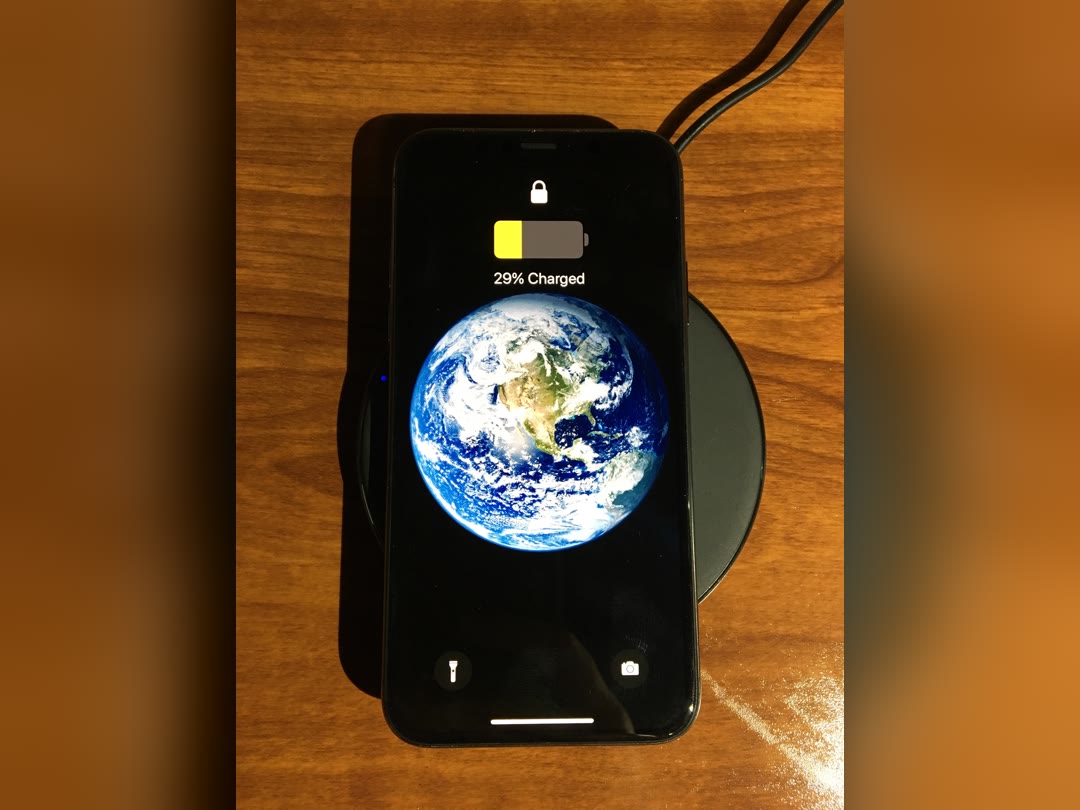
A phone charging cable is the one cord on most desks that never stays put. It slides off the back edge, tangles with the mouse cable, and ends up on the floor at the exact moment the battery warning appears. A wireless charging desk pad solves that by building the charger into the surface you already work on: the mat holds the keyboard and mouse, and the phone sits on a marked spot beside them and charges. No cable to find, no puck to knock off the desk, one less object in the layout.
I look at desks the way an office manager does: by what is in the way. A desk mat with wireless charging earns its place when it removes clutter without creating a new problem, and the new problems in this category are predictable. Most mats ship without the wall adapter they need, iPhones charge at roughly half the speed printed on the box, and a phone set down an inch off the charging spot simply stops charging. If you only want a plain surface, my guide to the best desk mats covers that, and if you want a standalone charger instead, see the best wireless charging pads.
For this 2026 guide I compared eight wireless charging desk mats across three shapes: full-depth mats that cover the whole work zone, keyboard-depth RGB strips for gaming setups, and a compact mouse pad for desks with no room for either. Each one is reviewed in full below, with the tradeoffs the listings leave out.
| Product | Price | Buy |
|---|---|---|
| TopMade Mouse Pad with 15W Fast Wireless Charging, 31.5x15.75 XXLBest Overall | $34.99 | View on Amazon |
| abc.mat Magnetic Wireless Charging Mouse Pad, 31.5x15.8Budget Pick | $33.24 | View on Amazon |
| abc.mat Magnetic Wireless Charging Mouse Pad and Adjustable Phone Stand, 31.5x15.8Upgrade Pick | $54.39 | View on Amazon |
| ExtreLife Magnetic Wireless Charging Mouse Pad XXL, 31.5x15.7Runner-Up | $34.89 | View on Amazon |
| TopMade 15W Wireless Charging XXL Large Leather Desk Mat, BlueBest Leather | $36.38 | View on Amazon |
| Gimars RGB Gaming Mouse Pad with 15W Wireless ChargingBest RGB | $24.57 | View on Amazon |
| Miroddi XXL Mouse Pad with Phone Holder, RGB Desk Mat with 15W Wireless ChargingBest RGB with Phone Holder | $37.99 | View on Amazon |
| VIVIYA 15W Wireless Charging Mouse Pad with Wrist SupportBest Compact Mouse Pad | $19.99 | View on Amazon |
Find the Best Wireless Charging Desk Pad for Your Need
Jump to the section that matches your desk:
Read This First: iPhones Charge at 7.5W on These Mats
Every mat on this page advertises 15W, and every one of them charges an iPhone at 7.5W at most. That is not a fault in any single product. None of these mats is Qi2-certified or Made for MagSafe, and an iPhone on a plain Qi charger is limited to 7.5W. When a listing calls a mat “magnetic”, it means there is a magnet ring that holds the phone over the coil, which helps alignment but does not unlock faster charging. The 15W figure applies to supported Android phones, and only when the mat is fed by an adapter strong enough to deliver it.
Independent measurements back up the cautious reading. Wirecutter measured just 7.7W from Journey’s 15W ALTI Slim pad. Office Express tested a charging mousepad and found that a 15% top-up took 53 minutes, against 22 minutes on a wall charger. The pattern is consistent: a wireless charging mat for desk use is a top-up device. It keeps a phone near full across a working day, which is what most people actually need, but it will not rescue a phone at 5% before a meeting. Keep a wall charger for that.
How We Chose These Wireless Charging Desk Pads
I did not run hands-on wattage tests for this guide, and I will not imply otherwise. Selection was built from the listings, the specifications, verified Amazon data, and the patterns in owner reviews. Every product was confirmed live, new and in stock before publication. From there I weighed the questions that decide whether a charging desk mat works in practice: does it include an adapter, is there a magnet or a raised target to keep the phone on the coil, does it have a separate zone for earbuds, how deep is the surface, and what does the base do on a smooth desktop.
Review patterns carried real weight, especially the negative ones. Where owners report that a mat charges slowly, misses certain phones, or stops charging after a few months, I say so in that product’s review rather than burying it. A charging mat that fails quietly is worse than a plain mat, because you only find out when the phone is flat.
Best Wireless Charging Desk Pads Overall
All eight mats are reviewed once, in full, in this section. The use-case sections further down point back to these same products.
Best Overall: TopMade XXL Mouse Pad with 15W Wireless Charging
The TopMade XXL gets the layout right, which is most of what this category asks for. At 31.5 by 15.75 inches it covers a full keyboard, a mouse with room to sweep, and a charging zone along the top edge, with space left for a notepad. The phone spot has a magnet ring, so an iPhone 12 or later snaps onto the coil instead of drifting off it when the desk gets bumped. Next to it sits a separate earbuds zone, which means the phone and the earbuds case charge side by side instead of trading places through the afternoon.
The surface is woven cloth with stitched edges and a waterproof finish. In daily use that matters more than it sounds: the stitched edge stops the front lip from fraying where the wrists rest, and a coffee spill beads up long enough to wipe off. The rubber base holds the mat in place during fast mouse work. TopMade includes a 6.56 ft USB-C to USB-C cable, long enough to reach an outlet behind most desks.
The limitation is the one shared by nearly every mat here: there is no wall adapter in the box, and this one needs a 9V/3A USB-C adapter to reach its rated output. Plug it into an old phone brick and it will charge slowly or not at all. The earbuds zone is not magnetic either, so the case has to be set on its marked spot by hand. Budget for the adapter and this is the mat I would put on most office desks.

TopMade Mouse Pad with 15W Fast Wireless Charging, 31.5x15.75 XXL
by TopMade
A full-depth woven cloth desk mat with a magnetic phone spot and a separate earbuds zone, the layout that suits most desks once you add your own adapter.
Pros
- Separate earbuds zone beside the phone spot, so a phone and an earbuds case charge at the same time instead of taking turns
- Magnet ring holds an iPhone 12 or later over the coil, which removes the usual reason a desk mat stops charging: a phone nudged off-centre
- Woven cloth top with stitched edges and a waterproof finish, so a spilled coffee wipes off and the edges do not fray under a wrist
- Ships with a 6.56 ft USB-C to USB-C cable, long enough to reach a wall outlet or a desk power strip without an extension
Cons
- No wall adapter in the box, and it needs a 9V/3A USB-C adapter to reach its rated output
- iPhones charge at 7.5W here, so a nearly flat phone still belongs on a wall charger
- The earbuds zone is not magnetic, so the case has to be set on the marked spot by hand
Best Value: abc.mat Magnetic Wireless Charging Mouse Pad
The abc.mat covers the same ground as the TopMade with a slightly different build. It is a full 31.5 by 15.8 inch mat with a magnetic iPhone spot, a separate 5W AirPods zone, and 15W Qi output for supported Android phones. The surface pairs PU with woven cloth over a rubber base, and the base grips well enough that the mat does not creep toward the edge when you mouse quickly.
Its standout point is the warranty. abc.mat backs this mat for two years, where TopMade offers one. For a product with a coil and a circuit board inside, a longer warranty is worth more than most spec sheet features, because the failure mode in this category is a mat that quietly stops charging after some months of use.
Two things to know. There is no adapter in the box, so plan for a 9V USB-C wall adapter if you do not already own one. And the review base on the listing is pooled across several abc.mat variants, so it describes the brand’s family of mats rather than this exact model. That is common on Amazon, but it is worth knowing when you read the listing. For a full-size magnetic layout with an earbuds zone and a long warranty, this is the best value on the page.

abc.mat Magnetic Wireless Charging Mouse Pad, 31.5x15.8
by abc.mat
The full-size magnetic desk mat that gives up nothing important in layout and adds a two-year warranty, as long as you supply the adapter.
Pros
- Magnetic iPhone spot and a separate 5W AirPods zone on a full 31.5 x 15.8 inch footprint
- PU and woven cloth surface on a rubber base that keeps the mat from creeping during fast mouse work
- Two-year warranty, double the one-year support the TopMade mats carry
- 15W Qi output for supported Android phones from the same coil an iPhone uses at 7.5W
Cons
- No adapter in the box, so plan for a 9V USB-C wall adapter if you do not already own one
- The listing's review base is pooled across several abc.mat variants, so it describes the family rather than this exact mat
- Like every mat here it charges an iPhone at a top-up rate, not a fast-charge rate
Upgrade Pick: abc.mat Wireless Charging Mouse Pad with Adjustable Phone Stand
This is the abc.mat layout with one change that alters how you use the phone at your desk: a fold-up stand that holds it upright while it charges. A phone lying flat on a mat is easy to ignore until it buzzes, and then you have to pick it up to read it. Stood upright, the screen stays readable for notifications, two-factor codes, and video calls taken on the phone while the laptop handles the shared screen. Fold the stand down and it behaves like a flat magnetic mat.
It is also the only pick on this page with a wall adapter in the box, a 20W unit. That removes the most common setup failure in the category outright. Charging hardware matches the flat abc.mat: magnetic alignment, 7.5W for iPhone, 15W for supported Android phones, and a 5W AirPods zone, on a micro-woven cloth top with a rubber base and the same two-year warranty.
Two caveats. The stand adds height at the back of the mat, so check the clearance if your monitor sits low or a monitor arm clamps near the back edge. And the stand changes the viewing angle, not the speed: an iPhone still charges at 7.5W upright. If you already own a suitable adapter and do not care about seeing the screen, the flat abc.mat does the same charging job.

abc.mat Magnetic Wireless Charging Mouse Pad and Adjustable Phone Stand, 31.5x15.8
by abc.mat
A full-size magnetic mat with a fold-up phone stand and the only adapter in the box on this page, for desks where the phone screen needs to stay visible.
Pros
- Fold-up stand holds the phone upright while it charges, so notifications and video calls stay readable without picking the phone up
- 20W adapter included, the only pick on this page that charges straight out of the box
- Magnetic iPhone alignment, 15W for supported Android phones and a 5W AirPods zone
- Micro-woven cloth top on a rubber base, backed by a two-year warranty
Cons
- The stand adds height at the back of the mat, which can crowd a low monitor or a monitor arm base
- Upright charging still runs at 7.5W on iPhone; the stand changes the viewing angle, not the speed
- If you already own a good 9V USB-C adapter, the bundled one adds little for you
Runner-Up: ExtreLife Magnetic Wireless Charging Mouse Pad XXL
The ExtreLife is a strong choice for iPhone owners in particular. Its charging spot uses a raised magnetic ring, which gives you something to feel for. Set an iPhone 12 through 16 down without looking and the ring pulls it into place, which is exactly the habit a desk charger has to tolerate. A 5W AirPods zone sits beside it, and the phone coil is rated at 15W for supported Android phones.
The top is faux leather over a micro-weave cloth layer with a rubber base, so it wipes clean like a leather mat but keeps the grip of a cloth one. It measures 31.5 by 15.7 inches, full desk depth. It ships from Amazon, which matters for a reason specific to this product.
That reason is Android compatibility. Owners report that some Samsung Galaxy S phones do not charge on it, and the listing does not explain why. If you carry a Galaxy, buy it with the return window in mind and test it the first day. iPhone users can largely ignore the concern. As with most mats here, the adapter is not included; plan on at least a 9V/2A USB-C unit.

ExtreLife Magnetic Wireless Charging Mouse Pad XXL, 31.5x15.7
by ExtreLife
A leather-topped full-size mat with a raised magnetic ring that suits iPhone owners well, with a known compatibility gap on some Galaxy phones.
Pros
- Raised magnetic ring gives a tactile target, so an iPhone 12 to 16 lands on the coil even when you set it down without looking
- Faux leather top that wipes clean, layered over micro-weave cloth and a rubber base
- 15W phone output plus a separate 5W AirPods zone
- Ships from Amazon, which keeps a return simple if your phone turns out not to charge on it
Cons
- Some owners report certain Samsung Galaxy S phones do not charge on it, so Android buyers should test it inside the return window
- Adapter not included; plan on a 9V/2A USB-C adapter at minimum
- iPhone charging tops out at 7.5W, as on every mat here
Best Leather: TopMade 15W Wireless Charging Leather Desk Mat
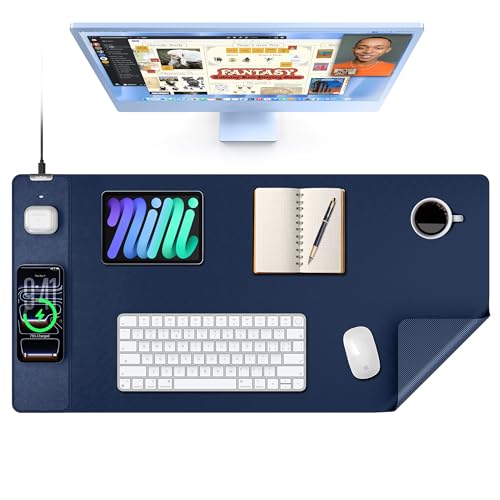
Leather desk mats are a look as much as a surface, and this TopMade is built around that. Both the top and the underside are PU leather, and the blue colorway (a black version is also sold) reads as a finished desk rather than a gaming setup. For a client-facing desk, a reception area, or a home office that sits in frame on video calls, it looks more considered than cloth.
Practically, leather wipes clean. Coffee rings, ink, and the general grime that builds up on a cloth mat come off with a damp cloth. The mat weighs 1.2 lb, so it is easy to roll back or reposition when the desk gets rearranged. The charging spot has a magnet ring for iPhone alignment, with 15W Qi output for supported Android phones.
The underside is the tradeoff. A PU leather base does not grip like the rubber bases on the cloth mats, so on a glossy laminate desktop it can shift during fast mouse work. On wood or a matte surface this is less of an issue. Support runs one year and the adapter is not included.
TopMade 15W Wireless Charging XXL Large Leather Desk Mat, Blue
by TopMade
An all-leather full-size desk mat with a magnetic charge spot, for desks where the look matters as much as the charging.
Pros
- PU leather on both the top and the base, a tidy look for a client-facing desk or a home office that sits behind video calls
- Light at 1.2 lb, so it rolls back or shifts easily when the desk layout changes
- Magnet ring centres an iPhone over the coil, with 15W Qi for supported Android phones
- Leather wipes clean of coffee rings and ink in a way woven cloth does not
Cons
- A PU leather underside does not grip like the rubber bases on the cloth mats, so it can shift on a glossy laminate desk
- No adapter included, and support runs one year
- iPhones charge at 7.5W, a top-up rate
Best RGB: Gimars RGB Gaming Mouse Pad with 15W Wireless Charging
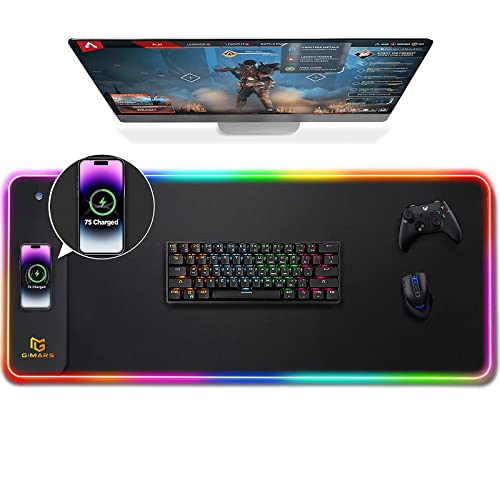
The Gimars is a gaming mat first. Ten RGB lighting modes run around the edge, the micro-textured fabric is tuned for fast mouse movement, and the surface is waterproof. The charging spot is a raised platform with a status LED, and that small light solves a real problem: on most mats you cannot tell whether the phone is charging without picking it up and checking the screen. Here a glance is enough.
Size is the main thing to understand before buying. At 31.5 by 11.8 inches it is a strip, not a full desk mat. It fits a keyboard and a mouse comfortably, with the phone platform at one end, but it does not reach the full depth of the desk. On a gaming setup that is usually what you want. On a desk that also holds paperwork, a notebook, or a second phone, you will run out of room.
Owners report that the lighting can flicker in steady mode, which is worth knowing if you plan to run a single static color. It takes USB-C input, and the adapter is not included.
Gimars RGB Gaming Mouse Pad with 15W Wireless Charging
by Gimars
A keyboard-depth RGB gaming mat with a raised, lit charging platform, for gamers who want lighting and a phone top-up in one strip.
Pros
- Ten RGB lighting modes around the edge for a gaming or streaming desk
- Raised charging platform with a status LED, so you can see at a glance whether the phone is actually charging
- Waterproof micro-textured fabric over a rubber base, made for fast mouse movement
- USB-C input and 15W Qi output for supported phones
Cons
- At 31.5 x 11.8 in it covers a keyboard and mouse but not the full depth of a desk
- Some owners report the lighting flickers in steady mode
- Adapter not included
Best RGB with Phone Holder: Miroddi XXL RGB Desk Mat with Wireless Charging
The Miroddi takes the RGB idea to full desk depth. At 31.5 by 15.75 inches, its eleven-color lighting frames the whole work zone rather than a keyboard strip, and the 4 mm nano-textured fabric gives the mouse a thick, cushioned surface. A built-in phone holder keeps the screen visible while it charges, which suits a gaming or streaming desk where the phone doubles as a second display for chat or alerts.
The honest concern is charging speed. Customers report that charging is slow, and the mat needs a 9V/3A USB-C adapter, which is not included, to reach its rated output. Part of that slowness is likely an under-powered adapter, so start there if you buy it. Even with the right adapter, treat it as a top-up mat rather than a way to recover a flat phone. There is no magnet ring, so alignment depends on seating the phone in the holder correctly.
Choose the Miroddi when the lighting and the full-depth layout are the point and the charging is a bonus. If charging is the priority, the TopMade or abc.mat mats are the better tools.

Miroddi XXL Mouse Pad with Phone Holder, RGB Desk Mat with 15W Wireless Charging
by Miroddi
A full-depth RGB desk mat with a phone holder, good for the look and the layout, with charging speed that owners call slow.
Pros
- Full 31.5 x 15.75 in depth, so the lighting frames the whole work zone rather than a strip
- Built-in phone holder keeps the screen in view while it charges
- Eleven RGB colors around a 4 mm nano-textured fabric surface
- 15W Qi output for supported phones
Cons
- Customers report charging is slow, so treat it as a top-up mat rather than a way to recover a flat battery
- Needs a 9V/3A USB-C adapter, which is not included
- No magnet ring, so alignment depends on seating the phone in the holder correctly
Best Compact Mouse Pad: VIVIYA 15W Wireless Charging Mouse Pad with Wrist Support
Not every desk has room for a 31.5-inch mat. The VIVIYA is a compact mouse pad with a charging spot and a gel-style wrist support, so it replaces an ordinary mouse pad rather than the whole desk surface. For a shared desk, a hot desk, or a narrow return beside a main workstation, that is the right size.
The wrist support is a genuine ergonomic plus. It keeps the wrist in a straighter line during long mouse sessions, and if that is the main thing you want, my guide to the best keyboard wrist rests covers dedicated options. The fabric top tracks well with ordinary optical mice, and the charger is rated at 15W for supported phones.
Reliability is the reason it sits lower on this list. Some owners report that it stops charging after a few days or a few months of use. That is not universal, but it is a pattern, so keep the receipt and register any warranty. The compact surface also leaves less room for wide mouse sweeps than a full desk mat.

VIVIYA 15W Wireless Charging Mouse Pad with Wrist Support
by VIVIYA
A small mouse pad with a wrist rest and a charging spot, for tight desks, with a reliability question worth knowing about before you buy.
Pros
- Built-in gel-style wrist support takes pressure off the wrist during long mouse sessions
- Takes the space of an ordinary mouse pad, for desks with no room for a full mat
- 15W Qi charging for supported phones
- Fabric top that tracks well with ordinary optical mice
Cons
- Some owners report it stops charging after a few days or a few months of use
- Adapter not included
- The compact surface leaves less room for wide mouse sweeps than a full desk mat
Best Wireless Charging Leather Desk Pad
A leather wireless charging desk pad wipes clean and looks finished, but the three leather-topped options here are built differently. The TopMade is leather on both sides, for the cleanest look, with the tradeoff of less grip on glossy desktops. The ExtreLife puts faux leather over cloth and a rubber base, so it holds its place better and adds a raised magnetic ring and an AirPods zone. The abc.mat blends PU and woven cloth on a rubber base, the practical middle ground with a two-year warranty. Pick by your desktop: on glossy laminate, favour a rubber base.
| Product | Price | Buy |
|---|---|---|
| TopMade 15W Wireless Charging XXL Large Leather Desk Mat, BlueBest all-leather desk pad PU leather top and underside for a finished look on a client-facing desk, with a magnet ring for iPhone alignment. | $36.38 | View on Amazon |
| ExtreLife Magnetic Wireless Charging Mouse Pad XXL, 31.5x15.7Best leather top on a rubber base Faux leather over cloth and a rubber base, with a raised magnetic ring for iPhone and a separate AirPods zone. | $34.89 | View on Amazon |
| abc.mat Magnetic Wireless Charging Mouse Pad, 31.5x15.8Best PU and cloth blend PU and woven cloth over a rubber base, a magnetic iPhone spot, an AirPods zone and a two-year warranty. | $33.24 | View on Amazon |
Best Wireless Charging Desk Pads by Use Case
Five more specific setups, each matched to the mat on this page that handles it best. If you only have room for a small pad, the VIVIYA is the desk mouse pad with wireless charging to look at first. Every product below is reviewed in full above.
| Product | Price | Buy |
|---|---|---|
| VIVIYA 15W Wireless Charging Mouse Pad with Wrist SupportBest desk mouse pad with wireless charging A compact mouse pad with a gel-style wrist support and a charging spot, for desks with no room for a full mat. | $19.99 | View on Amazon |
| abc.mat Magnetic Wireless Charging Mouse Pad and Adjustable Phone Stand, 31.5x15.8Best for iPhone with a stand A fold-up magnetic stand keeps the iPhone screen readable while it charges, and the 20W adapter comes in the box. | $54.39 | View on Amazon |
| Gimars RGB Gaming Mouse Pad with 15W Wireless ChargingBest RGB gaming mat Ten RGB modes and a raised charging platform with a status LED on a keyboard-depth strip. | $24.57 | View on Amazon |
| Miroddi XXL Mouse Pad with Phone Holder, RGB Desk Mat with 15W Wireless ChargingBest full-depth RGB mat with phone holder Eleven RGB colors across full desk depth with a phone holder, best treated as a top-up charger. | $37.99 | View on Amazon |
| TopMade Mouse Pad with 15W Fast Wireless Charging, 31.5x15.75 XXLBest for a large desk Full-depth woven cloth with a magnetic phone spot and a separate earbuds zone, room for keyboard, mouse and notebook. | $34.99 | View on Amazon |
Desk Mat or a Separate Wireless Charger?
A charging desk mat and a standalone charger solve the same problem in different ways. The mat wins on clutter: one object does the job of a mouse pad and a charger, the cable runs from one point, and nothing sits on the desk to be knocked over. It loses on flexibility. The charging spot is fixed to one place on the mat, the charging hardware ages with the mat, and if the coil fails you replace the whole surface.
A standalone pad or stand is easier to move, often faster, and replaceable on its own. If you already own a desk mat you like, or you want Qi2 or MagSafe charging speeds for an iPhone, a separate charger is the better buy, and my roundup of the best wireless charging pads covers those. If you need to charge several devices from one outlet, a desk power strip with USB ports can feed both the mat’s adapter and your other cables.
Setting Up a Wireless Charging Desk Mat
The setup is simple, but three details decide whether it works day to day. First, the adapter: use one that supports the mat’s stated input, usually 9V at 3A or 9V at 2A over USB-C. An old 5V phone brick is the most common reason a new mat seems broken.
Second, the cable route. Run the USB-C cable from the back of the mat to the outlet along the desk edge or a cable tray, not across the work area, and keep it clear of chair wheels. On a sit-stand desk, leave enough slack for the desk’s full travel so raising it does not pull the plug or drag the mat. My guide to the best cable management products covers clips and trays that keep that run tidy, and if you are choosing a desk at the same time, see the best standing desks.
Third, the layout. Put the charging zone where the phone naturally lands, usually to the side of the keyboard opposite your mouse hand, so you are not reaching across your mouse path. Keep keys, coins, and paper clips off the coil: the mat’s foreign object detection will stop charging when it senses metal. The ergonomic desk setup guide covers where the keyboard and mouse should sit relative to your body, and the mat should follow that, not the other way around.
Buyer's Guide
A wireless charging desk pad has to work as a mouse surface and as a charger at the same time. These six factors decide whether it does both well on your desk.
Charging Standard and Real Wattage
Every mat here uses plain Qi, and none is Qi2-certified or Made for MagSafe. That means iPhones charge at 7.5W and only supported Android phones reach the advertised 15W. Treat the headline figure as a ceiling and buy a desk mat for topping up through the day, not for fast charging.
Power Adapter
Most mats ship with a USB-C cable but no wall adapter, and an under-powered adapter is the top cause of slow or no charging. Check whether the mat asks for 9V at 3A or 9V at 2A and buy an adapter that supports it. Only the abc.mat with the phone stand includes one in the box.
Mat Size and Mouse Room
A 31.5 by 11.8 inch strip fits a keyboard and a mouse and little else. A 31.5 by 15.75 inch mat covers the keyboard, the mouse, the phone zone and leaves room for a notebook. Measure the clear depth in front of your monitor before you choose.
Alignment and Charge-Zone Layout
The coil is a small spot, and a phone that sits about an inch off-centre may stop charging. A magnet ring fixes that for iPhone 12 and later and for MagSafe cases. If you also charge earbuds, look for a separate earbuds zone so the phone and the case are not competing for one coil.
Case Compatibility
Thin plastic and silicone cases up to roughly 3 to 5 mm thick usually charge fine. Metal plates, wallet cases with cards, and PopSockets or ring grips block charging. If your case is thick or carries a grip, plan to take the phone out or change the case.
Surface Material and Non-Slip Base
Woven cloth tracks well under most mice and hides wear, while PU leather wipes clean and looks tidier on a client-facing desk. Check the underside too: a rubber base holds its place during fast mouse work, and a leather base can slide on glossy laminate.
How to Choose the Best Wireless Charging Desk Pad
Start with depth, because it decides most of the field. If you want the mat to cover the keyboard, mouse, phone and a notebook, buy a 31.5 by 15.75 inch class mat. If it only needs to sit under a keyboard and mouse on a gaming desk, a strip works. If the desk has no room for either, a compact pad like the VIVIYA is the answer.
Then check the adapter. Unless you buy the abc.mat with the phone stand, budget for a 9V USB-C adapter. Then decide on alignment: iPhone owners should favour a magnet ring, and anyone who charges earbuds should look for a separate earbuds zone. Finally, choose the surface for your desk: cloth for grip and mouse feel, leather for a clean look and easy wiping.
Final Verdict
For most desks, the TopMade XXL Mouse Pad with 15W Wireless Charging is the wireless charging desk pad to buy. It covers the full work zone, holds an iPhone on the coil with a magnet ring, charges earbuds on a separate zone, and the woven cloth top with stitched edges holds up to daily use. Add a 9V/3A USB-C adapter and it does exactly what this category promises.
If you want the same full-size magnetic layout with a longer warranty, the abc.mat Magnetic Wireless Charging Mouse Pad is the best value here. If you want to see the phone screen while it charges and would rather not shop for an adapter, the abc.mat with the adjustable phone stand is the upgrade. Whichever you choose, treat it as a top-up charger for the working day, not a fast charger. And if your mouse is due for replacement at the same time, my guide to the best wireless mice pairs well with any of these mats.
Frequently Asked Questions
Does a wireless charging desk mat charge through a phone case?
Why is my iPhone charging slowly on a wireless charging desk pad, and what adapter do I need?
Can a wireless charger work through a desk?
How do these compare with the Journey ALTI and ZAGG wireless charging desk mats?
Will a wireless charging desk mat charge my mouse, laptop or Apple Watch?
Related Articles
About the Reviewer

B.A. Business Administration, UCLA
Sarah Chen spent 10 years in office management and operations at Fortune 500 companies before founding DeskRated in 2026. After managing supply budgets and ordering for teams of 50+ people, she started writing the honest, no-fluff supply reviews that office professionals actually need. Sarah holds both CAP and PMP certifications and is based in Los Angeles.