7 Best Mechanical Keyboards of 2026
Sarah Chen reviews the best mechanical keyboards for office work and all-day typing. Compare switch feel, layout, noise, and connectivity across seven tested picks.
Updated
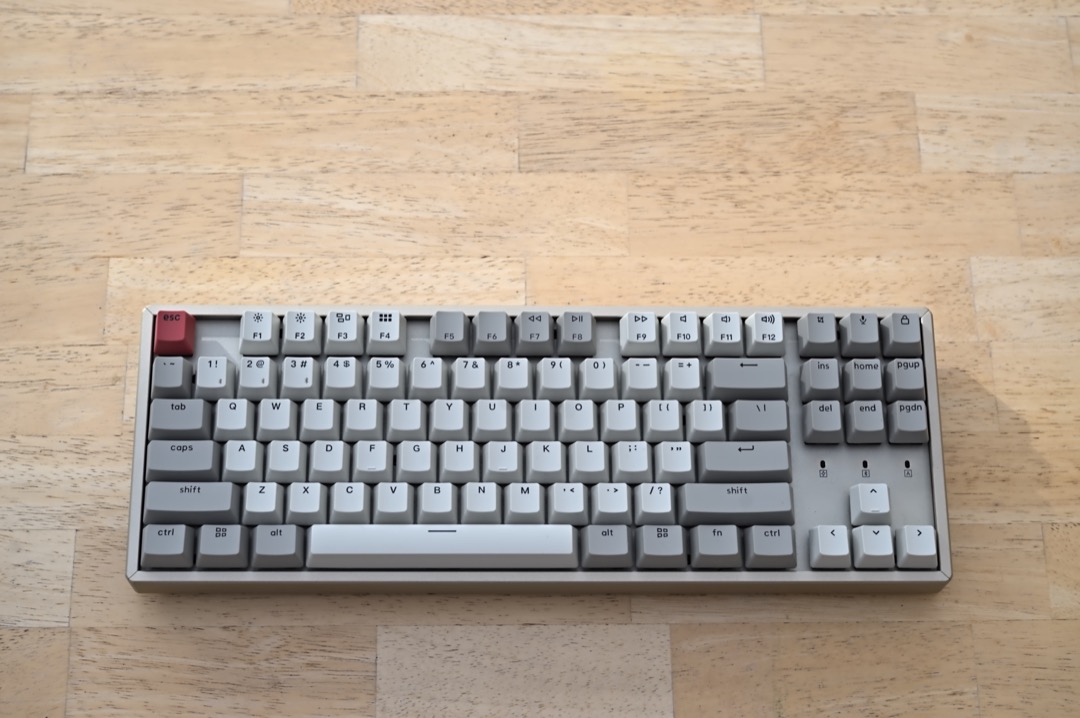
I have spent most of two decades in front of a keyboard, first as an executive assistant and then running project and administrative operations for distributed teams. In that time the keyboard has been the one piece of equipment I use more than any other, and for most of those years it was whatever came in the box with the computer. Switching to a mechanical keyboard changed something I had not expected it to: not my typing speed, which barely moved, but how my hands felt at five o’clock. A membrane keyboard requires you to press each key all the way down to the bottom to be certain it registered, thousands of times a day. A good mechanical switch tells your finger the keystroke landed halfway down, and you stop hammering. That is the real case for the best mechanical keyboards of 2026, and it has very little to do with the RGB lighting most listings lead with.
The other thing worth saying plainly is that mechanical keyboards have an office reputation problem, and it is only half deserved. Clicky blue switches genuinely are disruptive in a shared room. But tactile and linear switches in a case with internal foam damping are frequently quieter than the rattly membrane board on the desk next to you. Several keyboards on this list were chosen specifically because they solve the noise problem rather than apologise for it. If you have been avoiding mechanical keyboards because of what you have heard through an office wall, the picks below are the ones that change that calculation.
For this roundup we evaluated seven mechanical keyboards across every layout from 75% to full-size and every switch family that belongs in a workplace, weighing switch feel, measured noise characteristics, key height, connectivity, and repairability, alongside thousands of verified Amazon ratings. We favoured boards with a real reliability record over enthusiast novelties, and we verified every model’s price, stock status, and seller in August 2026. If your discomfort is coming from wrist angle rather than key feel, an ergonomic keyboard may be the better starting point, and either choice works better paired with a properly positioned keyboard wrist rest.
| Product | Price | Buy |
|---|---|---|
| Logitech MX Mechanical Wireless Illuminated KeyboardBest Overall | $149.99 | View on Amazon |
| Redragon K552P Tenkeyless Mechanical KeyboardBudget Pick | $36.99 | View on Amazon |
| Keychron Q6 Max QMK/VIA Wireless Mechanical KeyboardPremium Pick | $239.99 | View on Amazon |
| Logitech MX Mechanical Mini Wireless KeyboardRunner-Up | $129.99 | View on Amazon |
| Keychron K8 Tenkeyless Wireless Mechanical KeyboardRunner-Up | $63.99 | View on Amazon |
| Keychron C2 Full Size Wired Mechanical KeyboardRunner-Up | $56.99 | View on Amazon |
| RK ROYAL KLUDGE S98 Wireless Mechanical KeyboardRunner-Up | $74.99 | View on Amazon |
Find the Best Mechanical Keyboard for Your Need
Jump straight to the pick that matches how you work:
- Overall best mechanical keyboards
- Best mechanical keyboard for typing
- Best mechanical keyboard for office work
- Best low-profile mechanical keyboard
- Best full-size mechanical keyboard
- Best compact mechanical keyboard
- Best mechanical keyboard for Mac
How We Chose These Mechanical Keyboards
Every keyboard on this list had to earn its place by solving a problem the others do not. We required genuine mechanical switches — not the “mechanical feel” membrane boards that dominate the cheap end of the category — and we verified the switch family, actuation force, and damping treatment on each one rather than accepting marketing language. We set a reliability floor of several hundred verified Amazon ratings for every mainstream pick, with one deliberate exception: the Keychron Q6 Max is an enthusiast board with a small but engaged user base, and we have flagged its thin review record in its review rather than hiding it. We assessed noise against the practical test that matters, which is whether a colleague two desks away notices, and we assessed height and wrist angle because that is where discomfort actually originates. Finally, we checked price, availability, and the seller behind each buy box in August 2026, because a recommendation that points at an out-of-stock or third-party relisting is worthless.
Best Mechanical Keyboards Overall
Seven keyboards, each reviewed in full below, starting with the one that suits the most people.
Logitech MX Mechanical — Best Overall
The Logitech MX Mechanical is the keyboard I recommend to colleagues who ask what to buy, and the reason is that it removes the two objections that stop most office workers from trying a mechanical keyboard at all. The first is noise. Logitech’s tactile quiet switches were engineered to deliver the bump that makes mechanical typing worthwhile while suppressing the sharp report that bump normally produces. In practice it registers as a soft, low thud rather than a clack, and in an open-plan room it disappears into ambient noise in a way a standard tactile board does not.
The second objection is height. Most mechanical keyboards sit far taller than the laptop keyboard people are migrating from, and that extra elevation pushes the wrist into extension for hours at a time. Low-profile switches cut both the travel and the housing height, so the MX Mechanical’s key surface sits close to laptop height. For anyone who has spent years on a laptop or a slim membrane board, that means the transition costs you no wrist comfort, which is not something a standard-profile mechanical keyboard can claim without adding a palm rest.
The full-size layout is the reason this rather than the Mini takes the top position. Administrative, bookkeeping, and scheduling work runs on numeric entry, and the number row is meaningfully slower than a dedicated pad for anyone doing it in volume. Combine that with three-device pairing over Bluetooth or Logi Bolt — genuinely useful when a docked laptop, a desktop, and a tablet all live on the same desk — and you have a keyboard that fits a hybrid working pattern with no compromises. The honest limitation is the soldered switches: this is the one keyboard here where the feel you buy is the feel you keep, so if you are still unsure what switch you like, start cheaper and hot-swappable.

Logitech MX Mechanical Wireless Illuminated Keyboard
by Logitech
The best mechanical keyboard for most office workers — tactile feedback quiet enough for a shared room, a low-profile height that keeps wrists neutral, and a full number pad, in a board that needs no setup beyond pairing.
Pros
- Tactile quiet switches give you a real tactile bump without the sharp click that makes most mechanical keyboards unusable in an open-plan office
- Low-profile switch housings drop the key height close to a laptop keyboard, so your wrists stay flatter without adding a separate palm rest
- Full-size layout keeps a dedicated number pad — the single feature most finance, bookkeeping, and data-entry roles cannot give up
- Pairs with three devices over Bluetooth or Logi Bolt and switches between them with a single key, so one keyboard covers a docked laptop, a desktop, and a tablet
Cons
- Switches are soldered, not hot-swappable — if you decide you want a different feel later, the only path is buying a different keyboard
- The most expensive non-enthusiast pick here, and the smart backlight is single-colour white rather than the per-key RGB cheaper boards include
Redragon K552P — Best Budget
The Redragon K552P is the answer to the most sensible question a first-time buyer can ask, which is whether they will actually like typing on a mechanical keyboard before spending real money finding out. It is the cheapest board on this list by a wide margin, and it carries the deepest reliability record of anything here — over twelve thousand verified Amazon ratings averaging 4.7, accumulated over years rather than months. That combination is unusual. Budget keyboards normally trade durability for price; this one appears to have traded features instead.
What makes it more than a cheap board is the hot-swappable socket design. The stock switches are linear reds, which are quiet and smooth but offer no tactile feedback. If you find after a fortnight that you want the bump, you pull the switches with the included puller and drop in a tactile or silent set for the cost of a lunch, without soldering, tools, or heat. That turns the K552P from a fixed purchase into a testbed, which is exactly what someone new to the category needs. A steel-reinforced mounting plate and double-shot keycaps mean the chassis does not flex or the legends wear off while you experiment.
The compromises are real and worth being clear about. The USB cable is fixed rather than detachable, which is a nuisance on a desk where you unplug things regularly, and the tenkeyless layout has no number pad at all. If numeric entry is a daily part of your job, the Keychron C2 is a better cheap option. If it is not, the five inches of desk width the K552P gives back are worth more than the number pad you were not using, and the price makes it the lowest-stakes way into the category.

Redragon K552P Tenkeyless Mechanical Keyboard
by Redragon
The lowest-risk way to find out whether you actually like mechanical keyboards — a hot-swappable tenkeyless board with a reliability record most premium keyboards cannot match, at less than a quarter of the price of the overall pick.
Pros
- More than 12,000 verified Amazon ratings at a 4.7 average — by far the deepest reliability record of any keyboard on this list, at the lowest price
- Hot-swappable sockets let you pull the stock linear switches and drop in quieter or more tactile ones without soldering, so one cheap board can be re-tuned twice
- Tenkeyless 87-key frame frees roughly five inches of desk width compared with a full-size board, which matters on a shallow desk or a hot-desking setup
- Steel-reinforced plate and double-shot keycaps hold up to daily use far better than the flexing plastic chassis typical at this price
Cons
- Wired USB only, and the cable is not detachable — awkward on a desk where you dock and undock a laptop several times a day
- No number pad, so accounting, invoicing, and heavy data-entry work needs either a separate numeric keypad or a different layout entirely
Keychron Q6 Max — Upgrade Pick
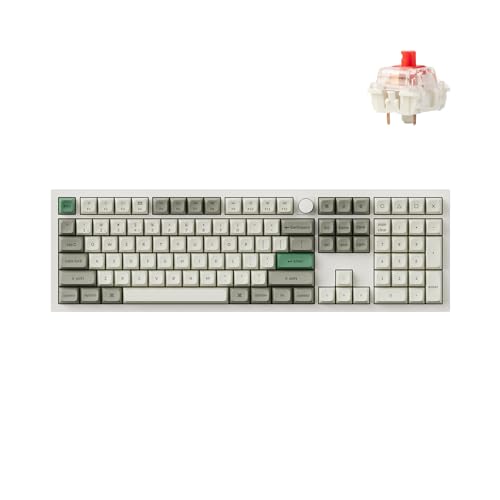
The Keychron Q6 Max is where mechanical keyboards stop being a peripheral and start being equipment. The case is CNC-machined from a solid block of 6063 aluminium and the plate is suspended in a double-gasket mount packed with layers of acoustic foam, and the point of all that construction is acoustic rather than structural. A keyboard built this way has no hollow cavity to resonate, so each keystroke lands as a short, deep sound with no ring after it. This is the quality enthusiasts spend money chasing, and the Q6 Max delivers it without requiring you to assemble anything.
The functional case for it is programmability. QMK and VIA support means every key can be remapped, and macros, layers, and shortcut combinations are stored on the keyboard’s own memory rather than in software on the host machine. For someone who lives in a small number of applications and has a set of repeated actions, that translates into real time saved, and because the configuration lives on the board it follows you to any computer without installing anything. The full-size layout keeps the number pad and adds a programmable rotary knob that most people end up assigning to volume or scroll.
Two things should temper the enthusiasm. This is a heavy aluminium object that belongs on one desk permanently, not something you move between an office and a home setup. And with only 34 Amazon ratings so far, averaging 4.3 stars, the long-term reliability picture is much thinner than for the mainstream boards on this list. Keychron’s track record with the Q series is good and the hot-swappable sockets mean a failed switch is trivially repairable, but you are buying on reputation more than on accumulated evidence. Buy it because you want the typing experience, not because you want the safest purchase here.
Keychron Q6 Max QMK/VIA Wireless Mechanical Keyboard
by Keychron
The pick for someone who types all day and wants the typing experience to be the best part of the desk — a full-metal, fully programmable board where the switches, keycaps, and layout are all yours to change.
Pros
- CNC-machined 6063 aluminium body with a double-gasket mount and multi-layer acoustic foam produces the deep, damped typing sound enthusiasts buy custom boards for
- Full QMK and VIA programmability stores macros and remapped keys on the keyboard itself, so your layout follows you to any machine with no software installed
- Hot-swappable for both 3-pin and 5-pin MX switches, which means the switch feel is a preference you can change rather than a purchase you are locked into
- Full-size layout adds a programmable rotary knob, and connects over 2.4 GHz, Bluetooth 5.1, or USB-C with up to three paired devices
Cons
- Heaviest and most expensive board here by a wide margin — the aluminium case makes it a desk fixture rather than something you carry between offices
- Only 34 Amazon ratings so far, averaging 4.3 stars, so the long-term reliability record is much thinner than the mainstream picks on this list
Logitech MX Mechanical Mini — Runner-Up
The MX Mechanical Mini is the same keyboard as our overall pick with the number pad removed, and whether that makes it better or worse than the full-size version depends entirely on one question: do you enter numbers in volume? If you do, this is the wrong board. If you do not, it is arguably the better of the two, and not only because it costs less.
The reason is the mouse. A full-size keyboard puts roughly five inches of number pad between your hands and your mouse, which means your right arm sits further from your body’s centreline for the entire working day. That sustained shoulder abduction is a well-documented contributor to right-side neck and shoulder ache in desk workers, and it is the single most under-discussed benefit of a compact keyboard. Removing the number pad lets the mouse come in close, and the difference is one people typically notice within a week of switching.
Everything else carries over from the full-size version: the same tactile quiet switches, the same low-profile height that keeps wrists near neutral without a palm rest, the same three-device pairing, and the same smart backlight that lights when your hands approach and dims to match the room. The same limitation carries over too. The switches are soldered, so you cannot revise the feel later, and at this price a hot-swappable 75% board with per-key RGB is easy to find. You are paying for the low-profile switch and the multi-device polish, which is a fair trade if those are the things you actually want.

Logitech MX Mechanical Mini Wireless Keyboard
by Logitech
The overall pick's typing feel in a footprint that fits a shallow desk or a hot desk — the right choice when desk width, or the distance your mouse hand has to travel, matters more than a number pad.
Pros
- Same tactile quiet switches and smart backlight as the full-size MX Mechanical in a 75% frame that saves roughly four inches of desk width
- Removing the number pad brings the mouse closer to the body's centreline, which reduces the shoulder abduction that causes right-side neck and shoulder ache
- Backlight senses your hands approaching and adjusts to ambient light, so it is legible in a dim room without burning battery in a bright one
- Three-device pairing over Bluetooth or Logi Bolt with USB-C recharging and roughly a fortnight of battery with the backlight on
Cons
- No number pad — a real cost for anyone who enters figures all day, and the reason the full-size version exists
- Not hot-swappable, and priced well above budget 75% boards that offer swappable switches and per-key RGB for less
Keychron K8 — Best for Mac and Windows Desks
Anyone who moves between a MacBook and a Windows desktop during the working day knows the specific irritation of a keyboard that only really belongs to one of them: Command and Option land in the wrong places, the function row does the wrong thing, and you spend a year mentally remapping. The Keychron K8 solves this at the hardware level. A physical toggle switches the layout between macOS and Windows, and both keycap sets are in the box, so the legends match whichever machine you are on rather than requiring you to remember what the key really does.
Beyond the platform switching, it is a straightforwardly good tenkeyless board. Keychron Brown tactile switches actuate at around 55 gf with a clear bump partway down, which is the classic all-day typing profile — feedback without volume. Bluetooth 5.1 holds three paired devices and cycles between them on a key combination, and a 4,000 mAh battery is large enough that with the backlight off you will charge it roughly once a month rather than once a week. USB-C wired mode is there when you want it.
The two things to plan for are height and switch permanence. This is a normal-profile board, noticeably taller than the low-profile Logitech options, so budget for a palm-height wrist rest if your sessions run long. And this particular version’s switches are soldered rather than socketed — Keychron sells a hot-swap variant, and if you expect to experiment with switch feel, that is the version to buy instead.

Keychron K8 Tenkeyless Wireless Mechanical Keyboard
by Keychron
The most frictionless mechanical keyboard for a mixed Mac and Windows desk — correct modifier keys on both platforms, three-device switching, and a battery you charge about once a month.
Pros
- Ships with both Mac and Windows keycap sets and a hardware layout toggle, so the modifier keys are correct on either machine instead of mentally remapped
- Bluetooth 5.1 holds three paired devices and switches on a key combination, with USB-C wired mode when you want zero latency
- A 4,000 mAh battery runs roughly 200 hours with the backlight off, which is a working month for most people between charges
- Keychron Brown tactile switches give a clear bump at around 55 gf actuation — noticeable feedback without the volume of a clicky switch
Cons
- This version's switches are not hot-swappable, so the switch feel is fixed at purchase unless you buy the hot-swap variant
- Normal-profile height needs a wrist rest for long sessions, unlike the low-profile Logitech boards on this list
Keychron C2 — Best Full-Size Value
The Keychron C2 exists to answer a question the rest of this list leaves open: what do you buy if you need a number pad, want genuine mechanical switches, and do not want to spend anywhere near what the overall pick costs? At roughly a third of the MX Mechanical’s price, the C2 delivers a full 104-key layout with real tactile Keychron switches rated to 50 million keystrokes — the same durability class as boards costing three and four times as much.
Keychron reached that price by removing things rather than cheapening the parts that matter. There is no wireless, no backlight, and no hot-swap socket. What remains is the switch, the plate, the keycaps, and the layout, and all four are the same standard you would find on a considerably more expensive board. The inclined frame with two-stage feet at 6 and 9 degrees is a genuinely useful inclusion at this price, because typing angle needs to be matched to your chair and desk height rather than assumed. Mac and Windows keycap sets and a dedicated Siri or Cortana key are in the box, so it drops onto either platform cleanly.
The absent backlight is the compromise most people will feel. In a well-lit office it is a non-issue; if you work evenings, in a dim room, or with the overheads off, unlit dark keycaps are genuinely hard to read and you will want the Keychron K8 instead. The wired-only connection is the other constraint, and if your desk is already fighting a cable problem, our cable management picks are worth reading before you add another one.

Keychron C2 Full Size Wired Mechanical Keyboard
by Keychron
The best-value full-size mechanical keyboard here — a proper number pad, genuine tactile switches, and Mac and Windows keycaps, with the wireless and backlight stripped out to hit the price.
Pros
- A full 104-key layout with number pad at roughly a third the price of the overall pick — the cheapest credible route to mechanical typing without losing the number pad
- Tactile Keychron switches rated to 50 million keystrokes, which is the same durability class as boards costing three and four times as much
- Includes Mac and Windows keycap sets plus a dedicated Siri or Cortana key, so it drops onto either platform without compromise
- Inclined frame with two-stage adjustable feet at 6 and 9 degrees lets you match the typing angle to your chair and desk height
Cons
- Wired USB-C only with no wireless option, which constrains placement on a desk where cable routing is already tight
- This version has no backlight at all, so it is hard to read in a dim room or during an evening shift
RK ROYAL KLUDGE S98 — Best Quiet Board with a Number Pad
The S98 is the keyboard for the person whose constraints conflict: they need a number pad, they sit in a shared room, and they are not prepared to spend what the premium picks cost. It is the only board here that resolves all three. Royal Kludge stacked five separate damping layers inside the case — an IXPE pad under the switches, two layers of sound-absorbing foam, and a silicone dampener beneath the circuit board — and the effect is to eliminate the hollow resonance that makes most plastic keyboards sound cheap and carry across a room. Combined with pre-lubed linear switches, which have no tactile bump to make noise in the first place, it is the quietest full-height board on this list.
The layout choice is smart. At 96%, it keeps the complete number pad and the arrow keys but compresses the navigation cluster tight against the number pad, which reclaims about an inch of width against a true full-size board. On a shallow desk that inch is the difference between the mouse having room and not. Connectivity covers Bluetooth, a 2.4 GHz dongle, and USB-C, and the small display panel showing connection mode, active layout, and battery level is more genuinely useful than it sounds when three devices are in play.
There are two caveats. The compressed navigation cluster takes a few days of muscle memory before Home, End, and Page Up land reliably, which is a normal cost of any sub-full-size layout. More significantly, the per-key RGB and animated display read unmistakably as gaming hardware. In a relaxed office nobody will care; in a conservative or client-facing environment, the lighting can be turned off entirely, but the aesthetic remains. If that matters, the Keychron C2 is the plainer alternative with a number pad.

RK ROYAL KLUDGE S98 Wireless Mechanical Keyboard
by RK ROYAL KLUDGE
The pick for a shared office where you still need a number pad — heavy internal sound damping and pre-lubed linear switches keep it near-silent, and hot-swap sockets let you quieten it further.
Pros
- Five layers of sound damping — an IXPE switch pad, two foam layers, and a silicone dampener — make it the quietest board here that still uses full-height switches
- A 96% layout keeps the number pad and arrow keys while cutting roughly an inch of width against a true full-size board
- Pre-lubed hot-swappable switches accept 3-pin and 5-pin MX switches, so the sound and feel can be tuned further after purchase
- Connects over Bluetooth, 2.4 GHz, or USB-C, and the smart display shows connection mode, layout, and battery at a glance
Cons
- Per-key RGB and the animated display read as gaming hardware, which may be a poor fit for a conservative office environment
- The 96% layout compresses the navigation cluster against the number pad, so Home, End, and Page Up take a few days to find reliably
Best Mechanical Keyboard for Typing
Typing all day is a different requirement from typing quickly in bursts. What matters over a six-hour stretch is a switch that tells your finger the keystroke registered before you drive the key into the plate, because bottoming out thousands of times is what produces fatigue in the fingers and forearms. Tactile switches do that; linear switches do not — our guide to keyboard switch types breaks down the actuation forces and noise levels behind each family. Beyond the switch, the case matters more than most buyers expect — a board with internal damping absorbs the impact rather than transmitting it back through the keycap, which is why premium boards feel softer to type on even with identical switches.
| Product | Price | Buy |
|---|---|---|
| Logitech MX Mechanical Wireless Illuminated KeyboardBest for typing overall Tactile quiet switches at a low profile — feedback on every keystroke without the noise or the wrist extension. | $149.99 | View on Amazon |
| Keychron Q6 Max QMK/VIA Wireless Mechanical KeyboardBest typing feel at any price A gasket-mounted aluminium case with acoustic foam gives the softest, deepest keystroke here. | $239.99 | View on Amazon |
| Keychron C2 Full Size Wired Mechanical KeyboardBest budget typing pick Genuine tactile Keychron switches rated to 50 million keystrokes for a fraction of the premium picks. | $56.99 | View on Amazon |
Best Mechanical Keyboard for Office Work
An office keyboard has one requirement the enthusiast market largely ignores: it has to be inaudible to the person sitting next to you. That rules out clicky switches entirely and pushes you toward tactile quiet or pre-lubed linear switches in a damped case. The second office-specific requirement is multi-device switching, because hybrid working means a docked laptop and a desktop frequently share one desk. The third is that it should not look like gaming equipment when a client walks past.
| Product | Price | Buy |
|---|---|---|
| Logitech MX Mechanical Wireless Illuminated KeyboardBest office keyboard overall Tactile quiet switches, a professional matte finish, and three-device switching for hybrid working. | $149.99 | View on Amazon |
| Logitech MX Mechanical Mini Wireless KeyboardBest for a shared or hot desk The same quiet switches in a 75% frame that fits a hot desk and brings the mouse closer in. | $129.99 | View on Amazon |
| Keychron C2 Full Size Wired Mechanical KeyboardBest plain office keyboard on a budget Understated, wired, and cheap, with real tactile switches and a full number pad. | $56.99 | View on Amazon |
Best Low-Profile Mechanical Keyboard
Low-profile mechanical keyboards shorten both the switch travel and the housing height, so the key surface sits close to a laptop keyboard rather than the inch-plus of a standard mechanical board. The reason to care is wrist angle. A tall keyboard forces the wrist into extension unless a palm rest raises the hand to meet it, and low-profile switches simply remove that problem instead of accessorising around it. The trade-off is a shorter, snappier keystroke that some typists find less satisfying, and a much smaller selection of switch options.
| Product | Price | Buy |
|---|---|---|
| Logitech MX Mechanical Wireless Illuminated KeyboardBest low-profile overall Low-profile tactile quiet switches with a full number pad — laptop-height typing without giving anything up. | $149.99 | View on Amazon |
| Logitech MX Mechanical Mini Wireless KeyboardBest compact low-profile The same low-profile switches in a 75% frame for shallow desks and travel. | $129.99 | View on Amazon |
Best Full-Size Mechanical Keyboard
A full-size layout is not nostalgia — for anyone doing bookkeeping, invoicing, spreadsheet work, or any sustained numeric entry, a dedicated number pad is substantially faster than the number row, and no amount of desk-space argument outweighs that. The choice within full-size comes down to whether you want true 104-key spacing or a 96% layout that keeps every key but tightens the gaps to save about an inch of width.
| Product | Price | Buy |
|---|---|---|
| Keychron C2 Full Size Wired Mechanical KeyboardBest full-size value A true 104-key layout with tactile switches at the lowest price of any full-size board here. | $56.99 | View on Amazon |
| RK ROYAL KLUDGE S98 Wireless Mechanical KeyboardBest compact full-size A 96% layout that keeps the number pad and arrows while reclaiming an inch of desk width. | $74.99 | View on Amazon |
| Keychron Q6 Max QMK/VIA Wireless Mechanical KeyboardBest premium full-size Full-size aluminium with a programmable knob and onboard QMK macro storage. | $239.99 | View on Amazon |
Best Compact Mechanical Keyboard
Compact layouts drop the number pad, and occasionally the function row, to reclaim desk width. The benefit people expect is a tidier desk; the benefit that actually matters is that the mouse moves four to five inches closer to your body’s centreline, reducing the sustained shoulder abduction that produces right-side neck and shoulder ache over months of desk work. Tenkeyless keeps a standard key layout minus the number pad, while 75% compresses the navigation keys against the main block for a smaller footprint still.
| Product | Price | Buy |
|---|---|---|
| Logitech MX Mechanical Mini Wireless KeyboardSmallest footprint A 75% frame with low-profile quiet switches — the narrowest board here that still has arrow keys. | $129.99 | View on Amazon |
| Keychron K8 Tenkeyless Wireless Mechanical KeyboardBest compact for mixed platforms Tenkeyless with a month of battery and hardware Mac and Windows switching. | $63.99 | View on Amazon |
| Redragon K552P Tenkeyless Mechanical KeyboardBest cheap compact Tenkeyless, hot-swappable, and cheap enough to experiment with switch feel. | $36.99 | View on Amazon |
Best Mechanical Keyboard for Mac
Mac compatibility is more than a checkbox. A keyboard built for Windows puts Command and Option in the wrong physical positions, labels them wrongly, and maps the function row to Windows behaviours, which means either living with the mismatch or remapping in software on every machine you use. The keyboards worth buying for a Mac ship both keycap sets, put a hardware or firmware layout toggle on the board itself, and support the macOS media keys natively.
| Product | Price | Buy |
|---|---|---|
| Keychron K8 Tenkeyless Wireless Mechanical KeyboardBest for Mac overall A hardware Mac and Windows toggle with both keycap sets included and three-device Bluetooth. | $63.99 | View on Amazon |
| Keychron C2 Full Size Wired Mechanical KeyboardBest wired Mac pick Mac and Windows keycaps plus a dedicated Siri key, with a full number pad, for the lowest price here. | $56.99 | View on Amazon |
| Logitech MX Mechanical Mini Wireless KeyboardBest low-profile Mac pick Low-profile switches and Logi Bolt or Bluetooth pairing that switches cleanly between a Mac and an iPad. | $129.99 | View on Amazon |
Best Mechanical Keyboards by Use Case
A few narrower situations come up often enough to be worth calling out directly. If you are specifically after a Bluetooth mechanical keyboard, note that not all wireless boards are equal: the ones that hold several devices at once and switch between them on a keypress are the ones worth paying for, and a board that offers a 2.4 GHz receiver alongside Bluetooth gives you a fallback when the Bluetooth stack on a work laptop is locked down.
| Product | Price | Buy |
|---|---|---|
| Redragon K552P Tenkeyless Mechanical KeyboardBest hot-swappable mechanical keyboard Socketed switches and the lowest price here make switch experimentation nearly free. | $36.99 | View on Amazon |
| RK ROYAL KLUDGE S98 Wireless Mechanical KeyboardBest for a shared or open-plan office Five layers of internal damping and pre-lubed linear switches keep it near-silent two desks away. | $74.99 | View on Amazon |
| Logitech MX Mechanical Wireless Illuminated KeyboardBest Bluetooth mechanical keyboard Pairs over Bluetooth or the Logi Bolt receiver, holds three devices, and recharges over USB-C — the most reliable wireless connection here. | $149.99 | View on Amazon |
| Keychron K8 Tenkeyless Wireless Mechanical KeyboardBest for multi-device desks Three Bluetooth devices on a key combination, with correct layouts on both Mac and Windows. | $63.99 | View on Amazon |
| Keychron Q6 Max QMK/VIA Wireless Mechanical KeyboardBest programmable mechanical keyboard QMK and VIA macros stored on the board itself, so your layout follows you between machines. | $239.99 | View on Amazon |
Buyer's Guide
A mechanical keyboard is one of the few desk purchases you will touch for six or more hours every working day, and the specification that matters most is not the one manufacturers lead with. Switch feel, noise, layout, and height determine whether the keyboard is comfortable at hour six; RGB lighting and polling rates do not.
Switch Type and Feel
Mechanical switches divide into three families, and the choice determines both comfort and how welcome you are in a shared room. Linear switches — reds and most pre-lubed enthusiast switches — travel straight down with no bump and no click. They are the quietest and smoothest, favoured for speed, but because nothing tells your finger the key has registered, light finger-resting can produce accidental input. Tactile switches — browns and their variants, used in the Keychron C2 and Keychron K8 — add a bump at the actuation point roughly halfway down the travel. That bump lets you release the key early instead of driving it into the plate, which is why tactile switches are the standard recommendation for all-day typing. Clicky switches add an audible click bar on top of the bump; they are satisfying at home and genuinely antisocial in an office. Logitech's tactile quiet switches are a fourth category worth knowing about: a tactile bump engineered specifically to minimise the noise the bump normally creates.
Layout and Desk Footprint
Layouts are described as a percentage of a full-size board. Full-size (100%, 104 keys) keeps everything including the number pad and is the right choice for finance, administrative, and data-entry work where the number pad is used constantly. A 96% layout like the RK ROYAL KLUDGE S98 keeps the number pad and arrow keys but compresses the navigation cluster to save about an inch of width. Tenkeyless or TKL (80%, 87 keys) drops the number pad entirely, freeing four to five inches — the Redragon K552P and Keychron K8 sit here. A 75% layout like the MX Mechanical Mini compresses further by tucking the function row and navigation keys tight against the main block. The width you save is not just tidiness: a narrower keyboard lets the mouse sit closer to your body, which reduces the sustained shoulder abduction behind a lot of right-side neck and shoulder complaints in desk workers.
Typing Noise
Noise is the single most common reason a mechanical keyboard gets returned to a drawer after a week in a shared office. Three things control it. The switch is the biggest factor — avoid clicky switches outright, and prefer switches that arrive pre-lubed from the factory, which removes the scratchy spring ping cheaper switches produce. The case is the second: boards with internal foam, an IXPE switch pad, or a gasket mount absorb the hollow resonance that makes an empty plastic chassis sound like a cheap keyboard. The RK ROYAL KLUDGE S98 stacks five damping layers and the Keychron Q6 Max uses a double-gasket mount with multi-layer acoustic foam for exactly this reason. The third is you: typing hard enough to bottom out every key is louder than any switch choice, and a tactile bump is what trains you to stop doing it.
Hot-Swappable Sockets
A hot-swappable board holds its switches in sockets rather than soldering them to the circuit board, so a switch can be pulled out with a puller and replaced in seconds with no tools and no heat. This matters more than it sounds. Switch preference is difficult to predict from a description and most people change their mind after living with a board for a month. On a hot-swap board — the Redragon K552P, RK ROYAL KLUDGE S98, and Keychron Q6 Max here — that revision costs the price of a switch set rather than the price of a new keyboard, and a single failed switch is a 30-second repair. Soldered boards like the Logitech MX Mechanical are not a mistake, but you are committing to that switch feel for the life of the keyboard, which is a reason to buy a soldered board only when you already know you like the switch.
Connectivity and Multi-Device Switching
Wired USB is the simplest and cheapest option, has no battery to manage, and gives the lowest latency — the Redragon K552P and Keychron C2 take this route. The constraint is placement: a fixed cable dictates where the keyboard can sit and adds one more thing to unplug on a hot desk. Wireless boards split into Bluetooth, which pairs with almost anything including tablets and phones, and 2.4 GHz dongles, which are more reliable and lower-latency but occupy a USB port. The feature to look for in a hybrid or multi-device workplace is simultaneous multi-device pairing: the Logitech MX Mechanical, MX Mechanical Mini, Keychron K8, and Keychron Q6 Max all hold three devices at once and switch with a keypress, which means one keyboard serves a docked laptop, a desktop tower, and a tablet without re-pairing each time.
Key Height and Wrist Angle
Standard-profile mechanical keyboards sit meaningfully taller than the laptop keyboard most people are coming from, and that extra height forces the wrist into extension unless something supports the palm. This is the most frequently overlooked specification on a spec sheet, and the most common cause of discomfort in the first fortnight with a new mechanical keyboard. There are two ways to solve it. Low-profile switches, used in both Logitech MX Mechanical boards, cut the switch travel and housing height so the key surface sits close to laptop height and the wrist stays near neutral without accessories. Alternatively, a standard-profile board plus a palm-height wrist rest reaches the same wrist angle for less money. What does not work is a tall board with the rear feet extended and no palm support — that combination maximises wrist extension, which is precisely what you are trying to avoid.
How to Choose the Best Mechanical Keyboard
Work the decision in this order and it resolves quickly. First, decide whether you need a number pad — that single answer splits the list in two and eliminates half the options immediately. Second, pick a switch family: tactile if you type prose, documents, or email all day, pre-lubed linear if silence in a shared room matters more than feedback, and clicky only if you work alone. Third, check the height: if you are coming off a laptop keyboard and do not want to add a wrist rest, buy low-profile. If you write code for a living, layout and on-board remapping start to matter as much as switch feel, and our guide to the best mechanical keyboards for programmers ranks boards on exactly that.
Only after those three does price become the useful filter. If you are new to the category and unsure about switch feel, buy cheap and hot-swappable first — a socketed board turns a guess into an experiment you can revise for the cost of a switch set. If you already know what you like and you are buying the keyboard you will use for the next five years, the soldered premium boards are a reasonable commitment, and the difference in daily comfort between a good mechanical keyboard and the one that shipped with your computer is larger than almost any other upgrade on the desk.
Final Verdict
The Logitech MX Mechanical is the right answer for most office workers, and the reasons are practical rather than enthusiast: tactile quiet switches that give feedback without carrying across the room, a low-profile height that keeps wrists near neutral with no palm rest required, a full number pad, and three-device switching that fits hybrid working. It is the most expensive mainstream pick here, and it earns it. If desk width matters more than numeric entry, the MX Mechanical Mini is the same keyboard in a narrower frame and costs less.
If you are not yet certain that mechanical is for you, do not start at the top. The Redragon K552P costs less than a quarter of the overall pick, carries a deeper reliability record than anything else on this list, and its hot-swappable sockets mean you can change your mind about switch feel twice for pocket change. That is the sensible entry point, and if you find the layout is what does not fit rather than the switches, the Keychron C2 adds the number pad back for very little more. Whichever you choose, pair it with a keyboard wrist rest at palm height if you go with a standard-profile board, and set the keyboard height against your chair using our ergonomic desk setup guide.
Frequently Asked Questions
Are mechanical keyboards too loud for an office?
What is the difference between a mechanical and a membrane keyboard?
Which switch type is best for typing all day at work?
Do I need a wrist rest with a mechanical keyboard?
Is a tenkeyless or full-size mechanical keyboard better for office work?
Related Articles
11 Best Mechanical Keyboards for Programmers in 2026
office-technology
Keyboard Switch Types Explained: Linear, Tactile, Clicky, and Silent
office-technology
7 Best Ergonomic Keyboards of 2026
desk-setup-furniture
7 Best Keyboard Wrist Rests of 2026
ergonomic-accessories
7 Best Wireless Mice for Office Work in 2026
desk-setup-furniture
About the Reviewer

Sarah Chen, CAP, PMP
B.A. Business Administration, UCLA
Sarah Chen spent 10 years in office management and operations at Fortune 500 companies before founding DeskRated in 2026. After managing supply budgets for teams of 50+ people and testing thousands of products through daily use, she started writing the honest, no-fluff supply reviews that office professionals actually need. Sarah holds both CAP and PMP certifications and is based in Los Angeles.