11 Best Mechanical Keyboards for Programmers in 2026
Sarah Chen reviews 11 mechanical keyboards for programmers, comparing QMK remapping, layout, switch noise and Linux support for everyday coding work.
Updated
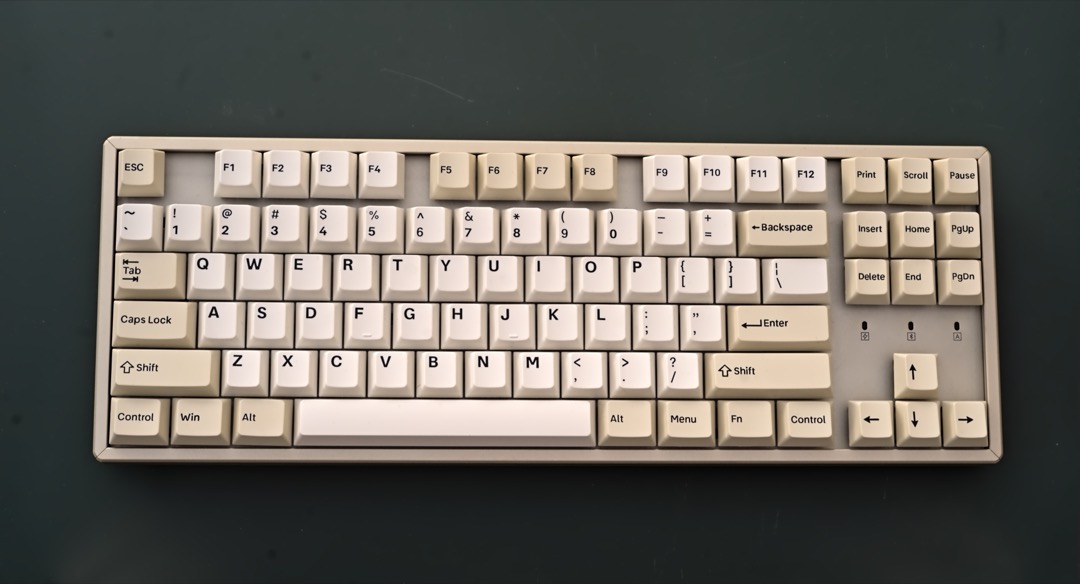
I have spent most of two decades specifying, buying and supporting office equipment, and no category generates more internal argument than keyboards for the engineering team. Everyone else accepts what IT issues. Developers do not, and they are usually right not to, because a programmer’s keyboard is not a typing surface so much as a control surface. It has to put Escape and Control somewhere reachable, keep the function keys a debugger needs, survive eight-hour days for years, and do all of that quietly enough that the person on the next desk does not file a complaint. That combination is why the best mechanical keyboards for programmers are a genuinely different shortlist from the general office boards in our mechanical keyboard roundup.
What follows is eleven keyboards evaluated for programming work specifically, in 2026 prices and availability. The thing I want to flag before the list is the vocabulary, because it is where most buying mistakes start. Almost every keyboard listing on Amazon says “programmable”. Very few mean the same thing by it. A board with QMK or VIA support stores your layout in its own memory, so Caps Lock is still Control when you plug it into a locked-down work laptop with no admin rights. A board with vendor software stores the layout on the host machine and forgets it the moment you move desks. Both get called programmable. Only one solves the problem programmers actually have, and I have been explicit throughout about which boards are which.
The other thing worth saying is that this is a procurement decision as much as a hobby one. Warranty length, whether there is a US support number to call, whether the layout survives an IT fleet that runs Windows, macOS and Linux at the same time, and whether the thing looks reasonable on an expense report all matter, and the enthusiast blogs never mention any of them. Where a board has a real support story, such as Kinesis with its three-year warranty, I have said so, because that is the sort of thing that decides an approval. If your hands are already sore, start with the ergonomic keyboards guide instead, since that is a different problem with a different answer.
| Product | Price | Buy |
|---|---|---|
| Keychron Q1 Pro Wireless Custom Mechanical KeyboardBest Overall | $209.99 | View on Amazon |
| Keychron K3 Version 2 QMK 75% Wireless Low-Profile Mechanical KeyboardBudget Pick | $84.00 | View on Amazon |
| HHKB Professional Hybrid Type-SPremium Pick | $287.74 | View on Amazon |
| Logitech Alto Keys K98M Wireless Mechanical Gasket KeyboardRunner-Up | $99.99 | View on Amazon |
| Kinesis Advantage360 Professional Split Ergonomic KeyboardRunner-Up | $479.00 | View on Amazon |
| Kinesis Freestyle Edge RGB Plus Split Mechanical KeyboardRunner-Up | $219.00 | View on Amazon |
| Cherry KC 200 MX Wired Mechanical Office Keyboard, Silent RedRunner-Up | $94.99 | View on Amazon |
| RK ROYAL KLUDGE RK61 Wireless 60% Mechanical KeyboardRunner-Up | $58.99 | View on Amazon |
| Keychron K10 Max QMK Wireless Custom Mechanical Full-Size KeyboardRunner-Up | $119.99 | View on Amazon |
| Keychron V6 Max Wireless QMK Mechanical KeyboardRunner-Up | $119.99 | View on Amazon |
| EPOMAKER TH99 Tri-Mode Wireless Mechanical KeyboardRunner-Up | $70.54 | View on Amazon |
Find the Best Keyboard for Your Coding Setup
Jump straight to the situation that matches yours:
- Best mechanical keyboards for programmers overall
- Best Mac keyboard for coding
- Best ergonomic keyboard for coding
- Best keyboard for coding and gaming
- Best silent keyboard for coding
- Best wireless keyboard for coding
- Best budget keyboard for coding
- More use cases, including split, 60% and full-size
How We Chose These Keyboards
Every board on this list had to earn its place against the way programmers actually work rather than against a spec sheet. We separated genuine QMK and VIA support from vendor remapping software and labelled each board honestly, because that distinction decides whether a layout follows you between machines. We checked switch families and manufacturer silent designations instead of quoting decibel figures, since keyboard noise has no standard test method and any number in a product listing is a marketing claim rather than a measurement. We looked at how each board behaves across macOS, Windows and Linux, including whether the physical modifier layout can be toggled and whether the configurator works outside Windows.
We also weighted the boring commercial factors that matter when a keyboard goes through an approvals process: warranty length, whether support is reachable in the buyer’s own country, keycap material and legend printing method, and whether a switch failure is a thirty-second repair or a replacement purchase. Review depth was treated as evidence rather than as a score, which is why several picks here carry an explicit warning about a thin review pool. Every price, seller and stock status was verified in September 2026.
Best Mechanical Keyboards for Programmers Overall
Eleven keyboards, each reviewed in full below, starting with the one that fits the widest range of programming work.
Keychron Q1 Pro: Best Overall
The Q1 Pro is the board I would put in front of most working programmers, and the reason is the firmware rather than the metal. It runs native QMK with VIA support, which means the layout lives in the keyboard’s own controller. Opening the configurator and dragging Control onto Caps Lock takes under a minute, and from then on it behaves that way on every machine you plug it into, including a corporate laptop where you cannot install a thing. That is the single most useful keyboard modification a programmer can make and the reason a board with real onboard firmware outclasses one with a vendor utility, however polished the utility is.
The physical build supports the case rather than making it. A CNC aluminium body with a gasket-mounted plate and screw-in stabilisers gives a keystroke that lands short and dense instead of ringing, and the big keys do not rattle the way they do on cheaper full-height boards. The 75% layout is the sweet spot for code: the function row stays physical for debugger stepping, the arrow keys stay physical for editors that still use them, and the number pad goes, which brings the mouse several inches closer to your body. Hot-swap sockets mean the K Pro Brown tactile switches are a starting position rather than the whole purchase, which matters because switch preference is close to impossible to predict from a description.
Two honest limitations. The review pool is genuinely thin at 29 Amazon ratings, and this is a pick made on capability and Keychron’s Q series track record, not on broad buyer consensus. It also weighs enough to be a desk fixture rather than something you move between an office and home. If your hands are already telling you something is wrong, the ergonomic picks further down solve a problem the Q1 Pro does not touch, and it is worth reading our keyboard switch types explainer before you commit to a switch family.

Keychron Q1 Pro Wireless Custom Mechanical Keyboard
by Keychron
The best mechanical keyboard for programmers who want their key layout to be part of their toolchain, with genuine QMK and VIA remapping stored on the board itself, a gasket-mounted aluminium case, and hot-swap sockets on a 75% layout that keeps the function row and arrows.
Pros
- Native QMK and VIA support means the Caps Lock to Control or Escape remap that most programmers want takes about a minute, and the mapping lives on the keyboard rather than in host software
- CNC-machined aluminium case with a gasket mount and screw-in stabilisers gives a dense, damped keystroke with none of the rattle full-height boards usually have on shift and space
- Hot-swap sockets accept 3-pin and 5-pin MX switches, so switch feel stays a preference you can revise rather than a decision locked in at purchase
- Connects over Bluetooth 5.1, a 2.4 GHz receiver, or USB-C, and ships with both Mac and Windows keycap sets so the modifiers are correct on either machine
Cons
- Only 29 Amazon ratings so far, so you are buying on the Q series reputation rather than on accumulated evidence
- The aluminium case is heavy enough that this is a permanent desk fixture, not a board you carry between an office and a home setup
- Setup takes longer than a plug-and-play keyboard, and the remapping payoff only arrives after an evening in the configurator
Keychron K3 Version 2: Best Value QMK Board
The K3 V2 is the answer to a question I get asked constantly, which is whether real programmability requires real money. It does not. This board runs the same QMK firmware family as the Q1 Pro, configured through Keychron’s Launcher web app, so the Caps Lock remap, layer keys and macros are all available at a fraction of the outlay. If the only thing you want from a mechanical keyboard is a layout that stays with the keyboard, this is where to start rather than at the top of the list.
It gets there by using low-profile switches and a plastic base under an aluminium top plate. Both choices have consequences. The low profile puts the key surface close to laptop height, which keeps the wrist nearer neutral without adding a palm rest, and that is a real ergonomic benefit for anyone migrating off a MacBook keyboard. It also makes the board slim enough to live in a laptop bag, which almost no other hot-swappable keyboard manages. The trade is that the plastic base flexes more than an all-metal chassis and the typing sound is thinner and higher than the Q1 Pro’s, and the short travel is genuinely divisive. People coming from standard-profile mechanical boards often describe it as abrupt.
The wireless behaviour is the other thing to know. Three-device Bluetooth pairing works well for a docked work laptop plus a personal machine, but owners do report occasional input lag when the host is under heavy load, which is the sort of thing you notice mid-build and not before. Wired USB-C mode removes the issue entirely. Treat wireless as the convenience and the cable as the fallback rather than the other way around, and this is the most capable board here for the money.

Keychron K3 Version 2 QMK 75% Wireless Low-Profile Mechanical Keyboard
by Keychron
The most sensible entry point into programmable keyboards, with real QMK firmware, hot-swap sockets and three-device Bluetooth in a low-profile 75% frame that actually travels.
Pros
- Runs the same QMK firmware as Keychron's premium boards through the Launcher web app, so onboard layers and the Caps Lock remap are available on the least demanding board here
- Low-profile switches sit close to laptop key height, which keeps the wrist nearer neutral without adding a palm rest
- Holds three Bluetooth devices and cycles between them on a key combination, which suits a docked work laptop plus a personal machine
- Slim enough to live in a laptop bag while still offering hot-swap sockets, which almost no other travel-sized board manages
Cons
- The plastic base under the aluminium top plate flexes more than an all-metal board, and the typing sound is thinner as a result
- Short low-profile travel divides typists sharply, and people coming from a standard-profile mechanical board often find it abrupt
- Owners report occasional Bluetooth lag when the host machine is under heavy load, worth knowing before you rely on it wirelessly during a long build
HHKB Professional Hybrid Type-S: Upgrade Pick
The HHKB is the one board on this list that people buy for reasons that have nothing to do with specifications. Its layout was designed around Unix conventions, which is why Control sits where Caps Lock does on every other keyboard, with no remapping needed and no configurator involved. For anyone who lives in vim, a terminal multiplexer, or an editor with Emacs-style bindings, that single layout choice removes the most common source of little-finger strain in programming, because Control stops being a stretch to the bottom corner and becomes a home-row modifier.
The switches are the other half of the appeal. Topre electrostatic capacitive switches are not MX-style at all: they use a rubber dome over a conical spring, and the result is a cushioned bottom-out with a distinct tactile character that people describe as thock. The Type-S variant adds internal dampening and is noticeably quieter than standard Topre, which makes it viable in a shared room in a way the standard model is not. Build quality is at the level where the same keyboard being on a desk in ten years is a reasonable expectation, and the PBT keycaps will not develop shine.
The honest counterweight is that this is a very expensive keyboard with a short feature list. There is no QMK, no VIA and no hot-swap, so customisation ends at a bank of DIP switches. There are no arrow keys, no function row and no backlight, which means F5 in a debugger and even basic cursor movement all run through the Fn layer until muscle memory takes over, and that takes a couple of weeks of genuinely slower work. Buy it because you want that specific layout and that specific switch feel. Do not buy it expecting the flexibility the Keychron boards give you.
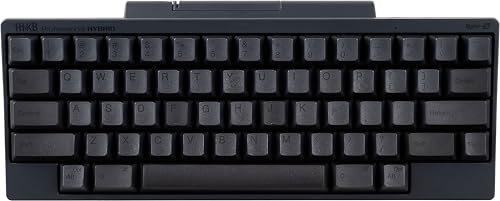
HHKB Professional Hybrid Type-S
by HHKB
The keyboard the Unix world built its habits around, with Topre capacitive switches, Control under the left little finger, and a 60% layout that repays the fortnight it takes to learn.
Pros
- Topre electrostatic capacitive switches give a cushioned bottom-out that no MX-style switch reproduces, and the Type-S variant is markedly quieter than standard Topre
- Control sits where Caps Lock normally does, which is the layout the Unix and vim conventions were written around, with no remapping required
- Pairs with four devices over Bluetooth and falls back to USB-C, and the 60% footprint leaves the mouse close to the body's centreline
- PBT keycaps and a switch design rated for tens of millions of keystrokes mean the legends and the feel both survive years of daily work
Cons
- No QMK, no VIA and no hot-swap sockets, so customisation is limited to a bank of DIP switches and the bundled utility
- No arrow keys, no function row and no number pad, so navigation and F-keys live behind the Fn layer and take a couple of weeks to internalise
- There is no backlight at all, and dark legends in a dim room are hard to read until touch typing is fully automatic
Logitech Alto Keys K98M: Best for Mac Coding
Logitech’s advantage over the enthusiast brands has never been hardware, it is what happens after you plug the thing in, and on macOS that gap is at its widest. Logi Options+ handles per-application remapping, correct macOS media key behaviour, and Flow, which lets one keyboard and mouse move between two machines by pushing the cursor to the edge of the screen. For a developer running a MacBook alongside a second machine, that is a genuinely useful workflow, and none of it requires a terminal, a udev rule or a flashing utility.
The hardware is better than Logitech’s software reputation suggests. It is gasket-mounted with internal damping, which is not something Logitech historically bothered with, and the 98-key layout keeps a full number pad while staying narrower than a true full-size board. Battery life is the standout number: rated at up to twelve months with the backlight off, which is the longest claimed runtime on this list and effectively removes charging from your attention. The hot-swap sockets are a welcome surprise on a mainstream Logitech board.
Two things temper it for programming specifically. There is no QMK and no VIA, so every remap you make depends on Logi Options+ running on that machine, which fails exactly where you need it most, on a locked-down build server or a Linux box. And the stock switches are clicky, which is the loudest configuration on this list. In an office with any noise sensitivity you will want to swap them for something silent, which the hot-swap sockets make easy but which is still an extra step and an extra purchase.

Logitech Alto Keys K98M Wireless Mechanical Gasket Keyboard
by Logitech
The best-integrated Mac keyboard here, a gasket-mounted 98-key board with up to a year of battery and the only remapping software on this list a Mac user can configure without opening a terminal.
Pros
- The macOS software story is the most polished here, with Logi Options+ handling per-app remapping, cross-machine Flow, and correct macOS media keys without any terminal work
- Rated at up to twelve months of battery with the backlight off, the longest claimed runtime of any keyboard on this list
- Gasket mount with internal damping takes the hard edge off the typing sound and removes the hollow resonance most plastic boards have
- The 98-key layout keeps a full number pad while staying narrower than a true full-size board, which matters if you run a trackpad or a large mouse pad
Cons
- Remapping runs entirely through Logi Options+, so there is no QMK or VIA and nothing is stored on the keyboard itself
- Single-colour white backlight rather than per-key RGB, which matters if you use lighting to mark modifier layers
- The stock switches are clicky, which is the loudest option here and a poor fit for an open-plan room unless you swap them out
Kinesis Advantage360 Professional: Best Ergonomic Pick
The Advantage360 is the most serious ergonomic hardware on this list, and it works by changing four things at once. The halves separate, so your hands sit at shoulder width instead of being pulled together, which takes the wrists out of ulnar deviation. Each half tents independently, so the forearms rotate out of full pronation. The keys sit in concave wells arranged in straight columns rather than the staggered rows inherited from typewriters, so each finger moves along its own line instead of reaching diagonally. And the modifiers move to thumb clusters, which takes Control, Shift and Backspace off the little fingers entirely. That last one matters most for programmers, because a language full of brackets and modifier chords loads the weakest fingers hardest.
None of that is free. There is a real adjustment period, typically several weeks of noticeably slower typing before the columnar layout and thumb clusters become automatic, and some people never fully get on with it. The switches are Kailh Box Pink Silent linears and they are not hot-swappable, so that quiet, light feel is the one you keep. It is also comfortably the most expensive keyboard here, and with 48 Amazon ratings the review record is thin against that price.
What tips it for a workplace purchase is the support position. Kinesis backs it with a three-year warranty and US-based technical support, which is longer and more reachable than anything else on this list, and the firmware is open source and fully reconfigurable with the layout stored on the keyboard. If you are buying this because of existing wrist or forearm symptoms, treat the keyboard as one part of the fix and read our ergonomic desk setup guide for the chair height and monitor position that have to change with it. Persistent pain is worth taking to a clinician rather than solving with hardware alone.

Kinesis Advantage360 Professional Split Ergonomic Keyboard
by Kinesis
The strongest ergonomic correction available on Amazon, with split tented contoured key wells and thumb clusters, backed by a three-year warranty and US support, for programmers whose hands have started complaining.
Pros
- Concave key wells with orthogonal columns and dedicated thumb clusters keep the wrists straight and move the modifier keys off the little fingers, which is where most keyboard strain accumulates
- The two halves separate up to about ten inches and tent independently, so shoulder width and forearm rotation are set to your body rather than to a fixed chassis
- Runs open-source firmware, so the whole layout including layers and macros is reconfigurable and stored on the keyboard rather than on the host
- Three-year warranty with US-based technical support, longer than anything else here and a genuine consideration when the purchase goes through procurement
Cons
- The most expensive keyboard on this list by a wide margin, and the adjustment period runs to several weeks of reduced typing speed before the layout becomes automatic
- Switches are not hot-swappable, so the quiet Kailh Box Pink linears are the feel you keep
- Only 48 Amazon ratings, a thin review record relative to the outlay
Kinesis Freestyle Edge RGB Plus: Best Affordable Split
Plenty of programmers know they want a split keyboard and balk at both the price and the relearning curve of a contoured board. The Freestyle Edge exists for exactly that person. It is a genuine two-piece split with the tenting lift kit included, so you get the two changes that produce most of the ergonomic benefit, hands at shoulder width and forearms rotated out of flat pronation, without having to relearn where every key lives. The layout stays flat and row-staggered, which means you can type on it competently on day one.
It also does something its flagship sibling does not: the switches are hot-swappable. On a keyboard aimed at people managing discomfort, that is more useful than it sounds, because switch weight is part of the ergonomic picture. If your current switches feel heavy after a long session, dropping in a lighter linear set is a cheap adjustment rather than a new keyboard. Mac keycaps ship in the box next to the Windows set, the palm supports detach and mount to each half independently so they follow the split, and Kinesis backs it with the same US support operation as the Advantage360.
The caveats are straightforward. It is wired USB only, so it cannot serve a second machine over Bluetooth. Remapping goes through the Kinesis SmartSet app rather than QMK or VIA, so the layout is not portable in the way the Keychron boards’ layouts are. And with 20 Amazon ratings, this is the thinnest review record on the list, which is worth weighing at this price even with the warranty behind it. It corrects wrist angle and shoulder width, not finger travel, and if the finger travel is what hurts, the Advantage360 is the board that addresses it.

Kinesis Freestyle Edge RGB Plus Split Mechanical Keyboard
by Kinesis
The split keyboard to buy when the Advantage360 is too much money or too big a change at once, with real separation, tenting, hot-swap sockets and Kinesis support, minus the contoured key wells.
Pros
- A genuine two-piece split with the tenting lift kit included, so the main ergonomic gain is available without committing to contoured key wells
- Hot-swappable sockets, which the Advantage360 does not offer, so switch feel can still be tuned after purchase
- Mac keycaps are in the box alongside the Windows set, and Kinesis backs it with the same US support operation as its flagship
- Detachable cushioned palm supports mount to each half independently, so the palm rest follows the split rather than fighting it
Cons
- Only 20 Amazon ratings, the thinnest review record on this list
- Wired USB only, so it cannot serve a second machine over Bluetooth the way the Keychron boards can
- The layout stays flat and row-staggered, so it corrects wrist angle and shoulder width but not finger travel the way a contoured well does
Cherry KC 200 MX: Best Silent Wired Board
There is a specific buyer for whom the Cherry KC 200 is obviously correct and everything else on this list is overthought: someone who sits in an open-plan room, wants a mechanical keyboard that will not annoy anyone, and does not want to install software or manage a battery. Cherry designed the MX switch, and the MX2A Silent Red used here is the genuine article rather than one of the many clones, with dampening pads inside the housing that quiet both the downstroke and the return. It is the quietest board on this list, and the linear travel means there is no tactile bump to make a noise in the first place.
The build reflects a different set of priorities from the enthusiast market. An anodised metal plate under the switches, laser-etched legends that will not wear off under a programmer’s hands the way pad-printed ones do, and switches rated at over 50 million actuations each. It plugs in over USB-A and appears as a standard HID device, which means no driver, no installer, no account, and no argument with IT. On a fleet that mixes Windows, macOS and Linux machines, that is a real deployment advantage and the reason keyboards like this end up standardised across a department.
The gap for programmers is remapping. There is none at all, so Caps Lock stays Caps Lock unless you handle it in the operating system, per machine. That is a genuine cost if portable layouts are what you came for, and it is why this sits as a specialist pick rather than a top-three one. It is also full-size, which pushes the mouse a hand’s width further right than the compact boards here. Buy it for silence and reliability, not for flexibility.

Cherry KC 200 MX Wired Mechanical Office Keyboard, Silent Red
by Cherry
The quietest keyboard here and the least demanding to deploy, with genuine Cherry silent linears, a metal plate, laser-etched legends and no software of any kind between you and the machine.
Pros
- Cherry MX2A Silent Red switches are the genuine article from the company that designed the MX stem, and the silent variant dampens both the downstroke and the return
- Rated at over 50 million actuations per switch on an anodised metal plate, which is why boards like this stay on the same desk for a decade
- Laser-etched legends do not wear away under a programmer's hands the way pad-printed legends on cheap keycaps do
- Plugs in over USB-A and works as a standard HID device on any operating system with no driver, installer or account
Cons
- No remapping of any kind, so Caps Lock stays Caps Lock unless you handle it at the operating system level
- No backlight beyond the status LEDs, and no hot-swap sockets
- The full-size footprint pushes the mouse a hand's width further right than a tenkeyless board does
RK ROYAL KLUDGE RK61: Best 60% Board
The RK61 has been around long enough that its review history is the deepest on this list, with thousands of ratings accumulated across the line’s colour and switch variants over several years. That depth is a fair signal about the design surviving daily use, though it is worth understanding that the rating pool is shared across variants rather than reflecting any single switch configuration. What it buys you at this end of the market is unusual: hot-swap sockets that take both 3-pin and 5-pin switches, and tri-mode connectivity over Bluetooth, a 2.4 GHz receiver and USB-C with three paired devices.
The layout is the whole proposition. At 61 keys it reclaims more desk width than anything else here, which matters on a shallow desk, a hot desk, or any setup where the mouse is getting pushed too far right. For a programmer who works almost entirely from the home row, in vim or with a heavily bound editor, dropping the function row and arrow keys costs nothing, because those keys were already being avoided. For anyone who steps through code with F10 and F11, or who navigates with arrow keys and Home and End, this is the wrong shape and the Fn layer will slow you down for weeks.
Remapping runs through Royal Kludge’s own driver software, not QMK or VIA, which means the layout you build stays on the machine that built it. On a board this cheap that is a reasonable compromise, but be clear about it before buying: if the portable-layout argument is what brought you to this list, the Keychron boards are where it is answered. The stock switches and single-colour backlight are serviceable rather than special, and the hot-swap sockets exist precisely so the switches do not have to be the end of the story.
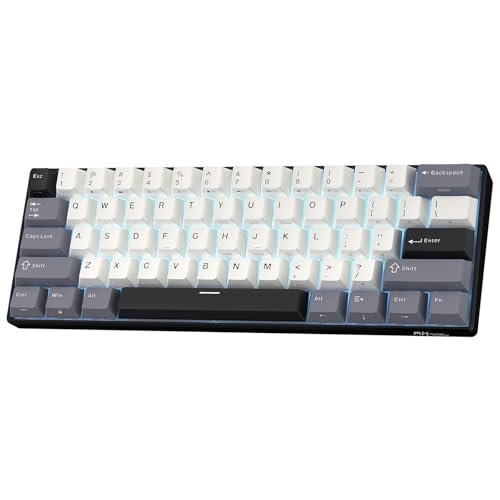
RK ROYAL KLUDGE RK61 Wireless 60% Mechanical Keyboard
by Royal Kludge
The most desk space you can reclaim for the least outlay, with hot-swap sockets and three connection modes, provided you are willing to live on the Fn layer for function and arrow keys.
Pros
- The RK61 line carries the deepest review history on this list, with thousands of ratings accumulated across its colour and switch variants over several years
- A 61-key layout reclaims more desk width than anything else here, which brings the mouse in close and helps on a shallow or hot desk
- Tri-mode connectivity over Bluetooth 5.0, a 2.4 GHz receiver or USB-C, with three paired devices, in a board at the low end of this list
- Hot-swap sockets take both 3-pin and 5-pin switches, so the stock switches are a starting point rather than the whole purchase
Cons
- Remapping runs through Royal Kludge's own driver software rather than QMK or VIA, so your layout does not travel with the keyboard to another machine
- Every arrow key, function key and navigation key lives on the Fn layer, a real adjustment for anyone who uses F5 through F12 in a debugger
- Stock switches and the single-colour backlight are serviceable rather than enthusiast-grade
Keychron K10 Max: Best Full-Size Board with QMK
Full-size and genuinely programmable is a rarer combination than it should be. The enthusiast market has largely abandoned the number pad, so a developer who does data work, works in spreadsheets alongside code, or simply refuses to give up the pad usually ends up choosing between a proper layout and onboard firmware. The K10 Max is one of the few boards that does not force that choice: a true 108-key layout running native QMK with VIA support, so the number pad stays and the Caps Lock remap still lives on the keyboard.
The acoustic engineering is better than a full-size board usually gets. A steel plate with IXPE and EPDM foam layers fills the large internal cavity that makes big keyboards sound hollow, and the result is a muted, low sound that does not carry. Connectivity covers a 2.4 GHz receiver, three Bluetooth devices, and wired USB-C at a 1000 Hz polling rate, which is more than any programming task needs but removes latency as a variable. The double-shot PBT keycaps ship in both Mac and Windows modifier sets, so the board drops onto either platform without mental remapping.
The costs are physical and evidential. This is the largest footprint on the list, and every inch of number pad pushes the mouse further from your body’s centreline, which is exactly the shoulder-position problem compact boards exist to solve. It is also heavy enough to be a permanent installation. And with 62 Amazon ratings on a relatively new SKU, the long-term record is still forming, so this is a purchase made on Keychron’s Max-series track record rather than on years of accumulated feedback.

Keychron K10 Max QMK Wireless Custom Mechanical Full-Size Keyboard
by Keychron
QMK remapping on a true full-size layout, which is a rarer combination than it should be, with onboard layers and macros and a number pad in a foam-damped steel-plate case.
Pros
- One of the few genuine QMK boards sold in a true 108-key full-size layout, so onboard remapping and a dedicated number pad stop being a trade-off
- Steel plate with IXPE and EPDM acoustic foam produces a muted, low typing sound despite the large full-size cavity
- Wired mode polls at 1000 Hz, and wireless covers a 2.4 GHz receiver plus three Bluetooth devices
- OSA-profile double-shot PBT keycaps ship with both Mac and Windows modifier sets in the box
Cons
- The largest desk footprint here, which pushes the mouse furthest from the body's centreline
- A newer SKU with only 62 Amazon ratings, so the long-term reliability record is still forming
- Heavy enough that it stays on one desk permanently
Keychron V6 Max: Best for Coding and Gaming
The V6 Max is the board for the person whose keyboard has a second shift after work. Keychron publishes the QMK source for it, which puts it a step beyond VIA-only boards: keymaps, layers and macros can be written, versioned in a repository and flashed, which is the workflow a programmer would design if asked. For most people the graphical Launcher covers everything they need, but the source being available means the ceiling is much higher than a GUI allows, and complex conditional layers are on the table.
Mechanically it is a gasket-mounted full-size board with a full foam stack and screw-in PCB stabilisers, and that last detail is the one people underestimate. Screw-in stabilisers are what stop the shift, enter and space keys from wobbling and rattling, which on a full-size board is the difference between a keyboard that sounds engineered and one that sounds hollow. The Gateron Brown hot-swap switches give a clear tactile bump for prose and code while staying quick enough for the games most people actually play, which is why this rather than a dedicated gaming board is the sensible dual-purpose answer. Oil-resistant OSA-profile PBT keycaps ship in both Mac and Windows sets.
Two things to weigh. It overlaps heavily with the K10 Max, and the choice between them comes down to plate material, switch preference and case construction rather than any capability difference. And per-key RGB is difficult to make look appropriate in a conservative office, even dimmed. Owners also report a brief Bluetooth reconnect delay when the host wakes from sleep, which is a small irritation rather than a fault, and one the 2.4 GHz receiver avoids.

Keychron V6 Max Wireless QMK Mechanical Keyboard
by Keychron
The dual-purpose pick, with open QMK source for real keymap work, a gasket-mounted case with screw-in stabilisers, and tactile switches fast enough that you do not need a second keyboard for evenings.
Pros
- Keychron publishes the QMK source for this board, so keymaps, layers and macros can be compiled and flashed from a repository rather than only configured in a GUI
- Gasket mount with sound-absorbing foam and PCB screw-in stabilisers removes the wobble and rattle that full-size boards usually carry on shift, enter and space
- Ships with both Mac and Windows keycaps in oil-resistant OSA-profile PBT, so the legends survive long sessions and the modifiers are right on either platform
- Gateron Brown hot-swap switches give a clear tactile bump for code and stay quick enough for the games people actually play after work
Cons
- It overlaps heavily with the K10 Max, and choosing between them comes down to plate material and switch preference rather than capability
- Per-key RGB is difficult to make look appropriate in a conservative office even turned right down
- Owners report a short Bluetooth reconnect delay after the host machine wakes from sleep
EPOMAKER TH99: Best Battery Life
The TH99’s headline is a number: an 8000 mAh battery rated at roughly 800 hours with the backlight off. On a list where most wireless boards are charged monthly, that turns charging into something you do a few times a year. If cable clutter is the thing you are actually trying to solve, and our cable management picks have already been deployed, this is the board that removes one more cable from the desk permanently and keeps it removed.
The rest of the design is more considered than the gaming-adjacent branding suggests. It is gasket-mounted with five damping layers and ships with Sea Salt Silent linear switches, so it is one of the quieter boards on this list and viable in a shared room. The 96% layout keeps a full number pad in a frame much closer to tenkeyless width than to full-size, which is a good compromise for a developer who needs the pad but not the footprint. A one-touch toggle switches between Mac and Windows layouts, which is the least friction of any platform switch here, and Cherry-profile PBT keycaps with a two-stage kickstand round it out.
The limitation to be clear about is remapping. Configuration runs through Epomaker’s own software, and VIA support on this model is not something I can confirm, so do not buy it on the assumption that layouts will be stored on the board and travel with it. If portable onboard keymaps are a requirement, the Keychron boards are the ones that guarantee it. The other practical note is weight: at over a kilogram this is not a keyboard to carry daily, despite the battery making it theoretically portable.
EPOMAKER TH99 Tri-Mode Wireless Mechanical Keyboard
by Epomaker
The wireless board to buy if charging cables annoy you, with an 8000 mAh cell, a one-touch Mac and Windows toggle, and quiet gasket-mounted silent linears in a layout that still has a number pad.
Pros
- An 8000 mAh battery rated at roughly 800 hours with the backlight off is the largest cell on this list, which turns charging into a quarterly chore
- A single key toggles between Mac and Windows layouts, so a personal MacBook and a work Windows machine can share one board without a settings trip
- Sea Salt Silent linear switches in a gasket mount with five damping layers make it one of the quietest boards here in a shared room
- The 96% layout keeps a full number pad in a frame much closer to tenkeyless width than to full-size
Cons
- Remapping runs through Epomaker's own software and the board is not a confirmed QMK or VIA device, so do not buy it expecting portable onboard keymaps
- The branding and lighting lean gaming, which is a consideration in a client-facing office
- It weighs over a kilogram, heavier than the 75% and 60% boards here and not something to carry daily
Best Mac Keyboard for Coding
Developing on a Mac creates two keyboard problems at once. The physical one is modifier placement, since a Windows-labelled board puts Command and Option in the wrong positions and labels them wrongly, which either costs you a year of mental translation or a per-machine remap. The software one is that most keyboard utilities are Windows-first, with a Mac build that lags behind. The boards worth buying for Mac work solve both: they ship Mac keycaps and a layout toggle, and they either have first-class Mac software or, better, they store the layout on the keyboard so no software is needed at all.
| Product | Price | Buy |
|---|---|---|
| Logitech Alto Keys K98M Wireless Mechanical Gasket KeyboardBest Mac keyboard for coding Logi Options+ handles per-app remapping and Flow on macOS with no terminal work, plus up to a year of battery. | $99.99 | View on Amazon |
| Keychron Q1 Pro Wireless Custom Mechanical KeyboardBest Mac keyboard for portable layouts Native QMK and VIA store the layout on the board, so the Mac remap follows you to a locked-down work machine. | $209.99 | View on Amazon |
| Keychron K3 Version 2 QMK 75% Wireless Low-Profile Mechanical KeyboardBest low-profile Mac pick Low-profile keys sit near MacBook height, with QMK firmware and three-device Bluetooth in a bag-sized frame. | $84.00 | View on Amazon |
Best Ergonomic Keyboard for Coding
Programming loads the hands differently from prose. Brackets, modifier chords and constant Control and Shift use put sustained work on the little fingers, and the staggered row layout inherited from typewriters makes several of those reaches diagonal. An ergonomic keyboard addresses that by mechanism rather than by cushioning: separating the halves takes the wrists out of ulnar deviation, tenting rotates the forearms out of full pronation, thumb clusters move modifiers off the weakest fingers, and lighter switches reduce the force each keystroke needs. Not every board that helps does all four.
| Product | Price | Buy |
|---|---|---|
| Kinesis Advantage360 Professional Split Ergonomic KeyboardBest ergonomic keyboard for coding Split, tented, contoured wells with thumb clusters, which is the most complete correction available here, plus a three-year warranty. | $479.00 | View on Amazon |
| Kinesis Freestyle Edge RGB Plus Split Mechanical KeyboardBest split without the relearning curve Real separation and tenting on a familiar flat layout, with hot-swap sockets so switch weight can be tuned too. | $219.00 | View on Amazon |
| Keychron K3 Version 2 QMK 75% Wireless Low-Profile Mechanical KeyboardBest light-touch option Not a true ergonomic board, but low-profile keys reduce wrist elevation, which is the cheapest useful change if a split is too much. | $84.00 | View on Amazon |
Best Keyboard for Coding and Gaming
One keyboard covering both jobs is a compromise most people can make comfortably, because the requirements overlap more than the marketing implies. Games want low latency and reliable simultaneous keypresses, which a 2.4 GHz receiver or a wired connection supplies. Code wants tactile feedback, real function keys and remapping. The place they genuinely diverge is switch weight, since very light linears that suit fast repeated inputs are the same switches that produce accidental keystrokes when your fingers rest on the home row while you think.
| Product | Price | Buy |
|---|---|---|
| Keychron V6 Max Wireless QMK Mechanical KeyboardBest keyboard for coding and gaming Open QMK source for keymaps and macros, a 2.4 GHz receiver for latency, and tactile switches that suit both jobs. | $119.99 | View on Amazon |
| EPOMAKER TH99 Tri-Mode Wireless Mechanical KeyboardBest quiet dual-purpose board Silent linears and a huge battery, for a shared house as much as a shared office. | $70.54 | View on Amazon |
| RK ROYAL KLUDGE RK61 Wireless 60% Mechanical KeyboardBest compact dual-purpose board A 60% frame leaves the most mouse room of anything here, with tri-mode connectivity and hot-swap sockets. | $58.99 | View on Amazon |
Best Silent Keyboard for Coding
Silent is a specific engineering claim, not a marketing adjective, and it is worth knowing what actually produces it. There is no standard test method for keyboard noise, so any decibel figure in a product listing is unverifiable. What is verifiable is the mechanism: a manufacturer’s silent switch designation means dampening pads inside the switch housing that soften both the downstroke and the return, and a linear switch has no tactile bump to make a noise in the first place. Add internal case foam or a gasket mount to absorb the hollow resonance and you have a board that genuinely does not carry across a room.
| Product | Price | Buy |
|---|---|---|
| Cherry KC 200 MX Wired Mechanical Office Keyboard, Silent RedBest silent keyboard for coding Genuine Cherry MX2A Silent Red linears on a metal plate, with no software and no battery to manage. | $94.99 | View on Amazon |
| EPOMAKER TH99 Tri-Mode Wireless Mechanical KeyboardBest silent wireless option Sea Salt Silent linears in a gasket mount with five damping layers, and a battery measured in months. | $70.54 | View on Amazon |
| Kinesis Advantage360 Professional Split Ergonomic KeyboardBest silent ergonomic option Kailh Box Pink Silent linears, so the ergonomic pick is also one of the quietest boards here. | $479.00 | View on Amazon |
Best Wireless Keyboard for Coding
Wireless on a developer’s desk is about desk topology rather than convenience: a clean surface, a keyboard you can push aside during a pairing session, and one board serving a docked work laptop plus a personal machine. Three things separate a good wireless board from a frustrating one. Multi-device pairing with a keypress to switch, so you are not re-pairing several times a day. A 2.4 GHz receiver alongside Bluetooth, because plenty of corporate laptops have a locked-down Bluetooth stack. And enough battery that charging never becomes a daily thought.
| Product | Price | Buy |
|---|---|---|
| EPOMAKER TH99 Tri-Mode Wireless Mechanical KeyboardBest wireless keyboard for coding An 8000 mAh cell rated near 800 hours, tri-mode connectivity, and a one-touch Mac and Windows toggle. | $70.54 | View on Amazon |
| Keychron Q1 Pro Wireless Custom Mechanical KeyboardBest wireless with onboard layouts Bluetooth, 2.4 GHz and USB-C with QMK layouts stored on the board rather than on the host. | $209.99 | View on Amazon |
| Logitech Alto Keys K98M Wireless Mechanical Gasket KeyboardBest wireless for Mac users Up to twelve months of battery with Logi Bolt or Bluetooth and Flow across two machines. | $99.99 | View on Amazon |
Best Budget Keyboard for Coding
Spending less does not have to mean giving up the features that matter for code. Below the premium tier you will lose the aluminium case and, on most boards, genuine QMK, but hot-swap sockets, multi-device wireless and a sensible compact layout are all available. The question to answer before buying at this level is which single feature you refuse to compromise on. If it is portable onboard layouts, only a QMK board delivers it. If it is desk space or wireless flexibility, the cheaper boards here compete directly with the expensive ones.
| Product | Price | Buy |
|---|---|---|
| RK ROYAL KLUDGE RK61 Wireless 60% Mechanical KeyboardBest budget keyboard for coding Tri-mode wireless, hot-swap sockets and the smallest footprint here, backed by the deepest review history on this list. | $58.99 | View on Amazon |
| Keychron K3 Version 2 QMK 75% Wireless Low-Profile Mechanical KeyboardBest budget board with real QMK Genuine QMK firmware and hot-swap sockets in a low-profile 75% frame, which is the value pick for portable layouts. | $84.00 | View on Amazon |
| EPOMAKER TH99 Tri-Mode Wireless Mechanical KeyboardBest budget wireless board A number pad, silent linears and a battery measured in months, at the lower end of this list. | $70.54 | View on Amazon |
Best Mechanical Keyboards for Programmers by Use Case
A few narrower requirements come up often enough to answer directly, whether you are shopping by form factor or by brand.
| Product | Price | Buy |
|---|---|---|
| Kinesis Freestyle Edge RGB Plus Split Mechanical KeyboardBest split keyboard for coding A true two-piece split with tenting included and hot-swap sockets, on a layout you can type on immediately. | $219.00 | View on Amazon |
| Keychron Q1 Pro Wireless Custom Mechanical KeyboardBest Keychron keyboard for coding Native QMK and VIA in an aluminium gasket-mounted 75% case, which is the most complete Keychron for programming. | $209.99 | View on Amazon |
| Logitech Alto Keys K98M Wireless Mechanical Gasket KeyboardBest Logitech keyboard for coding The most polished Mac software of any board here, with up to a year of battery and hot-swap sockets. | $99.99 | View on Amazon |
| RK ROYAL KLUDGE RK61 Wireless 60% Mechanical KeyboardBest 60% keyboard for coding The smallest footprint on this list, with tri-mode wireless and hot-swap sockets, for home-row workflows. | $58.99 | View on Amazon |
| Keychron K10 Max QMK Wireless Custom Mechanical Full-Size KeyboardBest full-size keyboard for coding A true 108-key layout running native QMK, so the number pad and portable layouts stop being a trade-off. | $119.99 | View on Amazon |
Buyer's Guide
A programmer touches a keyboard more than any other tool in the stack, and the specifications that decide whether it is still comfortable at hour eight are not the ones on the front of the box. Layout, switch feel, remapping, noise and operating system behaviour are the five that matter, and a sixth question people forget is what the keyboard does to the position of the mouse.
Keyboard Layout and Size for Coding
Layouts are described as a percentage of a full-size board, and each step down removes a group of keys. Full-size at 104 to 108 keys keeps everything including the number pad. A 96 or 98 percent layout keeps the number pad but compresses the navigation cluster to save roughly an inch of width. Tenkeyless removes the number pad entirely and frees four to five inches. A 75 percent layout tucks the function row and one navigation column tight against the main block, keeping F-keys and arrows physical in the smallest sensible footprint, which is why it is the most common recommendation for programming. A 65 percent drops the function row, and a 60 percent drops the arrow keys too. Decide this against your editor and debugger rather than against a photograph. If you step through code with F10 and F11 or you use Home, End and Page Up constantly, keeping those keys physical is worth more than the desk width. If you work from the home row in vim, a 60 percent costs you nothing. Width also has an ergonomic consequence: every inch of number pad pushes the mouse further right, and sustained shoulder abduction is a common source of right-side neck and shoulder ache in desk workers.
Switch Type for Coding
Switches divide into three families. Linear switches travel straight down with no bump and no click, which makes them the smoothest and, in their silent variants, the quietest. Because nothing signals actuation, resting fingers on the keys can produce accidental input, which some programmers dislike and others never notice. Tactile switches add a bump partway down at the actuation point, and that bump is what lets you release a key early instead of driving it into the plate. That is why tactile is the default recommendation for anyone typing all day. Clicky switches add an audible click bar on top of the bump and are unsuitable for a shared room. Beyond family, look for pre-lubed switches, which remove the scratchy spring ping cheap switches produce, and for hot-swap sockets, which turn switch choice from a permanent commitment into a reversible experiment. If you are unsure, start tactile and hot-swap, because switch preference is very hard to predict from a description and most people revise it within a month.
Remapping and Programmability
This is where keyboard marketing is least precise, and the distinction matters for programmers more than for anyone else. QMK is open-source firmware that runs on the keyboard's own controller, so a compiled keymap lives in the board and applies to any machine you plug it into, including a locked-down corporate laptop where you cannot install anything. VIA is a graphical configurator that edits a QMK-compatible keymap live, with no compiling. Vendor software such as Logi Options+, the Kinesis SmartSet app, Royal Kludge's driver or Epomaker's utility is a third and weaker category: it does remap keys, but the configuration usually depends on that software being installed and running on the host, and it does not follow the keyboard. The canonical programmer tweak is putting Control or Escape under Caps Lock, which puts the most-used modifier under the strongest finger instead of leaving a key almost nobody uses in prime real estate. On a QMK or VIA board that takes about a minute and then works everywhere. Anywhere else you are doing it per machine in the operating system.
Noise in a Shared Office
Noise is the most common reason a mechanical keyboard ends up in a drawer after a fortnight in an open-plan room, and there is no standard test method for keyboard noise, so decibel figures in listings are marketing rather than measurement. Judge it by mechanism instead. The switch is the largest factor: avoid clicky switches outright, and prefer a manufacturer's explicitly silent designation such as Cherry MX2A Silent Red, Kailh Box Pink Silent or Epomaker's Sea Salt Silent, all of which add dampening pads inside the switch housing to soften both the downstroke and the return. The case is second: internal foam, an IXPE switch pad or a gasket mount absorbs the hollow resonance that makes an empty plastic chassis sound cheap and carry across a room. The third factor is you. Bottoming out every key is louder than any switch choice, and a tactile bump is what teaches you to stop.
Multi-OS Support Including Linux
Most programmers work across at least two operating systems, and keyboards handle that unevenly. The first issue is physical: a Windows-labelled board puts Command and Option in the wrong places on a Mac, which is why boards that ship both keycap sets plus a hardware or firmware layout toggle are worth seeking out. The second is software. A keyboard whose remapping depends on a vendor application is only as portable as that application, and vendor utilities are usually Windows-first with a Mac build and no Linux support at all. QMK and VIA sidestep this entirely, because the keymap is stored on the keyboard and the operating system just sees a standard USB HID device. VIA's configurator also runs as a web app in a Chromium-based browser using WebHID, which works on Linux as well as Mac and Windows, though on Linux you generally need a udev rule granting your user access to the device before the browser can talk to it. A QMK board that has already been flashed needs nothing at all on the host. If Linux is part of your fleet, that difference is the whole argument for buying a QMK or VIA board.
Pairing the Keyboard With the Right Mouse
The keyboard decision changes the mouse decision, and people rarely make them together. Dropping the number pad moves the mouse four to five inches closer to your body's centreline, which reduces the sustained arm abduction behind a lot of right-side shoulder and neck complaints. If you already have shoulder or forearm symptoms, a vertical mouse rotates the forearm out of full pronation and pairs well with a compact or split keyboard, because both changes work on the same joint chain. If you are keeping a full-size board with a number pad, prioritise a mouse you can drive comfortably at a wider arm angle, and consider moving the mouse to your left hand for part of the day. Whichever you choose, set the two devices at the same height, because a keyboard on a riser next to a mouse on the desk surface reintroduces the wrist angle you were trying to remove.
How to Choose a Mechanical Keyboard for Programming
Work the decision in this order and it resolves quickly. First, answer the remapping question, because it eliminates more of the list than anything else. If you need Caps Lock to be Control on every machine you touch, including ones you cannot install software on, you need QMK or VIA and the shortlist is the Keychron boards or the Kinesis Advantage360. If you only ever use one machine and you are happy configuring the operating system, that constraint disappears and everything here is in play.
Second, pick the layout against your editor rather than against a photograph. Function keys and arrow keys are cheap to keep in a 75% board and expensive to lose in a 60% one if your debugger uses them. Third, pick the switch: tactile if you type in volume, silent linear if you share a room, and hot-swap if you are not certain, because being able to revise the choice for the price of a switch set is worth more than getting it right first time. Fourth, decide whether the number pad earns the desk width it costs, and remember that the width comes out of your mouse position rather than your desk tidiness.
Finally, make the mouse decision in the same session. A compact keyboard brings the mouse in close, which is most of the point of losing the number pad, and pairing it with a good wireless mouse at the same height finishes the job. If your forearm rather than your wrist is what aches, a vertical mouse rotates the forearm out of pronation and works on the same problem a split keyboard does. And if you are staying with a standard-profile board, budget for a palm-height keyboard wrist rest, because the height a mechanical board adds is the most common cause of discomfort in the first fortnight.
Final Verdict
The Keychron Q1 Pro is the right answer for most working programmers. Native QMK and VIA mean the layout lives on the keyboard and follows you to any machine, the 75% layout keeps the function row and arrows a debugger and an editor need while getting the number pad out of your mouse’s way, and the aluminium gasket-mounted case with hot-swap sockets means the physical side is as revisable as the firmware. Its review pool is thin at 29 ratings and I have not pretended otherwise, so this is a recommendation on capability rather than on crowd consensus. If a keyboard has to travel or has to cost less, the Keychron K3 Version 2 runs the same QMK firmware in a low-profile frame that fits a laptop bag, and it is the better first purchase for anyone not yet certain what they want from a mechanical board.
Two situations override all of that. If your hands, wrists or forearms are already sore, do not shop by firmware. The Kinesis Advantage360 is the strongest ergonomic correction on this list and the Freestyle Edge is the cheaper way into a split layout, and both come with a three-year warranty and support you can actually reach. If your constraint is the room rather than your hands, the Cherry KC 200 with genuine MX2A Silent Red switches is the quietest board here and needs no software at all. Whichever route you take, set the keyboard height against your chair and monitor before you judge the keyboard, using our ergonomic desk setup guide, and if you want the wider view of the category beyond programming, our mechanical keyboard roundup covers the general office picks.
Frequently Asked Questions
Is a mechanical keyboard actually better for coding?
Which type of keyboard is best for coding?
Should a programmer buy a 75%, 65% or 60% keyboard?
What do QMK and VIA actually mean on a keyboard?
How many years does a 50 million keystroke switch rating actually last?
Related Articles
About the Reviewer

Sarah Chen, CAP, PMP
B.A. Business Administration, UCLA
Sarah Chen spent 10 years in office management and operations at Fortune 500 companies before founding DeskRated in 2026. After managing supply budgets for teams of 50+ people and testing thousands of products through daily use, she started writing the honest, no-fluff supply reviews that office professionals actually need. Sarah holds both CAP and PMP certifications and is based in Los Angeles.