Best Bluetooth Keyboards for iPad of 2026
Sarah Chen, CAP, reviews the best Bluetooth keyboards for iPad in 2026: keyboard cases, trackpad folios, and slim travel boards for every current iPad size.
Updated
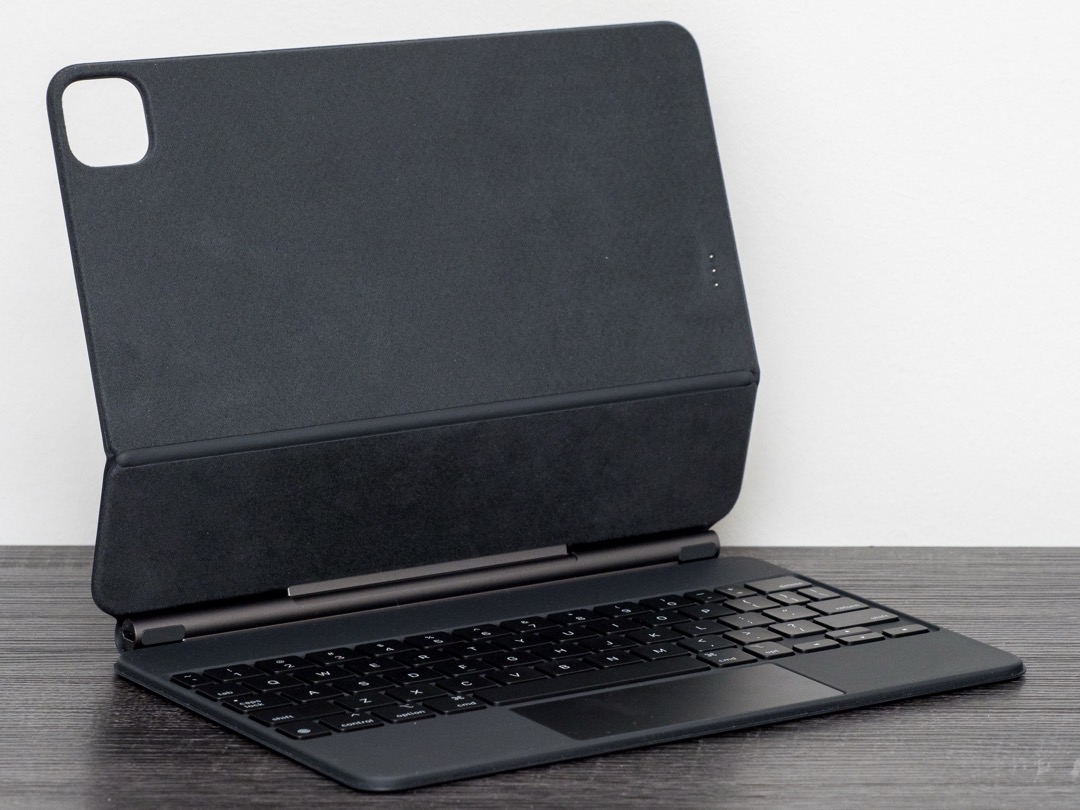
An iPad becomes a second workstation the moment a keyboard is attached to it, and not a moment before. As a Certified Administrative Professional who orders and supports the hardware for a floor of hybrid workers, I watch the same thing happen every year: somebody buys an iPad for meetings and reading, then finds themselves writing half their email on it with two thumbs. A good Bluetooth keyboard for iPad closes that gap for a fraction of the cost of a second laptop, as long as you buy against the iPad you actually own rather than the one in the product photo.
Compatibility is where most of the money in this category gets wasted. Apple ships iPads in five active sizes, across two entirely different keyboard connection methods, and on the newest iPad Pro it moved the Smart Connector to a different physical position than the generation before. A case bought for an iPad Air gen 5 will not necessarily fit an iPad Air 11-inch M4. If what you want is one board for a desk that also has a laptop and a phone on it, our general-purpose Bluetooth keyboards guide is the companion to this page and covers full-size office boards in depth. Everything here is judged on one narrower question: how it behaves attached to an iPad.
I evaluated twelve keyboards and keyboard cases for this 2026 guide, across three shapes. Full folio cases turn the iPad into something laptop-shaped. Detachable cases let the screen come off for reading and sketching, then snap back for typing. Standalone slim boards stay in a bag until they are needed and never touch the tablet at all. The expensive end of this category is not automatically the right end, and several of the cheapest picks below solve real problems the premium cases cannot.
| Product | Price | Buy |
|---|---|---|
| ZAGG Pro Keys Detachable Case and Wireless KeyboardBest Overall | $87.79 | View on Amazon |
| NOOX Bluetooth Keyboard for iPadBudget Pick | $12.99 | View on Amazon |
| Apple iPad Magic Keyboard Case for iPad Pro 11-inchPremium Pick | $288.00 | View on Amazon |
| Logitech Combo Touch Detachable iPad Keyboard Case (10th gen)Runner-Up | $139.82 | View on Amazon |
| Logitech Combo Touch iPad Air 11-inch Keyboard CaseRunner-Up | $199.99 | View on Amazon |
| Inateck AceTouch Case with Keyboard for iPad (A16)Runner-Up | $41.99 | View on Amazon |
| GreenLaw Keyboard Case for iPad mini 7/6Runner-Up | $59.99 | View on Amazon |
| Harvopu Case with Keyboard for iPad A16 11th/10th GenRunner-Up | $26.99 | View on Amazon |
| ProtoArc XK04 Foldable Compact KeyboardRunner-Up | $28.98 | View on Amazon |
| OMOTON 7-Color Backlit Bluetooth KeyboardRunner-Up | $16.99 | View on Amazon |
| XIWMIX Slim 7-Color Backlit Bluetooth KeyboardRunner-Up | $15.99 | View on Amazon |
| Logitech Keys-to-Go Bluetooth KeyboardRunner-Up | $79.95 | View on Amazon |
Find the Best iPad Keyboard for Your Need
Jump straight to the section that matches your iPad and your situation:
- Best iPad keyboards overall
- Best keyboard cases
- Best for iPad Pro
- Best for iPad Air
- Best for iPad mini
- Best with a trackpad
- Best Logitech option
- Best portable and folding
- More use cases
Bluetooth or Smart Connector: Decide This First
Every iPad keyboard connects one of two ways, and picking the wrong one is the single most expensive mistake in this category. Bluetooth is the universal option. It works with any iPad you own now, any iPad you buy later, and your phone and laptop besides. The nine Bluetooth products on this page will still be useful three tablets from now. What Bluetooth costs you is maintenance: a second battery to keep charged, a pairing routine to run once per device, and the occasional reconnect delay when the keyboard wakes from standby before the iPad does.
The Smart Connector is Apple’s three-pin magnetic contact strip on the back edge of the tablet. A case that uses it draws power directly from the iPad, so there is nothing to charge and nothing to pair. Open the lid and the keyboard is already awake. It is a genuinely better daily experience, and it is the reason people who use Smart Connector cases rarely go back. Only Apple and Logitech make them, which on this page means the Apple Magic Keyboard Case and both Logitech Combo Touch cases.
The catch is rigidity. A Smart Connector case is cut for a narrow set of iPad models and fits nothing else, and Apple moved the connector’s pin position on the M4 and M5 iPad Pro, which broke compatibility with cases built for earlier Pro generations. If you keep an iPad for years and want zero maintenance, buy Smart Connector and check the model number twice. If you replace tablets often, share devices across a team, or want the keyboard to outlive the iPad, buy Bluetooth.
How We Chose These iPad Keyboards
Selection started with fit rather than features, because a keyboard that does not physically match your iPad is worth nothing regardless of how it types. Each product’s compatibility list was read off the live listing and recorded in the table above, and the picks were then chosen to cover every current iPad line: base iPad and A16, iPad Air 11-inch, iPad Pro 11-inch, and the 8.3-inch iPad mini, which most case makers skip entirely.
From there the judgment was about the trade nobody puts on a spec sheet. A folio case with a trackpad roughly doubles the weight of the tablet, which is why the Inateck’s published 450-gram figure earned it a place: almost no brand in this category publishes weight at all, and it is the number that decides whether the setup gets carried. Trackpad quality was assessed on gesture reliability rather than presence, since the budget folios all list one and they do not all behave the same. Where a review pool is thin, I say so in the review instead of quietly rounding up, which is why the Logitech Keys-to-Go and the Combo Touch for iPad Air both carry that caveat plainly.
Ratings and review counts were read directly from the live Amazon listings. Every product on this page was confirmed in stock and buy-box-active before publication.
Best iPad Keyboards Overall
Each of the twelve keyboards below is reviewed once, in full, in this section. The use-case sections further down reference these same products rather than introducing new ones, so you can read the review once and then jump to whichever situation matches yours.
Best Overall: ZAGG Pro Keys Detachable Case and Wireless Keyboard
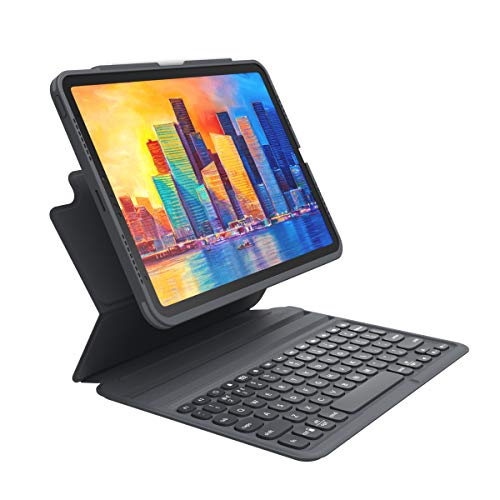
The ZAGG Pro Keys is the pick I hand to people who want one good answer and do not want to spend an evening cross-referencing model numbers. It is a keyboard case with seven-color backlit keys and an Apple Pencil holder, which covers typing and writing in one object, and it connects over Bluetooth rather than the Smart Connector. That last point is why it wins. A Smart Connector case is a bet on keeping this exact iPad, while this one keeps working when the tablet gets replaced.
The detachable design is the second reason it earns the top spot. The iPad lifts off the keyboard section, so reading a document, marking up a drawing, or turning the screen toward someone across a table does not mean folding a laptop-shaped object into an awkward triangle. It clips back on without re-pairing. The case is rated for 6.6-foot drop protection, which is the specification that actually matters for a device carried between meeting rooms all day, and it is a specification most keyboard cases quietly omit.
Two honest limitations. Reviewers consistently describe the key feel as mushier than the Logitech Combo Touch, which is the fair price of the Bluetooth flexibility. There is no trackpad on this version, so pointing means reaching for the screen; if you want one, see the trackpad cases further down. Bluetooth also means its own battery and the occasional pairing hiccup after the iPad has sat in standby. It also does not fit the base iPad at all, so this is an iPad Air and iPad Pro 11-inch purchase. If you have a base iPad, skip to the Logitech Combo Touch below.
ZAGG Pro Keys Detachable Case and Wireless Keyboard
by ZAGG
The best Bluetooth keyboard for iPad overall: a detachable folio with backlit keys, a Pencil holder, and real drop protection, on a connection that is not locked to one iPad generation.
Pros
- True Bluetooth rather than Smart Connector, so the keyboard is not tied to one iPad generation's connector pin position and keeps working if you move to a different tablet later
- Detachable folio design lets the iPad come off the keyboard for reading, sketching, or handing a screen across a table, then snap back for typing without re-pairing
- Backlit keys in seven colors plus an Apple Pencil holder in the same case, so dim-room typing and Pencil storage need no second accessory in the bag
- Rated for 6.6-foot drop protection, which is the specification that matters most for a device that gets carried between meeting rooms all day
Cons
- Key feel is described by reviewers as mushier than Logitech's Combo Touch, which is the fair trade for the Bluetooth flexibility
- Bluetooth means its own battery to charge and occasional pairing hiccups after the iPad has been left in standby
- Does not fit the base iPad, so this is an iPad Air and iPad Pro 11-inch purchase only
Best Value: NOOX Bluetooth Keyboard for iPad
The NOOX is the entry point to this whole category, and the reason it earns a place is not the price on its own. It is a standalone board rather than a case, so it fits essentially every current iPad size, from the 13-inch iPad Pro down to the mini, and it will fit whatever iPad replaces yours. It attaches to nothing, so the tablet keeps using the sleeve or folio it already has. For a shared drawer keyboard, a student’s second device, or an iPad that only occasionally needs to produce a long piece of writing, that combination is hard to argue with.
Buy it with clear expectations. The key travel is flat, and it suits a forty-minute email session considerably better than a full working day. There is no backlight, so an evening desk or a dim conference room means typing by touch. And it pairs to one device at a time, so an iPad plus a phone means a trip back into Bluetooth settings each way. None of those matter much for the job this board is bought to do, and all of them matter a great deal if you try to make it a primary keyboard.
What it does well is remove the excuse. Most people who say they cannot work on an iPad have simply never had a keyboard attached to one, and this is the least committal way to find out whether the workflow suits you before spending real money on a folio case.

NOOX Bluetooth Keyboard for iPad
by NOOX
The value pick: a standalone rechargeable Bluetooth board that fits nearly every current iPad and costs less than a month of coffee, with flat keys as the honest trade.
Pros
- Standalone board rather than a case, so it fits essentially every current iPad size instead of one model line, including iPad Pro 13-inch and 12.9-inch, iPad Air 13-inch and 11-inch, and iPad mini
- Rechargeable cell means no battery drawer to keep stocked, which matters for a spare board that lives in a desk until someone needs it
- Adds nothing to the iPad's thickness because it never attaches to it, so the tablet still fits its existing sleeve or folio
- Costs little enough that it can live permanently in a drawer or a shared kit as the spare board nobody has to sign out
Cons
- Flat key travel that suits short sessions far better than a full working day
- No backlight, so an evening desk or a dim meeting room means typing by touch
- Single-device pairing, so moving it between an iPad and a phone means going back into Bluetooth settings each way
Premium Upgrade: Apple iPad Magic Keyboard Case
For an M4 or M5 iPad Pro 11-inch, this is the reference implementation and everything else on this page is a compromise against it. The Smart Connector means there is nothing to pair and nothing to charge: the keyboard runs on the iPad’s battery and wakes the instant the lid opens. The trackpad handles the full iPadOS gesture set reliably, which none of the budget folios quite manage. The keys are backlit and there is a proper function row, so brightness and media controls do not require reaching up to touch the screen.
The floating cantilever hinge is the part people underestimate until they use it. It holds the display noticeably higher and closer to eye level than a kickstand case does, which over a long session is a real neck-posture difference rather than a styling flourish. If the iPad Pro is genuinely your main machine for several hours a day, that matters more than the spec sheet suggests, and it is worth pairing with a proper desk setup at home. Our monitor setup guide covers the same eye-level principle for a fixed workstation, and a USB-C dock turns the same iPad into a docked machine when you sit back down.
The trade-offs are blunt. This is the most expensive product on this page by a wide margin, and it buys a keyboard rather than a computer. There is no rear cover, so the back of the iPad is unprotected when the case is closed. And it fits the M4 and M5 iPad Pro 11-inch only, with no backwards compatibility to earlier Pro generations. A 13-inch version also exists if you have the larger Pro, though it sells through a third-party seller rather than Apple directly.

Apple iPad Magic Keyboard Case for iPad Pro 11-inch
by Apple
The premium upgrade for an M4 or M5 iPad Pro: no pairing, no charging, a backlit function row, and the best trackpad here, at the highest price here.
Pros
- Smart Connector attachment means there is nothing to pair and nothing to charge, because the keyboard draws power from the iPad and wakes the instant the lid opens
- Built-in trackpad with the full iPadOS gesture set, which is the most reliable pointing experience of any keyboard on this page
- Backlit keys plus a dedicated function row, so brightness, volume, and media controls do not require reaching up to the screen
- The floating cantilever hinge holds the screen closer to eye level than a kickstand case does, which is a genuine neck-posture gain over a long session
Cons
- The highest price on this page by a wide margin, and it buys a keyboard rather than a computer
- No rear cover, so the back of the iPad is left unprotected when the case is closed
- Fits the M4 and M5 iPad Pro 11-inch only, with no backwards compatibility to earlier Pro generations
Best for the Base iPad: Logitech Combo Touch (10th Gen and A16)
If you own the base iPad, this is the one to buy, and it is not a close call. The Combo Touch attaches over the Smart Connector, which means no pairing menu, no channel key, and no keyboard battery to think about. It carries a large precision trackpad that is closer to a laptop trackpad in size than anything else near this price, and a dedicated iPadOS shortcut row covering Home, Spotlight, Lock, screenshot, brightness, and media. Those keys are the difference between an iPad that feels like a computer and one that keeps making you reach for the screen.
The kickstand is the design decision that separates it from the Apple case. Instead of a fixed hinge angle, the back panel props the iPad through a wide adjustable range, so the same case works on a desk, an aircraft tray table, and a lap. It also means the iPad’s back stays covered, which the Apple Magic Keyboard Case does not do. For a device that gets handed around a classroom or an office floor, that protection is worth more than the extra rigidity of a cantilever.
The honest caveats are weight and connector reliability. This is a full protective case, and the assembled package is heavy in a way a slim folio is not. And a minority of reviewers report Smart Connector dropout that needs the keyboard reseated, which is usually debris on the three gold contact pins rather than a hardware fault, but it happens often enough to mention.

Logitech Combo Touch Detachable iPad Keyboard Case (10th gen)
by Logitech
The strongest case for the base iPad: a Smart Connector folio with a laptop-sized trackpad, a proper iPadOS shortcut row, and a kickstand that works anywhere.
Pros
- Smart Connector attachment, so there is no pairing menu, no channel key, and no keyboard battery to think about
- Large precision trackpad that is closer to a laptop trackpad in size than anything else at this price on the page
- Dedicated iPadOS shortcut row covering Home, Spotlight, Lock, screenshot, brightness, and media, which removes most of the reaching up to the screen
- Built-in kickstand adjusts through a wide angle range, so the same case works on a desk, an aircraft tray, and a lap
Cons
- Bulk and weight are significant, because this is a full protective case rather than a slim cover
- A minority of reviewers report Smart Connector dropout that needs the keyboard reseated
Best for iPad Air: Logitech Combo Touch for iPad Air 11-inch
This is the same design as the base-iPad Combo Touch, cut for the iPad Air 11-inch M2, M3, and M4 as well as the iPad Air gen 5. If you own an Air and want the Combo Touch experience, this is the only version that fits, and the muscle memory transfers exactly: same large precision trackpad, same iPadOS shortcut row, same adjustable kickstand, same Smart Connector attachment with no pairing and no charging.
It is also the product on this page I would ask you to read most carefully before buying. At 4.0 stars it carries the lowest rating here, and its 505 ratings make it the second-thinnest review pool on the page, so the reliability picture is less settled than the base-iPad model’s. The Air-specific complaints cluster around one thing rather than scattering: kickstand hinge tension loosening over several months, so the screen gradually stops holding the angle you set it to. It also costs more than the base-iPad version of the same case.
That does not make it a bad purchase, and for an iPad Air used as a primary work machine the Smart Connector convenience is still worth paying for. It does mean that if you want a keyboard case for an Air and the hinge complaint concerns you, the ZAGG Pro Keys fits the same tablets, carries a much larger review pool, and detaches rather than hinging at all.

Logitech Combo Touch iPad Air 11-inch Keyboard Case
by Logitech
The Air-fitting Combo Touch: the same Smart Connector trackpad folio as the base-iPad model, with a weaker rating and a hinge complaint worth reading first.
Pros
- Brings the Combo Touch design to the iPad Air 11-inch M2, M3, and M4 as well as the iPad Air gen 5, which the base-iPad version does not fit
- Smart Connector attachment, so the Air gains a backlit keyboard and a trackpad without a second battery or a pairing routine
- Same large precision trackpad and iPadOS shortcut row as the base-iPad Combo Touch, so the muscle memory transfers between the two
- Adjustable kickstand covers desk, lap, and tray-table angles rather than the two fixed positions most folio cases offer
Cons
- At 4.0 stars this is the lowest-rated product on this page, and 505 ratings make it the second-thinnest review pool here
- Air-specific complaints centre on the kickstand hinge tension loosening over several months of use
- Costs more than the base-iPad version of the same case
Widest Compatibility: Inateck AceTouch Case with Keyboard
The AceTouch is the answer when one keyboard has to serve several different iPads. Its fit list is the broadest of any case here, covering the iPad A16 11th gen and 10th gen, the iPad Air 11-inch from M2 through M4, the iPad Air gen 4 and 5, and the iPad Pro 11-inch across generations 1 to 4. For an office or a classroom running a mix of tablets bought over several years, that single fact removes an entire procurement headache: you order one model number instead of four.
Two other things set it apart. The magnetic detach separates screen from keyboard in about a second, without unclipping anything, which is the fastest transition between typing and reading on this page. And Inateck publishes an actual weight figure of 450 grams. Almost nobody in this category does, and it is the number that decides whether the combined package stays in the bag. For reference, that is roughly the weight of the iPad itself, which is the honest arithmetic of every full folio case here, made visible for once.
The reservations are real. At 797 ratings the review pool sits below the thousand mark, which is thinner than the ZAGG or the Logitech cases and worth weighing if you are buying several. Three-finger trackpad gestures are less reliable than Apple’s implementation, so app switching by gesture is occasionally fiddly. And some units ship with a single backlight brightness level rather than an adjustable range, which appears to vary by production batch.

Inateck AceTouch Case with Keyboard for iPad (A16)
by Inateck
The case to buy when one keyboard has to serve several different iPads: the broadest fit list here, a published weight, a trackpad, and a backlight.
Pros
- The widest compatibility list of any case here, spanning iPad A16 11th and 10th gen, iPad Air 11-inch M2 through M4, iPad Air gen 4 and 5, and iPad Pro 11-inch gen 1 to 4
- Magnetic one-second detach separates screen from keyboard without unclipping anything, which is the fastest transition between typing and reading on this page
- Publishes an actual weight figure of 450 grams, which almost no competitor in this category does, so you can plan a bag around it
- Trackpad plus a seven-color backlight at a price well below the Smart Connector folios
Cons
- 797 ratings puts the review pool below the thousand mark, so the long-term reliability picture is thinner than for the ZAGG or the Logitech cases
- Three-finger trackpad gestures are less reliable than Apple's implementation
- Some units ship with a single backlight brightness level rather than an adjustable range
Best for iPad mini: GreenLaw Keyboard Case
The 8.3-inch iPad mini is the size the accessory industry forgot, and finding a keyboard case for it that is not an afterthought takes real searching. The GreenLaw is built specifically for the iPad mini 7 with A17 Pro and the iPad mini 6, and it fits nothing else, which is exactly what you want from a case for a size this specific.
The 360-degree rotating hinge is what makes a mini genuinely usable rather than merely equipped. The screen turns to portrait for reading a document or a PDF, folds flat behind the keyboard to become a tablet again, and returns to laptop position for typing, all without detaching anything. On a device this small, a fixed-angle folio would be too limiting to bother with. It also packs a built-in touchpad and a seven-color backlight into a chassis that size, which is rare in the mini category, and it charges over USB-C on the same cable as the iPad mini itself.
The limitation is physical and unavoidable: key size is cramped for touch typists, because there is only so much width in an 8.3-inch shell. Treat it as a competent keyboard for email, notes, and forms rather than a drafting machine. Reviewers also report the hinge loosening after several months of regular rotation, which is the usual failure mode for rotating mechanisms in this price range.

GreenLaw Keyboard Case for iPad mini 7/6
by GreenLaw
The rare keyboard case built for the 8.3-inch iPad mini, with a rotating hinge, a touchpad, and a backlight, at the cost of cramped keys.
Pros
- One of very few keyboard cases built specifically for the 8.3-inch iPad mini 7 with A17 Pro and the iPad mini 6, a size most case makers skip entirely
- 360-degree rotating hinge lets the screen turn to portrait or fold flat behind the keyboard, which is what makes a mini usable for reading and typing in the same session
- Built-in touchpad and a seven-color backlight in a chassis this small, which is rare in the mini category
- USB-C charging, so it shares the same cable as the iPad mini itself
Cons
- Key size is cramped for touch typists, which is a physical limit of an 8.3-inch chassis rather than a design fault
- The hinge is reported to loosen after several months of regular rotation
Best Value Folio with a Trackpad: Harvopu Keyboard Case
The Harvopu is the case to look at when the budget will not stretch to a Logitech Combo Touch but you still want the full folio experience on a base iPad. It is detachable, it carries a multi-touch trackpad and a seven-color backlight, and it includes a Pencil holder so the stylus travels with the tablet instead of rolling loose in a bag. That is close to the Combo Touch feature list at a fraction of the outlay, for the iPad A16 11th gen and the iPad 10th gen.
It also comes in several colorways, which sounds cosmetic and is not. For a shared classroom set or an office pool of identical tablets, colour is the cheapest way to make devices distinguishable at arm’s length, and it cuts down the mix-ups that otherwise consume an administrator’s afternoon. The case line as a whole carries one of the largest review pools on this page, spread across the Harvopu A16 case line and its colour variants rather than concentrated on any single colourway, which still gives a useful read on the design’s failure rate.
Where it gives ground is materials and long-term mechanical reliability. Reviewers say directly that it feels cheap next to the ZAGG and Logitech cases, and the magnetic detach becomes less secure over months of repeated use, so the screen holds on less confidently at the end of a year than at the start. For a device that lives on a desk, neither matters much. For one that gets thrown in a bag daily, spend more.

Harvopu Case with Keyboard for iPad A16 11th/10th Gen
by Harvopu
The value trackpad folio for a base iPad: backlight, Pencil holder, and detachable screen at a fraction of the name-brand price, with materials that show it.
Pros
- Detachable design with a multi-touch trackpad and a seven-color backlight at a price closer to a bare case than to a keyboard folio
- Pencil holder built into the case, so the stylus travels with the iPad instead of loose in a bag
- Available in several colorways, which matters more than it sounds for a shared or classroom fleet where devices need to be told apart at a glance
- One of the largest review pools on this page across the Harvopu A16 case line, which gives the failure-rate picture real weight
Cons
- Materials feel cheap next to the ZAGG and Logitech cases, and reviewers say so directly
- The magnetic detach becomes less secure over months of repeated use
Best Foldable Travel Keyboard: ProtoArc XK04
The XK04 solves a different problem from every case on this page. It does not attach to the iPad at all. It folds down to pocket size, rides in a jacket or the front compartment of a bag, and unfolds into a keyboard when you need one. For anyone whose bag is already full, that volume saving is worth more than any feature a folio case offers, and it pairs naturally with a well-organised carry setup. If you are rebuilding the whole kit, our work backpacks guide covers bags with the compartment layout this kind of accessory needs.
It holds three paired devices at once, which is unusual at this size and genuinely useful: an iPad, a phone, and a work laptop can all share the same board without a trip into Bluetooth settings. The PU leather cover protects the folded keys in transit, so it does not need a pouch of its own, and it charges over USB-C on the same cable as the iPad, which is one fewer thing in the bag.
The trade is the one every folding keyboard makes. It is cramped for long sessions, and the fold means the typing surface is not perfectly continuous. There is no backlight and no trackpad. This is a keyboard for producing real writing away from a desk in a way a touchscreen cannot, not a replacement for a desk board, and it is honest about that.

ProtoArc XK04 Foldable Compact Keyboard
by ProtoArc
The keyboard for a bag that is already full: folds to pocket size, holds three devices, and charges on the same cable as the iPad.
Pros
- Folds down to pocket size, so it rides in a jacket or the front pocket of a bag rather than competing with the iPad for sleeve space
- Holds three paired devices at once, which suits an iPad plus a phone plus a work laptop without a trip into Bluetooth settings
- PU leather cover protects the folded keys in a bag, so it does not need its own pouch
- USB-C charging, so it shares a cable with the iPad rather than adding another one to the kit
Cons
- Cramped for long typing sessions, which is the standing trade for a keyboard that folds
- No backlight and no trackpad
Best Slim Backlit Board: OMOTON 7-Color Backlit Bluetooth Keyboard
The OMOTON carries the highest star rating on this page at 4.6, across 2,700 ratings, and it does that while being one of the least expensive products here. The reason is focus. It does one thing, which is put a slim, backlit, rechargeable Bluetooth keyboard in front of an iPad, and it does not attempt a trackpad, a case, or multi-device switching.
The backlight is the feature that justifies choosing it over the NOOX. Seven colours is a consumer flourish and in practice you will use the white setting, but having any backlight at this price is unusual, and it turns evening typing and dim meeting rooms from an exercise in touch-typing accuracy into a normal working session. The profile is slim enough to slide behind an iPad in a folio or flat into a laptop sleeve without adding noticeable bulk, and it charges over USB-C, so there is no battery compartment and no drawer of spare cells to maintain.
Three limitations to know before buying. It pairs to one device at a time, so an iPad plus phone workflow means re-pairing each way. It is not MFi-certified, which means exact iPadOS Globe-key mapping is not guaranteed even though ordinary typing works perfectly. And reconnect lag after the keyboard sleeps is the recurring complaint across this whole tier of slim board, this one included, so expect a beat or two of delay when you start typing after a break.

OMOTON 7-Color Backlit Bluetooth Keyboard
by OMOTON
The highest-rated board here: a slim, seven-color backlit Bluetooth keyboard that costs very little and asks only that you pair it to one device.
Pros
- Carries the highest star rating on this page at 4.6, across a review pool of 2,700 ratings
- Seven-color backlight at a price where a backlight is usually the first feature cut, which makes evening and dim-room typing practical
- Ultra-slim profile that slides behind an iPad in a folio or flat into a laptop sleeve without adding noticeable bulk
- USB-C rechargeable, so there is no battery compartment and no spare cells to keep in a drawer
Cons
- Single-device pairing only, so an iPad plus phone workflow means re-pairing each way
- Not MFi-certified, so exact iPadOS Globe-key mapping is not guaranteed
- Reconnect lag after the keyboard sleeps is the recurring complaint in this tier of board
Best Backlit Board for Older iPads: XIWMIX Slim 7-Color Backlit Keyboard
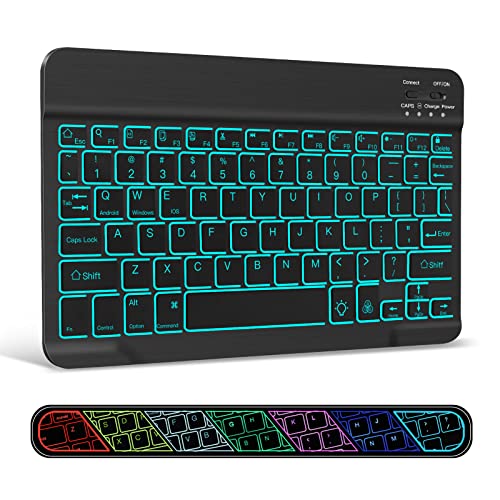
The XIWMIX exists for a situation the rest of this page ignores: an older iPad that current keyboard cases no longer fit. Its compatibility list reaches back through the 10.2-inch 9th, 8th, and 7th generation iPads, the 10.5-inch iPad Air, the iPad mini 5, and the 9.7-inch iPad Pro, alongside current models like the iPad 11th gen and the 10.9-inch 2022 iPad. Schools and small offices tend to run exactly this kind of mixed fleet, and this is the board that serves it.
It is also more forthcoming about its battery than most competitors. The 450 mAh cell is rated at roughly 10 days of use and about 3 months of standby, which means it survives being forgotten in a bag between trips rather than arriving dead. At 0.4 pounds it never becomes the reason the iPad stays at the desk. The seven-color backlight includes a breathing mode, which is decorative, but the plain white setting works exactly as you would want it to.
The catch is the radio. This is Bluetooth 3.0 rather than a modern 5.x chipset, which limits it to a rated 33 feet and makes reconnects flaky after the keyboard’s 10-minute auto-sleep. The three-mode OS switch between iOS, Android, and Windows is a function-key combination rather than true simultaneous multi-device pairing, so it is a setting you change, not a device you switch to. The key legends are generic multi-OS rather than iPad-specific. For the price and for the iPads it rescues, those are fair terms.
XIWMIX Slim 7-Color Backlit Bluetooth Keyboard
by XIWMIX
The backlit board for an older iPad that newer cases no longer fit, with a published battery rating and a dated Bluetooth 3.0 radio as the catch.
Pros
- Covers older iPads that current cases have abandoned, including the 10.2-inch 9th, 8th and 7th gen, the 10.5-inch iPad Air, the iPad mini 5, and the 9.7-inch iPad Pro
- Seven-color backlight with a breathing mode, which is the cheapest route on this page to keys you can see in the dark
- 450 mAh cell rated at roughly 10 days of use and about 3 months of standby, so it survives being forgotten in a bag between trips
- Weighs 0.4 pounds, light enough that it never becomes the reason you leave the iPad at the desk
Cons
- Bluetooth 3.0 rather than a 5.x radio, which limits it to a rated 33 feet and makes reconnects flaky after the 10-minute auto-sleep
- The three-mode OS switch is a function-key combination between iOS, Android, and Windows rather than simultaneous multi-device pairing
- Generic multi-OS key legends rather than true iPadOS mapping
Best True-Bluetooth Logitech: Logitech Keys-to-Go
Logitech’s current iPad range is almost entirely Smart Connector, which is excellent when the case fits your tablet and useless when it does not. The Keys-to-Go is the exception: a genuine Bluetooth board from Logitech that works with any iPad, and with a phone and a laptop besides. It holds three paired devices with a tap-to-switch key, which is the feature that turns one keyboard into the input device for a whole desk.
What you are paying Logitech for is correct key mapping. The full iPadOS shortcut row for volume, media, and brightness is mapped properly rather than approximated by a generic multi-OS layout, which is precisely where the cheap slim boards on this page fall short. It also has a built-in protective cover and an ultra-slim profile, so it travels without a sleeve and without picking up damage in a bag.
The caveats are significant and I will not soften them. It has only 247 ratings, by far the thinnest review pool on this page, so long-term reliability is not yet well evidenced. There is no published battery runtime figure, and reviewers report inconsistent battery life, which is an odd omission from a brand that publishes precise figures across the rest of its range. And the very low-profile keys take a real adjustment period coming from a laptop keyboard. Buy it for the key mapping and the three-device switching, with those reservations understood.

Logitech Keys-to-Go Bluetooth Keyboard
by Logitech
Logitech's slim travel board for people who want correct iPadOS keys without a Smart Connector case, held back by a thin review pool and vague battery claims.
Pros
- One of the very few true Bluetooth keyboards Logitech still sells for iPad, where the rest of its current iPad line is Smart Connector and locked to specific tablet generations
- Holds three paired devices with a tap-to-switch key, so an iPad, a phone, and a laptop share one board without a settings trip
- Full iPadOS shortcut row for volume, media, and brightness, mapped correctly rather than approximated by a generic multi-OS layout
- Built-in protective cover and an ultra-slim profile, so it travels without a sleeve
Cons
- Only 247 ratings, by far the thinnest review pool on this page, so long-term reliability is not yet well evidenced
- No published battery figure, and reviewers report inconsistent battery life
- The very low-profile keys take a genuine adjustment period coming from a laptop keyboard
Best iPad Keyboard Cases
A keyboard case is the right shape when the iPad is a primary work device rather than an occasional one, because it protects the screen in transit and holds it at a working angle without a separate stand. The three below cover the range. The Logitech Combo Touch is the strongest all-round case for a base iPad, with a Smart Connector that removes pairing and charging entirely. The ZAGG Pro Keys is the pick for an iPad Air or Pro 11-inch, and the only one of the three that detaches and runs on Bluetooth, so it survives a tablet upgrade. The Harvopu covers the same base iPad as the Logitech for far less, with materials that reflect the difference.
| Product | Price | Buy |
|---|---|---|
| Logitech Combo Touch Detachable iPad Keyboard Case (10th gen)Best case for the base iPad Smart Connector attachment with no pairing and no keyboard battery, a laptop-sized precision trackpad, and a kickstand that adjusts through desk, lap, and tray-table angles. | $139.82 | View on Amazon |
| ZAGG Pro Keys Detachable Case and Wireless KeyboardBest detachable case The iPad lifts off for reading and snaps back for typing, over Bluetooth rather than Smart Connector, with 6.6-foot drop protection and a Pencil holder built in. | $87.79 | View on Amazon |
| Harvopu Case with Keyboard for iPad A16 11th/10th GenBest value case Detachable folio with a trackpad, a seven-color backlight, and a Pencil holder for the base iPad, at a fraction of the name-brand outlay. | $26.99 | View on Amazon |
Best Keyboard for iPad Pro
The iPad Pro question splits on which Pro you own. For the M4 and M5 11-inch, Apple’s own Magic Keyboard Case is the reference: Smart Connector power, the most reliable trackpad here, backlit keys, and a cantilever hinge that holds the screen at eye level. It fits those two generations and nothing earlier, because Apple moved the Smart Connector pin position. For a Pro 11-inch from generations 1 through 4, the Smart Connector route is closed and Bluetooth is the answer. The ZAGG Pro Keys and the Inateck AceTouch both cover those older Pro generations, and the Inateck covers the widest range of them.
| Product | Price | Buy |
|---|---|---|
| Apple iPad Magic Keyboard Case for iPad Pro 11-inchBest for iPad Pro M4 and M5 Nothing to pair and nothing to charge, with backlit keys, a full function row, and the most reliable trackpad gestures on this page. | $288.00 | View on Amazon |
| ZAGG Pro Keys Detachable Case and Wireless KeyboardBest for older iPad Pro 11-inch Bluetooth rather than Smart Connector, so it fits iPad Pro 11-inch generations 1 to 4, detaches for reading, and survives a tablet upgrade. | $87.79 | View on Amazon |
| Inateck AceTouch Case with Keyboard for iPad (A16)Widest Pro generation coverage Fits iPad Pro 11-inch generations 1 to 4 alongside several iPad Air lines, with a magnetic one-second detach and a published 450-gram weight. | $41.99 | View on Amazon |
Best Keyboard for iPad Air
The iPad Air sits awkwardly between the base iPad and the Pro, and case makers treat it as its own line rather than a variant, so fit needs checking carefully. Logitech’s Combo Touch for the Air 11-inch is the Smart Connector option and the only way to get that experience on an Air, with the hinge-tension complaint in its reviews as the thing to weigh. The ZAGG Pro Keys covers the same Air generations over Bluetooth with a much larger review pool behind it and a detachable screen. The Inateck AceTouch is the budget route, and it fits the widest span of Air models here.
| Product | Price | Buy |
|---|---|---|
| Logitech Combo Touch iPad Air 11-inch Keyboard CaseBest Smart Connector option for Air The only Combo Touch that fits the Air 11-inch M2 to M4 and Air gen 5, with no pairing or charging, but the lowest rating on this page and the second-thinnest review pool. | $199.99 | View on Amazon |
| ZAGG Pro Keys Detachable Case and Wireless KeyboardBest Bluetooth case for Air Fits the Air 11-inch M3 and the Air gen 4, 5, and M2 over Bluetooth, with a detachable screen, a Pencil holder, and 6.6-foot drop protection. | $87.79 | View on Amazon |
| Inateck AceTouch Case with Keyboard for iPad (A16)Best value case for Air Covers Air 11-inch M2 through M4 and Air gen 4 and 5, with a trackpad, a seven-color backlight, and a magnetic detach, well below the Smart Connector cases. | $41.99 | View on Amazon |
Best Keyboard for iPad mini
The 8.3-inch iPad mini is barely served by the case industry, so the realistic choice is one purpose-built case or a standalone board that does not care about tablet size. The GreenLaw is the purpose-built option, with a rotating hinge, a touchpad, and a backlight in a mini-sized shell. If cramped keys are the dealbreaker, a standalone board is the better answer, because it gives you full-size key spacing next to a small screen. The ProtoArc XK04 folds to pocket size and pairs three devices. The XIWMIX is the slim backlit option and explicitly lists the iPad mini 5 among its supported models.
| Product | Price | Buy |
|---|---|---|
| GreenLaw Keyboard Case for iPad mini 7/6Best mini keyboard case Built specifically for the iPad mini 7 and mini 6, with a 360-degree rotating hinge, a built-in touchpad, and a seven-color backlight. | $59.99 | View on Amazon |
| ProtoArc XK04 Foldable Compact KeyboardBest folding board for a mini Folds to pocket size and gives full key spacing next to a small screen, with three-device pairing and USB-C charging. | $28.98 | View on Amazon |
| XIWMIX Slim 7-Color Backlit Bluetooth KeyboardBest slim backlit board for a mini Lists the iPad mini 5 among its supported models, with a seven-color backlight and a rated 10 days of use per charge. | $15.99 | View on Amazon |
Best iPad Keyboard with a Trackpad
A trackpad changes what an iPad can do more than any other keyboard feature, because iPadOS supports a real cursor with text selection, drag and drop, and gesture-based app switching. The three below are the Bluetooth trackpad options, which matters because the Smart Connector cases are locked to specific iPad generations while these are not. The Inateck AceTouch is the pick for coverage, fitting more iPad lines than anything else here. The Harvopu is the least expensive route to a trackpad on a base iPad. The GreenLaw is the only one that puts a touchpad on an iPad mini at all.
| Product | Price | Buy |
|---|---|---|
| Inateck AceTouch Case with Keyboard for iPad (A16)Best trackpad case overall Multi-touch trackpad across the widest iPad fit list here, with a published 450-gram weight, though three-finger gestures are less reliable than Apple's. | $41.99 | View on Amazon |
| Harvopu Case with Keyboard for iPad A16 11th/10th GenBest value trackpad case Multi-touch trackpad, seven-color backlight, and a Pencil holder for the base iPad at the lowest outlay of any trackpad case on this page. | $26.99 | View on Amazon |
| GreenLaw Keyboard Case for iPad mini 7/6Only trackpad option for iPad mini A built-in touchpad in an 8.3-inch shell, which no other product here offers for the iPad mini 7 or mini 6. | $59.99 | View on Amazon |
Best Logitech Keyboard for iPad
Choosing a Logitech board for an iPad comes down to one question: Smart Connector or Bluetooth. The two Combo Touch cases use the Smart Connector, so they need no pairing and no charging, and each fits one narrow set of iPads. The 10th gen and A16 version is the one for a base iPad; the Air 11-inch version is the only Combo Touch that fits an iPad Air. If neither fits your tablet, Keys-to-Go is Logitech’s remaining true-Bluetooth answer, and it is largely alone in that role because most of Logitech’s older Bluetooth-only iPad boards have drifted to Renewed-only listings on Amazon rather than being restocked new.
| Product | Price | Buy |
|---|---|---|
| Logitech Combo Touch Detachable iPad Keyboard Case (10th gen)Best Logitech case for base iPad Smart Connector, no pairing and no charging, with a large precision trackpad and the full iPadOS shortcut row, for the iPad 10th gen and A16 11th gen. | $139.82 | View on Amazon |
| Logitech Combo Touch iPad Air 11-inch Keyboard CaseBest Logitech case for iPad Air The same design cut for the Air 11-inch M2 to M4 and Air gen 5, with a 4.0-star rating and a hinge-tension complaint worth reading before ordering. | $199.99 | View on Amazon |
| Logitech Keys-to-Go Bluetooth KeyboardBest true-Bluetooth Logitech board Bluetooth rather than Smart Connector, so it works with any iPad, holds three paired devices, and maps the iPadOS media and brightness keys correctly. | $79.95 | View on Amazon |
Best Portable Keyboard for iPad
Portable means two different things here and the right one depends on your bag. A folding board wins on volume, collapsing into a space a folio case cannot, at the cost of a seam under your fingers. A slim board wins on continuity, giving an uninterrupted typing surface that slides flat behind the tablet. The ProtoArc XK04 is the folding pick and holds three devices. The Logitech Keys-to-Go is the slim pick with correct iPadOS key mapping and a built-in cover. The OMOTON is the lightest-commitment option, slim and backlit, with single-device pairing as the trade.
| Product | Price | Buy |
|---|---|---|
| ProtoArc XK04 Foldable Compact KeyboardBest folding travel board Folds to pocket size with a PU leather cover, pairs three devices, and charges over USB-C on the same cable as the iPad. | $28.98 | View on Amazon |
| Logitech Keys-to-Go Bluetooth KeyboardBest slim board for iPadOS keys Ultra-slim with a built-in protective cover, three-device switching, and a correctly mapped iPadOS shortcut row, though the review pool is thin. | $79.95 | View on Amazon |
| OMOTON 7-Color Backlit Bluetooth KeyboardBest pocket-friendly backlit board A slim seven-color backlit board with USB-C charging and the highest star rating on this page, limited to one paired device at a time. | $16.99 | View on Amazon |
Best iPad Keyboards by Use Case
Five more specific situations, each matched to the board on this page that handles it best. Every one of these is reviewed in full above.
| Product | Price | Buy |
|---|---|---|
| ZAGG Pro Keys Detachable Case and Wireless KeyboardBest ZAGG keyboard for iPad ZAGG's detachable folio with backlit keys, a Pencil holder, and 6.6-foot drop protection, on Bluetooth so it outlives the tablet. | $87.79 | View on Amazon |
| XIWMIX Slim 7-Color Backlit Bluetooth KeyboardBest backlit keyboard for iPad A seven-color backlight with a breathing mode and a published 450 mAh rating, across the widest span of older and current iPads here. | $15.99 | View on Amazon |
| NOOX Bluetooth Keyboard for iPadCheapest keyboard for iPad The entry point to the category: a standalone rechargeable board that fits nearly every current iPad size, adds no bulk to the tablet, and asks almost nothing of the budget. | $12.99 | View on Amazon |
| Logitech Keys-to-Go Bluetooth KeyboardBest rechargeable keyboard for iPad Rechargeable with three-device switching, a built-in cover, and correctly mapped iPadOS media and brightness keys. | $79.95 | View on Amazon |
| OMOTON 7-Color Backlit Bluetooth KeyboardBest iPad keyboard for students The highest-rated board here, slim and backlit, rechargeable over USB-C, and priced so a lost or broken unit is not a crisis. | $16.99 | View on Amazon |
Buyer's Guide
An iPad keyboard is bought against a specific tablet, a specific bag, and a specific kind of work, which is why the most expensive option is so often the wrong one. These are the six factors that decide whether the keyboard gets used daily or ends up in a drawer.
Bluetooth or Smart Connector
This is the first decision and it constrains every other one. A Smart Connector keyboard, which on this page means the Apple Magic Keyboard Case and both Logitech Combo Touch cases, draws power from the iPad and needs no pairing at all: open the lid and type. The cost is rigidity, because a Smart Connector case fits one narrow set of iPad generations and nothing else, and Apple moved the connector's pin position on the M4 and M5 iPad Pro, which stranded older cases. A Bluetooth keyboard, which covers the other nine products here, works with any iPad you own now or buy later, and with your phone and laptop too. The cost is a second battery to charge and occasional reconnect friction after standby. Buy Smart Connector if you intend to keep this iPad for years and want zero maintenance. Buy Bluetooth if you replace tablets, share devices across a team, or want the keyboard to outlive the iPad.
Case or standalone board
A keyboard case turns the iPad into something that looks and behaves like a small laptop, with the screen held at a fixed angle and the whole assembly protected when closed. That is the right shape if the iPad is a primary work device and gets carried between rooms all day. A standalone board, like the NOOX, the OMOTON, or the ProtoArc XK04, adds nothing to the iPad's thickness and does not care which iPad you own, which suits people who type on the tablet in bursts rather than continuously. Weight is the deciding factor for most buyers, and almost nobody publishes it. The Inateck AceTouch is the exception at a stated 450 grams, which is roughly the weight of the iPad itself, and that doubling is what a full folio case costs you in the bag.
iPad generation compatibility
More money is wasted here than anywhere else in this category. Apple currently ships iPads in five sizes, and case makers cut their shells for specific models, so an iPad Air gen 5 case will not reliably fit an iPad Air 11-inch M4 even though the screens are close in size. Check the model number in Settings, then General, then About before ordering anything that attaches to the tablet. The ZAGG Pro Keys fits iPad Air and iPad Pro 11-inch but explicitly does not fit the base iPad. The GreenLaw is iPad mini 7 and mini 6 only. The Inateck AceTouch has the broadest fit list here, which is the practical reason to choose it if a single keyboard has to serve several different iPads on a team. Standalone Bluetooth boards sidestep the problem entirely.
Trackpad value
A trackpad changes what an iPad can do more than any other keyboard feature, because iPadOS has full cursor support with text selection, drag and drop, and multi-finger gestures for switching apps. If your work involves editing documents, moving files, or anything with a lot of precise selection, a trackpad removes constant reaching up to the screen and the arm fatigue that comes with it. The quality gap is real, though. Apple's own trackpad handles the full gesture set reliably, Logitech's precision trackpad is close behind, and the budget folios do the basics well while being less consistent on three-finger gestures. If you mostly write prose and rarely edit, a trackpad is weight you do not need, and the ProtoArc, OMOTON, and NOOX are lighter for skipping it.
iPadOS function row and Globe key mapping
A keyboard that types correctly can still be frustrating to use if its top row does nothing. iPadOS uses the Globe key for keyboard switching, dictation, and a whole set of system shortcuts, and it expects the function row to control brightness, volume, media, Home, Spotlight, and screenshots. Keyboards built for iPad map those correctly: the Logitech Combo Touch cases carry the full shortcut row, and Logitech's Keys-to-Go maps the media and brightness keys properly. Generic multi-OS boards do not. The XIWMIX switches between iOS, Android, and Windows modes with a function-key combination and prints generic legends rather than iPad ones, and the OMOTON is not MFi-certified, so Globe-key behaviour is not guaranteed. Neither is a dealbreaker for typing, but both mean occasional reaching for the screen.
Weight and the travel-kit budget
The reason an iPad keyboard ends up unused is almost never the typing experience. It is that the combined package became heavier than the laptop it was meant to replace, at which point people carry the laptop. Work backwards from the bag: decide the total weight you are willing to carry, subtract the iPad, and shop within what is left. A full folio with a trackpad roughly doubles the weight of the tablet. A slim standalone board adds a small fraction of it. A folding board like the ProtoArc XK04 splits the difference and takes up almost no volume, which matters as much as weight in a packed bag. If the iPad is a travel-only machine, the lighter combination almost always wins, and a bag with a dedicated tablet sleeve keeps the keyboard from grinding against the screen in transit.
How to Choose the Best iPad Keyboard
Work the decision in this order and it resolves quickly. Start with the connection, because it eliminates most of the field: Smart Connector if you plan to keep this iPad for years and want a keyboard that never needs charging or pairing, Bluetooth if you want the board to survive the next tablet. Then check the model number in Settings, then General, then About, and confirm it against the fit list before ordering anything that attaches to the tablet. Then decide on the trackpad, which is genuinely transformative for document editing and genuinely unnecessary if you mostly write prose.
Weight is the last check and the one people skip. A folio case roughly doubles what you carry, and the setup that never gets used is the one that turned out heavier than the laptop it was replacing. If the iPad is a travel machine, favour a slim or folding board over a full case. If it lives on a desk, the case wins. Either way, treat the keyboard as one part of a working setup rather than the whole of it, and check the rest of the kit against our work from home essentials checklist so the iPad ends up at a sensible height with a light on it rather than flat on a kitchen table.
Final Verdict
For most people the answer is the ZAGG Pro Keys. It is a detachable case with backlit keys and a Pencil holder, it is rated for a 6.6-foot drop, and it runs on Bluetooth rather than the Smart Connector, so it keeps working when you replace the iPad. That last point is the one that decides it: a Smart Connector case is a bet on a specific tablet generation, and Apple has already broken that bet once by moving the connector position on the M4 iPad Pro. If you own a base iPad, the ZAGG does not fit and the Logitech Combo Touch for the 10th gen and A16 is the pick instead, with the best trackpad and shortcut row near its price. For an M4 or M5 iPad Pro used as a main machine, the Apple iPad Magic Keyboard Case is the reference implementation and worth its outlay.
If you are testing whether an iPad can do real work before committing, the NOOX Bluetooth Keyboard is the sensible way to find out: a standalone board that fits nearly every current iPad, adds no bulk, and costs little enough that discovering the workflow does not suit you is not an expensive lesson. Students and anyone typing in dim rooms should look at the OMOTON, which carries the highest rating on this page and adds a backlight for very little. Whichever you choose, get the iPad up to eye level rather than flat on the desk. A laptop stand does the job for a tablet just as well as for a laptop, and it is the cheapest posture fix in any office.
Frequently Asked Questions
Do any Bluetooth keyboards work with iPads?
What is the best Bluetooth keypad for iPad?
Is there a mechanical keyboard for iPad Pro?
Why is my iPad keyboard not working?
What is the split keyboard on iPad?
Is the Apple Magic Keyboard for iPad worth it compared to a third-party Bluetooth keyboard?
How do you connect a Bluetooth keyboard to an iPad?
Related Articles
About the Reviewer

Sarah Chen, CAP, PMP
B.A. Business Administration, UCLA
Sarah Chen spent 10 years in office management and operations at Fortune 500 companies before founding DeskRated in 2026. After managing supply budgets for teams of 50+ people and testing thousands of products through daily use, she started writing the honest, no-fluff supply reviews that office professionals actually need. Sarah holds both CAP and PMP certifications and is based in Los Angeles.