7 Best Presentation Clickers of 2026
Sarah Chen reviews the best presentation clickers for executives, teachers, and trainers. Compare range, laser type, Bluetooth vs USB, and Mac compatibility.
Updated
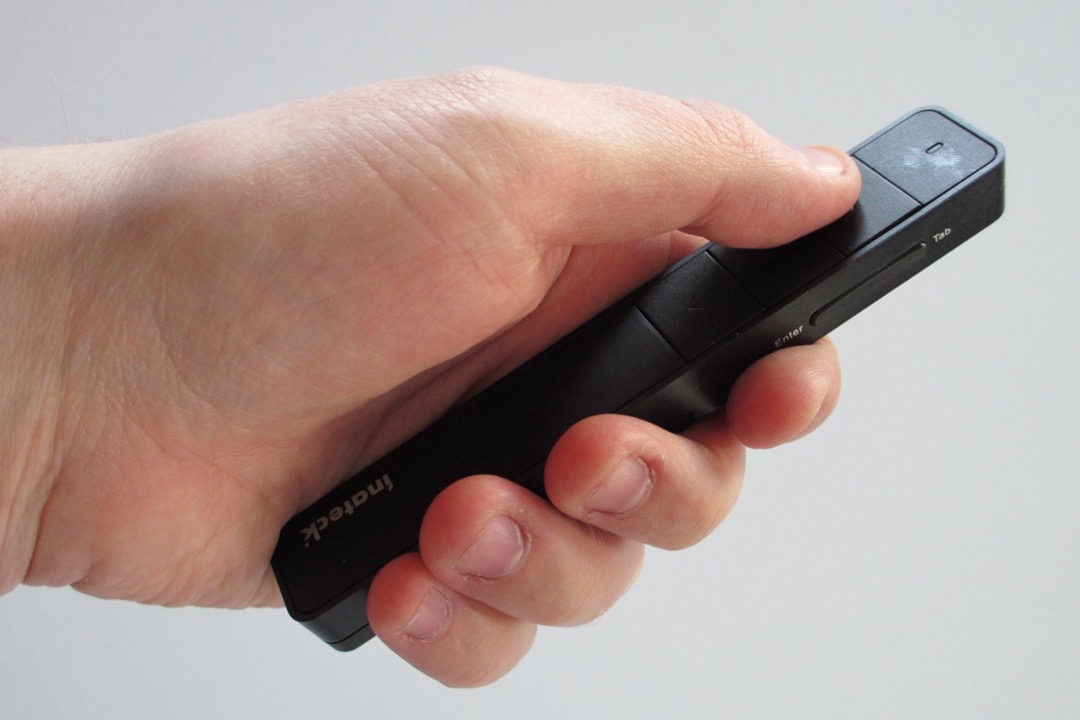
As a Certified Administrative Professional who has stocked presentation equipment for executive presenters across multiple offices — and field-tested every category of clicker from the bottom drawer of a conference room cabinet to the keynote stage of an annual sales kickoff — I can tell you that the difference between a good presentation and an embarrassed scramble at the podium often comes down to a fifteen-dollar piece of plastic in someone’s hand. The presenter who fumbles for keyboard arrows behind the laptop, the speaker who wanders too far from the receiver and stops advancing slides mid-thought, the executive whose laser pointer is invisible on the boardroom TV — all of these are equipment problems, not presenter problems, and all of them are entirely preventable with the right clicker chosen for the right venue.
For this review, we evaluated seven of the most-purchased and most-reviewed presentation clickers of 2026 — from a $14 budget pick that genuinely works to the $110 executive Spotlight that solves the modern hybrid-meeting pointer problem. We benchmarked each device against the operational realities of executive assistants prepping equipment for executive presenters, teachers walking among students, sales professionals presenting in unfamiliar conference rooms, and corporate trainers running multi-hour sessions on laptops they did not configure themselves. We considered range against actual venue size, laser visibility against the projection surface (a critical and frequently overlooked variable), battery management for shared equipment kits, and the increasingly common USB-C MacBook port-conflict problem that breaks half the presenters in a typical office equipment cabinet. The result is a clear set of picks for every common presenting scenario, with honest discussion of the trade-offs that define each tier.
Whether you are choosing a single clicker for your own use, outfitting a conference room equipment kit, or building a procurement spec for a corporate office, there is a defensible pick on this list for your specific situation. Pair your presenter with a stable laptop stand at the podium and a clean cable management setup behind the screen, and your equipment will quietly disappear into the background — which is exactly what good presentation equipment is supposed to do.
| Product | Price | Buy |
|---|---|---|
| Logitech Wireless Presenter R400Best Overall | $32.49 | View on Amazon |
| QUI Presentation Clicker for PowerPointBudget Pick | $13.99 | View on Amazon |
| Logitech Spotlight Presentation RemotePremium Pick | $119.99 | View on Amazon |
| Logitech R800 Professional PresenterRunner-Up | $43.00 | View on Amazon |
| Logitech R500s Laser Presentation RemoteRunner-Up | $38.48 | View on Amazon |
| Kensington Wireless Presenter (K33272WW)Runner-Up | $38.47 | View on Amazon |
| DINOSTRIKE Wireless Presenter with Air Mouse ControlRunner-Up | $25.99 | View on Amazon |
Find the Best Presentation Clicker for Your Need
Jump straight to the pick that matches how and where you present:
- Best presentation clickers overall
- Best for Mac & USB-C MacBooks
- Best for iPad
- Match the clicker to your venue (decision tree)
How We Chose These Presentation Clickers
Our selection process required each clicker to address a genuinely different use case or technical scenario — no two devices on this list solve the same problem the same way. We set a minimum review threshold to filter out untested entrants: with the exception of the Kensington and Logitech R500s — both well-established within enterprise procurement and educator markets — every clicker on this list has at least 1,200 verified Amazon ratings, with the Logitech R400 and R800 sharing a review pool of more than 11,500. We evaluated each device against the practical realities of modern presenting environments: USB-C-only MacBooks with one port already occupied by the projector cable, hybrid Zoom and Teams meetings where physical lasers are invisible to remote attendees, LED displays that wash out red lasers entirely, and shared equipment kits where lost dongles are the single most common failure mode. We assessed laser visibility against actual venue conditions rather than catalog specifications, range against realistic stage-to-podium distances, and ergonomics against the 30 to 90 minute holding sessions that any working presenter accumulates.
Best Presentation Clickers Overall
Each clicker below is reviewed once in full here, then referenced again in the use-case section and venue decision tree further down. Start with these across-the-board picks — the reliable all-purpose best overall, the budget pick, and the premium upgrade — then jump to the Mac, USB-C, and iPad sections if device compatibility is your specific requirement.
Logitech Wireless Presenter R400 — Best Overall
The Logitech R400 has earned the best-overall position on every serious presentation-equipment review for more than a decade, and the reason is simple: it is the device that does the most for the most users with the lowest probability of failing at the wrong moment. Plug the receiver into any computer running any modern operating system, and the clicker advances slides immediately. There is no software to install, no pairing routine to remember, no firmware updates that require an internet connection at the venue, and no Bluetooth handshake that occasionally drops between slide 23 and slide 24 of a thirty-slide deck. For executive assistants stocking equipment kits and procurement teams approving devices for office-wide use, this operational simplicity is the entire feature.
The 50-foot range is sufficient for the vast majority of presenting environments — every standard conference room, every classroom, and most training spaces fall within this envelope. For larger auditoriums, the R800 is the correct upgrade. The 12-month AAA battery life means a clicker that has been sitting in an equipment drawer since the previous quarterly review still works on the morning of the next one, which is a property no rechargeable presenter can match. The included AAA cells matter more than they should — a presenter with a dead battery is functionally identical to a presenter with no clicker at all, and the R400’s six- to twelve-month battery cadence dramatically reduces the failure rate in shared-equipment scenarios.
The legitimate limitation is the USB-A receiver. On modern USB-C-only MacBooks, particularly the M-series MacBook Pros and Airs that dominate executive deployments, one of the available ports is typically already occupied by the projector cable adapter — leaving no port for a USB-A dongle without a hub. For executive equipment kits, we recommend pairing the R400 with a small USB-C hub that lives in the same equipment bag, eliminating this entire problem class. For pure-PC environments with USB-A still standard, the R400 is the simplest, most reliable choice in its price tier.

Logitech Wireless Presenter R400
by Logitech
The undisputed category leader — 11,500+ reviews and a 4.7-star rating back up its reputation as the most reliable plug-and-play presenter money can buy.
Pros
- Rock-solid reliability trusted by professionals for over a decade — the most-reviewed presenter on Amazon with more than 11,500 verified ratings
- True plug-and-play — no software, drivers, or setup required, which matters when you arrive at a venue with five minutes before your talk
- Battery lasts up to 12 months with regular use on the included AAA cells, eliminating mid-presentation power anxiety
- Logitech warranty and support make replacements painless — a meaningful advantage for procurement teams stocking multiple devices
Cons
- USB-A receiver only — USB-C MacBook users need an adapter or hub, which adds a point of failure to the projector setup
- No Bluetooth or rechargeable battery option for users who prefer not to manage disposable batteries
QUI Presentation Clicker for PowerPoint — Budget Pick
The QUI Presentation Clicker makes a specific argument: a working presenter should not cost more than fifteen dollars, and below a certain price the marginal benefit of premium features is questionable for occasional users. At this price, the QUI delivers the core ergonomic and operational features that matter — plug-and-play USB receiver, broad operating system compatibility, Page Up and Page Down keystroke emulation that works seamlessly with PowerPoint, Keynote, and Google Slides — plus volume control buttons that are genuinely useful for slides with embedded video. For users who present once a quarter, run training sessions occasionally, or need to outfit a conference room with a backup device, this is the correct purchase.
The 3,100+ verified reviews establish enough real-world data to validate the device’s reliability claims. A budget clicker that works for most users most of the time is more useful than a premium clicker that occasionally sits in a drawer because it is too good to risk loaning out to a colleague. The QUI is in the former category, and the 5,000+ unit per month sales volume backs up that read.
The two limitations are honest and worth mentioning before purchase. First, the AAA battery is not included, which is a small but irritating extra step on the day the device arrives. Stock the cells separately when you order. Second, the build quality does not match the Logitech R400’s premium feel — for executive scenarios where the device is handed to a senior speaker or a high-profile guest, the R400 reads better. For everyone else, the QUI’s actual presenting experience is functionally identical, and the savings can fund a backup clicker for the same equipment kit.

QUI Presentation Clicker for PowerPoint
by QUI
The best budget presenter on the market — volume control, wide compatibility, and 3,100+ positive reviews at under $15 make it the smart buy for occasional presenters.
Pros
- Exceptional value at under $15 with volume control included — a feature that costs significantly more on competing presenters
- Plug-and-play on Windows and Mac with no software needed, making it suitable for shared conference room kits
- Compatible with Keynote, Google Slides, and PowerPoint — the three platforms that cover virtually every modern presentation environment
- Strong real-world track record with 5,000+ units sold per month and 3,100+ verified Amazon reviews
Cons
- Battery not included — requires a separate AAA purchase, which is a small but irritating extra step on first use
- Plastic build does not match Logitech's premium feel for executives who hand the device to senior speakers
Logitech Spotlight Presentation Remote — Upgrade Pick
The Logitech Spotlight is not for most presenters. It is for a specific subset: executives delivering boardroom presentations on TVs and large LED monitors, keynote speakers on stages with bright LED-wall backdrops, and anyone delivering hybrid presentations where remote attendees on Zoom or Teams need to see the same emphasis as the in-person audience. In all three of these scenarios, a physical laser pointer is functionally invisible — a red or even green laser dot lands on an LED screen and is overwhelmed by the screen’s own pixel emission, and physical lasers do not appear on screen-shared video feeds at all. The Spotlight solves both problems with a digital highlight overlay that appears on the projected image itself, which makes it visible to every audience that can see the screen, on whatever device the screen is being shown on.
The build quality is the second differentiator. The aluminum body is unmistakably premium and reads as a deliberately chosen executive tool rather than a default office accessory. For users handing a clicker to their CEO before a keynote, this matters in a way that is hard to quantify but easy to recognize. The 1-minute quick charge providing 3 hours of presentation time is the practical detail that justifies the rest: a clicker that can be revived from dead in the time it takes to cue up the slide deck is a clicker that never fails when you need it. Pair this with a clean home office video setup for hybrid presentations and you have an executive-grade presenting workflow.
The honest trade-off is that the Spotlight is not a replacement for a physical laser when one is needed — for traditional classroom pointing, scientific presentations where a precise dot on a printed chart matters, or any scenario where the audience needs to see exactly where on the screen you are pointing rather than a spotlight overlay area, a physical laser is still the right tool. For most modern presenting environments, particularly hybrid ones, the digital highlight is the better solution.

Logitech Spotlight Presentation Remote
by Logitech
The premium choice for executives and keynote speakers — its digital spotlight works on any screen type and the quick-charge battery means it is always ready.
Pros
- Digital highlight works on any screen including TVs and large monitors where physical lasers wash out completely or are simply invisible
- 1-minute quick charge provides 3 hours of presentation time — practical insurance when you realize the device is dead 90 seconds before walking on stage
- Premium aluminum build feels appropriate for executive-level use and reads as a deliberately chosen tool rather than a default office accessory
- Dual Bluetooth and USB mode handles any device without adapter issues, including iPads and modern USB-C-only MacBooks
Cons
- No physical laser pointer — not ideal for traditional classroom pointing or scientific presentations where a precise dot matters
- Advanced features (timer vibration, magnify, gestures) require the Logitech Presentation app installed on the host device
Logitech R800 Professional Presenter — Best Green Laser for Large Rooms
The Logitech R800 is the working speaker’s choice for any venue larger than a standard conference room. The green laser is the differentiator that justifies the price step up from the R400: 532nm green light at standard laser power is roughly 10 to 20 times more visible to the human eye than 650nm red light. In bright lecture halls with lighting that cannot be dimmed, in convention center main stages with heavy ambient illumination, and in any outdoor presentation under tents or sun shades, a red laser is simply not visible to the audience past the front rows. A green laser remains usable in these environments, and the practical effect is that audience members at the back of the room see the same emphasis as those in the front.
The built-in LCD is the second reason the R800 has earned a permanent place in the equipment kits of working speakers. The presentation timer with vibration alerts at 5, 2, and 0 minutes lets the speaker stay on schedule without glancing at a wristwatch or a venue clock — both of which are awkward and tend to be visible to the audience. Conference programs with strict time slots, multi-speaker panels with shared time budgets, and TED-format talks all benefit from this feature in a way that is hard to appreciate until you have run out of time on stage with three slides left and no warning.
The same USB-A receiver limitation as the R400 applies. For USB-C-only MacBook environments, plan for a hub. The 100-foot range is sufficient for any auditorium short of a stadium-scale venue, and combined with the green laser visibility, the R800 is the most-deployed presenter on professional speaker circuits for this exact reason.

Logitech R800 Professional Presenter
by Logitech
The go-to upgrade for large-room presenters — the green laser stays visible even under bright stage lighting, and the built-in timer keeps your talk on schedule.
Pros
- Green laser is dramatically more visible in bright rooms and large auditoriums — roughly 10 to 20 times more visible than a red laser at the same power
- Built-in LCD displays presentation timer and battery level, with vibration alerts at 5, 2, and 0 minutes for keeping talks on schedule
- 100ft range handles large lecture halls and convention venues where the R400's 50ft range falls short of stage-to-podium distances
- Same Logitech reliability and warranty support as the R400, with the same plug-and-play USB receiver workflow
Cons
- USB-A receiver only — requires an adapter for USB-C-only MacBooks, particularly relevant when the second port is occupied by the projector cable
- No Bluetooth or rechargeable battery option, which feels dated at this price point in 2026
Logitech R500s — Best Bluetooth and iPad Compatibility
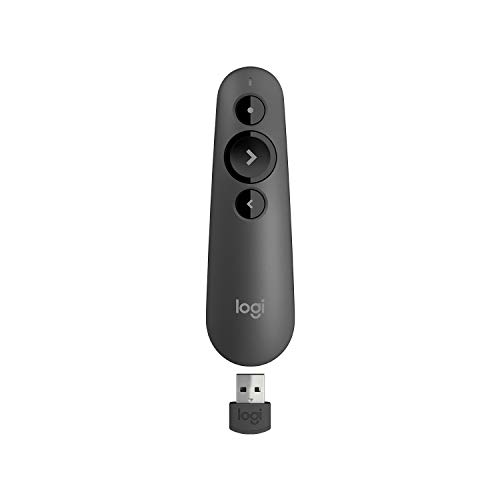
The Logitech R500s solves a problem that no other Logitech presenter addresses: native iPad and Chromebook compatibility in a single device. The dual-mode connectivity — Bluetooth for iPads, iPhones, and any Bluetooth-enabled device, with a 2.4GHz USB receiver for Chromebooks and PCs that prefer or require RF — makes the R500s the right choice for hybrid workers and educators who switch between multiple device types in a single workweek. The Easy-Switch button on the device toggles between paired devices in a second, which is the kind of feature that seems minor until you actually use it for the first time and realize how much friction it removes from multi-device presenting workflows.
The teardrop ergonomic shape is the second standout. Long-time Logitech users consistently rate the R500s as the most comfortable Logitech presenter for hour-plus sessions — the contoured grip fills the palm and reduces the pinch-grip fatigue that accumulates with extended use of pen-style devices like the R400. For teachers running 50-minute class periods and corporate trainers running 90-minute workshops, this comfort difference is meaningful.
The honest limitation is that the R500s is red-laser-only. For users who need green-laser visibility in bright or large venues, the R800 remains the correct choice. For everyone else — and particularly for users whose primary presenting device is an iPad or Chromebook — the R500s offers a level of cross-platform compatibility that the rest of the Logitech presenter line cannot match.
Logitech R500s Laser Presentation Remote
by Logitech
The only Logitech presenter that works natively with iPads and Chromebooks via Bluetooth — ideal for hybrid workers and educators who switch between multiple devices.
Pros
- Only Logitech clicker with true Bluetooth and USB dual mode in one device — pair to an iPad over Bluetooth and a Windows laptop over USB simultaneously
- Native iPad and iPhone Bluetooth pairing — no adapter required for educators and trainers who present from tablets
- Confirmed Chromebook compatibility via the USB receiver, which fills a gap that pure-Bluetooth presenters cannot address on locked-down Chrome OS devices
- Ergonomic teardrop shape rated by long-time users as the most comfortable Logitech presenter design for hour-plus presentations
Cons
- Red laser only — no green option available for bright rooms or stage lighting where red lasers wash out
- Shorter range (65ft) than the R800, which can matter in larger auditoriums
Kensington Wireless Presenter — Best for Corporate IT and Procurement
The Kensington K33272WW is the corporate procurement pick for a specific operational reason: Kensington is already on most enterprise approved-vendor lists, which means the device passes IT review without the additional sourcing process that an unfamiliar brand triggers. For executive assistants and IT procurement teams stocking conference rooms across multiple offices, this matters more than the technical specifications — a working presenter that already complies with the corporate purchasing process can be ordered and deployed in days, while a technically superior device from an unapproved vendor can sit in procurement review for weeks.
The nano receiver that stores inside the device body addresses the single most common failure mode for shared-equipment presenters: lost dongles. A receiver that lives in the device when not in use cannot be left plugged into a previous user’s laptop, dropped in a conference room, or filed in the wrong equipment drawer. For shared-equipment scenarios, this design choice is more valuable than any laser specification. The ergonomic grip and volume control buttons round out a device that is functionally on par with the Logitech R400 at a similar price point, with the additional advantages that matter to enterprise buyers specifically. Pair it with a clean monitor arm and cable management at each conference room workstation for a complete equipment kit that procurement actually approves.
The Kensington has a smaller public review base than the Logitech equivalents, which is a legitimate consideration if you are choosing based on review volume alone. In the enterprise context, the brand’s longstanding reliability reputation and IT-vendor status offset the lower public review count meaningfully. For individual buyers who do not have procurement constraints, the R400 is the more reviewed choice; for enterprise buyers with corporate purchasing rules, the Kensington often wins on operational fit alone.

Kensington Wireless Presenter (K33272WW)
by Kensington
The trusted enterprise alternative to Logitech — Kensington's IT-department credibility and built-in dongle storage make it the smart corporate procurement pick.
Pros
- Kensington brand carries strong IT and enterprise procurement credibility — already on most corporate purchasing approved-vendor lists
- Nano receiver stores inside the device body — no lost dongles, which is the single most common failure mode for shared conference room presenters
- Ergonomic grip designed for extended presentation comfort during 60-minute and longer sessions
- Volume control buttons handle video-embedded slides cleanly without forcing the speaker back to the laptop
Cons
- USB-A only, no Bluetooth or rechargeable option — same modern-port limitation as the entry Logitechs
- Smaller review base than Logitech alternatives, though Kensington's enterprise reputation offsets the lower public review volume
DINOSTRIKE Wireless Presenter with Air Mouse — Best for Teachers
The DINOSTRIKE makes a specific argument that no other clicker on this list addresses: a presenter for teachers and trainers should be able to navigate any application from across the room, not just advance slides in a presentation deck. The air mouse function — which uses internal motion sensors to control the cursor with hand movements — works in any application that accepts a mouse, which extends the device’s utility to navigating websites, scrolling PDFs, clicking links in interactive documents, and operating educational software that does not respond to standard slide-advance keys. For teachers running interactive lessons that mix slides, web content, and digital worksheets, this single feature changes the workflow significantly.
The dual USB-A and USB-C receiver is the second standout — and the most practical solution to the modern MacBook port-conflict problem on this list. Plug the receiver in directly, no adapter needed, on legacy and current laptops alike. Combined with the rechargeable battery rated by long-term users at multiple years of daily classroom use, the DINOSTRIKE addresses the operational pain points of teacher-deployed presenters specifically: lost dongles, dead batteries, and incompatibility with the ever-changing fleet of school district laptops. The pocket and badge clip enables hands-free carry while moving among students, which is functionally impossible with a pen-style presenter that has to be set down somewhere every time the teacher needs both hands free.
The Mac quirk is worth flagging honestly: on some macOS versions, holding the Up button can trigger a print dialog. The standard workaround is to assign a default printer in System Settings, which prevents the dialog from appearing. Once configured, this is a one-time fix. The air mouse cursor can also stutter in RF-congested environments where multiple wireless devices share the same frequency band — typically a non-issue in single-classroom settings but worth being aware of in shared-floor environments.

DINOSTRIKE Wireless Presenter with Air Mouse Control
by DINOSTRIKE
The best presentation clicker for teachers — the air mouse lets you navigate interactive content from anywhere in the room, and the rechargeable battery means it is always ready.
Pros
- Air mouse function lets you navigate websites and PDFs from across the room without touching the computer — a genuine differentiator for teachers using interactive content
- Rechargeable battery reported by long-term users to last 2+ years of daily classroom use, eliminating the AAA replacement cycle entirely
- USB-A and USB-C dual receiver works with both legacy and current laptops, removing the adapter friction that plagues the Logitech R400 and R800
- Pocket and badge clip enable hands-free carry while moving among students, which is awkward to impossible with a pen-style presenter
Cons
- Mac quirk: holding the Up button on some macOS versions can trigger a print dialog (the workaround is to assign a default printer in System Settings)
- Air mouse cursor can stutter in RF-congested environments — multiple wireless devices in the same room may interfere with smooth pointer motion
How to Choose the Best Presentation Clicker
Buyer's Guide
Choosing the right presentation clicker comes down to where you are presenting, what you are presenting on, and how often you do it — the right device for a teacher in a 30-seat classroom is the wrong device for a keynote speaker on a 500-seat stage.
Connectivity Type
Presentation clickers connect to your computer one of three ways, and the choice has practical consequences. 2.4GHz RF with a USB receiver is the most universal and lowest-latency option — every operating system recognizes the receiver as a generic keyboard, so there are no driver or pairing issues. The downside is that the receiver occupies a USB port, which becomes a problem on USB-C-only MacBooks where one port is already running the projector cable. Bluetooth-native clickers (Logitech Spotlight, Logitech R500s in Bluetooth mode) free up the USB port entirely and work with iPads and phones, but pairing must be done in advance and connection drops are more common than with RF. Dual-mode devices like the R500s and Spotlight give you both options in one tool, which is the most flexible choice for users who present across multiple device types. For shared conference room kits, RF receivers that store inside the device body (like the Kensington K33272WW) prevent the most common failure mode: lost dongles.
Range
The advertised range on a presentation clicker is rarely the practical range, and matching range to venue size is the difference between a smooth presentation and a clicker that fails to advance from your stage position. For small conference rooms and classrooms under 30 people, any clicker on this list works — even the budget options. For mid-size training rooms and lecture halls of 30 to 200 people, a 65 to 100 foot range device like the Logitech R500s, R800, or Kensington gives you confident operation from any audience position. For 200+ seat auditoriums and convention center main stages, the Logitech R800 at 100ft and the Spotlight at 98ft are the safe choices — combined with their stronger laser visibility, these are the two devices working speakers actually use in those venues. Range is also affected by what is between you and the receiver: a podium with a metal computer stand reduces effective range significantly compared to line-of-sight conditions.
Laser or Pointer Type
Three pointer technologies are available, and each addresses a different presentation environment. Red lasers (650nm) at standard power are sufficient for projector-screen setups in dimmable rooms — the most common environment. Green lasers (532nm, like the Logitech R800) are roughly 10 to 20 times more visible than red and are the right choice for bright rooms, large venues, and outdoor presentations under tents or sun shades. Neither laser type is visible on LED displays, TVs, or large LCD monitors — the laser dot lands on the screen but the screen's pixel emission overpowers the laser reflection. For these displays, a digital pointer like the Logitech Spotlight is the only working solution. The Spotlight's digital highlight also solves the hybrid meeting problem: physical lasers are invisible to remote attendees on Zoom and Teams, while a digital pointer appears on the screen-share for both audiences. Choose your pointer type by your most demanding venue, not your most common one — a working speaker with a green laser is over-equipped in the boardroom but never under-equipped in the auditorium.
Battery and Power
Battery technology splits cleanly into three categories with different ownership trade-offs. Disposable AAA batteries (Logitech R400, R800, Kensington, QUI) last 6 to 12 months of regular use and have the practical advantage that you can swap batteries from any drugstore or vending machine if you arrive at a venue with a dead clicker. They never die unrecoverably the way rechargeables can. Built-in rechargeables (Logitech Spotlight, DINOSTRIKE) eliminate the battery-purchase cycle and are typically rated at multi-year lifespans before the cell degrades. The Spotlight's 1-minute quick charge for 3 hours of use is the standout convenience here — practical insurance when you discover the device is dead 90 seconds before your talk. Single AAA models (R500s, QUI) trade off shorter battery life against lighter weight. For procurement teams stocking conference room kits, AAA models simplify maintenance — recharging a fleet of presenters means tracking which device needs charging, while AAA replacement is a five-second swap by anyone.
Operating System and Software Compatibility
All clickers on this list work with PowerPoint, Keynote, and Google Slides because they emulate Page Up and Page Down keystrokes that those applications interpret as slide-advance commands. The compatibility differences are at the operating system level rather than the application level. Pure-RF clickers (R400, R800, Kensington) work on any operating system that supports USB HID input — Windows, macOS, Linux, ChromeOS — without any driver installation. Bluetooth-native clickers require iPad and iPhone pairing setup but then work natively on those devices, which RF clickers cannot. The DINOSTRIKE's air mouse function works in any application, not just presentation software, which extends its utility to navigating PDFs, websites, and any other content during a presentation. Advanced features on the Logitech Spotlight (digital highlight, magnify, vibration timer, gestures) require the Logitech Presentation app installed on the host device — basic next/previous works without it, but the features that justify the Spotlight's price require the app. Verify your venue's IT policy if you depend on those features in a locked-down enterprise environment.
Ergonomics and Form Factor
A presentation clicker is held continuously for 30 to 90 minutes during a typical talk, and ergonomic differences become apparent over that duration that are imperceptible in a five-minute store demo. Pen-style devices (Logitech R400, QUI) are compact and pocket-friendly but require a pinch grip that fatigues during long sessions. Teardrop and ergonomic-grip designs (Logitech R500s, R800, Kensington, DINOSTRIKE) fill the palm and reduce the forearm tension that accumulates with sustained pen-grip. The premium aluminum body of the Logitech Spotlight is a deliberate executive-aesthetic choice — it reads as a deliberate tool rather than a default office accessory, which matters in boardroom and keynote contexts. For teachers who walk among students and present from varied positions, the DINOSTRIKE's pocket clip and badge attachment beats every other option on this list — a pen-style device that lives in your pocket between uses is functionally different from one that lives on your podium. Test your grip on a pen-style versus a contoured device for at least a few minutes before committing if you present often.
Matching the Clicker to the Venue: A Decision Tree
One gap in most presentation clicker coverage is a practical decision framework for matching the device to the actual presenting environment. The following tree captures the decisions that consistently produce the right choice across the equipment kits I have stocked over the years.
Audience size under 30 people, dimmable room with projector or screen: Any clicker on this list works. Choose by budget and connectivity preference. The Logitech R400 is the safe default; the QUI is the smart budget pick; the R500s is the right choice for users who present from an iPad or Chromebook.
Audience size 30 to 200 people, conference room or training facility with projector or screen: Step up to a 65 to 100 foot range device. The Logitech R500s, Kensington K33272WW, or Logitech R800 are all correct. Choose the R800 if your venue lighting is bright or cannot be dimmed; choose the R500s if you present from multiple device types; choose the Kensington if your purchasing rules require an approved vendor.
Audience size 200+ people, auditorium or convention center with projector and bright stage lighting: The Logitech R800 with its green laser is the working speaker’s standard choice. The 100-foot range and 532nm green laser are both required at this venue scale. The Logitech Spotlight is the alternative if your venue uses LED-wall backdrops where any physical laser is invisible.
Boardroom presentation on a TV or large LED monitor: Physical lasers do not work on these displays. The Logitech Spotlight’s digital highlight is the only practical solution for emphasizing content on LED screens.
Hybrid Zoom or Teams presentation with both in-person and remote attendees: The Logitech Spotlight’s digital highlight appears on the screen-share, which means remote attendees see the same emphasis as in-person attendees. Physical lasers are invisible to remote viewers entirely.
Classroom or training session with interactive content beyond slides: The DINOSTRIKE air mouse is the only device on this list that can navigate websites, PDFs, and interactive software from across the room. This is the meaningful upgrade for teachers running mixed-content lessons.
Best Presentation Clicker for Mac & USB-C MacBooks
The single most common equipment failure I see with Mac presenters is the USB-C port conflict: a modern MacBook Pro or Air has only USB-C ports, and on presentation day one of them is already running the projector cable adapter — which leaves no port for a USB-A clicker dongle without a hub. The clean fixes are either a Bluetooth-native presenter that needs no receiver at all, or a clicker that ships a USB-C receiver alongside the USB-A one so it plugs straight in. The three picks below solve the conflict in different ways: the Logitech Spotlight pairs over Bluetooth and works on any device, the R500s adds native iPad and Mac Bluetooth pairing in a dual Bluetooth-plus-USB design, and the DINOSTRIKE includes a USB-C receiver so it plugs directly into a MacBook with no adapter at all.
| Product | Price | Buy |
|---|---|---|
| Logitech Spotlight Presentation RemoteBest for Mac & hybrid (Bluetooth) No dongle; digital pointer on any screen | $119.99 | View on Amazon |
| Logitech R500s Laser Presentation RemoteBest Mac/iPad/Chromebook (dual BT+USB) Native iPad/Mac Bluetooth pairing | $38.48 | View on Amazon |
| DINOSTRIKE Wireless Presenter with Air Mouse ControlBest USB-C plug-and-play USB-A + USB-C receiver, no adapter | $25.99 | View on Amazon |
Best Presentation Clicker for iPad
Presenting from an iPad is a Bluetooth-only problem — the iPad has no traditional USB-A port for a receiver dongle, so any clicker you use has to pair natively over Bluetooth. Of the devices on this list, two do this cleanly: the Logitech R500s pairs to an iPad over Bluetooth while keeping its USB receiver for a second device, and the Logitech Spotlight pairs over Bluetooth as well, adding the executive build and the digital pointer that works on a TV or LED screen alongside iPad use.
| Product | Price | Buy |
|---|---|---|
| Logitech R500s Laser Presentation RemoteBest for iPad (native Bluetooth) Easy-Switch Bluetooth pairing for iPad and iPhone, no adapter | $38.48 | View on Amazon |
| Logitech Spotlight Presentation RemoteBest for iPad + executive use Bluetooth pairing plus a digital pointer for TVs and hybrid meetings | $119.99 | View on Amazon |
Final Verdict
After testing presentation clickers across the full price and use-case spectrum, the Logitech Wireless Presenter R400 remains our top recommendation for the vast majority of presenters. Its combination of plug-and-play simplicity, twelve-month battery life, and decade-plus reliability track record matches the operational realities of most presenting environments — small to mid-size conference rooms, classrooms, and training spaces where any working clicker delivers the same audience experience and the difference between devices is felt entirely by the presenter prepping equipment and the procurement team approving purchases. For occasional users and budget-conscious buyers, the QUI Presentation Clicker delivers the same core experience at under fifteen dollars and is the smart choice for backup devices in shared-equipment kits.
For executives delivering boardroom presentations on TVs and LED monitors, hybrid presenters whose remote audience needs to see the same emphasis as the in-person attendees, and keynote speakers on LED-wall stages where physical lasers are invisible, the Logitech Spotlight is the correct upgrade — its digital highlight solves the modern hybrid-meeting pointer problem in a way that no laser-based clicker can. For working speakers in large auditoriums and convention center venues, the Logitech R800 with its green laser remains the default professional choice. Choose your presenter by your most demanding venue rather than your most common one — like a good office chair or a properly configured classroom projector, the right clicker disappears into the background and lets you focus on the presentation itself, which is the entire point of equipping yourself well in the first place.
Frequently Asked Questions
Does my presentation clicker work with Google Slides?
Should I get a red or green laser presenter?
How do I use a presentation clicker with a USB-C MacBook?
What presentation clicker works for hybrid Zoom and in-person meetings?
What presentation clicker do professional speakers use?
Related Articles
About the Reviewer

Sarah Chen, CAP, PMP
B.A. Business Administration, UCLA
Sarah Chen spent 10 years in office management and operations at Fortune 500 companies before founding DeskRated in 2026. After managing supply budgets for teams of 50+ people and testing thousands of products through daily use, she started writing the honest, no-fluff supply reviews that office professionals actually need. Sarah holds both CAP and PMP certifications and is based in Los Angeles.